⚠ 這是歷史版本頁面 — 查看 Keka 最新版本 →

- 目前版本1.6.5
- 更新日期2026-06-01
- 檔案大小35.4 MB
- 檔案名稱Keka-1.6.5.dmg
- 作業系統Mac OS X 10.10 or later
- 支援語系English
- 授權型式免費軟體
- 開發商 aONe
- 軟體分類Mac 軟體 / 備份還原
##
編輯短評
Keka 是 macOS 平台上頗受好評的免費壓縮與解壓縮工具,核心任務就是讓使用者輕鬆處理各種常見的壓縮格式,包括 Zip 與 7Z 等。它最具辨識度的特色在於雙重操作模式:一方面提供直覺的拖放式圖形介面,讓不熟悉指令的用戶也能快速上手;另一方面也支援從終端機以指令方式呼叫,滿足進階使用者的需求。這款軟體長期維持活躍更新,在同類工具中屬於熱門選擇,且完全免費,對預算有限的人來說相當友善。
Keka 適合一般日常需要壓縮或解壓縮檔案的使用者,無論是偶爾處理下載的壓縮檔,還是經常打包多個檔案傳送,都能勝任。與 RAR 或 WinZip Mac Edition 等商業替代方案相比,Keka 最大的取捨在於以免費提供完整功能,但介面僅支援英文,且僅限 macOS 平台使用。若你習慣圖形化操作,拖放介面會很順手;若你偏好指令效率,終端機整合也是加分項。整體而言,它是一款務實且沒有多餘負擔的選擇。
##
翻譯排程處理中,以下暫以英文原文呈現
軟體介紹
Keka for Mac is a versatile file archiver that offers users of all technical knowledge levels the ability to easily, quickly, and reliably compress and extract files in various supported formats.
It comes as a standalone tool that can be used inside a simple drag-and-drop UI interface and as a background service accessible from a command-based Terminal app.
This highly versatile approach makes it appealing to both novice and seasoned users, especially since it is completely free to use.
The app supports a wide range of compression formats (including the most popular ones Zip and 7Z), even more extraction formats (ZIP, RAR, TAR, and others), and can even manage ISO format for CD/DVD disc image archives, enabling users to quickly access this archived content without the need for cumbersome CD/DVD virtual drive apps.
However, users should be aware that this app supports much more extraction than compression formats, limiting its usefulness for users who want total control over their file management workflow.
Key Features
To install it, users simply must download the latest version of the installer from the official website, or the secure FileHorse servers. The developers actively support only the modern version of the app that receives regular updates on mac OS 10.5 or newer.
The legacy version of the app (for Mac OS X 10.4 and older) can be found on the official website.
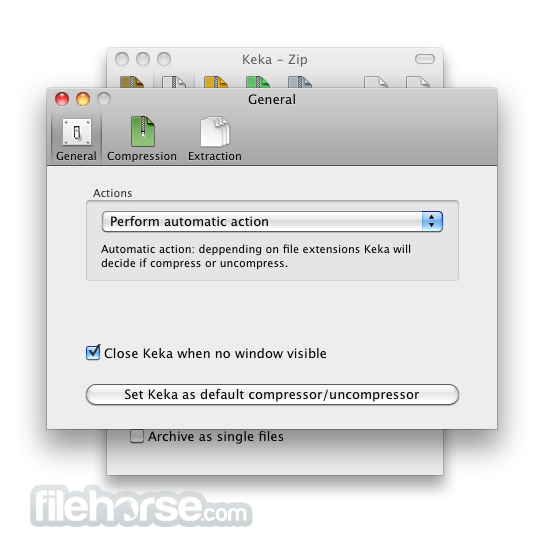
Once installed, Mac users can also make the Keka app as their default extraction app, but this can only be achieved by downloading and installing a separate helper app called “KekaDefaultApp” from the official website.
Simply start the app and follow a few simple on-screen instructions to finish the procedure of elevating Keka to the position of primary compression file manager.
How to Use
Most users will access the services of this app from inside its streamlined user interface that allows dragging and dropping of files to the specific activation zones for file compression and decompression.
However, its services can also be accessed from Finder and Desktop file context menus, as well as from inside the Terminal app.
Terminal commands can also be used to access a larger array of configuration options that are not accessible from its GUI interface, including changing the way compression formats work, additional password and checksum tools, and more.
User Interface
This app features a simple and intuitive user interface, allowing users to quickly compress and extract files using a familiar drag-and-drop interaction.
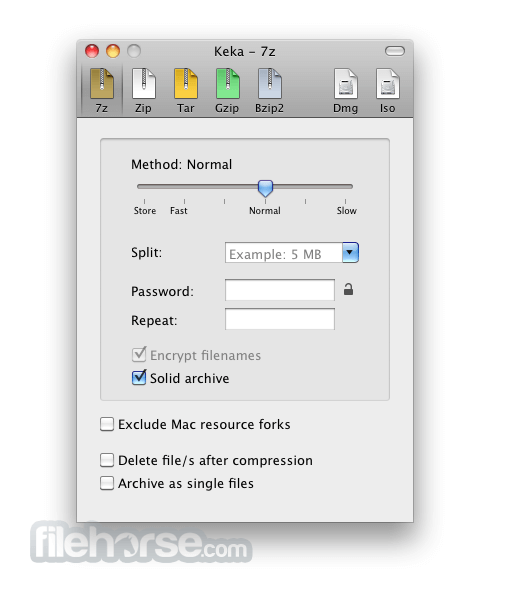
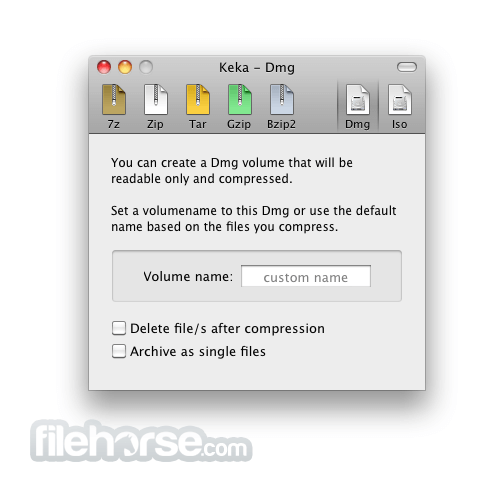
The main dashboard promotes the use of 5 compression formats that all showcase tabbed configuration modules (7Z, ZIP, Tar, Gzip, Bzip2), as well as Dmg and Iso management tools.
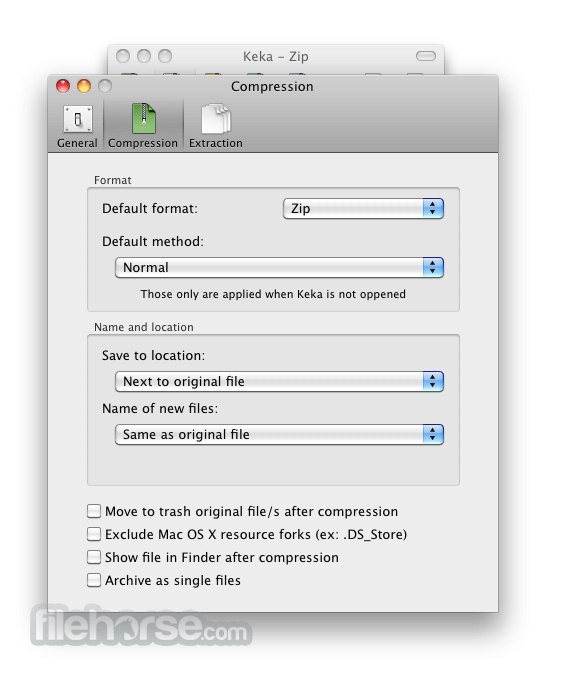
All compression formats have their own set of configuration options such as compressing strength tool, split option, volume name, password encryption, and more.
All in all, the app is very simple to use and can be mastered in mere seconds after the first startup.
FAQ
What is Keka for macOS?
It is a lightweight file archiver utility for Mac, allowing users to compress and extract files in various formats.
Is it safe?
Yes. This is a safe and reliable application.
What compression formats are supported?
7z, Zip, Tar, Gzip, Bzip2, DMG and ISO.
What decompression formats are supported?
RAR, 7z, Lzma, Zip, Tar, Gzip, Bzip2, ISO, EXE, CAB, and PAX.
What’s New
This app is in active development and regularly receives new functionality and stability updates.
The latest version as of the time of this review added support for 6 international languages and added a more reliable way of tracking progress during the ZIP split file option task.
Alternatives
The Unarchiver – The most popular file extraction tool for Macs.
BetterZip – Offers advanced file compression and encryption features.
RAR for Mac – A versatile file compression and extraction tool, providing users with the capability to compress, decompress, and manage RAR files.
Pricing
This app is 100% free. It does not feature any premium subscription options, in-app ads, or premium unlocks.
System Requirements
The Keka app requires Mac OS X 10.10 or newer.
Several separate legacy versions are offered on the app’s official website for Mac OS X 10.4 to Mac OS X 10.9.
PROS
Keka for Mac is a reliable and easy-to-use file archiver utility for Mac, offering a wide range of compression and extraction features to users of all technical levels. It supports a simple drag-and-drop interface, context menu file management options, and Terminal commands, with compatibility with various formats.
While all this makes it a valuable tool for managing file archives on Mac, the most demanding users may need to look for other premium apps that can unlock additional advanced features not available in this app.
Download Keka for Mac Latest Version Why is this app published on FileHorse? (More info)
It comes as a standalone tool that can be used inside a simple drag-and-drop UI interface and as a background service accessible from a command-based Terminal app.
This highly versatile approach makes it appealing to both novice and seasoned users, especially since it is completely free to use.
The app supports a wide range of compression formats (including the most popular ones Zip and 7Z), even more extraction formats (ZIP, RAR, TAR, and others), and can even manage ISO format for CD/DVD disc image archives, enabling users to quickly access this archived content without the need for cumbersome CD/DVD virtual drive apps.
However, users should be aware that this app supports much more extraction than compression formats, limiting its usefulness for users who want total control over their file management workflow.
Key Features
- Compress files in popular archive formats such as 7Z, ZIP, TAR, GZIP, and others.
- Extract files from 10+ popular compresses archive formats.
- Full support for encryption using AES-256 standard.
- A large array of advanced tools, including support for file splitting, compression strengths, separate item compression, and more.
- Simple drag-and-drop interface for ease of use.
- Full support for Terminal command access.
To install it, users simply must download the latest version of the installer from the official website, or the secure FileHorse servers. The developers actively support only the modern version of the app that receives regular updates on mac OS 10.5 or newer.
The legacy version of the app (for Mac OS X 10.4 and older) can be found on the official website.
Once installed, Mac users can also make the Keka app as their default extraction app, but this can only be achieved by downloading and installing a separate helper app called “KekaDefaultApp” from the official website.
Simply start the app and follow a few simple on-screen instructions to finish the procedure of elevating Keka to the position of primary compression file manager.
How to Use
Most users will access the services of this app from inside its streamlined user interface that allows dragging and dropping of files to the specific activation zones for file compression and decompression.
However, its services can also be accessed from Finder and Desktop file context menus, as well as from inside the Terminal app.
Terminal commands can also be used to access a larger array of configuration options that are not accessible from its GUI interface, including changing the way compression formats work, additional password and checksum tools, and more.
User Interface
This app features a simple and intuitive user interface, allowing users to quickly compress and extract files using a familiar drag-and-drop interaction.
The main dashboard promotes the use of 5 compression formats that all showcase tabbed configuration modules (7Z, ZIP, Tar, Gzip, Bzip2), as well as Dmg and Iso management tools.
All compression formats have their own set of configuration options such as compressing strength tool, split option, volume name, password encryption, and more.
All in all, the app is very simple to use and can be mastered in mere seconds after the first startup.
FAQ
What is Keka for macOS?
It is a lightweight file archiver utility for Mac, allowing users to compress and extract files in various formats.
Is it safe?
Yes. This is a safe and reliable application.
What compression formats are supported?
7z, Zip, Tar, Gzip, Bzip2, DMG and ISO.
What decompression formats are supported?
RAR, 7z, Lzma, Zip, Tar, Gzip, Bzip2, ISO, EXE, CAB, and PAX.
What’s New
This app is in active development and regularly receives new functionality and stability updates.
The latest version as of the time of this review added support for 6 international languages and added a more reliable way of tracking progress during the ZIP split file option task.
Alternatives
The Unarchiver – The most popular file extraction tool for Macs.
BetterZip – Offers advanced file compression and encryption features.
RAR for Mac – A versatile file compression and extraction tool, providing users with the capability to compress, decompress, and manage RAR files.
Pricing
This app is 100% free. It does not feature any premium subscription options, in-app ads, or premium unlocks.
System Requirements
The Keka app requires Mac OS X 10.10 or newer.
Several separate legacy versions are offered on the app’s official website for Mac OS X 10.4 to Mac OS X 10.9.
PROS
- Supports a wide range of compression and extraction formats.
- Simple and intuitive user interface.
- Offers file encryption and splitting features.
- Accessible from the Terminal app.
- Limited advanced options compared to competing apps.
Keka for Mac is a reliable and easy-to-use file archiver utility for Mac, offering a wide range of compression and extraction features to users of all technical levels. It supports a simple drag-and-drop interface, context menu file management options, and Terminal commands, with compatibility with various formats.
While all this makes it a valuable tool for managing file archives on Mac, the most demanding users may need to look for other premium apps that can unlock additional advanced features not available in this app.
Download Keka for Mac Latest Version Why is this app published on FileHorse? (More info)
##
畫面截圖
- 2026-07-01 Keka 1.6.7 34.24 MB
- 2026-06-01 Keka 1.6.5 35.4 MB
- 2026-05-08 Keka 1.6.4 35.31 MB
- 2026-04-20 Keka 1.6.3 35.26 MB
- 2026-03-18 Keka 1.6.1 35.08 MB
- 2025-09-13 Keka 1.6.0 35.56 MB
- 2025-07-01 Keka 1.5.2 30.83 MB
- 2025-05-30 Keka 1.5.1 30.82 MB