⚠ 這是歷史版本頁面 — 查看 Krita 最新版本 →

- 目前版本5.2.14
- 更新日期2025-12-13
- 檔案大小351.21 MB
- 檔案名稱krita-5.2.14_signed.dmg
- 作業系統macOS 10.12 Sierra or later
- 支援語系English
- 授權型式開源軟體
- 開發商 Krita Team
- 軟體分類Mac 軟體 / 影像設計
##
編輯短評
Krita 是一套免費開源的數位繪圖與插畫應用程式,專為需要完整繪畫功能的創作者設計。它內建多種筆刷類型、圖層、繪圖輔助工具與穩定器,並支援 CMYK、HDR 繪畫、透視網格等進階功能,還附帶動畫工具與筆刷、圖案、向量素材庫,可說是把專業繪圖需求一次打包。這套軟體由 Krita Team 長期維護,更新相當活躍,在同類開源繪圖工具中屬於主流首選,評價普遍不錯。
它特別適合插畫家、概念設計師或動畫創作者,尤其是想避開訂閱制軟體負擔的使用者。與 Photoshop 或 Illustrator 等商業軟體相比,Krita 的強項在於繪畫體驗與筆刷表現,而非影像合成或向量排版,取捨上要留意。目前 macOS 版僅提供英文介面,且為開源授權,可自由下載使用,但若需要中文介面或更廣泛的影像處理功能,可能得搭配其他工具或等待後續語系支援。
##
翻譯排程處理中,以下暫以英文原文呈現
軟體介紹
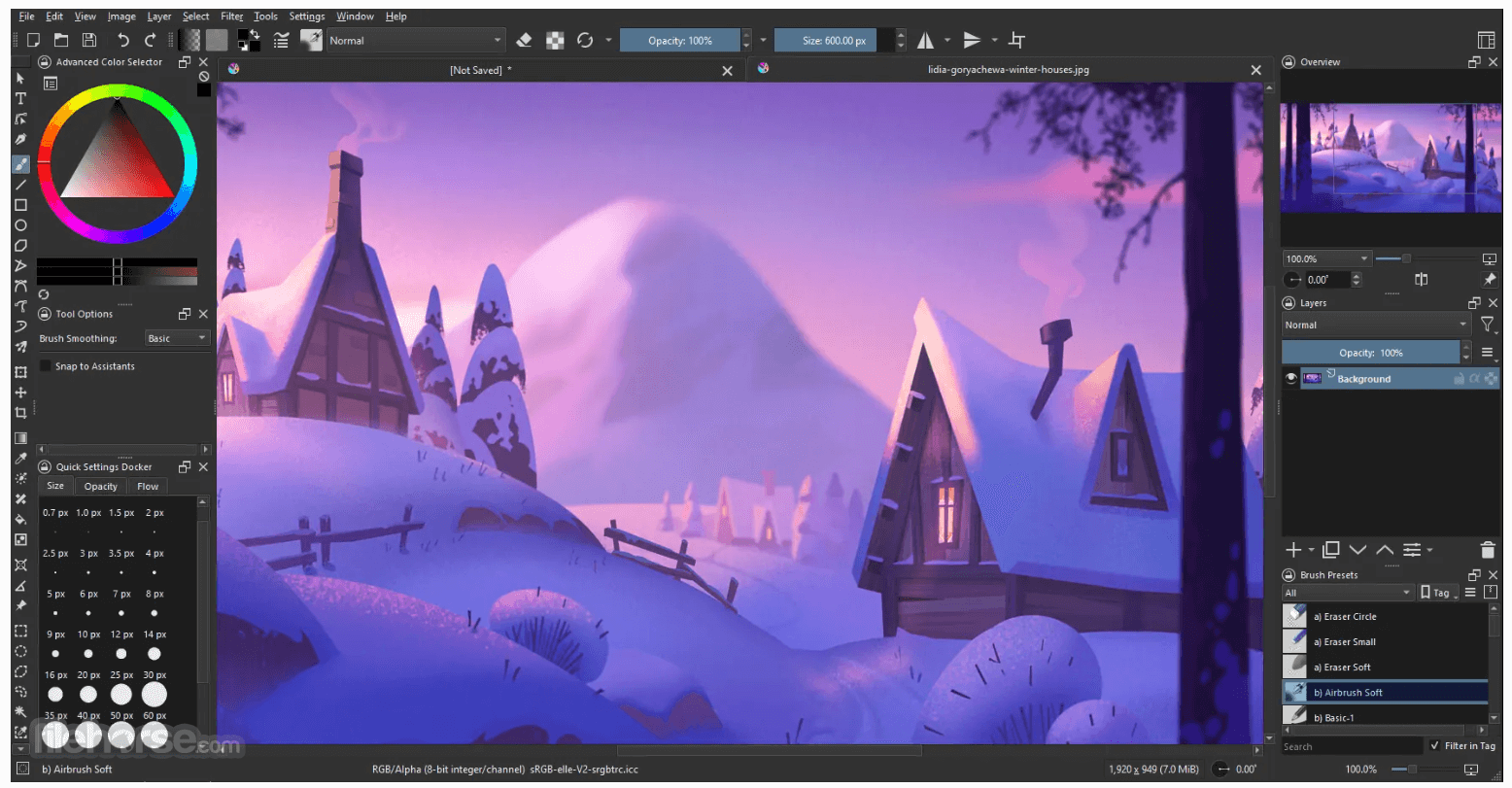
Krita for Mac is a FREE digital painting and illustration application. The app offers CMYK support, HDR painting, perspective grids, dockers, filters, painting assistants, and many other features you would expect.
Download fast the latest version of Krita for macOS!
Highlights
Interface and Workspace
The app has a user-friendly interface. In the settings menu, you can choose the color theme, which toolbars and dockers you want to use, and edit keyboard shortcuts. Save a given set of dockers as a workspace and switch between them. The canvas can be easily rotated and mirrored. The OpenGL canvas supports high-bit depth monitors. There is a large set of options available to create a no-distractions canvas-only painting mode.
Wrap-Around Mode
It is easy to create seamless textures and patterns now. Press the ‘W’ key while painting to toggle wrap-around mode. The image will make references of itself along the x and y axis. Continue painting and watch all of the references update instantly. No more clunky offsetting to see how your image repeats itself. You can even paint off the edge and it will automatically start painting on the top. It is one of those features you have to see for yourself.
Multiple Brush Engines and Blending Modes
A brush engine is more than just a typical brush pattern with settings changed. Each brush engine has its own logic and behavior. The included engines are pixel, smudge, duplicate, filter, hairy, hatching, texture, chalk, color smudge, curve, deform, dyna, experiment (Alchemy), grid, particle, sketch, and spray brushes. Brush settings can be saved as presets and shared. There are a staggering amount of blending modes available. The blending modes are arranged by category and have your favorites stored at the top of the list.
Advanced Selection and Masking Tools
Krita for Mac comes with many methods of selecting parts of your canvas in order to edit them. You can select with shapes such as rectangles and circle, paint your selection, polgon selection, select by color, select by Bezier. You can add, remove, or intersect to your selection. You can also make selection by layer contents by context clicking the layer and clicking “select opaque”. You can create a transparency layer by itself, or add one to an existing layer. This is great tool for non-destructive changes.
Symmetry Tools and Drawing Aids
Symmetry tools that go much further than basic mirroring. Take full control by being able to determine how many axis you need. Modify the origin center, angle, and smoothing parameters. Easy to toggle x and y mirror buttons in the top toolbar. Drawing aids such as perspective grids and shapes that have magnetic settings.
Filters and Effects
Filters can be used directly on a layer, or as filter masks or layers. The effect of a filter is previewed on the image itself. There are special effects like wave, oil paint, and emboss. Adjustments such as levels, brightness/contrast, and HSV are also included. Additional tools that can be useful for making selections like color to alpha and color transfer.
Layer and Color Management
Krita has raster, vector, filter, programmatic, group, and file-backed layers. Each layer has settings for visibility, edit lock, transparency lock, and alpha locking. Layers can be dragged and dropped to and from other applications. Vector layers support text, vector shapes and filters on vector shapes. The tool supports the following color models for creating and editing images: RGBA, Gray, CMYKA, Lab, YCbCr, XYZ in 8 bits integer, 16 bits integer, 16 bits floating point, 32 bits floating point. The app always uses color management.
Krita 5.2 Release Highlights (What`s New)
Focus Areas: Krita 5.2 builds on previous releases by addressing significant pain points, improving foundational systems, and introducing new features for enhanced functionality. Key areas include animation, text handling, tools, dockers, and file formats.
1. Animation Enhancements:
Synchronized Playback: Audio-visual synchronization now uses the robust MLT framework, ensuring precise alignment between keyframes and audio.
Simplified Video Export: Integrated FFmpeg into this program, streamlining video export and eliminating setup difficulties for most users (except on Android).
2. Text Tool Overhaul:
New Layout Engine: Features like text-in-shape, text-on-path, and color font support are now available.
Future Plans: In Krita 5.3, a redesigned text tool will allow on-canvas text editing with enhanced controls.
3. Tool Improvements:
Cumulative Undo Overhaul: Intuitive merging of undo operations for efficient painting.
Anti-Aliasing for Sketch Brush: Produces smoother results.
Transform Tool Update: Enables transformation of multiple selected layers simultaneously.
Fill Tool Upgrades: Added new fill modes and blending options for better precision.
4. Shortcuts and Selection Tools:
New Actions: Added eraser toggle, color sampling from the screen, and layer selection via canvas menu.
Selection Tool Enhancements: Options for opacity and DPI-aware decorations.
5. Docker Updates:
Wide Gamut Color Selector: Supports wide-gamut color selection for advanced workflows.
Layers Docker Improvements: Enhanced display options, including blending mode and opacity details.
6. File Format Support:
CMYK Improvements: Alignment with Photoshop blending modes for better PSD compatibility.
JPEG-XL and WebP Enhancements: Improved compression, metadata handling, and CMYK support.
RAW and EXR Updates: Faster processing and improved multi-layer handling.
7. Other Notable Changes:
Brush Settings Rewrite: Introduced the Lager library to simplify and extend brush settings.
FAQ
Is Krita free?
Yes, this program is entirely free and open-source. It operates under the GNU General Public License (GPL).
Can I use Krita for professional work?
Absolutely. It offers professional-grade tools for digital art, including color management, vector support, and animation features.
Does Krita support Photoshop files?
Yes, it can open and save .psd files, though certain complex layers or effects might not translate perfectly.
Does Krita work on tablets?
Yes, it supports pen tablets and even has a version optimized for Android tablets.
How can I learn Krita?
It offers built-in tutorials and an extensive online user manual. Additionally, the community provides numerous guides and YouTube tutorials.
Alternatives
Adobe Photoshop - A feature-rich but expensive software known for its versatility in digital art and photo editing.
Adobe Illustrator - Create logos, icons, sketches, typography and other vector art!
Inkscape: Free vector graphics and design software.
GIMP - Another open-source alternative, though its primary focus is photo editing rather than painting.
Canva: Easy online graphic design platform.
PROS
Also Available: Download Krita for Windows
Download Krita for Mac Latest Version Why is this app published on FileHorse? (More info)
Download fast the latest version of Krita for macOS!
Highlights
- Multiple brush types for different art styles
- Layers, drawing assistants, stabilizers
- Animation tools to transform your artwork
- Brushes, patterns, and vector libraries
- Texture packs and page templates
- Plugins that add new functionality
- Share your artwork and get feedback to improve
- Give feedback to developers when new features and plugins are being created
Interface and Workspace
The app has a user-friendly interface. In the settings menu, you can choose the color theme, which toolbars and dockers you want to use, and edit keyboard shortcuts. Save a given set of dockers as a workspace and switch between them. The canvas can be easily rotated and mirrored. The OpenGL canvas supports high-bit depth monitors. There is a large set of options available to create a no-distractions canvas-only painting mode.
Wrap-Around Mode
It is easy to create seamless textures and patterns now. Press the ‘W’ key while painting to toggle wrap-around mode. The image will make references of itself along the x and y axis. Continue painting and watch all of the references update instantly. No more clunky offsetting to see how your image repeats itself. You can even paint off the edge and it will automatically start painting on the top. It is one of those features you have to see for yourself.
Multiple Brush Engines and Blending Modes
A brush engine is more than just a typical brush pattern with settings changed. Each brush engine has its own logic and behavior. The included engines are pixel, smudge, duplicate, filter, hairy, hatching, texture, chalk, color smudge, curve, deform, dyna, experiment (Alchemy), grid, particle, sketch, and spray brushes. Brush settings can be saved as presets and shared. There are a staggering amount of blending modes available. The blending modes are arranged by category and have your favorites stored at the top of the list.
Advanced Selection and Masking Tools
Krita for Mac comes with many methods of selecting parts of your canvas in order to edit them. You can select with shapes such as rectangles and circle, paint your selection, polgon selection, select by color, select by Bezier. You can add, remove, or intersect to your selection. You can also make selection by layer contents by context clicking the layer and clicking “select opaque”. You can create a transparency layer by itself, or add one to an existing layer. This is great tool for non-destructive changes.
Symmetry Tools and Drawing Aids
Symmetry tools that go much further than basic mirroring. Take full control by being able to determine how many axis you need. Modify the origin center, angle, and smoothing parameters. Easy to toggle x and y mirror buttons in the top toolbar. Drawing aids such as perspective grids and shapes that have magnetic settings.
Filters and Effects
Filters can be used directly on a layer, or as filter masks or layers. The effect of a filter is previewed on the image itself. There are special effects like wave, oil paint, and emboss. Adjustments such as levels, brightness/contrast, and HSV are also included. Additional tools that can be useful for making selections like color to alpha and color transfer.
Layer and Color Management
Krita has raster, vector, filter, programmatic, group, and file-backed layers. Each layer has settings for visibility, edit lock, transparency lock, and alpha locking. Layers can be dragged and dropped to and from other applications. Vector layers support text, vector shapes and filters on vector shapes. The tool supports the following color models for creating and editing images: RGBA, Gray, CMYKA, Lab, YCbCr, XYZ in 8 bits integer, 16 bits integer, 16 bits floating point, 32 bits floating point. The app always uses color management.
Krita 5.2 Release Highlights (What`s New)
Focus Areas: Krita 5.2 builds on previous releases by addressing significant pain points, improving foundational systems, and introducing new features for enhanced functionality. Key areas include animation, text handling, tools, dockers, and file formats.
1. Animation Enhancements:
Synchronized Playback: Audio-visual synchronization now uses the robust MLT framework, ensuring precise alignment between keyframes and audio.
Simplified Video Export: Integrated FFmpeg into this program, streamlining video export and eliminating setup difficulties for most users (except on Android).
2. Text Tool Overhaul:
New Layout Engine: Features like text-in-shape, text-on-path, and color font support are now available.
Future Plans: In Krita 5.3, a redesigned text tool will allow on-canvas text editing with enhanced controls.
3. Tool Improvements:
Cumulative Undo Overhaul: Intuitive merging of undo operations for efficient painting.
Anti-Aliasing for Sketch Brush: Produces smoother results.
Transform Tool Update: Enables transformation of multiple selected layers simultaneously.
Fill Tool Upgrades: Added new fill modes and blending options for better precision.
4. Shortcuts and Selection Tools:
New Actions: Added eraser toggle, color sampling from the screen, and layer selection via canvas menu.
Selection Tool Enhancements: Options for opacity and DPI-aware decorations.
5. Docker Updates:
Wide Gamut Color Selector: Supports wide-gamut color selection for advanced workflows.
Layers Docker Improvements: Enhanced display options, including blending mode and opacity details.
6. File Format Support:
CMYK Improvements: Alignment with Photoshop blending modes for better PSD compatibility.
JPEG-XL and WebP Enhancements: Improved compression, metadata handling, and CMYK support.
RAW and EXR Updates: Faster processing and improved multi-layer handling.
7. Other Notable Changes:
Brush Settings Rewrite: Introduced the Lager library to simplify and extend brush settings.
FAQ
Is Krita free?
Yes, this program is entirely free and open-source. It operates under the GNU General Public License (GPL).
Can I use Krita for professional work?
Absolutely. It offers professional-grade tools for digital art, including color management, vector support, and animation features.
Does Krita support Photoshop files?
Yes, it can open and save .psd files, though certain complex layers or effects might not translate perfectly.
Does Krita work on tablets?
Yes, it supports pen tablets and even has a version optimized for Android tablets.
How can I learn Krita?
It offers built-in tutorials and an extensive online user manual. Additionally, the community provides numerous guides and YouTube tutorials.
Alternatives
Adobe Photoshop - A feature-rich but expensive software known for its versatility in digital art and photo editing.
Adobe Illustrator - Create logos, icons, sketches, typography and other vector art!
Inkscape: Free vector graphics and design software.
GIMP - Another open-source alternative, though its primary focus is photo editing rather than painting.
Canva: Easy online graphic design platform.
PROS
- Free and open-source
- Extensive brush engine customization
- Professional-grade layer management
- Active and supportive community
- Cross-platform compatibility
- Occasional performance issues with large files
- Limited support for certain file formats
Also Available: Download Krita for Windows
Download Krita for Mac Latest Version Why is this app published on FileHorse? (More info)
##
畫面截圖
- 2026-07-30 Krita 5.3.3 373.67 MB
- 2026-06-03 Krita 5.3.2.1 370.31 MB
- 2026-05-28 Krita 5.3.2 370.28 MB
- 2026-03-31 Krita 5.3.1 369.19 MB
- 2026-03-25 Krita 5.3.0 369.2 MB
- 2026-02-28 Krita 5.2.16 352.7 MB
- 2026-01-29 Krita 5.2.15 352.71 MB
- 2025-12-13 Krita 5.2.14 351.21 MB