⚠ 這是歷史版本頁面 — 查看 Macs Fan Control 最新版本 →

- 目前版本1.5.16
- 更新日期2023-09-09
- 檔案大小21.71 MB
- 檔案名稱macsfancontrol.zip
- 作業系統macOS 10.13 High Sierra or later
- 支援語系English
- 授權型式免費軟體
- 開發商 CrystalIDEA Software
- 軟體分類Mac 軟體 / 系統優化
##
編輯短評
Macs Fan Control 是一款專為 Mac 設計的系統工具,主要用來監控與調整風扇轉速和溫度設定。它提供直覺的儀表板,讓使用者能輕鬆控制所有偵測到的風扇,不僅能管理日常運作時的噪音,也能作為診斷工具,及早發現硬體潛在問題,避免核心元件過熱。這款軟體由 CrystalIDEA Software 開發,長期持續更新,在同類工具中屬於熱門選擇,雖然評分人數不多,但使用者普遍給予正面評價。
這款工具特別適合對電腦溫度敏感、希望手動調整風扇轉速的使用者,例如在錄音、剪輯或遊戲時降低噪音,或是在高負載下加強散熱。相較於 CleanMyMac X 等綜合型優化工具,它輕量且專注於風扇與溫度控制,功能更為直接。軟體為免費授權,僅提供英文介面,且僅支援 macOS 平台,使用前需留意。
##
翻譯排程處理中,以下暫以英文原文呈現
軟體介紹
Macs Fan Control is a lightweight but powerful system utility designed from the ground up to provide users with all technical knowledge levels with a streamlined way to monitor and control fan speeds and temperature settings on Mac computers.
With a simple-to-use dashboard and an easy way to control functions of all detected system fans, this tool can be used not only to manage active noise levels during daily Mac operations but also serve as an important diagnostic tool that can detect hardware issues and prevent central processing component of potential overheating.
In addition to real-time monitoring and direct fan control, advanced users can even create fan presets that can switch cooling modes between various daily operations.
The app is available as a free download, with an optional Pro version that offers additional features for power users.
Key Features
To install this app on any modern Mac, simply download the installer from the official website, the Mac App Store, or the secure FileHorse servers. Ensure that your Mac's security settings allow apps from the App Store and identified developers.
Once installed, the app can be launched and configured according to your preferences.
How to Use
After the first startup, the app automatically works in its default “Auto” mode where all detected system fans are still under full control by the official macOS background service.
However, users can easily take control over the functioning of any fan and see real-time changes in the data sent by temperature sensors.
Advanced users can even create custom fan presets that can take control over all detected fans and switch them into a specific work mode (reliable fan speed for daily productivity, quiet nighttime use, fast-moving air during gaming, and more).
User Interface
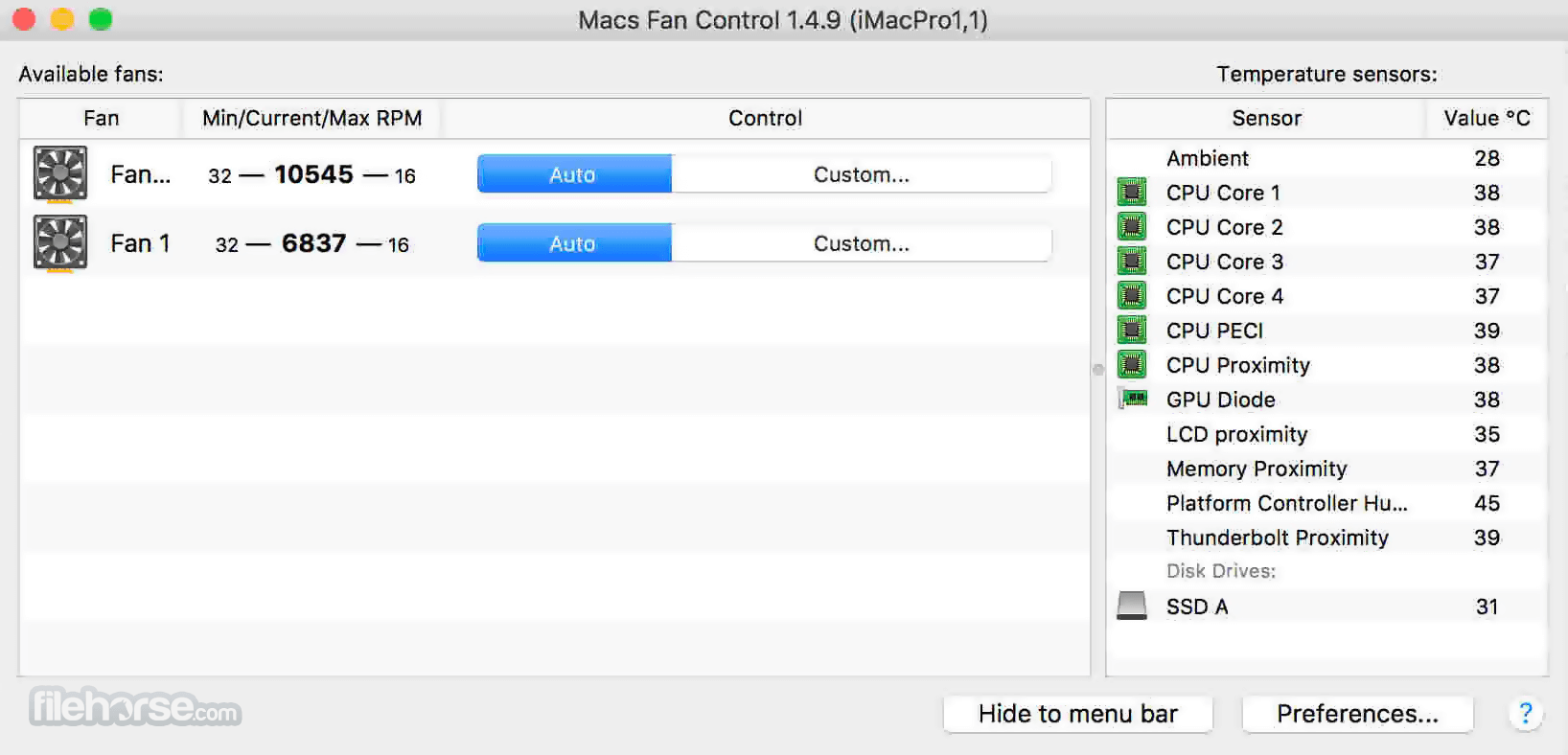
The app features a clean and intuitive interface, with options for controlling fan speed and temperature settings neatly showcased inside a single dashboard window.
It also provides real-time monitoring of fan speed and temperature sensors, allowing anyone to quickly identify and address any issues.
In addition to the listing of all the detected fans (with their accompanying names, Min/Current/Max speeds, and current active Auto/Custom presets), the app also has a standalone temperature module that shows heat data from all sensors located inside the CPU, GPU, motherboard, storage drives, and other components.
The premium version of the app unlocks access to fan presets, which can be easily accessed from inside the app.
FAQ
What is Macs Fan Control?
It is a highly useful application designed to monitor and control fan speed and temperature settings on Mac computers.
Is it safe?
Yes. This lightweight app is very safe to use.
Alternatives
TG Pro – A feature-rich utility for monitoring that provides early detection of failed fans and overheating components.
iStatMenus – A powerful Mac monitoring software with a wide array of useful tools, including temperature monitoring and fan control.
Pricing
The latest version of this lightweight app is optimized for macOS 10.13 High Sierra. However, users on older systems are free to download previous versions of this app.
PROS
Macs Fan Control is a versatile and powerful app that offers advanced fan control and monitoring capabilities for Mac users. Its customizable presets and support for NVMe drives make it a valuable tool for optimizing Mac performance and maintaining a comfortable working environment.
While it is highly usable in its generous free mode, full control over all available system fans is only possible with the purchase of a premium license.
Note: While the software is classified as free, it is actually donationware. Please consider making a donation to help support development.
Download Macs Fan Control Latest Version Why is this app published on FileHorse? (More info)
With a simple-to-use dashboard and an easy way to control functions of all detected system fans, this tool can be used not only to manage active noise levels during daily Mac operations but also serve as an important diagnostic tool that can detect hardware issues and prevent central processing component of potential overheating.
In addition to real-time monitoring and direct fan control, advanced users can even create fan presets that can switch cooling modes between various daily operations.
The app is available as a free download, with an optional Pro version that offers additional features for power users.
Key Features
- Real-time fan monitoring – Easily gain an overview of the fan speed and all accessible temperature sensors.
- Complete control over cooling – Manually tasks fans to work faster or slower.
- Customizable fan presets – Create and easily activate fan presets for different activities.
- Comprehensive sensor compatibility – Access sensor data from all modern hardware accessories, including NVMe storage drives.
- Streamlined user interface – Complete fan management inside one simple-to-use dashboard.
- Wide OS compatibility – Optimized for all modern versions of Mac computers (both Intel and M1+), with an optional Windows version for BootCamp use.
- Available worldwide – Fully translated into more than 30 international languages.
To install this app on any modern Mac, simply download the installer from the official website, the Mac App Store, or the secure FileHorse servers. Ensure that your Mac's security settings allow apps from the App Store and identified developers.
Once installed, the app can be launched and configured according to your preferences.
How to Use
After the first startup, the app automatically works in its default “Auto” mode where all detected system fans are still under full control by the official macOS background service.
However, users can easily take control over the functioning of any fan and see real-time changes in the data sent by temperature sensors.
Advanced users can even create custom fan presets that can take control over all detected fans and switch them into a specific work mode (reliable fan speed for daily productivity, quiet nighttime use, fast-moving air during gaming, and more).
User Interface
The app features a clean and intuitive interface, with options for controlling fan speed and temperature settings neatly showcased inside a single dashboard window.
It also provides real-time monitoring of fan speed and temperature sensors, allowing anyone to quickly identify and address any issues.
In addition to the listing of all the detected fans (with their accompanying names, Min/Current/Max speeds, and current active Auto/Custom presets), the app also has a standalone temperature module that shows heat data from all sensors located inside the CPU, GPU, motherboard, storage drives, and other components.
The premium version of the app unlocks access to fan presets, which can be easily accessed from inside the app.
FAQ
What is Macs Fan Control?
It is a highly useful application designed to monitor and control fan speed and temperature settings on Mac computers.
Is it safe?
Yes. This lightweight app is very safe to use.
Alternatives
TG Pro – A feature-rich utility for monitoring that provides early detection of failed fans and overheating components.
iStatMenus – A powerful Mac monitoring software with a wide array of useful tools, including temperature monitoring and fan control.
Pricing
- Free Plan: A generous basic version of the app offers unrestricted access to all detected fans and temperature sensors, with the option to force custom fan speeds.
- Pro License: $14.95 lifetime license unlocks access to custom fan presets, priority customer support, and all future software updates.
- Pro License for macOS & Windows: $24.95 for an additional license to use this app in the Boot Camp/Windows environment.
The latest version of this lightweight app is optimized for macOS 10.13 High Sierra. However, users on older systems are free to download previous versions of this app.
PROS
- Advanced fan control and monitoring capabilities.
- Automatic detection of all system fans and temperature sensors.
- Support for NVMe drives.
- Customizable fan presets.
- No-nonsense user interface.
- Fan presets are only available in the premium version of the app.
Macs Fan Control is a versatile and powerful app that offers advanced fan control and monitoring capabilities for Mac users. Its customizable presets and support for NVMe drives make it a valuable tool for optimizing Mac performance and maintaining a comfortable working environment.
While it is highly usable in its generous free mode, full control over all available system fans is only possible with the purchase of a premium license.
Note: While the software is classified as free, it is actually donationware. Please consider making a donation to help support development.
Download Macs Fan Control Latest Version Why is this app published on FileHorse? (More info)
##
畫面截圖
- 2026-04-16 Macs Fan Control 1.5.21 22.68 MB
- 2025-12-17 Macs Fan Control 1.5.20 22.67 MB
- 2025-10-03 Macs Fan Control 1.5.19 22.67 MB
- 2025-06-20 Macs Fan Control 1.5.18 22.53 MB
- 2024-12-16 Macs Fan Control 1.5.17 22.5 MB
- 2023-09-09 Macs Fan Control 1.5.16 21.71 MB
- 2023-03-06 Macs Fan Control 1.5.15 21.13 MB
- 2022-12-03 Macs Fan Control 1.5.14 21.13 MB