⚠ 這是歷史版本頁面 — 查看 MediaHuman Audio Converter 最新版本 →

- 目前版本2.3.1
- 更新日期2026-03-20
- 檔案大小43.38 MB
- 檔案名稱MHAudioConverter.dmg
- 作業系統macOS 10.12 Sierra or later
- 支援語系English
- 授權型式免費軟體
- 開發商 MediaHuman.com
- 軟體分類Mac 軟體 / 音訊軟體
##
編輯短評
MediaHuman Audio Converter 是一款免費的 macOS 音訊轉檔工具,主要解決音樂格式轉換的需求,支援 WMA、AAC、WAV、FLAC、OGG 與 Apple Lossless 等常見格式。它最大的特色是介面極簡、操作直覺,內建 MP3、AAC、WMA 等預設轉檔設定檔,讓使用者不必理解複雜的參數就能完成轉換,同時也保留進階調整的彈性。這款軟體由 MediaHuman 持續維護,近一年更新仍算頻繁,在同類免費工具中屬於評價中等偏上的熱門選擇。
如果你只是偶爾需要把音樂轉成特定格式,例如把 FLAC 轉成 Apple Lossless 放進 iTunes,或把 WMA 轉成 MP3 方便隨身裝置播放,這套軟體會很順手。相較於 Auto-Tune Pro、Logic Pro 這類專業級工具,它功能單純、沒有學習門檻,但也不具備編輯或效果處理能力。需要注意的是,介面目前僅提供英文,沒有中文版;macOS 與 Windows 都有對應版本,授權為免費軟體,可以放心下載使用。
##
翻譯排程處理中,以下暫以英文原文呈現
軟體介紹
MediaHuman Audio Converter is a freeware for macOS. It can help you in case you need to convert your music in WMA, AAC, WAV, FLAC, OGG or Apple Loseless format.
This program was designed specially to simplify as much as possible the process of conversion. At the same time, it gives you an opportunity to adapt it to your needs.
That's why the interface of the program is simple and intuitive, very easy to understand. It doesn't contain anything superfluous. There are predefined profiles for such formats as MP3, AAC, WMA and others in the program
It simplifies greatly its use. If there is no profile you need, you can specify them. And save for later use. It will save your time greatly.
MediaHuman Audio Converter for Mac uses the latest versions of audio codecs, which guarantees the best quality of output sound. Also, using this audio converter you can extract audio tracks from video files. It supports the most common video formats, such as MP4, AVI, MKV, 3GP, MPEG, WMV and many others.
All you need to do is to add video file and specify output audio format. If video contains several audio tracks, so you will have an opportunity to choose the one you need. The program supports Drag&Drop that really simplifies its use. It also supports batch conversion, it means that you can add several files for conversion.
And have a rest while they are converted. And of course, MediaHuman Converter transfers tag information from source file. Estimate the usability of the program by downloading it right now.
Features and Highlights
Batch conversion
Add all files you want, select the output format and click Start – the program takes care of the rest.
Support for lossless formats
You can directly convert one lossless format to another, without intermediate conversion. For example, you can turn FLAC to Apple Lossless supported by most Apple devices.
Automatic CUE splitting
The program locates .cue files in the folder and suggests splitting the image to individual tracks if some are found.
Automatically search for disk covers
If a file contains id3 tags but lack the cover, the program tries to retrieve one using several Internet services.
iTunes support
Apple fans will admit the option to add converted files directly to iTunes multimedia library. You can choose a specific playlist.
Retain folder structure
Command the program to keep the structure of your folders when running conversion. A must have option for those who store music in Artist/Album folders.
How to Use
Open the application from Applications folder
Drag and drop audio files into the window
Choose desired output format from the toolbar
Click the "Start" button to begin conversion
Access converted files from the output folder
System Requirements
Download MediaHuman Audio Converter for Mac Latest Version Why is this app published on FileHorse? (More info)
This program was designed specially to simplify as much as possible the process of conversion. At the same time, it gives you an opportunity to adapt it to your needs.
That's why the interface of the program is simple and intuitive, very easy to understand. It doesn't contain anything superfluous. There are predefined profiles for such formats as MP3, AAC, WMA and others in the program
It simplifies greatly its use. If there is no profile you need, you can specify them. And save for later use. It will save your time greatly.
MediaHuman Audio Converter for Mac uses the latest versions of audio codecs, which guarantees the best quality of output sound. Also, using this audio converter you can extract audio tracks from video files. It supports the most common video formats, such as MP4, AVI, MKV, 3GP, MPEG, WMV and many others.
All you need to do is to add video file and specify output audio format. If video contains several audio tracks, so you will have an opportunity to choose the one you need. The program supports Drag&Drop that really simplifies its use. It also supports batch conversion, it means that you can add several files for conversion.
And have a rest while they are converted. And of course, MediaHuman Converter transfers tag information from source file. Estimate the usability of the program by downloading it right now.
Features and Highlights
Batch conversion
Add all files you want, select the output format and click Start – the program takes care of the rest.
Support for lossless formats
You can directly convert one lossless format to another, without intermediate conversion. For example, you can turn FLAC to Apple Lossless supported by most Apple devices.
Automatic CUE splitting
The program locates .cue files in the folder and suggests splitting the image to individual tracks if some are found.
Automatically search for disk covers
If a file contains id3 tags but lack the cover, the program tries to retrieve one using several Internet services.
iTunes support
Apple fans will admit the option to add converted files directly to iTunes multimedia library. You can choose a specific playlist.
Retain folder structure
Command the program to keep the structure of your folders when running conversion. A must have option for those who store music in Artist/Album folders.
How to Use
Open the application from Applications folder
Drag and drop audio files into the window
Choose desired output format from the toolbar
Click the "Start" button to begin conversion
Access converted files from the output folder
System Requirements
- macOS 10.12 Sierra or later
- Intel or Apple Silicon (M1/M2) processor
- At least 100 MB free disk space
- Minimum 2 GB RAM
- Internet connection for first-time setup
- Easy drag-and-drop interface
- Supports multiple file formats
- Batch conversion feature
- Free to use with no ads
- Preserves original audio quality
- No advanced editing tools
- Limited output customization
- No built-in CD ripping
- Interface lacks modern design
- Occasional crash with large batches
Download MediaHuman Audio Converter for Mac Latest Version Why is this app published on FileHorse? (More info)
##
畫面截圖
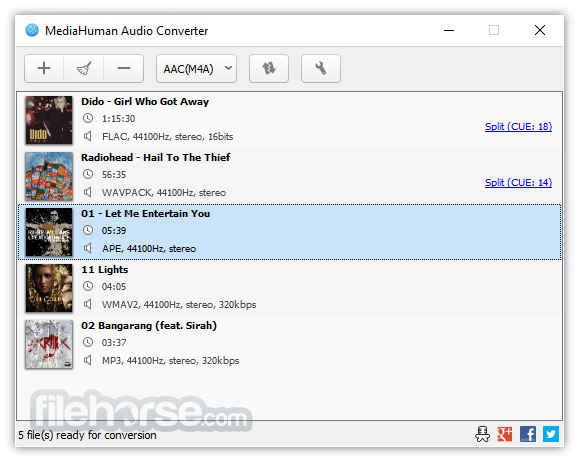
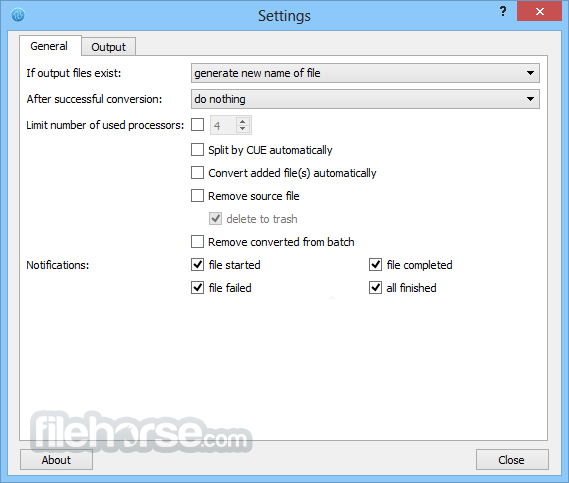
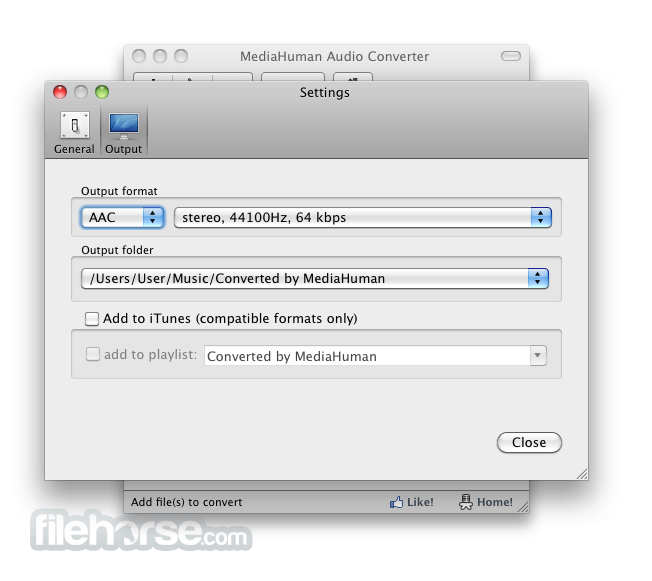
- 2026-04-06 MediaHuman Audio Converter 2.3.6 52.99 MB
- 2026-04-01 MediaHuman Audio Converter 2.3.5 47.2 MB
- 2026-03-21 MediaHuman Audio Converter 2.3.2 43.33 MB
- 2026-03-20 MediaHuman Audio Converter 2.3.1 43.38 MB
- 2026-03-13 MediaHuman Audio Converter 2.3 43.16 MB
- 2025-07-02 MediaHuman Audio Converter 2.2.5 43.54 MB
- 2024-09-13 MediaHuman Audio Converter 2.2.4 43.5 MB
- 2024-02-02 MediaHuman Audio Converter 2.2.3 42.96 MB