⚠ 這是歷史版本頁面 — 查看 Nox App Player 最新版本 →

- 目前版本3.8.5.6
- 更新日期2021-06-17
- 檔案大小660.58 MB
- 檔案名稱NoxInstaller_3.8.5.6_en.dmg
- 作業系統macOS 10.12 Sierra or later
- 支援語系English
- 授權型式免費軟體
- 開發商 Nox Team
- 軟體分類Mac 軟體 / 遊戲
##
編輯短評
Nox App Player 是一款專為 Mac 設計的 Android 模擬器,讓你在電腦上直接執行 Android 應用程式與遊戲。它由香港團隊開發,強調易用性,即使不熟悉技術也能輕鬆上手,並能流暢運行 3D 遊戲、社交軟體與生產力工具。這款免費軟體在遊戲分類中擁有不錯的評價,雖然更新步調不算頻繁,但仍有持續維護,算是穩定的選擇。
如果你需要在 Mac 上玩 Android 手遊、測試應用程式,或想在大螢幕上使用手機 App,Nox 是值得考慮的選項。相較於 BlueStacks Air 等熱門模擬器,Nox 同樣免費且能流暢運行遊戲,但它的更新頻率較低,且目前僅提供英文介面,對中文使用者稍有門檻。此外,它另有 Windows 版本,方便跨平台使用。整體來說,它適合追求簡單上手、不介意英文介面的 Mac 用戶。
##
翻譯排程處理中,以下暫以英文原文呈現
軟體介紹
Nox App Player for Mac is a reliable and feature-rich Android emulator designed to provide users with a seamless Android experience on their Mac computers.
Developed by a Hong Kong-based software team at Nox Limited, this emulator is designed to be user-friendly and easy to use, empowering users of all technical knowledge levels to get Android applications of all types up and running on their desktop and laptop Mac hardware, even including modern 3D video games, multiplayer-themed hits, social apps, productivity tools, and more.
Like many other emulators on the market, this free solution enables users to access the entirety of the Google Play ecosystem of apps and to sideload custom apps at will, dramatically expanding the number of applications that can be accessed on the Mac platform.
The app can provide a seamless full-screen gaming experience, be an important tool for enhancing daily productivity with many tasks, and even be a stable testing platform for the development of new Android apps.
Advanced features include fully customizable keyboard controls, support for gamepads, built-in video and macro-recording tools, network play support, and much more.
All of this and much more is available to all Mac users for 100% free, both on desktop and laptop hardware.
Key Features
To install this app on any modern Mac, users must download the software from the official website or secure FileHorse servers and simply follow the installation prompts.
The installation process is straightforward and does not require any technical expertise or additional customization, as the app can automatically detect present rendering hardware and optimize the rendering process for seamless access to mobile Android apps.
How to Use
Once inside this popular Android emulator, users can easily navigate to the Google Play Store, log in with their regular Google credentials, and install their favorite Android apps and games.
And since all cloud interactions with those apps are handled by the official Google Play service, users can retain direct access to the same online servers and data syncing services available on Android smartphones, helping everyone to remain in contact with their friends, family, and coworkers directly via a desktop emulator.
In addition to seamless Android app access, users can also customize their emulation experience by adjusting settings such as CPU and RAM allocation, resolution, and frame rates.
Gaming is specially optimized, with built-in support for keyboard and gamepad control remapping and high-bandwidth network play without relying on potentially unreliable mobile data connections.
User Interface
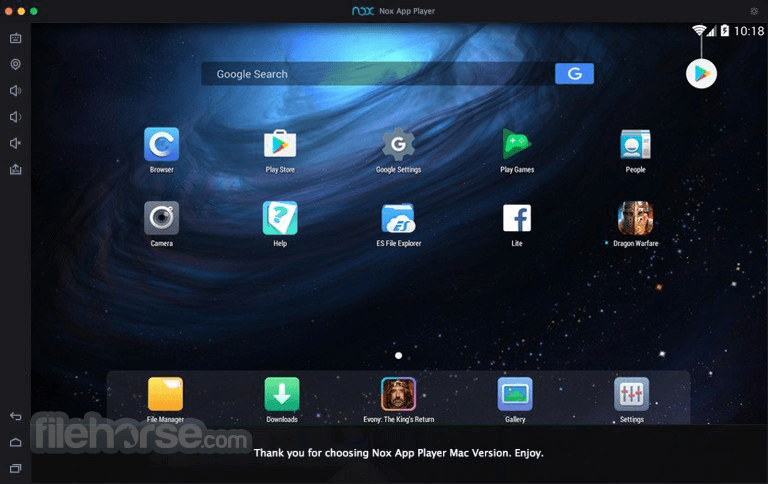
The user interface is clean and modern, with a focus on simplicity and ease of use by focusing the majority of the main dashboard on the active rendering surface and locating the customization tools on the right border of the app.
This includes easy-to-reach tools for Full Screen, Volume Up/Down, FileAssist, APK installation, MultiDrive, Cleanup tool, and more.
The app supports the seamless dragging and dropping of files from the desktop surface inside the Android OS environment, dramatically simplifying file transfers and data management.
FAQs
What is Nox App Player?
It is a stable and highly compatible Android emulator that can help Mac users access an incredible variety of mobile apps directly on their computers.
Is it safe?
Yes. This app is managed by a reputable software developer. Users are recommended to use caution when sideloading custom APK apps.
Alternatives
Bluestacks - The popular Android emulator that allows users to run Android apps and games with ease.
Droid4X - A versatile Android emulator for Windows and Mac platforms.
ARChon for Mac - A unique Android emulator platform that can be accessed directly from inside the Google Chrome web browser.
Pricing
This app is free to download and use.
System Requirements
PROS
Nox App Player for Mac is a highly competent Android app emulator, enabling users of all technical knowledge levels to easily access thousands of popular mobile apps on the Mac platform, including the latest resource-intensive 3D games.
With full support for customizable gaming controls, macro management, and multi-app processing, this popular Android emulator can transform the capabilities of any Mac and enable users to access the Android app ecosystem on much more powerful desktop and laptop hardware.
Also Available: Download Nox App Player for Windows
Download Nox App Player for Mac Latest Version Why is this app published on FileHorse? (More info)
Developed by a Hong Kong-based software team at Nox Limited, this emulator is designed to be user-friendly and easy to use, empowering users of all technical knowledge levels to get Android applications of all types up and running on their desktop and laptop Mac hardware, even including modern 3D video games, multiplayer-themed hits, social apps, productivity tools, and more.
Like many other emulators on the market, this free solution enables users to access the entirety of the Google Play ecosystem of apps and to sideload custom apps at will, dramatically expanding the number of applications that can be accessed on the Mac platform.
The app can provide a seamless full-screen gaming experience, be an important tool for enhancing daily productivity with many tasks, and even be a stable testing platform for the development of new Android apps.
Advanced features include fully customizable keyboard controls, support for gamepads, built-in video and macro-recording tools, network play support, and much more.
All of this and much more is available to all Mac users for 100% free, both on desktop and laptop hardware.
Key Features
- High Compatibility - Access thousands of modern and legacy Android apps from categories such as Productivity, Social, News, Gaming, and others!
- High-performance Rendering - Access all mobile apps with the enhanced processing power of Mac hardware, ensuring higher rendering resolutions and framerates in games.
- Customizable Controls - Users are free to customize keyboard mapping, control games via gamepads, and more.
- Multi-Instance Manager - Easily run multiple instances of Android simultaneously without a great impact on rendering performance.
- Root Access - Take full control over the Android OS platform with full root access support.
- Screen and Video Recording - Instantly record screenshots of the screen or take video recordings with excellent image quality.
- APK File Installation - Users can easily sideload APK files directly from their computer.
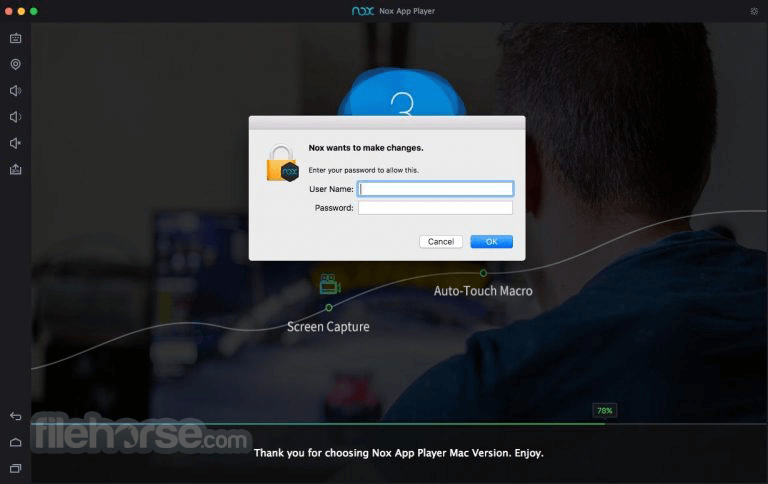
- Macro Recorder - Built-in support for recording and reproducing macros, enabling users to automate tasks in games and other software.
To install this app on any modern Mac, users must download the software from the official website or secure FileHorse servers and simply follow the installation prompts.
The installation process is straightforward and does not require any technical expertise or additional customization, as the app can automatically detect present rendering hardware and optimize the rendering process for seamless access to mobile Android apps.
How to Use
Once inside this popular Android emulator, users can easily navigate to the Google Play Store, log in with their regular Google credentials, and install their favorite Android apps and games.
And since all cloud interactions with those apps are handled by the official Google Play service, users can retain direct access to the same online servers and data syncing services available on Android smartphones, helping everyone to remain in contact with their friends, family, and coworkers directly via a desktop emulator.
In addition to seamless Android app access, users can also customize their emulation experience by adjusting settings such as CPU and RAM allocation, resolution, and frame rates.
Gaming is specially optimized, with built-in support for keyboard and gamepad control remapping and high-bandwidth network play without relying on potentially unreliable mobile data connections.
User Interface
The user interface is clean and modern, with a focus on simplicity and ease of use by focusing the majority of the main dashboard on the active rendering surface and locating the customization tools on the right border of the app.
This includes easy-to-reach tools for Full Screen, Volume Up/Down, FileAssist, APK installation, MultiDrive, Cleanup tool, and more.
The app supports the seamless dragging and dropping of files from the desktop surface inside the Android OS environment, dramatically simplifying file transfers and data management.
FAQs
What is Nox App Player?
It is a stable and highly compatible Android emulator that can help Mac users access an incredible variety of mobile apps directly on their computers.
Is it safe?
Yes. This app is managed by a reputable software developer. Users are recommended to use caution when sideloading custom APK apps.
Alternatives
Bluestacks - The popular Android emulator that allows users to run Android apps and games with ease.
Droid4X - A versatile Android emulator for Windows and Mac platforms.
ARChon for Mac - A unique Android emulator platform that can be accessed directly from inside the Google Chrome web browser.
Pricing
This app is free to download and use.
System Requirements
- OS: macOS 10.9 or later
- CPU: Quadcore X86 processor with Virtualization support
- GPU: GeForce GTX 460 or Radeon R7 250 GPU
- RAM: 8GB of memory
- Storage: 1GB of free space for the emulator (more for individual downloaded apps)
PROS
- High compatibility.
- Stable and accurate reproduction of Android apps.
- Ability to easily render 3D games.
- Customizable gaming controls.
- Multi-app emulation.
- Advanced screen and video capture options.
- Free.
- Resource-intensive.
- Occasional crashes or app compatibility issues.
Nox App Player for Mac is a highly competent Android app emulator, enabling users of all technical knowledge levels to easily access thousands of popular mobile apps on the Mac platform, including the latest resource-intensive 3D games.
With full support for customizable gaming controls, macro management, and multi-app processing, this popular Android emulator can transform the capabilities of any Mac and enable users to access the Android app ecosystem on much more powerful desktop and laptop hardware.
Also Available: Download Nox App Player for Windows
Download Nox App Player for Mac Latest Version Why is this app published on FileHorse? (More info)
##
畫面截圖
- 2026-01-05 Nox App Player 3.8.5.7 660.64 MB
- 2021-06-17 Nox App Player 3.8.5.6 660.58 MB
- 2021-05-13 Nox App Player 3.8.5.5 660.52 MB
- 2021-04-12 Nox App Player 3.8.5.3 654.49 MB
- 2021-02-08 Nox App Player 3.8.5.2 654.42 MB
- 2020-12-01 Nox App Player 3.8.5.1 661.74 MB
- 2020-11-16 Nox App Player 3.8.5.0 666.34 MB
- 2020-10-16 Nox App Player 3.8.1.0 615.4 MB