- 目前版本2026.6
- 更新日期2026-07-31
- 作業系統Mac OS X 10.9 or later
- 支援語系English
- 授權型式未分類
- 開發商 Avid Technology, Inc.
- 軟體分類Mac 軟體 / 音訊軟體
##
翻譯排程處理中,以下暫以英文原文呈現
軟體介紹
Sibelius for Mac is a powerful music notation tool. Sibelius, represents giant leap forwards for notation software, with three ground-breaking, unique features that will change the way you work with instrumental parts, composing for film and TV, and teach music with technology.
Create beautiful, captivating scores more quickly than ever before with the world's best selling notation software.
Create custom staff sizes
Thanks to popular demand, you now have more flexible layout and composition possibilities to best present your score. Change the individual staff sizes of independent instruments and groups of instruments to create a clear and perfect looking score. And gain fine control of the new staff sizes in Engraving Rules.
Make music easier to learn
Music doesn't have to be so black and white. With the latest Sibelius for macOS, you can now color individual notes and/or chords, giving students a more enhanced and visual way of learning to read and write music notation.
Get better rest
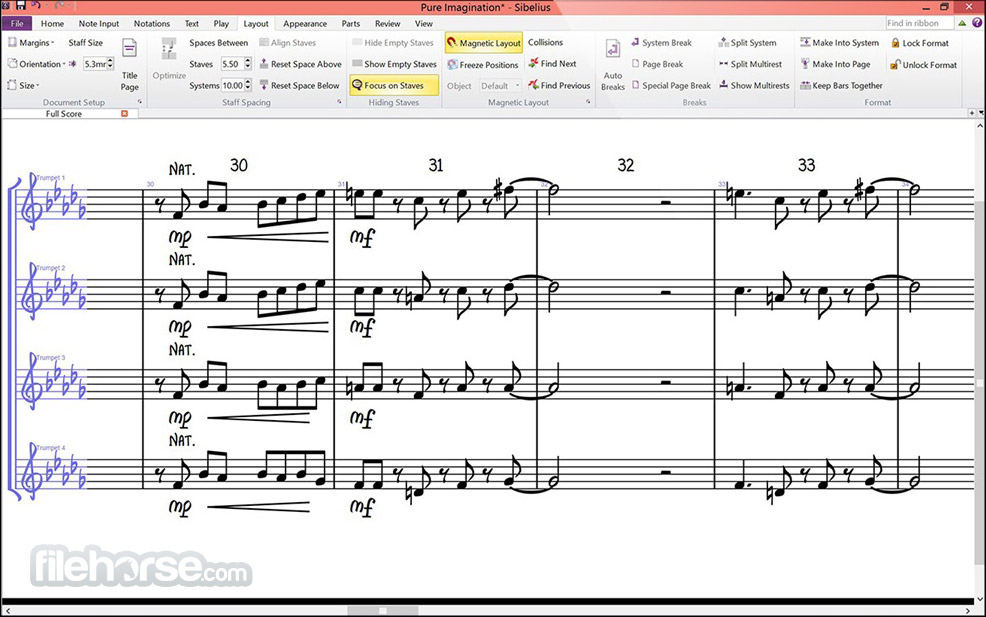
Inserting rests into your score is now easier and more intuitive. Whenever you add one, Magnetic Layout automatically repositions the rest to align optimally with the phrasing of preceding notes—no manual fixes required. Create easy-to-read scores faster than ever. Plus, you can now move rests and notes horizontally in your score.
Re-spell and repeat with ease
It's now possible to have the same pitched note display a different accidental in any part compared to the rest of the score. You can also create concise first, second, and third time bars that appear and play back exactly like you'd expect them to, eliminating manual correction. Plus, all time signature changes now appear after the barline but before repeat barlines by default.
Share your score
Want to share your composition with a colleague, client, or friend? You can now export your composition as an MP3 audio file for faster file transfer that won't hit email size limits.
Add notes and comments
Sometimes you have a great idea, but you forget to write it down. Then the next thing you know, your idea is gone. The new Annotate feature allows you to add notes directly on the score—you can create reminders for yourself as you’re composing, or communicate edits and feedback to others.
User Interface
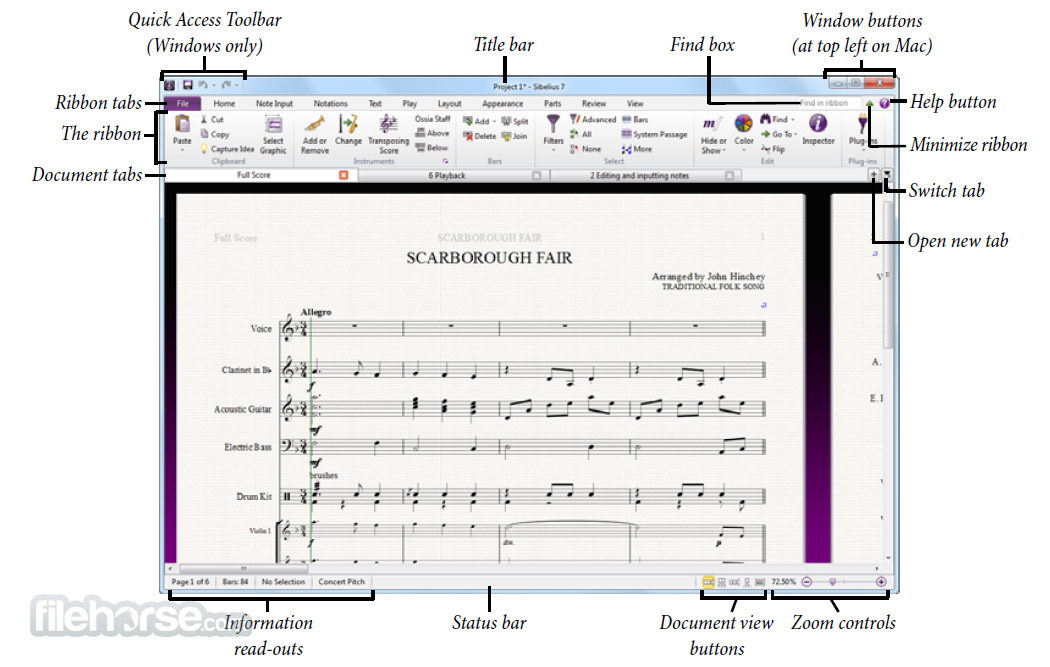
The app interface is clean and intuitive, organized into a ribbon-style menu similar to Microsoft Office products.
The design prioritizes ease of use, with clearly labeled icons and tools for navigation.
Users can customize their workspace by rearranging panels and docking frequently used tools.
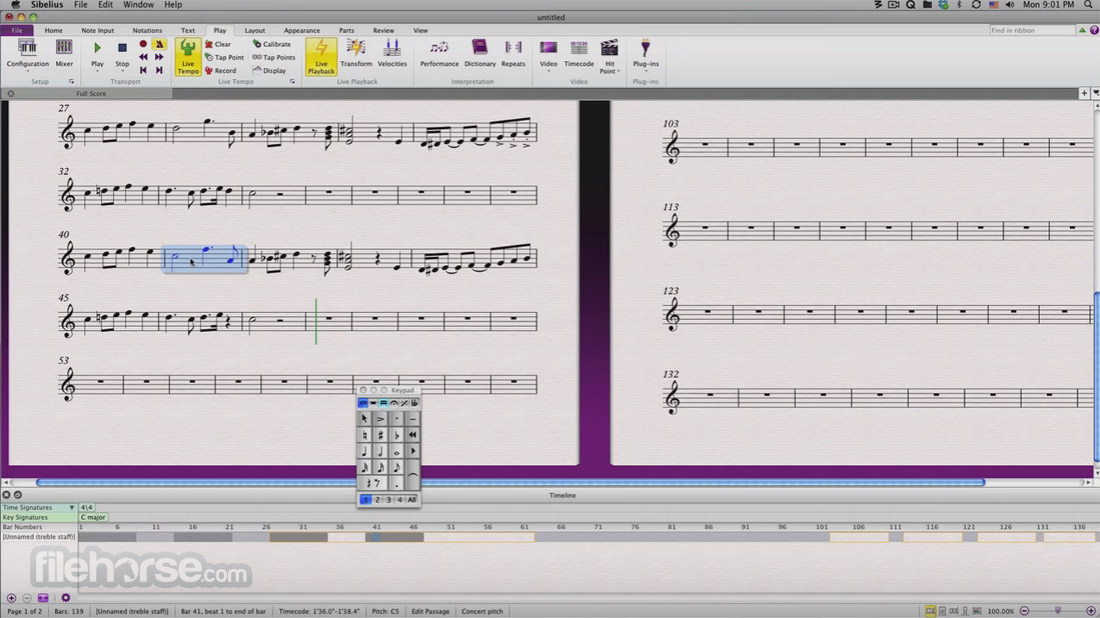
The score area dominates the screen, offering a responsive canvas where changes update in real-time.
Installation and Setup
Download and Installation: Visit the Avid website or FileHorse.com and download the macOS installer for your operating system. Follow the on-screen instructions.
License Activation: Log in with your Avid account or create one, then activate your license via the Avid Link application.
Setup: Configure playback devices, MIDI settings, and audio preferences. It includes a guided setup wizard for first-time users.
How to Use
Create a New Score: Use the startup wizard to select a template or define your ensemble. Customize the key, time signature, and layout.
Input Notes: Enter notes using a MIDI keyboard, the computer keyboard, or by clicking on the staff with your mouse.
Edit and Arrange: Use the ribbon menu to adjust dynamics, articulation, and phrasing. Rearrange sections with the Arrange Tool.
Playback and Review: Play your composition with Sibelius Sounds to hear realistic renditions of your score.
Export and Share: Save your work as a PDF, MusicXML, or audio file. Share online via Avid’s cloud sharing service or directly export parts.
What`s New
Input & Notation Tools
Supports third-party sound libraries, alongside 24GB of factory content with VST/AU plugin compatibility for realistic playback.
Collaboration & Sharing
Can I use Sibelius for Mac without a MIDI keyboard?
Yes, it allows note entry using your computer keyboard or mouse, providing flexibility for users without MIDI devices.
Is there a free version of Sibelius?
Avid offers a free version called Sibelius First, which includes basic features for creating simple scores. However, it has limitations compared to the paid versions.
Can I collaborate on scores with others in real time?
While the software doesn’t offer real-time collaboration, you can use Avid Cloud Sharing to share and review scores with others.
Does Sibelius support third-party plugins?
Yes, it supports third-party plugins, allowing users to extend its functionality for specific tasks.
What export formats does Sibelius support?
It supports PDF, MusicXML, MIDI, MP3, and WAV formats, making it compatible with other music software and easy to share with performers.
Pricing
Sibelius First: Free, with limited features for beginners.
Create or sign in to your accounts: Avid Master Account. Your Avid Master Account gives you access to software downloads, in-app purchases, support, community forums, and more across Avid sites.
Sibelius Artist: $9.99/month or $119.88/year, suitable for intermediate users.
System Requirements
Also Available: Download Sibelius for Windows
Download Sibelius for Mac Latest Version Why is this app published on FileHorse? (More info)
Create beautiful, captivating scores more quickly than ever before with the world's best selling notation software.
Create custom staff sizes
Thanks to popular demand, you now have more flexible layout and composition possibilities to best present your score. Change the individual staff sizes of independent instruments and groups of instruments to create a clear and perfect looking score. And gain fine control of the new staff sizes in Engraving Rules.
Make music easier to learn
Music doesn't have to be so black and white. With the latest Sibelius for macOS, you can now color individual notes and/or chords, giving students a more enhanced and visual way of learning to read and write music notation.
Get better rest
Inserting rests into your score is now easier and more intuitive. Whenever you add one, Magnetic Layout automatically repositions the rest to align optimally with the phrasing of preceding notes—no manual fixes required. Create easy-to-read scores faster than ever. Plus, you can now move rests and notes horizontally in your score.
Re-spell and repeat with ease
It's now possible to have the same pitched note display a different accidental in any part compared to the rest of the score. You can also create concise first, second, and third time bars that appear and play back exactly like you'd expect them to, eliminating manual correction. Plus, all time signature changes now appear after the barline but before repeat barlines by default.
Share your score
Want to share your composition with a colleague, client, or friend? You can now export your composition as an MP3 audio file for faster file transfer that won't hit email size limits.
Add notes and comments
Sometimes you have a great idea, but you forget to write it down. Then the next thing you know, your idea is gone. The new Annotate feature allows you to add notes directly on the score—you can create reminders for yourself as you’re composing, or communicate edits and feedback to others.
User Interface
The app interface is clean and intuitive, organized into a ribbon-style menu similar to Microsoft Office products.
The design prioritizes ease of use, with clearly labeled icons and tools for navigation.
Users can customize their workspace by rearranging panels and docking frequently used tools.
The score area dominates the screen, offering a responsive canvas where changes update in real-time.
Installation and Setup
Download and Installation: Visit the Avid website or FileHorse.com and download the macOS installer for your operating system. Follow the on-screen instructions.
License Activation: Log in with your Avid account or create one, then activate your license via the Avid Link application.
Setup: Configure playback devices, MIDI settings, and audio preferences. It includes a guided setup wizard for first-time users.
How to Use
Create a New Score: Use the startup wizard to select a template or define your ensemble. Customize the key, time signature, and layout.
Input Notes: Enter notes using a MIDI keyboard, the computer keyboard, or by clicking on the staff with your mouse.
Edit and Arrange: Use the ribbon menu to adjust dynamics, articulation, and phrasing. Rearrange sections with the Arrange Tool.
Playback and Review: Play your composition with Sibelius Sounds to hear realistic renditions of your score.
Export and Share: Save your work as a PDF, MusicXML, or audio file. Share online via Avid’s cloud sharing service or directly export parts.
What`s New
Input & Notation Tools
- Enter notes via onscreen Keypad, MIDI keyboard, computer keyboard, Apple Pencil, or stylus.
- AI-assisted Chord Symbol Entry simplifies adding musical embellishments.
- Magnetic Layout & Auto Optimize prevents score collisions by auto-adjusting formatting.
- Panorama View removes layout constraints for freeform writing.
Supports third-party sound libraries, alongside 24GB of factory content with VST/AU plugin compatibility for realistic playback.
Collaboration & Sharing
- Cloud Sharing enables global collaboration, feedback, and publishing.
- Share drafts and publish final arrangements with Cloud Publishing.
- Intelligent MIDI Import auto-assigns instruments to imported MIDI tracks.
- Add details like chord symbols, tabs, articulations, and lyrics for professional-quality scores.
- Dynamic Parts auto-updates individual parts when score changes are made.
- Unlimited staves and deep customization for ensembles of any size.
- Score Subsets for creating custom arrangements or rehearsal scores.
- Use this program across mobile, tablet, Chromebook, Mac, and Windows devices.
- Choose Network Licensing for shared environments or Team Licensing for individual access.
- Over 1,700 teaching resources with the Worksheet Creator.
- Access 2,000 music snippets in the Ideas Panel to inspire creativity.
- Classroom Control lets educators manage materials, access networked files, and control students’ devices.
- Create interactive assignments and lesson plans with Cloud Sharing.
Can I use Sibelius for Mac without a MIDI keyboard?
Yes, it allows note entry using your computer keyboard or mouse, providing flexibility for users without MIDI devices.
Is there a free version of Sibelius?
Avid offers a free version called Sibelius First, which includes basic features for creating simple scores. However, it has limitations compared to the paid versions.
Can I collaborate on scores with others in real time?
While the software doesn’t offer real-time collaboration, you can use Avid Cloud Sharing to share and review scores with others.
Does Sibelius support third-party plugins?
Yes, it supports third-party plugins, allowing users to extend its functionality for specific tasks.
What export formats does Sibelius support?
It supports PDF, MusicXML, MIDI, MP3, and WAV formats, making it compatible with other music software and easy to share with performers.
Pricing
Sibelius First: Free, with limited features for beginners.
Create or sign in to your accounts: Avid Master Account. Your Avid Master Account gives you access to software downloads, in-app purchases, support, community forums, and more across Avid sites.
Sibelius Artist: $9.99/month or $119.88/year, suitable for intermediate users.
- Create scores up to 16 staves
- 10GB sound library included
- Includes desktop + mobile
- Create scores with unlimited staves
- 36GB sound library included
- Includes desktop + mobile
System Requirements
- OS: macOS
- RAM: 4 GB (8 GB recommended)
- Storage: 1 GB for installation
- Audio: ASIO-compatible sound card recommended
- Intuitive interface and easy workflow
- Industry-standard features for professional-quality scores
- Comprehensive support for playback and export formats
- Regular updates and active user community
- Steeper learning curve for advanced features
- Limited real-time collaboration
Also Available: Download Sibelius for Windows
Download Sibelius for Mac Latest Version Why is this app published on FileHorse? (More info)
##
畫面截圖