
- 軟體名稱MediaPortal
- 目前版本2.5.0
- 更新日期2026-02-19
- 檔案大小212.8 MB
- 檔案名稱MediaPortal2-2.5.0.zip
- 作業系統Windows 7 / Windows 8 / Windows 10 / Windows 11
- 支援語系English
- 授權型式開源軟體
- 開發商 MediaPortal Team
- 軟體分類Windows 軟體 / 影片軟體
編輯短評
MediaPortal 是一套開源的媒體中心軟體,主要解決把電腦接上大電視後,能像智慧電視一樣使用。它的特色在於整合了電視與廣播的收看和錄製,也能播放影片、音樂,甚至自動從 IMDB 下載電影封面與資訊。這套軟體持續更新,在同類工具中算是熱門選擇,評價普遍不錯,但由於功能較為進階,適合願意花時間設定的使用者。
這套軟體適合想打造個人化家庭娛樂中心的人,尤其是喜歡看電視、錄影或管理大量媒體檔案的使用者。與 KMPlayer 或 K-Lite Codec Pack 等播放器相比,MediaPortal 更偏向完整的媒體中心,功能更全面,但相對設定較複雜。它是開源軟體,免費使用,但僅支援 Windows,且介面目前只有英文,使用前需要留意語系上的限制。
軟體介紹
MediaPortal 是一款免費且開放原始碼的媒體中心軟體,旨在將您的 PC 變成一個完整的多媒體中心。
它最初基於 XBMC(現為Kodi),如今已發展為一個獨立平台,提供多樣化的功能,涵蓋媒體播放、直播電視、錄影等。
它支援 Windows 11/10 作業系統,並為尋求整合數位媒體的使用者提供引人入勝且可自訂的體驗。
MediaPortal 的靈活性使其成為想要個人化媒體體驗使用者的理想選擇。無論您是串流電影、聆聽音樂,還是觀看直播電視,這款軟體都能滿足每個人的需求。其強大的外掛生態系統進一步增強了功能,使其成為科技愛好者的最愛。
功能
它最初基於 XBMC(現為Kodi),如今已發展為一個獨立平台,提供多樣化的功能,涵蓋媒體播放、直播電視、錄影等。
它支援 Windows 11/10 作業系統,並為尋求整合數位媒體的使用者提供引人入勝且可自訂的體驗。
MediaPortal 的靈活性使其成為想要個人化媒體體驗使用者的理想選擇。無論您是串流電影、聆聽音樂,還是觀看直播電視,這款軟體都能滿足每個人的需求。其強大的外掛生態系統進一步增強了功能,使其成為科技愛好者的最愛。
功能
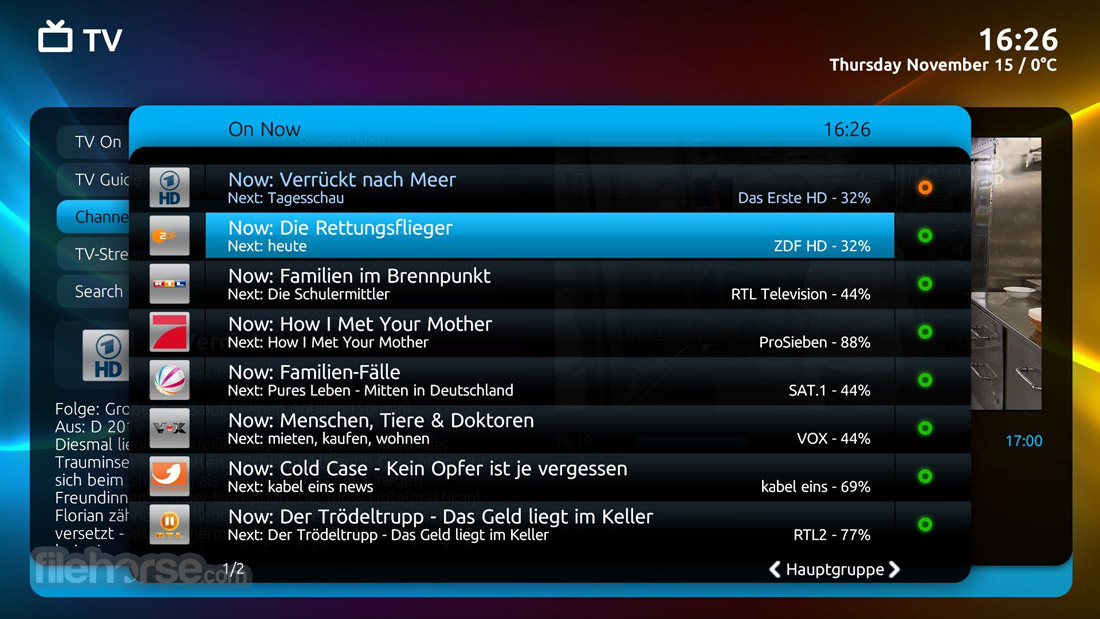
- 直播電視與 PVR:支援多個調諧器,讓您觀看和錄製直播電視。功能包括時移、電子節目表(EPG)和系列錄影。
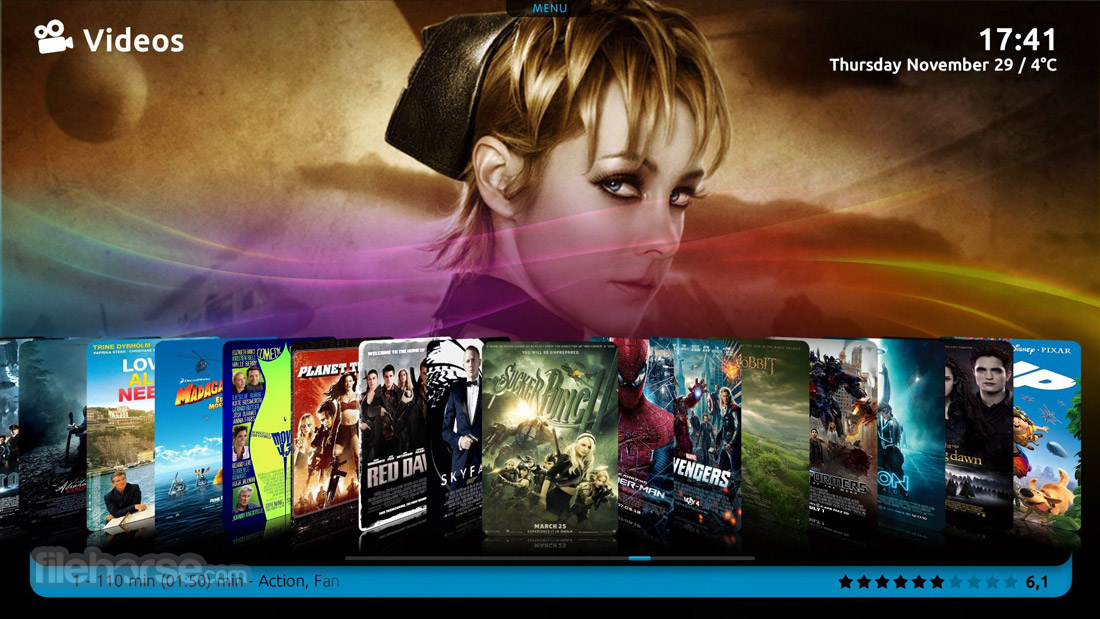
- 媒體播放:從本機儲存或網路磁碟播放影片、音樂和照片,支援幾乎所有主流格式。
- 豐富的外掛:透過天氣更新、YouTube 整合和家庭自動化控制等外掛增強功能。
- 可自訂的佈景主題:透過多種可下載的佈景主題個人化您的介面,或自行設計。
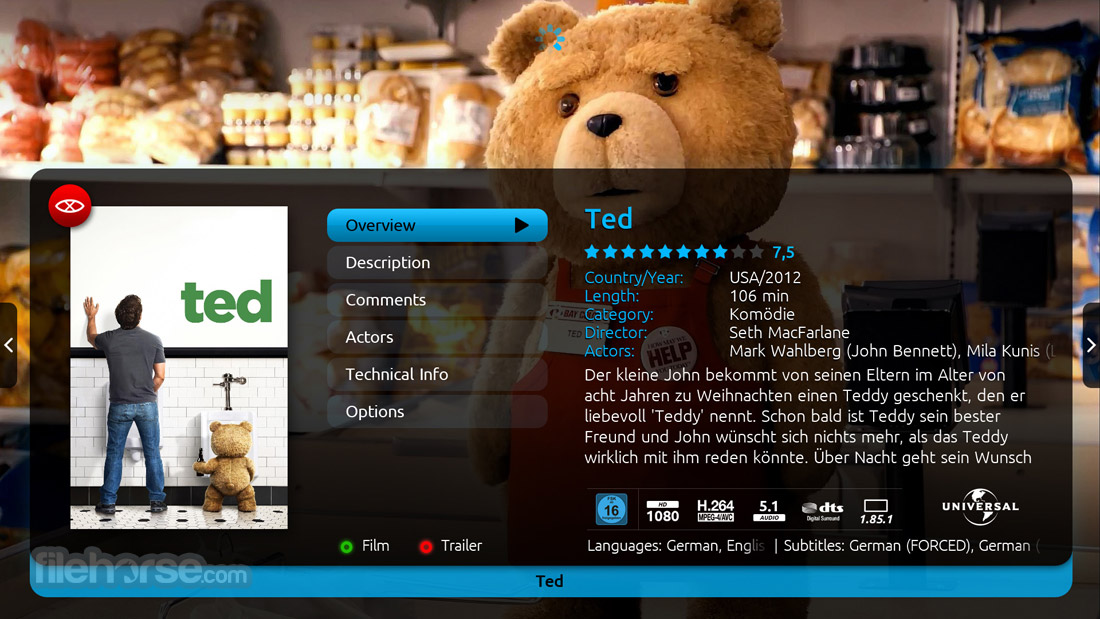
- 媒體管理:自動整理您的媒體庫,包含中繼資料、封面和字幕。
- 多房間支援:將內容串流到網路上的其他裝置,讓這款應用程式成為真正的家庭媒體中心。
- 多種遙控器選項:相容於多種遙控器,提供無縫導覽。
畫面截圖
5 張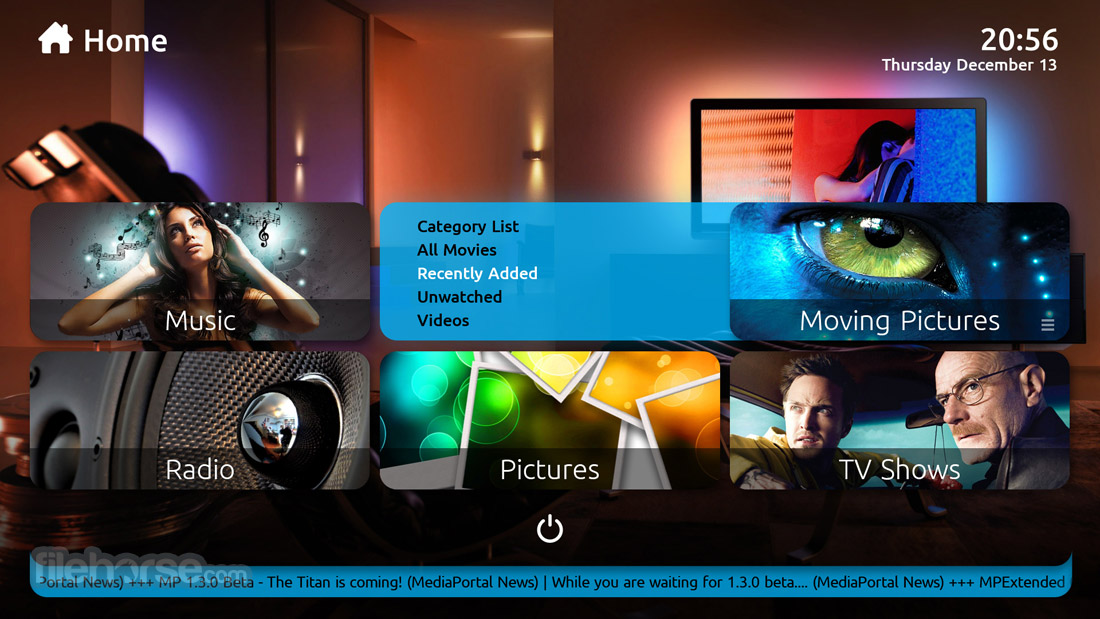

更新日誌
2.5.0
Brand-new Installer: Introduces a modernized setup experience with improved package management that clearly displays installed, updated, added, or removed components.
Multiple TV Engine Options: The installer now allows users to choose between TVE3 (.NET4.8), TVE3.5, or the new TVMosaic backend.
.NET 6 Migration: The core codebase has been ported from .NET4.8 to .NET6, improving performance and long-term compatibility.
Dedicated Radio Tile: Radio is now separated from TV, featuring its own home content and EPG screens while still sharing recordings and schedules.
TVMosaic Integration: Adds support for the community-driven TVMosaic engine, configurable via web browser and capable of cross-platform operation.
Enhanced EPG Handling: Improved loading and processing of electronic program guide data and channel indexing.
Nereus Skin Improvements: Adds animated dialogs, customizable home screen header (date/time/weather), selectable tile styles, improved fan art preview, and refined UI styling.
Revised Input Device Manager: Expands support for both HID and non-HID devices with more advanced input mapping.
Backend & Stability Improvements: Includes shortcut fixes, consolidated settings, enhanced certification logos, and improved diagnostics tools.
User Interface
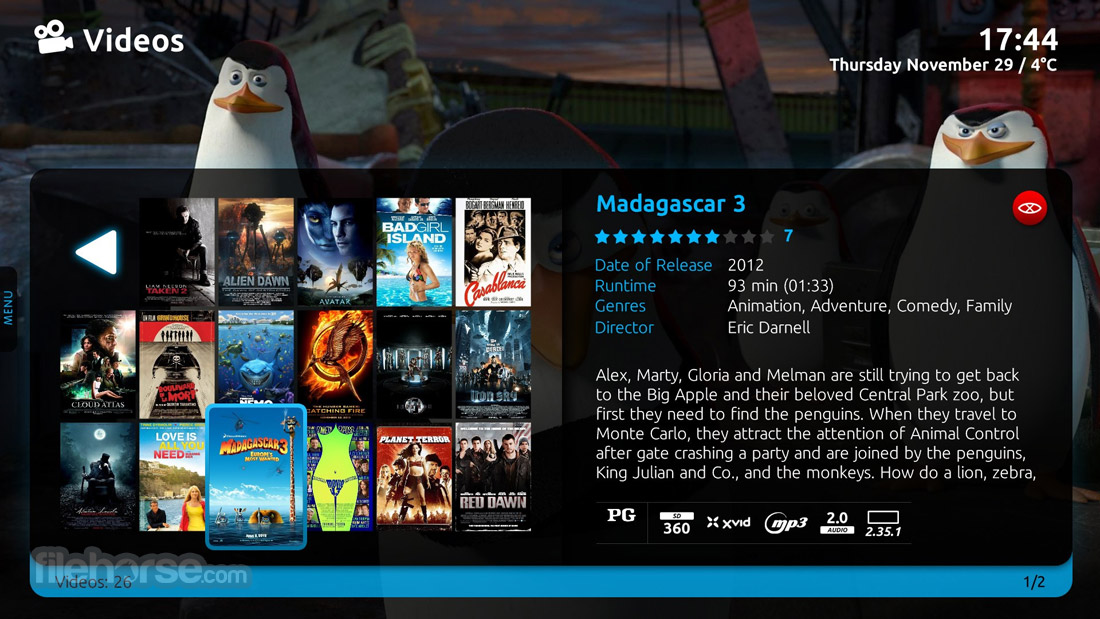
MediaPortal’s user interface is sleek, intuitive, and customizable. The home screen organizes features into easy-to-navigate categories, such as TV, Videos, Music, Pictures, and Plugins.
The interface supports high-definition resolutions and is optimized for both mouse/keyboard and remote control usage. While beginners will appreciate its straightforward design, advanced users can dive into more intricate customizations.
Installation and Setup
FAQs
Is MediaPortal free to use?
Yes, this app is completely free and open-source, with no hidden costs.
What are the key differences between MediaPortal 1 and MediaPortal 2?
MediaPortal 1 offers more plugins and a mature ecosystem, while MediaPortal 2 has a modern interface and better multi-room support.
Can I use MediaPortal without a TV tuner?
Yes, you can still use it for media playback, streaming, and plugins. However, live TV and PVR features require a tuner.
Is MediaPortal compatible with smart TVs or streaming devices?
The app doesn’t natively run on smart TVs, but you can stream content to these devices via DLNA or compatible apps.
How does MediaPortal handle metadata and subtitles?
It automatically fetches metadata and subtitles from online databases, ensuring your library is well-organized and user-friendly.
Alternatives
Kodi - Known for its expansive plugin ecosystem, Kodi offers similar media playback and customization features.
Plex - A popular choice for those seeking an easy-to-use media server with excellent remote access capabilities.
Plex Media Server - Upload media content to a media center to stream movies, music, and photos.
Emby - Provides robust live TV and media management features, with premium options for advanced users.
JRiver Media Center - A paid option with extensive features for audiophiles and video enthusiasts.
Windows Media Player - New way to store and enjoy all your music, video, pictures, and recorded TV.
Pricing
This program is free and open-source, funded by community contributions. All features, plugins, and skins are included without additional cost.
System Requirements
This software is a powerful media center solution for PC users seeking a comprehensive, customizable platform. With its robust feature set, open-source nature, and active community support, it is well-suited for enthusiasts who want to centralize their media experience.
While its initial setup may require some effort, the payoff is a tailored, feature-rich system that rivals many commercial alternatives.
For those willing to invest the time to explore its capabilities, MediaPortal is a top-tier choice for managing and enjoying digital media. Whether you’re an avid TV viewer, music lover, or movie enthusiast, it has the tools to deliver a truly immersive home media experience.
Note: Requires .NET Framework and DirectX. Compatible video card with at least 128 MB of video memory.
Download MediaPortal Latest Version Why is this app published on FileHorse? (More info)
Multiple TV Engine Options: The installer now allows users to choose between TVE3 (.NET4.8), TVE3.5, or the new TVMosaic backend.
.NET 6 Migration: The core codebase has been ported from .NET4.8 to .NET6, improving performance and long-term compatibility.
Dedicated Radio Tile: Radio is now separated from TV, featuring its own home content and EPG screens while still sharing recordings and schedules.
TVMosaic Integration: Adds support for the community-driven TVMosaic engine, configurable via web browser and capable of cross-platform operation.
Enhanced EPG Handling: Improved loading and processing of electronic program guide data and channel indexing.
Nereus Skin Improvements: Adds animated dialogs, customizable home screen header (date/time/weather), selectable tile styles, improved fan art preview, and refined UI styling.
Revised Input Device Manager: Expands support for both HID and non-HID devices with more advanced input mapping.
Backend & Stability Improvements: Includes shortcut fixes, consolidated settings, enhanced certification logos, and improved diagnostics tools.
User Interface
MediaPortal’s user interface is sleek, intuitive, and customizable. The home screen organizes features into easy-to-navigate categories, such as TV, Videos, Music, Pictures, and Plugins.
The interface supports high-definition resolutions and is optimized for both mouse/keyboard and remote control usage. While beginners will appreciate its straightforward design, advanced users can dive into more intricate customizations.
Installation and Setup
- Download: Start by downloading the installer from MediaPortal’s official website or FileHorse.
- Install: Run the installer and choose between "MediaPortal 1" (classic version) or "MediaPortal 2" (modern version). Follow the step-by-step wizard to complete the installation.
- Configure: Use the Configuration Tool to set up your media library, TV tuners, EPG, and network shares. This process may take some time, but it ensures a tailored experience.
- Plugins and Skins: Browse the app Extensions Manager to install additional plugins and skins.
- Test and Enjoy: Launch this program, verify everything is working as expected, and start enjoying your media.
- Accessing Media: Navigate through the home menu to access TV, music, videos, or photos. Use the search functionality to quickly locate specific content.
- Playing Live TV: Select the "TV" section, browse the EPG, and click on a channel to start streaming. Use the recording feature to save shows for later viewing.
- Installing Plugins: Open the Extensions Manager, browse available plugins, and install the ones you need. Restart the app to activate them.
- Customizing Skins: Download skins from the official website, place them in the Skins folder, and select your preferred design in the Configuration Tool.
- Remote Access: Use the web interface or a compatible app to control this software from your smartphone or tablet.
FAQs
Is MediaPortal free to use?
Yes, this app is completely free and open-source, with no hidden costs.
What are the key differences between MediaPortal 1 and MediaPortal 2?
MediaPortal 1 offers more plugins and a mature ecosystem, while MediaPortal 2 has a modern interface and better multi-room support.
Can I use MediaPortal without a TV tuner?
Yes, you can still use it for media playback, streaming, and plugins. However, live TV and PVR features require a tuner.
Is MediaPortal compatible with smart TVs or streaming devices?
The app doesn’t natively run on smart TVs, but you can stream content to these devices via DLNA or compatible apps.
How does MediaPortal handle metadata and subtitles?
It automatically fetches metadata and subtitles from online databases, ensuring your library is well-organized and user-friendly.
Alternatives
Kodi - Known for its expansive plugin ecosystem, Kodi offers similar media playback and customization features.
Plex - A popular choice for those seeking an easy-to-use media server with excellent remote access capabilities.
Plex Media Server - Upload media content to a media center to stream movies, music, and photos.
Emby - Provides robust live TV and media management features, with premium options for advanced users.
JRiver Media Center - A paid option with extensive features for audiophiles and video enthusiasts.
Windows Media Player - New way to store and enjoy all your music, video, pictures, and recorded TV.
Pricing
This program is free and open-source, funded by community contributions. All features, plugins, and skins are included without additional cost.
System Requirements
- Operating System: Windows 11, 10, 8, or 7 (32-bit or 64-bit)
- Processor: Dual-core CPU (minimum)
- RAM: 2 GB (4 GB recommended)
- Graphics: DirectX 9 compatible GPU
- Storage: At least 500 MB for installation (additional space for media files)
- Additional Hardware: TV tuner (for live TV and PVR features)
- Free and open-source.
- Highly customizable.
- Extensive plugin and skin support.
- Excellent live TV and PVR features.
- Supports a wide range of media formats.
- Installation and configuration can be time-consuming.
- Limited official support; relies on community forums.
- Windows-only compatibility.
This software is a powerful media center solution for PC users seeking a comprehensive, customizable platform. With its robust feature set, open-source nature, and active community support, it is well-suited for enthusiasts who want to centralize their media experience.
While its initial setup may require some effort, the payoff is a tailored, feature-rich system that rivals many commercial alternatives.
For those willing to invest the time to explore its capabilities, MediaPortal is a top-tier choice for managing and enjoying digital media. Whether you’re an avid TV viewer, music lover, or movie enthusiast, it has the tools to deliver a truly immersive home media experience.
Note: Requires .NET Framework and DirectX. Compatible video card with at least 128 MB of video memory.
Download MediaPortal Latest Version Why is this app published on FileHorse? (More info)
歷史版本
完整清單 →- 2026-02-19 MediaPortal 2.5.0 212.8 MB
- 2025-08-14 MediaPortal 1.38.1 243.06 MB
- 2025-07-25 MediaPortal 1.38 243.07 MB
- 2022-07-15 MediaPortal 2.4.1 203.19 MB
- 2021-12-31 MediaPortal 2.4 188.21 MB
- 2021-01-08 MediaPortal 2.3.2 189.29 MB
- 2020-12-25 MediaPortal 2.3.1 188.15 MB
- 2020-10-22 MediaPortal 2.3 187.29 MB