⚠ 這是歷史版本頁面 — 查看 Mouse Jiggler 最新版本 →

- 目前版本1.7.4
- 更新日期2018-04-14
- 檔案大小51.2 KB
- 檔案名稱MouseJiggle.exe
- 作業系統Windows 7 64 / Windows 8 64 / Windows 10 64 / Windows 11
- 支援語系English
- 授權型式開源軟體
- 開發商 Alistair Young
- 軟體分類Windows 軟體 / 系統優化
##
編輯短評
Mouse Jiggler 是一款功能極簡的 Windows 小工具,唯一用途就是模擬滑鼠輸入,讓游標在畫面上規律地來回移動。它解決的是系統閒置偵測的問題——當你暫時離開電腦、卻不想讓螢幕保護程式或待機模式啟動時,只要執行它就能騙過系統。這款開源軟體由 Alistair Young 開發,長期以來持續維護,但更新頻率不算高;在同類工具中屬於小眾選擇,評價中等,沒有太多花俏功能,就是單純做好一件事。
它特別適合需要長時間監控安裝程序、跑批次作業,或觀看長流程時不想動系統設定的使用者。與同分類的系統優化工具相比,Mouse Jiggler 不做清理或效能調整,專注在防止閒置觸發,取捨上就是犧牲功能廣度換取極低的使用門檻——免安裝、直接執行即可。需要注意的是,它僅支援英文介面,且官方不提供保固或技術支援;若你習慣中文操作環境,或需要更完整的電源管理方案,可能要考慮其他替代軟體。
##
翻譯排程處理中,以下暫以英文原文呈現
軟體介紹
Mouse Jiggler is a very simple piece of software whose sole function is to "fake" mouse input to Windows PC and jiggle the mouse pointer back and forth. Mouse Jiggler is a free product provided without warranty or support.
Useful for avoiding desktop screensavers or other things triggered by idle detection that, for whatever reason, you can't turn off any other way; or as a quick way to stop a screensaver activating during an installation or when monitoring a long operation without actually having to muck about with the screensaver settings.
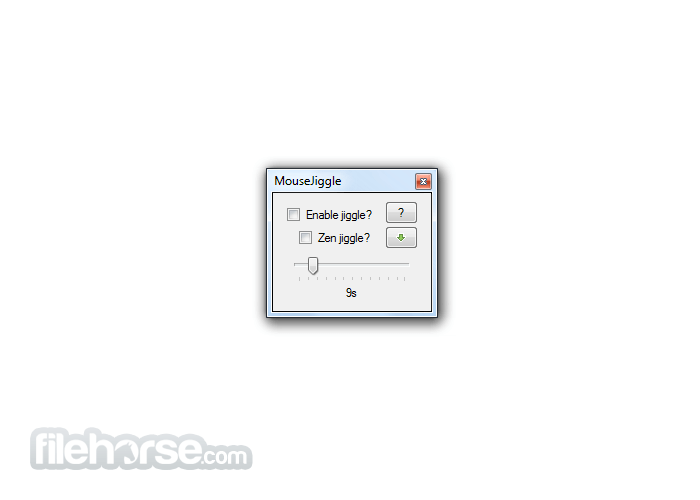
Simply run the MouseJiggle.exe included in the release .zip file. Check the "Enable jiggle?" checkbox to start jiggling the mouse pointer; uncheck it to stop. The jiggle is slight enough that you should be able to use the computer normally, even with jiggling enabled.
Portable Version
A portable version of Mouse Jiggler (i.e., one which does not require the .NET runtime, and so can be installed on locked-down corporate machines that don't have it installed) is available on the releases page, as MouseJiggler-portable.zip. Just unzip and go.
Operation
What is Mouse Jiggler used for?
Mouse Jiggler is a small Windows utility designed to prevent your computer from going idle. It simulates mouse movement, which helps keep your system awake and prevents screen savers, sleep mode, or automatic lock from activating.
Does Mouse Jiggler physically move the cursor on the screen?
It can, but it doesn’t have to. Mouse Jiggler offers two modes:
Is Mouse Jiggler safe and legitimate to use?
Yes. Mouse Jiggler is an open-source utility available on GitHub, which means its source code can be reviewed publicly. It does not contain hidden background services or bundled software. As with any tool, users should download it only from the official repository and use it in accordance with workplace policies if installed on a company device.
PROS
Download Mouse Jiggler Latest Version Why is this app published on FileHorse? (More info)
Useful for avoiding desktop screensavers or other things triggered by idle detection that, for whatever reason, you can't turn off any other way; or as a quick way to stop a screensaver activating during an installation or when monitoring a long operation without actually having to muck about with the screensaver settings.
Simply run the MouseJiggle.exe included in the release .zip file. Check the "Enable jiggle?" checkbox to start jiggling the mouse pointer; uncheck it to stop. The jiggle is slight enough that you should be able to use the computer normally, even with jiggling enabled.
Portable Version
A portable version of Mouse Jiggler (i.e., one which does not require the .NET runtime, and so can be installed on locked-down corporate machines that don't have it installed) is available on the releases page, as MouseJiggler-portable.zip. Just unzip and go.
Operation
- The 'Zen jiggle?' checkbox enables a mode in which the pointer is jiggled 'virtually' - the system believes it to be moving and thus screen saver activation, etc., is prevented, but the pointer does not actually move.
- To minimize this program to the system tray, click the button marked with a green, down-pointing arrow.
- If you want to start the MouseJiggler with jiggling already enabled, run the MouseJiggle.exe with either the -j or --jiggle command-line switch.
- The "-z" / "--zen" command-line switch forces zen jiggling to be enabled for the current (and future) invocations of MouseJiggler.
- (Added in 1.5+): The "-m" / "--minimized" command-like switch tells MouseJiggler to start already minimized.
What is Mouse Jiggler used for?
Mouse Jiggler is a small Windows utility designed to prevent your computer from going idle. It simulates mouse movement, which helps keep your system awake and prevents screen savers, sleep mode, or automatic lock from activating.
Does Mouse Jiggler physically move the cursor on the screen?
It can, but it doesn’t have to. Mouse Jiggler offers two modes:
- Normal mode, which visibly moves the cursor slightly.
- “Zen jiggle” mode, which simulates mouse input without actually moving the visible cursor on the screen.
Is Mouse Jiggler safe and legitimate to use?
Yes. Mouse Jiggler is an open-source utility available on GitHub, which means its source code can be reviewed publicly. It does not contain hidden background services or bundled software. As with any tool, users should download it only from the official repository and use it in accordance with workplace policies if installed on a company device.
PROS
- Simple to Use: This program is straightforward to operate, requiring no advanced setup.
- Portable: The tool is lightweight and doesn’t need installation, making it convenient to carry on a USB stick.
- Prevents Sleep Mode: It effectively prevents your computer from entering sleep mode by simulating mouse movements.
- Open-Source: Being open-source, it's free to use and can be modified to suit specific needs.
- No Installation Required: It runs as a standalone executable, avoiding system modifications.
- Limited Functionality: The tool's primary function is basic, with no additional features for more complex tasks.
- No Customization: The app doesn’t offer advanced settings for mouse movements, limiting its versatility.
Download Mouse Jiggler Latest Version Why is this app published on FileHorse? (More info)
##
畫面截圖
- 2026-02-28 Mouse Jiggler 3.0.0 49.9 MB
- 2021-04-09 Mouse Jiggler 2.0.25 409.6 KB
- 2021-03-07 Mouse Jiggler 2.0.24 409.6 KB
- 2021-02-26 Mouse Jiggler 2.0.23 409.6 KB
- 2021-01-26 Mouse Jiggler 2.0.14 409.6 KB
- 2021-01-23 Mouse Jiggler 2.0.13 409.6 KB
- 2020-12-29 Mouse Jiggler 1.8.42 30.72 KB
- 2020-05-17 Mouse Jiggler 1.8.35 30.72 KB