MultCloud - Multiple Cloud Storage Manager
v MultCloud - Multiple Cloud Storage Manager
Windows
未分類
8.76/10 (4)
- 目前版本MultCloud - Multiple Cloud Storage Manager
- 更新日期2026-08-12
- 作業系統Windows 7 / Windows 8 / Windows 10 / Windows 11
- 支援語系English
- 授權型式未分類
- 開發商 MultCloud Team
- 軟體分類Windows 軟體 / 備份還原
##
翻譯排程處理中,以下暫以英文原文呈現
軟體介紹
MultCloud is a powerful cloud management service that allows users to manage and transfer files across multiple cloud storage providers from a single platform.
Whether you use Google Drive, Dropbox, OneDrive, Amazon S3, or other cloud services, MultCloud integrates them all into one intuitive interface.
It is a handy tool for individuals and businesses that deal with multiple cloud storage accounts and seek a centralized solution for efficient file management.
Integration: It supports a wide range of cloud storage services, enabling users to connect and manage multiple accounts seamlessly.
File Transfer and Sync: Users can easily transfer and synchronize files between different cloud storage accounts without the need to download and re-upload them.
File Sharing: It allows users to share files and folders directly from one cloud storage account to another, making collaboration across cloud services effortless.
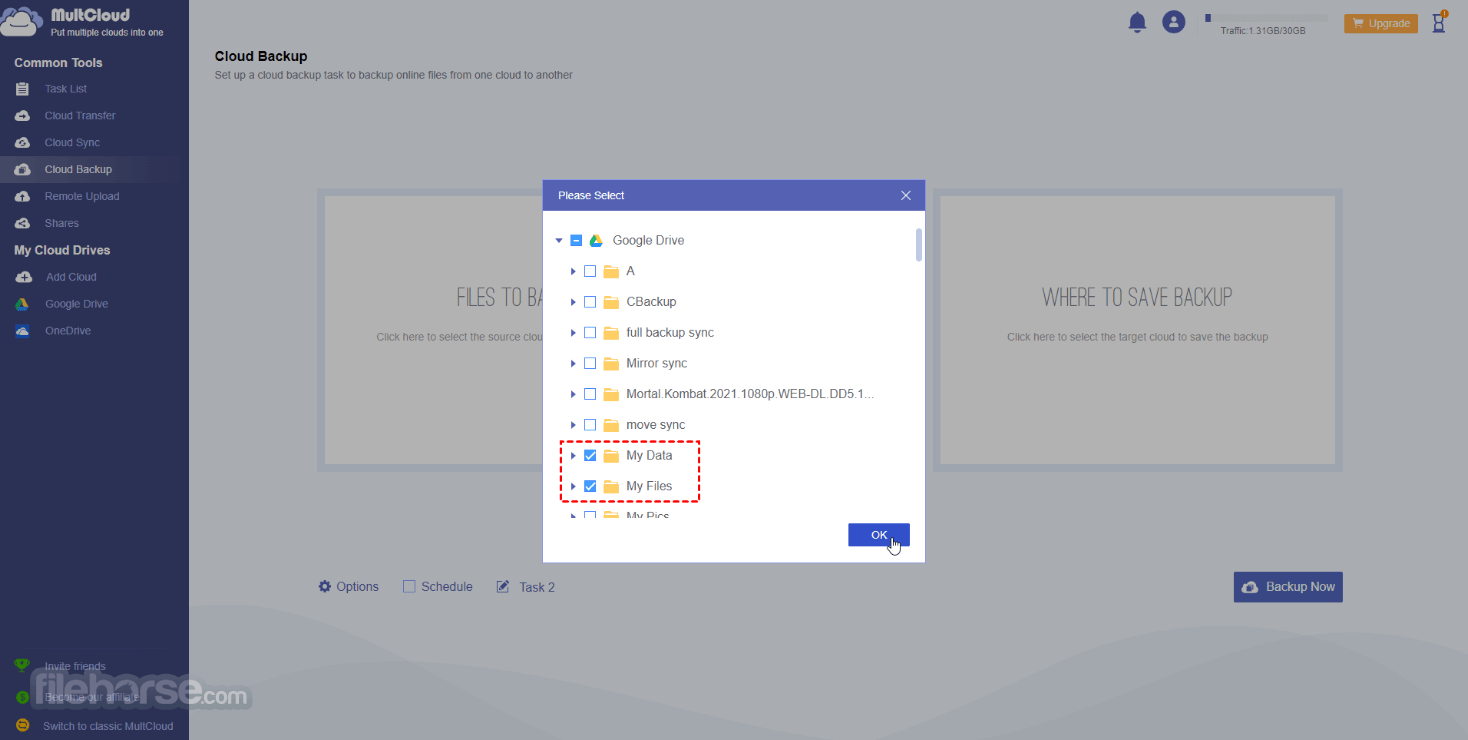
Cloud Backup and Migration: With the app, users can perform scheduled backups of their cloud data or migrate data from one cloud service to another with just a few clicks.
File Preview and Editing: The software enables users to preview files from different cloud storage accounts without downloading them. Additionally, certain file types can be edited directly within MultCloud.
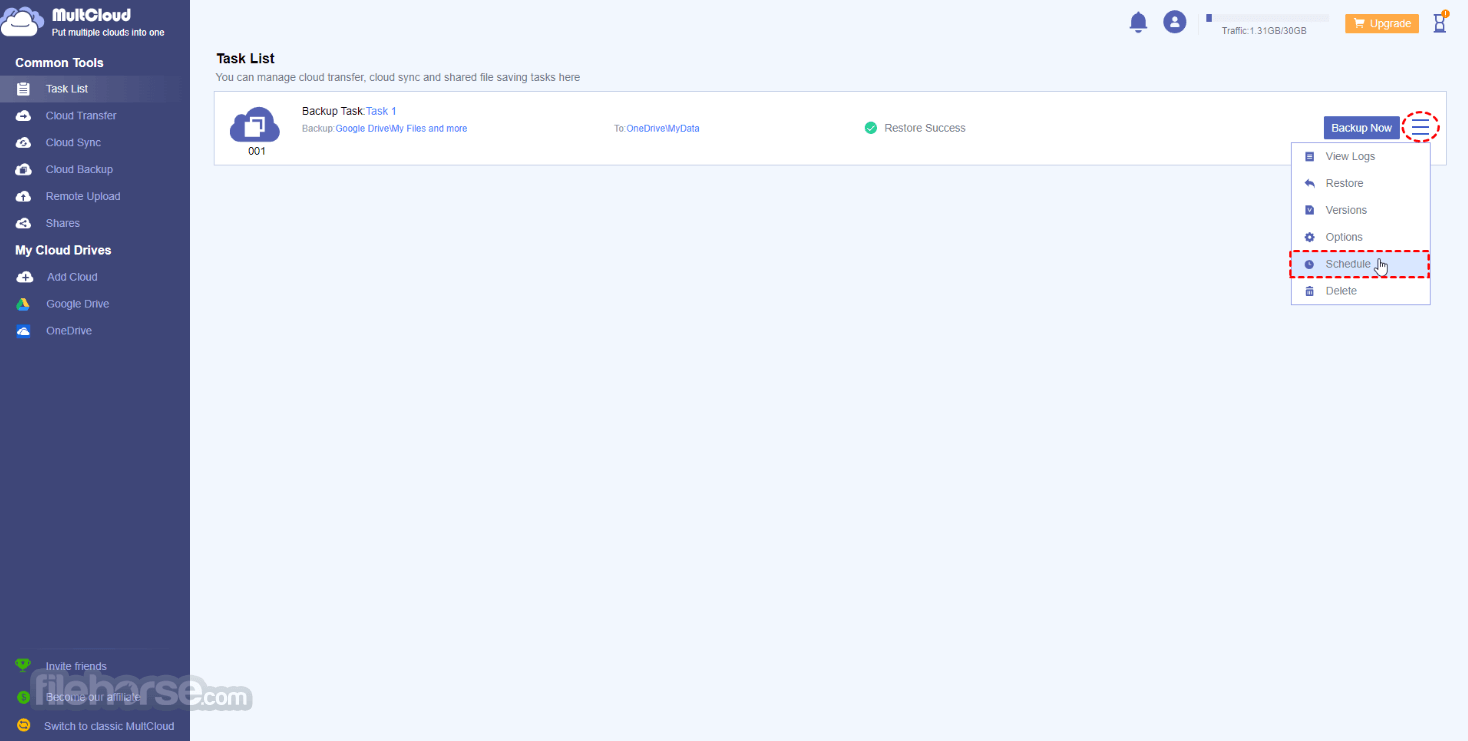
Scheduled Transfers: Users can set up automated transfers and syncs at specific times, ensuring efficient file management and updates.
Cloud-to-Cloud Copy and Move: It allows users to directly copy or move files between different cloud storage services, saving time and bandwidth.
Security and Encryption: The platform prioritizes data security by using secure SSL encryption for data transfers and does not store any user data on its servers.
User Interface
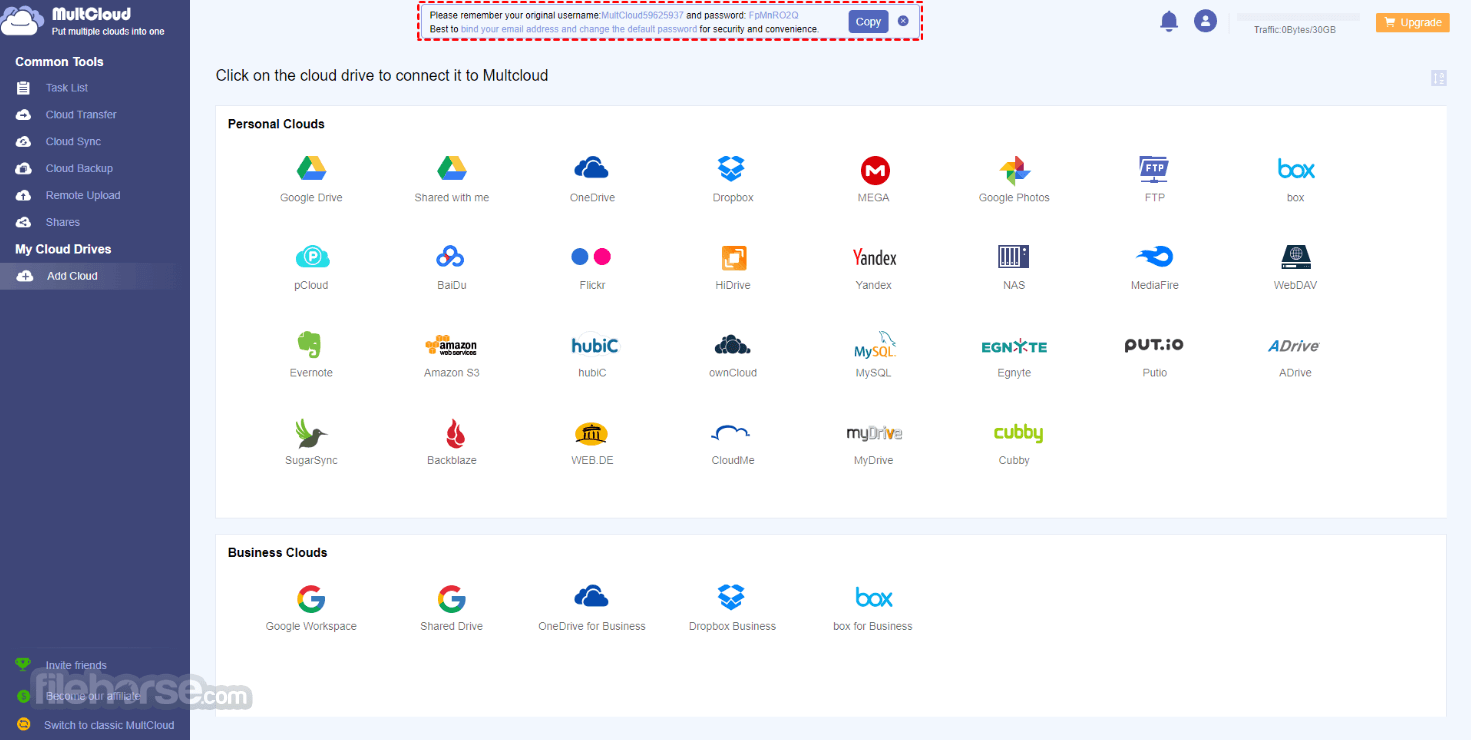
MultCloud's user interface is clean, modern, and user-friendly. The dashboard prominently displays connected cloud storage accounts and features a simple navigation system that makes accessing files and performing operations intuitive.
The layout ensures that users can quickly locate the tools they need without any confusion.
Installation and Setup
Getting started with the SaaS is a breeze. Users can either access the platform through a web browser or download the desktop app for Windows, macOS, or Linux.
After creating an account, users can connect their various cloud storage accounts by following the straightforward setup process.
How to UseCreate an Account: Sign up for a MultCloud account using your email address. Add Cloud Storage Accounts: Click on "Add Clouds" and authorize MultCloud to access your cloud storage accounts. You can add as many accounts as you need. Manage Files: Use the file manager interface to navigate through your connected cloud storage accounts, and easily transfer, copy, move, or sync files. File Preview and Editing: Double-click on a file to preview its contents. Certain file types can be edited directly within MultCloud using the built-in editor. Scheduled Transfers: Set up automated transfers or syncs by navigating to "Transfer" and selecting the "Scheduled Transfer" option.
FAQs
Is MultCloud safe to use with my cloud storage accounts?
Yes, the product is safe and secure to use. The platform uses SSL encryption for data transfers and does not store any user data on its servers.
Can I transfer files between different cloud storage providers without downloading them?
Yes, it allows you to transfer files directly between different cloud storage services without the need to download and re-upload them.
Does MultCloud support team collaboration features?
While the webapp primarily focuses on individual file management, it does support file sharing between cloud storage accounts, making collaboration possible.
Are there any limitations on the number of cloud storage accounts I can connect?
No, there are no limitations on the number of cloud storage accounts you can connect to the app.
Does MultCloud work on mobile devices?
MultCloud is primarily designed for desktop use, but can be accessed through a web browser on mobile devices.
Pricing
It offers a freemium model, with a free plan that allows users to connect up to two cloud storage accounts and perform basic file transfers and management.
For more advanced features, such as scheduled transfers and multi-account migration, users can choose from various affordable premium plans, starting at $19.99 per month.
Free — $0 /month
Everything in Free, plus:
Everything in 100 GB Plan, plus:
Everything in 100GB Plan, plus:
Everything in Unlimited Yearly, plus:
Alternatives
CloudHQ - A cloud management service that syncs, integrates, and backs up data across multiple cloud platforms like Google Drive, Dropbox, and OneDrive.
Koofr - A secure cloud storage and management tool that lets you connect and access files from different cloud accounts in one place.
System Requirements
It operates on most modern web browsers and offers desktop applications compatible with Windows (Windows 7 and above), macOS (10.12 and above), and Linux.
PROS
MultCloud is an impressive cloud management solution that streamlines file management and transfers across multiple cloud storage services. With its extensive support for various providers and user-friendly interface, it is a valuable tool for individuals and businesses dealing with scattered cloud data.
Although it lacks some collaboration features and mobile app support could be enhanced, MultCloud's security, ease of use, and cost-effective pricing make it a top choice for anyone looking to centralize their cloud storage management. Whether you are a casual user with a few cloud accounts or a business professional with multiple providers, it offers an efficient and practical solution to manage all your cloud storage needs from one platform.
Download MultCloud Latest Version Why is this app published on FileHorse? (More info)
Whether you use Google Drive, Dropbox, OneDrive, Amazon S3, or other cloud services, MultCloud integrates them all into one intuitive interface.
It is a handy tool for individuals and businesses that deal with multiple cloud storage accounts and seek a centralized solution for efficient file management.
- Consolidate all your cloud storage services into one unified platform, enabling smooth file transfer and synchronization between different cloud drives.
- Seamlessly move files from one cloud storage to another without the need to download them.
- Effortlessly back up and restore files between cloud services in real-time.
- Maintain continuous synchronization between two cloud drives to ensure up-to-date data at all times.
- Access and manage all your cloud accounts with a single login for enhanced convenience and efficiency.
Integration: It supports a wide range of cloud storage services, enabling users to connect and manage multiple accounts seamlessly.
File Transfer and Sync: Users can easily transfer and synchronize files between different cloud storage accounts without the need to download and re-upload them.
File Sharing: It allows users to share files and folders directly from one cloud storage account to another, making collaboration across cloud services effortless.
Cloud Backup and Migration: With the app, users can perform scheduled backups of their cloud data or migrate data from one cloud service to another with just a few clicks.
File Preview and Editing: The software enables users to preview files from different cloud storage accounts without downloading them. Additionally, certain file types can be edited directly within MultCloud.
Scheduled Transfers: Users can set up automated transfers and syncs at specific times, ensuring efficient file management and updates.
Cloud-to-Cloud Copy and Move: It allows users to directly copy or move files between different cloud storage services, saving time and bandwidth.
Security and Encryption: The platform prioritizes data security by using secure SSL encryption for data transfers and does not store any user data on its servers.
User Interface
MultCloud's user interface is clean, modern, and user-friendly. The dashboard prominently displays connected cloud storage accounts and features a simple navigation system that makes accessing files and performing operations intuitive.
The layout ensures that users can quickly locate the tools they need without any confusion.
Installation and Setup
Getting started with the SaaS is a breeze. Users can either access the platform through a web browser or download the desktop app for Windows, macOS, or Linux.
After creating an account, users can connect their various cloud storage accounts by following the straightforward setup process.
How to Use
FAQs
Is MultCloud safe to use with my cloud storage accounts?
Yes, the product is safe and secure to use. The platform uses SSL encryption for data transfers and does not store any user data on its servers.
Can I transfer files between different cloud storage providers without downloading them?
Yes, it allows you to transfer files directly between different cloud storage services without the need to download and re-upload them.
Does MultCloud support team collaboration features?
While the webapp primarily focuses on individual file management, it does support file sharing between cloud storage accounts, making collaboration possible.
Are there any limitations on the number of cloud storage accounts I can connect?
No, there are no limitations on the number of cloud storage accounts you can connect to the app.
Does MultCloud work on mobile devices?
MultCloud is primarily designed for desktop use, but can be accessed through a web browser on mobile devices.
Pricing
It offers a freemium model, with a free plan that allows users to connect up to two cloud storage accounts and perform basic file transfers and management.
For more advanced features, such as scheduled transfers and multi-account migration, users can choose from various affordable premium plans, starting at $19.99 per month.
Free — $0 /month
- 5GB data traffic per month
- Convert up to 50 emails per month
- 2 data transfer threads
Everything in Free, plus:
- 100GB data traffic per month
- Unlimited email conversions
- 10 data transfer threads
- Scheduled transfers, sync, and backups
Everything in 100 GB Plan, plus:
- 1200GB data traffic per year
Everything in 100GB Plan, plus:
- Unlimited data traffic per year
Everything in Unlimited Yearly, plus:
- Lifetime unlimited data traffic
- Lifetime license with no recurring subscription
Alternatives
CloudHQ - A cloud management service that syncs, integrates, and backs up data across multiple cloud platforms like Google Drive, Dropbox, and OneDrive.
Koofr - A secure cloud storage and management tool that lets you connect and access files from different cloud accounts in one place.
System Requirements
It operates on most modern web browsers and offers desktop applications compatible with Windows (Windows 7 and above), macOS (10.12 and above), and Linux.
PROS
- Excellent multi-cloud integration
- Simple and user-friendly interface
- Convenient file transfer and synchronization
- Secure data transfers with SSL encryption
- Flexible and affordable pricing plans
- Mobile app support could be improved
- Limited collaboration features
MultCloud is an impressive cloud management solution that streamlines file management and transfers across multiple cloud storage services. With its extensive support for various providers and user-friendly interface, it is a valuable tool for individuals and businesses dealing with scattered cloud data.
Although it lacks some collaboration features and mobile app support could be enhanced, MultCloud's security, ease of use, and cost-effective pricing make it a top choice for anyone looking to centralize their cloud storage management. Whether you are a casual user with a few cloud accounts or a business professional with multiple providers, it offers an efficient and practical solution to manage all your cloud storage needs from one platform.
Download MultCloud Latest Version Why is this app published on FileHorse? (More info)
##
畫面截圖