⚠ 這是歷史版本頁面 — 查看 MySQL Workbench 最新版本 →

- 目前版本8.0.44
- 更新日期2025-10-23
- 檔案大小252 MB
- 檔案名稱mysql-workbench-community-8.0.44-winx64.msi
- 作業系統Windows 10 (64-bit) / Windows 11
- 支援語系English
- 授權型式開源軟體
- 開發商 Oracle
- 軟體分類Windows 軟體 / 開發者工具
##
編輯短評
MySQL Workbench 是 Oracle 推出的官方圖形化管理工具,主要解決 MySQL 資料庫在設計、開發與日常維護上缺乏統一視覺介面的問題。它最鮮明的特色是提供 ER 圖建模、SQL 編輯器與資料庫管理功能於一體,並支援正向與反向工程,讓開發者能直觀地設計資料表結構。這套軟體長期由官方維護,更新相當活躍,在同類工具中屬於主流首選,評價普遍不錯,是 MySQL 使用者最常接觸的圖形介面之一。
這套工具適合資料庫管理員、後端開發者以及需要頻繁設計資料庫架構的技術人員,無論是建立新資料表、撰寫查詢語法,還是調整伺服器效能參數,都能在單一介面完成。與其他第三方資料庫工具相比,它最大的優勢是與 MySQL 生態系整合最徹底,但功能也相對集中在 MySQL 上,若同時管理多種資料庫系統,可能得搭配其他軟體。授權方面提供免費的社群版,Windows 與 macOS 都有對應版本,不過介面目前僅有英文,使用時需留意這點。
##
翻譯排程處理中,以下暫以英文原文呈現
軟體介紹
MySQL Workbench is a powerful and widely used graphical user interface (GUI) tool for MySQL database management.
Developed by Oracle, it provides database administrators, developers, and data architects with a unified visual platform to design, develop, and manage MySQL databases.
MySQL Workbench Desktop for Windows is available in both Community (FREE) and Commercial editions, offering a range of features for database modeling, SQL development, administration, and performance tuning.
Key Features
Database Modeling and Design – Allows users to create and modify ER diagrams, forward and reverse engineer schemas, and visually design database structures.
SQL Development – Offers an SQL editor with syntax highlighting, auto-completion, and query execution tools.
Database Administration – Provides features for managing users, privileges, server configuration, logs, and backup management.
Performance Monitoring and Tuning – Includes built-in tools for database performance analysis, query optimization, and debugging.
Data Migration – Supports migration from various databases such as Microsoft SQL Server, PostgreSQL, and SQLite to MySQL.
User Interface
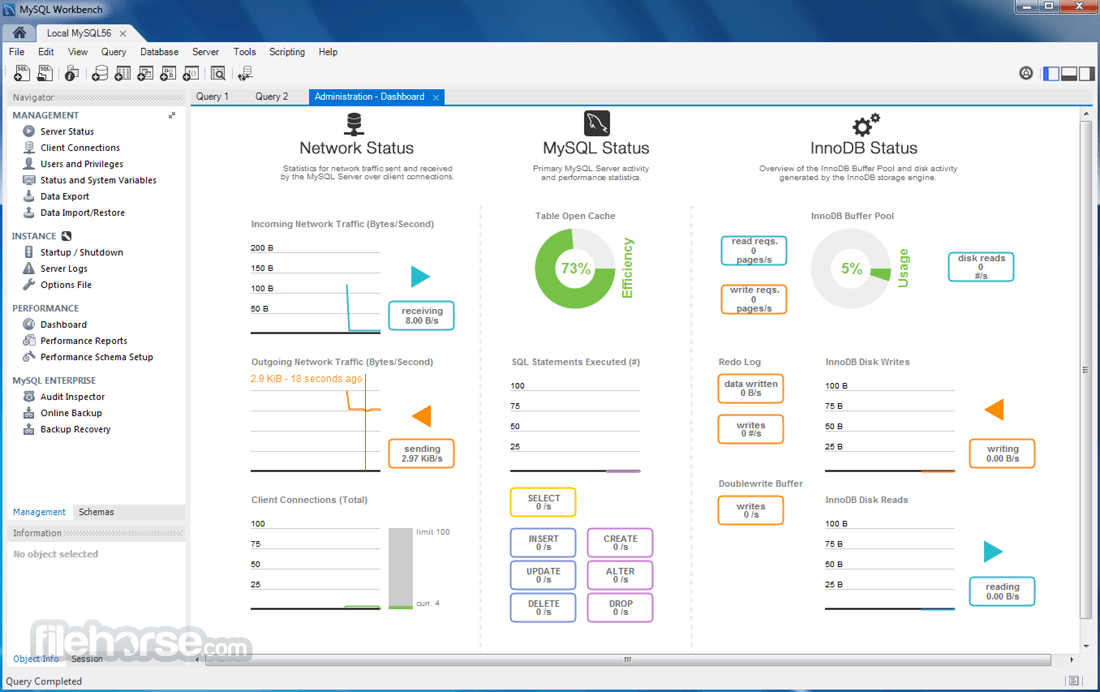
The interface of MySQL Workbench is clean and well-organized, with three main panels:
Navigator Panel – Lists database objects such as schemas, tables, and views.
SQL Editor Panel – Allows users to write and execute SQL queries with syntax highlighting and auto-completion.
Results Grid – Displays query execution results in a tabular format, with export options for reports.
While the UI is feature-rich, beginners might find it overwhelming due to its complexity.
Installation and Setup
Creating a New Database – Open MySQL Workbench, go to “Schemas” and click on “Create Schema.”
Writing SQL Queries – Use the SQL editor to write and execute queries.
Designing Database Models – Use the model editor to create ER diagrams and generate SQL scripts.
Performing Data Migration – Access the data migration wizard to transfer data from other database platforms.
Managing Users and Privileges – Navigate to the “Administration” tab to set user roles and permissions.
FAQ
Is MySQL Workbench free to use?
Yes, the Community Edition is free, but there are Commercial editions with additional features.
Can MySQL Workbench connect to remote databases?
Yes, it supports SSH tunneling and direct remote connections.
Does MySQL Workbench support other databases besides MySQL?
It is primarily designed for MySQL but supports migration from other database systems.
How do I optimize query performance in MySQL Workbench?
Use the Query Analyzer and Performance Schema tools to analyze and optimize queries.
Is MySQL Workbench available for macOS and Linux?
Yes, it is cross-platform and available for Windows, macOS, and Linux.
Alternatives
DBeaver – Open-source multi-database management tool with a modern interface.
HeidiSQL – Lightweight MySQL administration tool with a focus on speed and simplicity.
phpMyAdmin – Web-based MySQL management tool with an intuitive UI.
Navicat for MySQL – Premium database management tool with advanced features.
TablePlus – Modern GUI tool for multiple database engines including MySQL.
Pricing
MySQL Workbench Community Edition – Free
MySQL Workbench Commercial Edition – Part of MySQL Enterprise subscription (pricing varies)
System Requirements
MySQL Workbench is a must-have tool for MySQL developers and administrators who need a robust and feature-rich database management environment. While it offers powerful tools for database design, SQL execution, and performance tuning, beginners may find its interface and functionality challenging at first.
Note: Requires .NET Framework.
Also Available: Download MySQL Workbench for Mac
Download MySQL Workbench Latest Version Why is this app published on FileHorse? (More info)
Developed by Oracle, it provides database administrators, developers, and data architects with a unified visual platform to design, develop, and manage MySQL databases.
MySQL Workbench Desktop for Windows is available in both Community (FREE) and Commercial editions, offering a range of features for database modeling, SQL development, administration, and performance tuning.
Key Features
Database Modeling and Design – Allows users to create and modify ER diagrams, forward and reverse engineer schemas, and visually design database structures.
SQL Development – Offers an SQL editor with syntax highlighting, auto-completion, and query execution tools.
Database Administration – Provides features for managing users, privileges, server configuration, logs, and backup management.
Performance Monitoring and Tuning – Includes built-in tools for database performance analysis, query optimization, and debugging.
Data Migration – Supports migration from various databases such as Microsoft SQL Server, PostgreSQL, and SQLite to MySQL.
User Interface
The interface of MySQL Workbench is clean and well-organized, with three main panels:
Navigator Panel – Lists database objects such as schemas, tables, and views.
SQL Editor Panel – Allows users to write and execute SQL queries with syntax highlighting and auto-completion.
Results Grid – Displays query execution results in a tabular format, with export options for reports.
While the UI is feature-rich, beginners might find it overwhelming due to its complexity.
Installation and Setup
- Download the App – Available from the official MySQL website or FileHorse.
- Install MySQL Server – Required for Workbench to function properly.
- Run the Installer – Select the appropriate version and configure MySQL connections.
- Connect to a Database – Use the MySQL Workbench connection manager to connect to a local or remote MySQL server.
- Start Using MySQL Workbench – Create schemas, execute queries, or manage databases.
Creating a New Database – Open MySQL Workbench, go to “Schemas” and click on “Create Schema.”
Writing SQL Queries – Use the SQL editor to write and execute queries.
Designing Database Models – Use the model editor to create ER diagrams and generate SQL scripts.
Performing Data Migration – Access the data migration wizard to transfer data from other database platforms.
Managing Users and Privileges – Navigate to the “Administration” tab to set user roles and permissions.
FAQ
Is MySQL Workbench free to use?
Yes, the Community Edition is free, but there are Commercial editions with additional features.
Can MySQL Workbench connect to remote databases?
Yes, it supports SSH tunneling and direct remote connections.
Does MySQL Workbench support other databases besides MySQL?
It is primarily designed for MySQL but supports migration from other database systems.
How do I optimize query performance in MySQL Workbench?
Use the Query Analyzer and Performance Schema tools to analyze and optimize queries.
Is MySQL Workbench available for macOS and Linux?
Yes, it is cross-platform and available for Windows, macOS, and Linux.
Alternatives
DBeaver – Open-source multi-database management tool with a modern interface.
HeidiSQL – Lightweight MySQL administration tool with a focus on speed and simplicity.
phpMyAdmin – Web-based MySQL management tool with an intuitive UI.
Navicat for MySQL – Premium database management tool with advanced features.
TablePlus – Modern GUI tool for multiple database engines including MySQL.
Pricing
MySQL Workbench Community Edition – Free
MySQL Workbench Commercial Edition – Part of MySQL Enterprise subscription (pricing varies)
System Requirements
- OS: Windows 11 or Windows 10 (64-bit)
- Processor: Intel or AMD 64-bit processor
- RAM: Minimum 4GB (8GB+ recommended)
- Storage: At least 200MB free disk space
- Graphics: DirectX 10 compatible graphics card
- Comprehensive set of tools for MySQL database management
- Supports database design, SQL development, and administration
- Free Community Edition available with essential features
- Built-in performance monitoring and optimization tools
- Data migration tools for transferring from other databases
- Can be resource-intensive for large databases
- Limited support for non-MySQL databases
- UI can be overwhelming due to feature complexity
- Some advanced features are locked behind a paid subscription
MySQL Workbench is a must-have tool for MySQL developers and administrators who need a robust and feature-rich database management environment. While it offers powerful tools for database design, SQL execution, and performance tuning, beginners may find its interface and functionality challenging at first.
Note: Requires .NET Framework.
Also Available: Download MySQL Workbench for Mac
Download MySQL Workbench Latest Version Why is this app published on FileHorse? (More info)
##
畫面截圖
- 2026-04-24 MySQL Workbench 8.0.47 255 MB
- 2026-01-23 MySQL Workbench 8.0.46 250 MB
- 2025-12-02 MySQL Workbench 8.0.45 252 MB
- 2025-10-23 MySQL Workbench 8.0.44 252 MB
- 2025-07-23 MySQL Workbench 8.0.43 43 MB
- 2025-04-15 MySQL Workbench 8.0.42 42.98 MB
- 2025-01-21 MySQL Workbench 8.0.41 42.01 MB
- 2024-10-16 MySQL Workbench 8.0.40 41.91 MB