⚠ 這是歷史版本頁面 — 查看 NetBalancer 最新版本 →

- 目前版本12.5.2
- 更新日期2024-11-29
- 檔案大小38.09 MB
- 檔案名稱NetBalancerSetup.exe
- 作業系統Windows 7 / Windows 8 / Windows 10 / Windows 11
- 支援語系English
- 授權型式試用版
- 開發商 SeriousBit
- 軟體分類Windows 軟體 / 檔案傳輸與網路
##
編輯短評
NetBalancer 是一款 Windows 平台上的網路流量管理工具,核心功能是讓使用者針對每個應用程式設定上傳與下載的優先權,藉此在背景執行下載任務的同時,仍能保有順暢的瀏覽體驗。它與一般限速軟體最大的不同在於採用「優先權」機制,低優先權的程式不會被硬性限制,而是在高優先權程式需要頻寬時自動讓出資源,這讓頻寬分配更為彈性。此軟體由 SeriousBit 長期維護,近一年仍有更新,在同類工具中屬於評價普遍不錯的選擇,但使用者樣本數不算多。
這套工具特別適合經常同時進行大量下載與線上遊戲、視訊會議的使用者,當你不想手動暫停下載任務,又希望關鍵應用程式保有穩定連線時,它就能派上用場。與 Internet Download Manager 或 uTorrent 等專注於下載本身的工具相比,NetBalancer 的角色是「管理」而非「執行」,兩者可以搭配使用。需要注意的是,它提供的是試用版授權,且僅支援英文介面,對中文使用者來說門檻稍高,但操作邏輯並不複雜,稍加摸索即可上手。
##
翻譯排程處理中,以下暫以英文原文呈現
軟體介紹
NetBalancer uses to browse and do any Internet activity comfortably even when your download manager or torrent client downloads huge files from the Internet just lower their network priority with the tool.
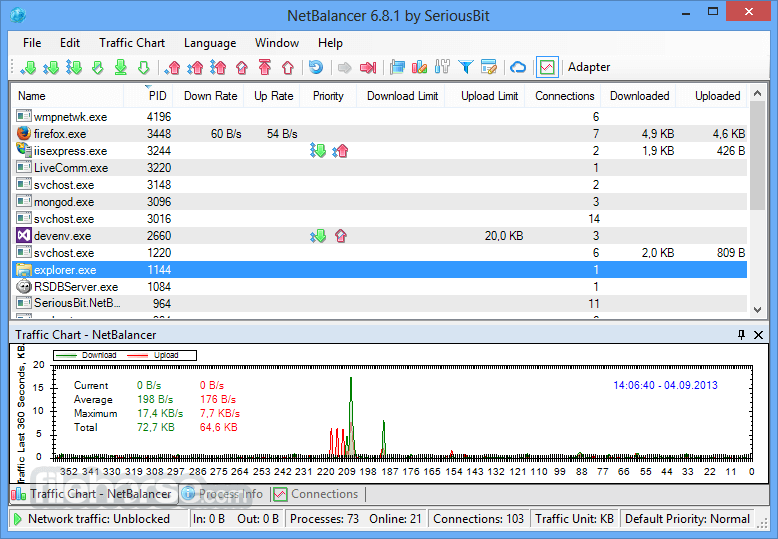
You can use NetBalancer to set download or upload transfer rate priority for any applications and monitor their Internet traffic. Applications with a higher network priority will gain more traffic bandwidth than those with a lower one.
Benefit NetBalancer and other traffic shaping software are that the program works with priorities, so applications with low priority won't be limited if other high priority applications don't use the network.
If you are looking for great alternatives, we recommend you to download GlassWire, DU Meter, or NetOptimizer.
Features and Highlights
Priorities and limits
Set download and upload network priorities or limits for any process.
Automation support
Use various command line commands and web APIs for complete automation.
Rules and filters
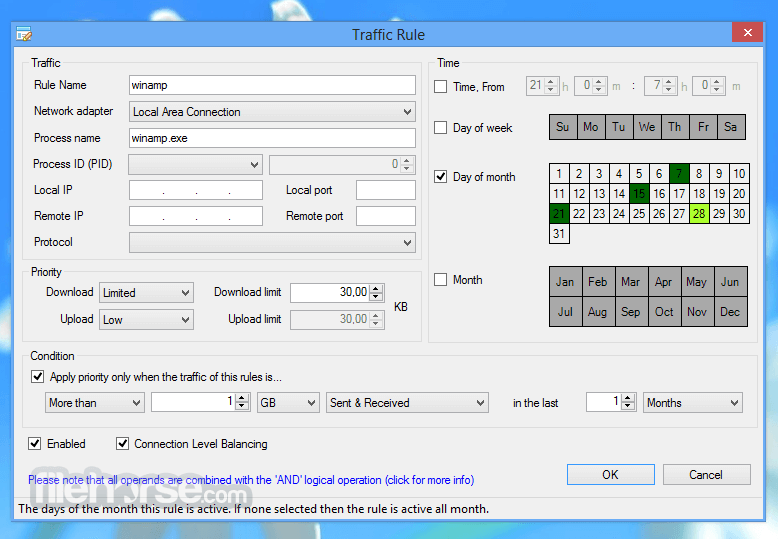
Define detailed traffic rules and filters for maximum control.
Sync
Sync your computers with the app Service and control them from the web control panel.
Password secured
Protect all settings and priorities with a password to prevent unauthorized changes.
Monitor processes
Show all system processes with their download and upload speeds up to connections level.
View history
Detailed download and upload traffic history for any process since first the tool's install.
System tray and toolbar
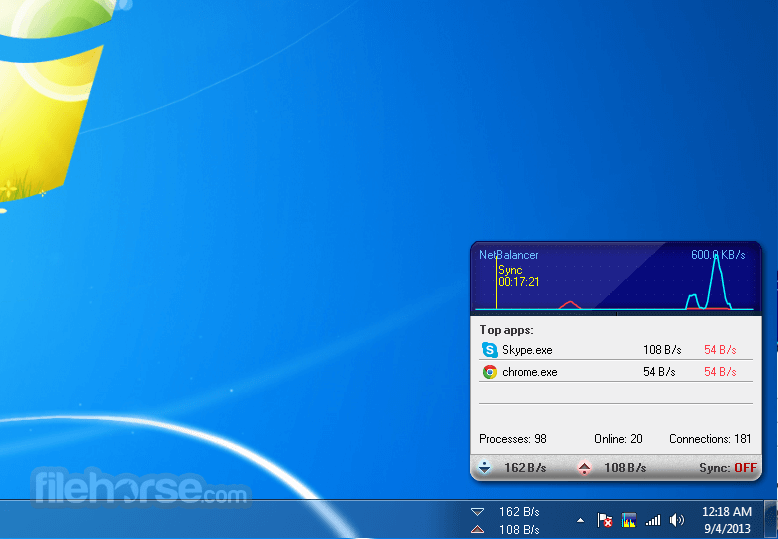
Show network traffic and other info in a system tray icon or taskbar toolbar.
Support for IPv6
Net Balancer has native IPv6 support for rules and filters.
Tags and bulk commands
Apply tags to your computers and control them with bulk commands like a Pro.
Various traffic charts and statistics
View detailed network traffic charts and statistics.
Everything encrypted
Everything in this system is encrypted: website traffic, sync traffic, all internal traffic, passwords, and communications, all zeros and ones are encrypted and hashed with TLS and SHA2 for maximum security.
How to Use
Download NetBalancer Latest Version Why is this app published on FileHorse? (More info)
You can use NetBalancer to set download or upload transfer rate priority for any applications and monitor their Internet traffic. Applications with a higher network priority will gain more traffic bandwidth than those with a lower one.
Benefit NetBalancer and other traffic shaping software are that the program works with priorities, so applications with low priority won't be limited if other high priority applications don't use the network.
If you are looking for great alternatives, we recommend you to download GlassWire, DU Meter, or NetOptimizer.
Features and Highlights
Priorities and limits
Set download and upload network priorities or limits for any process.
Automation support
Use various command line commands and web APIs for complete automation.
Rules and filters
Define detailed traffic rules and filters for maximum control.
Sync
Sync your computers with the app Service and control them from the web control panel.
Password secured
Protect all settings and priorities with a password to prevent unauthorized changes.
Monitor processes
Show all system processes with their download and upload speeds up to connections level.
View history
Detailed download and upload traffic history for any process since first the tool's install.
System tray and toolbar
Show network traffic and other info in a system tray icon or taskbar toolbar.
Support for IPv6
Net Balancer has native IPv6 support for rules and filters.
Tags and bulk commands
Apply tags to your computers and control them with bulk commands like a Pro.
Various traffic charts and statistics
View detailed network traffic charts and statistics.
Everything encrypted
Everything in this system is encrypted: website traffic, sync traffic, all internal traffic, passwords, and communications, all zeros and ones are encrypted and hashed with TLS and SHA2 for maximum security.
How to Use
- Launch the app and allow necessary permissions
- View all active network connections in the main interface
- Set download and upload priorities for specific processes
- Limit bandwidth usage for selected applications
- Block unwanted applications from accessing the internet
- Monitor real-time network traffic and statistics
- Create custom network rules and schedules
- Export and analyze detailed traffic reports
- Adjust settings for notifications and logging
- Operating System: Windows 7, 8, 10, 11 (32-bit & 64-bit)
- Processor: Intel or AMD, 1 GHz or faster
- RAM: Minimum 512 MB (2 GB recommended)
- Storage: At least 50 MB free disk space
- Internet: Required for activation and updates
- Easy bandwidth management for applications
- Real-time network monitoring and statistics
- Customizable traffic rules and filters
- Lightweight and minimal resource usage
- Supports automated network prioritization
- Limited features in the free version
- Interface may feel outdated
- No cloud-based synchronization
- Requires manual setup for advanced rules
- Some features need technical knowledge
Download NetBalancer Latest Version Why is this app published on FileHorse? (More info)
##
畫面截圖
- 2025-09-30 NetBalancer 12.6.1 35.72 MB
- 2025-01-20 NetBalancer 12.5.4 38.11 MB
- 2025-01-07 NetBalancer 12.5.3 38.1 MB
- 2024-11-29 NetBalancer 12.5.2 38.09 MB
- 2024-11-06 NetBalancer 12.5.1 36.92 MB
- 2024-10-24 NetBalancer 12.4.2 36.91 MB
- 2024-07-01 NetBalancer 12.4.1 36.9 MB
- 2024-02-26 NetBalancer 12.3.2 36.91 MB