- 目前版本34.0.1
- 更新日期2026-08-05
- 檔案大小112 MB
- 檔案名稱Nextcloud-34.0.1-x64.msi
- 作業系統Windows 10 / Windows 11
- 支援語系English
- 授權型式開源軟體
- 開發商 Nextcloud GmbH
- 軟體分類Windows 軟體 / 備份還原
##
翻譯排程處理中,以下暫以英文原文呈現
軟體介紹
Nextcloud Desktop Sync Client enables you to: Specify one or more directories on your computer that you want to synchronize to the Nextcloud server.
Always have the latest files synchronized, wherever they are located. Your files are always automatically synchronized between your server and local PC. Improve collaboration and communication and reduce operational expenses with the leading content collaboration platform.
The core strength of the app is its ability to enhance team productivity on the go with an easy user interface on mobile, web, and desktop and powerful integrated document collaboration and communication capabilities.
Real-time notifications of shares or comments on mobile devices, built-in collaborative editing of Microsoft Office compatible files, seamless transition to chat and audio/video calls, and a wide variety of productivity tools to handle mail, appointments, tasks, and more are available in Nextcloud for Desktop.
The Nextcloud Secure Sharing Outlook Add-in enables the users to easily and securely send files, folders, or upload links to others from within Microsoft Outlook. The Add-in can replace attachments, automatically uploading files to Nextcloud and inserting a secure link in the email. It also makes it easy for users to provide others with a secure file upload link.
Nextcloud Files clients for Android, iOS, and desktop systems allow users to sync and share files, in a fully secure way through an encrypted connection. The mobile clients feature automatic upload of pictures and videos users take and they can synchronize selected files and folders. The clients can handle multiple accounts, show all activity happening on the server, and notify users of new events such as the availability of new shares.
Features and Highlights
Easy access anywhere
A modern and easy-to-use web interface, desktop clients, and mobile apps. Real-time collaboration and instant access to all data from any device, anywhere!
Ultimate security
Powerful encryption capabilities and a built-in rule-based File Access Control. Complemented by strong password policies, brute-force protection, ransomware protection, and more.
Deep integration
Access data from FTP, Windows Network Drive, SharePoint, NFS, Object storage, ... Simple configuration and integration of lower costs and decrease risk while leveraging existing IT investments.
Powerful search
Nextcloud Desktop Sync Client includes a powerful full-text search engine capable of using ElasticSearch as back-end. Its flexible plugin-based interface enables search capabilities beyond files and accommodates other back-end solutions like Apache Solr.
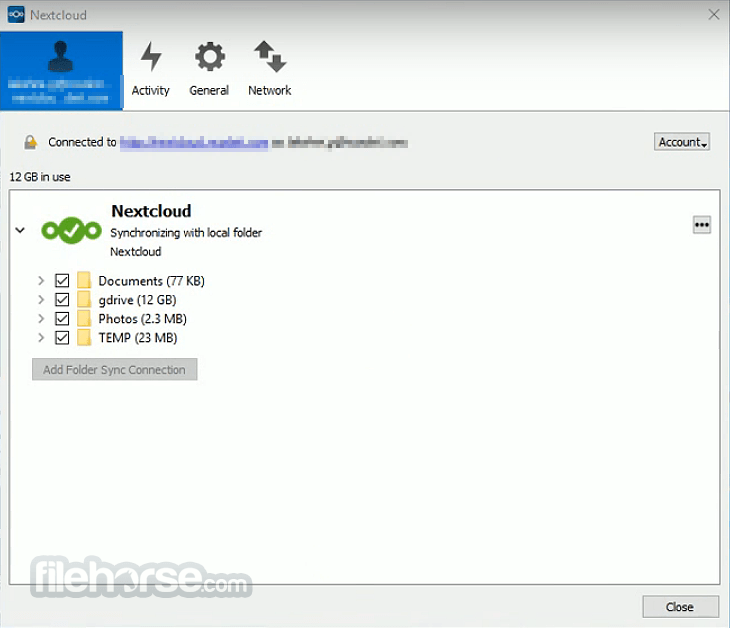
Use the desktop clients to keep your files synchronized between your server and your desktop. Select one or more directories on your local machine and always have access to your latest files wherever you are. Learn more about Nextcloud Desktop Synchronization Client in this review.
Customizing the Windows Installation
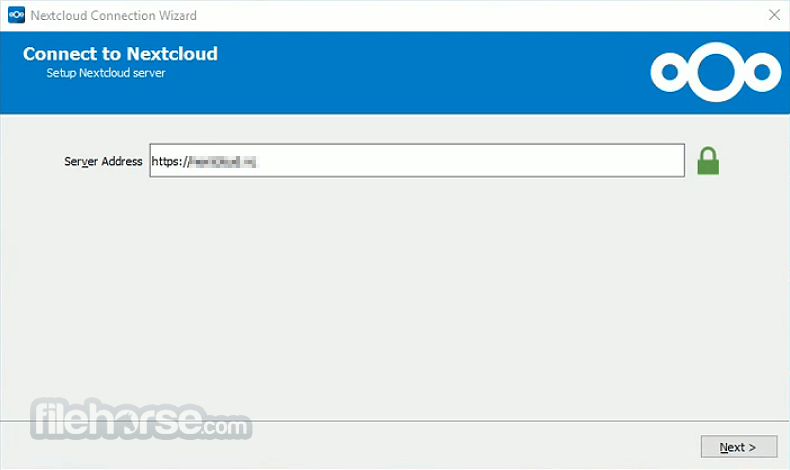
If you just want to install Nextcloud Desktop Synchronization Client on your local system, you can simply launch the .msi file and configure it in this page.
How to Use
Download Nextcloud Latest Version Why is this app published on FileHorse? (More info)
Always have the latest files synchronized, wherever they are located. Your files are always automatically synchronized between your server and local PC. Improve collaboration and communication and reduce operational expenses with the leading content collaboration platform.
The core strength of the app is its ability to enhance team productivity on the go with an easy user interface on mobile, web, and desktop and powerful integrated document collaboration and communication capabilities.
Real-time notifications of shares or comments on mobile devices, built-in collaborative editing of Microsoft Office compatible files, seamless transition to chat and audio/video calls, and a wide variety of productivity tools to handle mail, appointments, tasks, and more are available in Nextcloud for Desktop.
The Nextcloud Secure Sharing Outlook Add-in enables the users to easily and securely send files, folders, or upload links to others from within Microsoft Outlook. The Add-in can replace attachments, automatically uploading files to Nextcloud and inserting a secure link in the email. It also makes it easy for users to provide others with a secure file upload link.
Nextcloud Files clients for Android, iOS, and desktop systems allow users to sync and share files, in a fully secure way through an encrypted connection. The mobile clients feature automatic upload of pictures and videos users take and they can synchronize selected files and folders. The clients can handle multiple accounts, show all activity happening on the server, and notify users of new events such as the availability of new shares.
Features and Highlights
Easy access anywhere
A modern and easy-to-use web interface, desktop clients, and mobile apps. Real-time collaboration and instant access to all data from any device, anywhere!
Ultimate security
Powerful encryption capabilities and a built-in rule-based File Access Control. Complemented by strong password policies, brute-force protection, ransomware protection, and more.
Deep integration
Access data from FTP, Windows Network Drive, SharePoint, NFS, Object storage, ... Simple configuration and integration of lower costs and decrease risk while leveraging existing IT investments.
Powerful search
Nextcloud Desktop Sync Client includes a powerful full-text search engine capable of using ElasticSearch as back-end. Its flexible plugin-based interface enables search capabilities beyond files and accommodates other back-end solutions like Apache Solr.
Use the desktop clients to keep your files synchronized between your server and your desktop. Select one or more directories on your local machine and always have access to your latest files wherever you are. Learn more about Nextcloud Desktop Synchronization Client in this review.
Customizing the Windows Installation
If you just want to install Nextcloud Desktop Synchronization Client on your local system, you can simply launch the .msi file and configure it in this page.
How to Use
- Install the application on your PC
- Launch Nextcloud and log in with your credentials
- Connect to your Nextcloud server
- Configure sync folders and settings
- Drag and drop files to sync them
- Access files via the Nextcloud web interface
- Share files and folders with others
- Enable two-factor authentication for security
- Manage storage and sync settings
- Windows 10 or Windows 11
- 64-bit processor
- Minimum 2 GB RAM (4 GB recommended)
- At least 200 MB of free disk space
- Stable internet connection
- Open-source and free to use
- Strong data privacy controls
- Cross-platform compatibility
- Customizable with plugins
- Secure file sharing features
- Requires self-hosting setup
- Can be resource-intensive
- Limited support for beginners
- Some features need manual setup
- Performance depends on server
Download Nextcloud Latest Version Why is this app published on FileHorse? (More info)
##
畫面截圖