⚠ 這是歷史版本頁面 — 查看 nVFlash 最新版本 →

- 目前版本5.728
- 更新日期2021-12-22
- 檔案大小8.57 MB
- 檔案名稱nvflash_5.728.zip
- 作業系統Windows 7 / Windows 8 / Windows 10 / Windows 11
- 支援語系English
- 授權型式免費軟體
- 開發商 NVIDIA Corporation
- 軟體分類Windows 軟體 / 影片軟體
##
編輯短評
nVFlash 是 NVIDIA 官方推出的顯示卡 BIOS 刷寫工具,主要用來更新顯示卡 EEPROM 中的韌體,也能備份目前韌體影像、檢視韌體版本,或判斷顯示卡上的 EEPROM 型號。它是一款命令列工具,可獨立於命令提示字元執行,也能寫入批次檔或由其他程式呼叫,對需要精準控制刷寫流程的使用者來說相當直接。此工具由 NVIDIA 長期維護,更新步調不算頻繁但持續有在釋出,在同類工具中屬於官方首選,不過因為用途特殊,整體評價人數不多,屬於小眾但口碑穩定的實用工具。
這套軟體適合需要自行更換或還原顯示卡 BIOS 的進階使用者,例如超頻玩家、改卡愛好者,或是維修人員在處理顯示卡故障時使用。與 KMPlayer、K-Lite Codec Pack 這類多媒體播放或解碼工具相比,nVFlash 的定位完全不同,沒有直接替代品,NVIDIA 官方工具在相容性上自然最有保障,但命令列介面對不熟悉指令操作的人來說門檻較高。軟體為免費授權,僅提供英文介面,內含 32 位元與 64 位元版本,使用前需確認自己系統架構與顯示卡型號,刷寫 BIOS 有一定風險,操作時要格外謹慎。
##
翻譯排程處理中,以下暫以英文原文呈現
軟體介紹
NVIDIA nVFlash is used to update the firmware stored in the EEPROM of a NVIDIA display adapter.
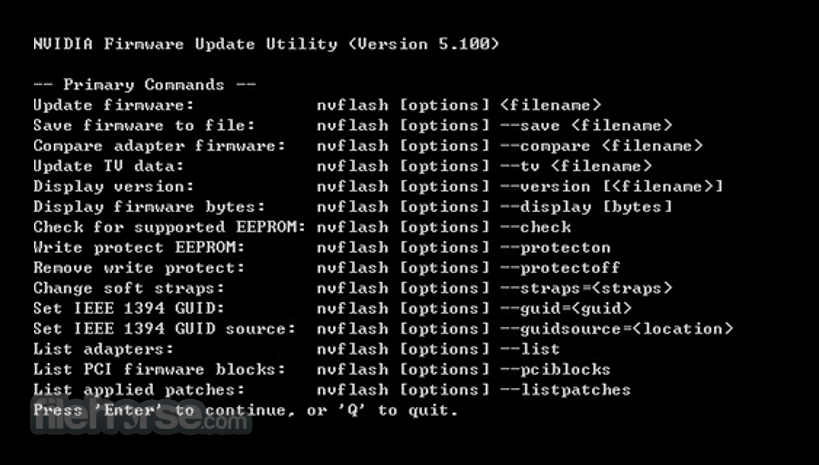
It can also be used to perform other tasks on the adapter, such as saving a copy of the current firmware image to a file, displaying the version of the firmware image, or determining the EEPROM part present on a display adapter.
This archive contains a 32-bit and 64-bit version of the NVIDIA BIOS flashing utility. nVFlash for Windows is a command-line utility that can be run standalone from the command prompt, run from batch files, or spawned from other programs.
NVIDIA NVFlash is a desktop tool used for flashing the BIOS of NVIDIA graphics cards, including Ampere, Turing, Pascal, and older generations.
Supported NVIDIA GPUs:
It allows BIOS flashing on various NVIDIA graphics cards, including but not limited to:
Important Commands:
Backup Current BIOS:
FAQs
What is NVFlash used for?
NVFlash is a command-line utility used to flash or update the BIOS (firmware) of NVIDIA graphics cards. It is typically used by advanced users to update GPU firmware, modify BIOS settings, or restore a graphics card after a failed firmware modification.
Is NVFlash safe to use?
NVFlash can be safe when used correctly with the proper firmware file for your exact GPU model. However, flashing an incorrect BIOS or interrupting the process can permanently damage the graphics card, so it is recommended only for experienced users who understand the risks.
Is NVFlash still relevant in 2026?
Yes, NVFlash remains relevant in 2026 for hardware enthusiasts, overclockers, and technicians who need low-level access to NVIDIA GPU firmware. However, for most users, official manufacturer tools and driver updates are safer and more appropriate options.
System Requirements
Download nVFlash Latest Version Why is this app published on FileHorse? (More info)
It can also be used to perform other tasks on the adapter, such as saving a copy of the current firmware image to a file, displaying the version of the firmware image, or determining the EEPROM part present on a display adapter.
This archive contains a 32-bit and 64-bit version of the NVIDIA BIOS flashing utility. nVFlash for Windows is a command-line utility that can be run standalone from the command prompt, run from batch files, or spawned from other programs.
NVIDIA NVFlash is a desktop tool used for flashing the BIOS of NVIDIA graphics cards, including Ampere, Turing, Pascal, and older generations.
Supported NVIDIA GPUs:
It allows BIOS flashing on various NVIDIA graphics cards, including but not limited to:
- GeForce RTX Series: RTX 3090, RTX 3080, RTX 3070, RTX 3060 Ti, RTX 3060
- GeForce RTX 20 Series: RTX 2080 Ti, RTX 2080, RTX 2070, RTX 2060
- GeForce GTX 16 & 10 Series: GTX 1660, GTX 1650, GTX 1080 Ti, GTX 1080, GTX 1070, GTX 1060, GTX 1050
Important Commands:
Backup Current BIOS:
- nvflash --save backup.rom
- nvflash bios.rom
FAQs
What is NVFlash used for?
NVFlash is a command-line utility used to flash or update the BIOS (firmware) of NVIDIA graphics cards. It is typically used by advanced users to update GPU firmware, modify BIOS settings, or restore a graphics card after a failed firmware modification.
Is NVFlash safe to use?
NVFlash can be safe when used correctly with the proper firmware file for your exact GPU model. However, flashing an incorrect BIOS or interrupting the process can permanently damage the graphics card, so it is recommended only for experienced users who understand the risks.
Is NVFlash still relevant in 2026?
Yes, NVFlash remains relevant in 2026 for hardware enthusiasts, overclockers, and technicians who need low-level access to NVIDIA GPU firmware. However, for most users, official manufacturer tools and driver updates are safer and more appropriate options.
System Requirements
- OS: Windows 7/8/10/11 (64-bit)
- Processor: Intel/AMD 2.0 GHz or higher
- RAM: 2GB minimum (4GB recommended)
- Storage: 50MB free disk space
- GPU: NVIDIA GPU required
- Official NVIDIA firmware flashing tool
- Supports multiple GPU models
- Allows BIOS backup before flashing
- Command-line functionality available
- Fast and efficient firmware updates
- Risk of bricking the GPU
- No graphical user interface (CLI-based)
- Limited support for non-NVIDIA cards
- Requires technical expertise
- No automatic recovery feature
Download nVFlash Latest Version Why is this app published on FileHorse? (More info)
##
畫面截圖
- 2026-02-22 nVFlash 5.867 14.9 MB
- 2024-02-20 nVFlash 5.821 6.27 MB
- 2023-05-19 nVFlash 5.814 12.22 MB
- 2023-04-03 nVFlash 5.804 5.92 MB
- 2022-10-25 nVFlash 5.792 11.2 MB
- 2022-10-19 nVFlash 5.780 11.38 MB
- 2022-10-13 nVFlash 5.763 5.56 MB
- 2021-12-22 nVFlash 5.728 8.57 MB