⚠ 這是歷史版本頁面 — 查看 NVIDIA Broadcast 最新版本 →

NVIDIA Broadcast 1.4.0.28
v 1.4.0.28
Windows
免費軟體
8.6/10 (20)
- 目前版本1.4.0.28
- 更新日期2023-01-13
- 檔案大小44 MB
- 檔案名稱NVIDIA_Broadcast_v1.4.0.28.exe
- 作業系統Windows 10 (64-bit) / Windows 11
- 支援語系English
- 授權型式免費軟體
- 開發商 NVIDIA Corporation
- 軟體分類Windows 軟體 / 影片軟體
##
編輯短評
NVIDIA Broadcast 是 NVIDIA 官方推出的免費工具,核心是借助 RTX 顯示卡的 AI 運算能力,把一般房間變成簡易直播或視訊工作室。它最有辨識度的特色,就是能即時處理麥克風與攝影機訊號,例如消除背景噪音、模糊或替換視訊背景,讓線上會議、直播或語音通話的品質明顯提升。這套軟體由原廠持續維護,更新頻率穩定,在同類工具中算是相當熱門的選擇,不過目前僅提供英文介面。
這款軟體特別適合直播主、經常開線上會議或錄製教學影片的使用者,尤其是身處吵雜環境、又不想額外添購隔音設備或實體綠幕的人。與其他免費影音工具相比,NVIDIA Broadcast 的取捨在於它高度依賴 RTX 系列顯示卡,沒有這類硬體就無法發揮功能;若你用的是非 RTX 顯示卡,可能得考慮其他純軟體方案。授權上它完全免費,但僅支援 Windows 平台,且介面只有英文,使用前需留意這些限制。
##
翻譯排程處理中,以下暫以英文原文呈現
軟體介紹
The NVIDIA Broadcast app transforms any room into a home studio. Take your live streams, voice chats, and video conference calls to the next level with AI-enhanced voice and video. Get a taste of what the Broadcast app can do for you using the incredible performance of NVIDIA® RTX GPUs.
Steal the show with incredible graphics and smooth, stutter-free live streaming. Next-generation hardware encoding and decoding combine to show off all your best moments in exquisite detail.
And the all-new NVIDIA Broadcast app for PC takes your live streams to the next level with powerful AI capabilities like noise removal, virtual background, and more. NVIDIA® RTX™ GPUs deliver the performance and image quality necessary to give your audience your best—every time.
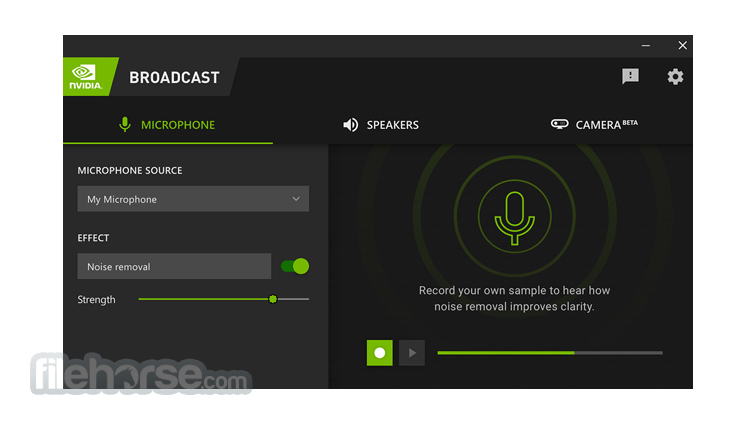
NOISE REMOVAL
Loud keyboard typing. Annoying microphone static. Bothersome PC fans. Nagging background reverb. Noise Removal and Room Echo Removal use AI to eliminate unwanted background noise at the touch of a button.
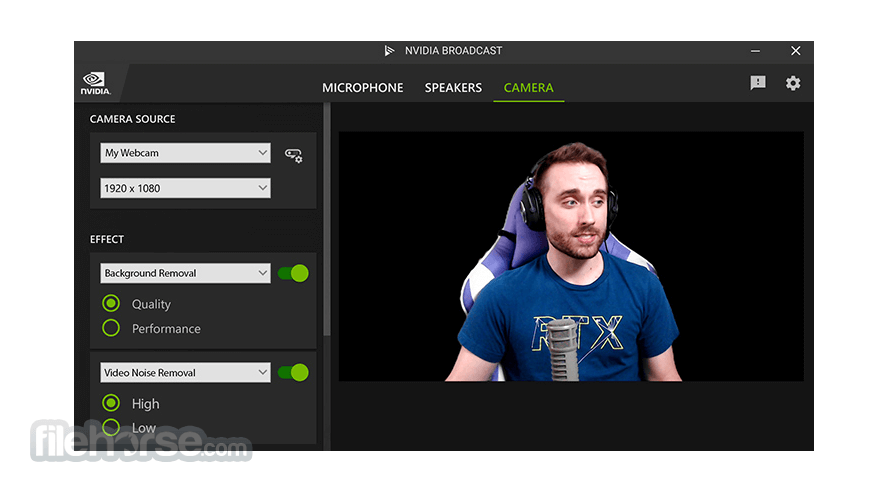
VIRTUAL BACKGROUND
Experience instant creative control at your fingertips. Background Removal, Replacement, and Blur (beta) allow you to customize your background without the need for expensive equipment or complex lighting setups. Personalize your webcam feed using powerful AI greenscreen effects perfect for work and play, wherever you are. The possibilities are endless.
AUTO FRAME
Lights, camera, app-tion. Dynamically track your movements in real-time with Auto Frame, automatically cropping and zooming so you remain the star of the show — even as you move around.
VIDEO NOISE REMOVAL
No light? No problem. Enhance the quality of your webcam, removing the visual noise that is present in low-light situations for a clearer picture.
Get Started
1. Download the App
Choose your device and effects in the NVIDIA Broadcast App
2. Choose Your Device and Effects
Select NVIDIA Broadcast as your in-app device
3. Select NVIDIA Broadcast
As Your In-App Device
SYSTEM REQUIREMENTS of NVIDIA Broadcast
Download NVIDIA Broadcast Latest Version Why is this app published on FileHorse? (More info)
Steal the show with incredible graphics and smooth, stutter-free live streaming. Next-generation hardware encoding and decoding combine to show off all your best moments in exquisite detail.
And the all-new NVIDIA Broadcast app for PC takes your live streams to the next level with powerful AI capabilities like noise removal, virtual background, and more. NVIDIA® RTX™ GPUs deliver the performance and image quality necessary to give your audience your best—every time.
NOISE REMOVAL
Loud keyboard typing. Annoying microphone static. Bothersome PC fans. Nagging background reverb. Noise Removal and Room Echo Removal use AI to eliminate unwanted background noise at the touch of a button.
VIRTUAL BACKGROUND
Experience instant creative control at your fingertips. Background Removal, Replacement, and Blur (beta) allow you to customize your background without the need for expensive equipment or complex lighting setups. Personalize your webcam feed using powerful AI greenscreen effects perfect for work and play, wherever you are. The possibilities are endless.
AUTO FRAME
Lights, camera, app-tion. Dynamically track your movements in real-time with Auto Frame, automatically cropping and zooming so you remain the star of the show — even as you move around.
VIDEO NOISE REMOVAL
No light? No problem. Enhance the quality of your webcam, removing the visual noise that is present in low-light situations for a clearer picture.
Get Started
1. Download the App
Choose your device and effects in the NVIDIA Broadcast App
2. Choose Your Device and Effects
Select NVIDIA Broadcast as your in-app device
3. Select NVIDIA Broadcast
As Your In-App Device
SYSTEM REQUIREMENTS of NVIDIA Broadcast
- GPU: NVIDIA GeForce RTX 2060, Quadro RTX 3000, TITAN RTX or higher
- RAM: 8GB RAM or higher
- CPU Recommended: Intel Core i5 8600, AMD Ryzen r5 2600 or higher
- Driver: NVIDIA Studio Driver 462.46 or Game Ready Driver 465.89, and above
- Internet: Internet connectivity during installation
- AI-Powered Features: Utilizes advanced AI for noise removal, virtual background, and auto-framing.
- Improved Audio and Video Quality: Significantly enhances the clarity and quality of streaming audio and video.
- User-Friendly Interface: Easy to navigate and use, even for beginners.
- Regular Updates: Consistent updates that introduce new features and improve existing ones.
- Wide Compatibility: Works seamlessly with various popular streaming platforms and communication apps.
- Requires RTX GPU: Only compatible with NVIDIA RTX graphics cards, limiting its accessibility.
- Resource Intensive: Can be demanding on system resources, potentially affecting performance on lower-end setups.
- Occasional Bugs: Users may encounter occasional glitches or bugs, especially after updates.
- Limited Customization: Some advanced users might find the customization options limited compared to other software.
Download NVIDIA Broadcast Latest Version Why is this app published on FileHorse? (More info)
##
影片介紹
##
畫面截圖
- 2026-07-24 NVIDIA Broadcast 2.2.1 180 MB
- 2026-06-02 NVIDIA Broadcast 2.2.0 180 MB
- 2026-01-06 NVIDIA Broadcast 2.1.0 178 MB
- 2025-07-22 NVIDIA Broadcast 2.0.2 160 MB
- 2025-03-20 NVIDIA Broadcast 2.0.1 148 MB
- 2025-02-01 NVIDIA Broadcast 2.0.0 148 MB
- 2024-06-25 NVIDIA Broadcast 1.4.0.29 44 MB
- 2023-01-13 NVIDIA Broadcast 1.4.0.28 44 MB