⚠ 這是歷史版本頁面 — 查看 Oracle SQL Developer 24.3.1 (64-bit) 最新版本 →

Oracle SQL Developer 24.3.0 (64-bit)
v 24.3.0 (64-bit)
Windows
免費軟體
8.2/10 (144)
- 目前版本24.3.0 (64-bit)
- 更新日期2024-10-17
- 檔案大小554.93 MB
- 檔案名稱sqldeveloper-24.3.0.284.2209-x64.zip
- 作業系統Windows 7 64 / Windows 8 64 / Windows 10 64 / Windows 11
- 支援語系English
- 授權型式免費軟體
- 開發商 Oracle
- 軟體分類Windows 軟體 / 開發者工具
##
編輯短評
Oracle SQL Developer 是 Oracle 官方推出的免費整合開發環境,主要用來管理 Oracle 資料庫,無論是傳統架構或雲端環境都能涵蓋。它把 PL/SQL 開發、SQL 查詢與腳本執行、資料庫管理、報表、資料建模,以及從第三方資料庫遷移到 Oracle 的工具全部整合在一起,對開發者與 DBA 來說是相當完整的單一工作平台。這套軟體由 Oracle 長期維護,更新頻率穩定,在同類開發者工具中屬於主流且評價普遍不錯的選擇,尤其對 Oracle 生態系的使用者而言幾乎是必備工具。
它適合需要頻繁操作 Oracle 資料庫的開發人員、資料庫管理員,以及負責資料庫遷移專案的團隊。若你習慣用圖形介面管理資料庫,而不是純指令列,這套工具能大幅降低日常維運與開發的門檻。與其他免費資料庫工具相比,它對 Oracle 特有功能的支援最完整,但代價是介面較為厚重、資源占用偏高,且目前僅提供英文介面,沒有官方中文版。軟體本身免費,但需注意它僅支援 Windows 平台,使用前最好確認你的 Oracle 版本與作業系統相容性。
##
翻譯排程處理中,以下暫以英文原文呈現
軟體介紹
Oracle SQL Developer is a FREE, integrated development environment for Windows PC designed to streamline the creation and administration of Oracle Databases, whether in conventional setups or within Cloud environments.
Oracle SQL Developer 64-bit encompasses a comprehensive spectrum of features, including seamless end-to-end development for PL/SQL applications, a versatile workspace for executing queries and scripts, a database management console for DBAs, a reporting interface, a comprehensive data modeling solution, and a migration platform for transferring third-party databases to Oracle.
The program is a leading solution for Oracle Database management and offers users three distinct interfaces: Desktop, Browser, and Command Line, catering to diverse preferences and needs.
Highlights
SQL Developer IDE
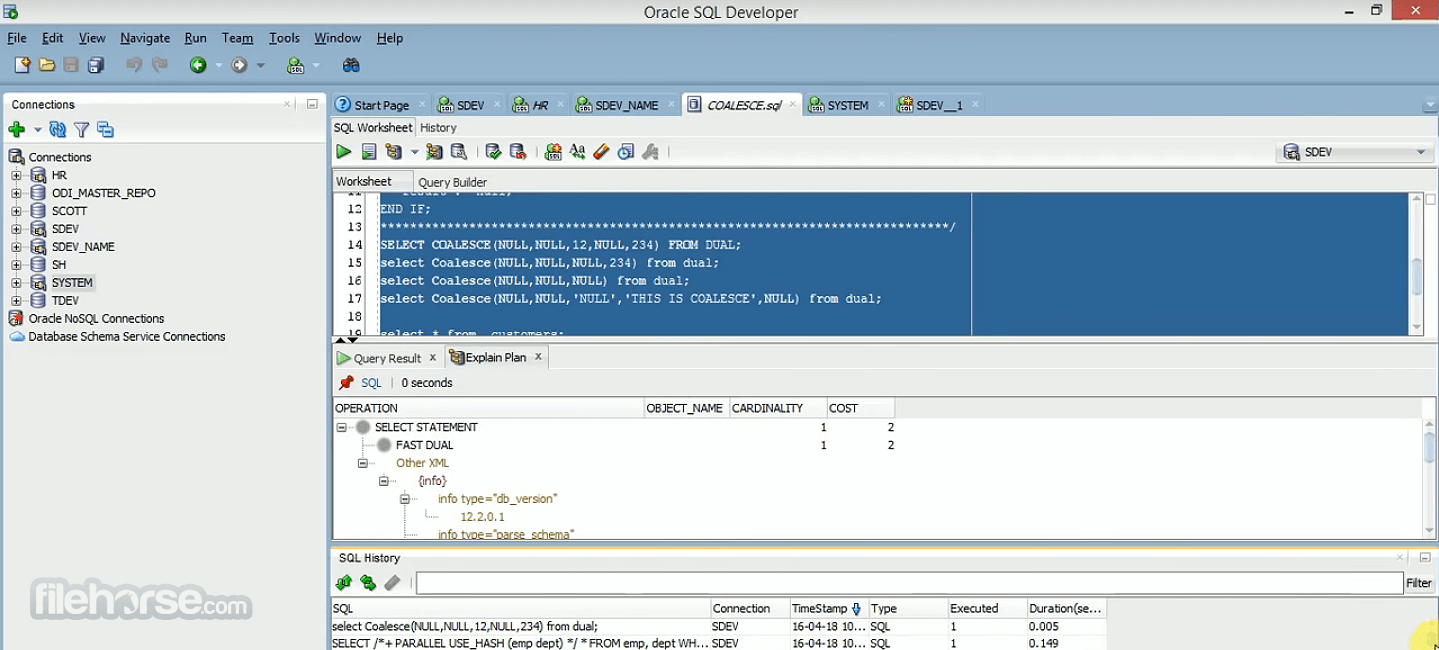
The user interface of Oracle SQL Developer is well-organized and intuitive. It features a customizable layout that allows users to arrange their workspace to suit their preferences.
The menus, toolbars, and panels are logically structured, making it easy to find and access the desired features. The dark theme option is a welcome addition for those who prefer a more visually appealing interface. Overall, the user interface is user-friendly and well-designed, catering to both beginners and experienced database professionals.
Installation and Setup
Installing the tool is a straightforward process. Users can download the software from the official Oracle website, and installation wizards guide them through the necessary steps.
During installation, users can configure database connections and other preferences. The setup process is well-documented, and Oracle provides helpful resources for troubleshooting common installation issues.
How to Use
Connecting to a Database
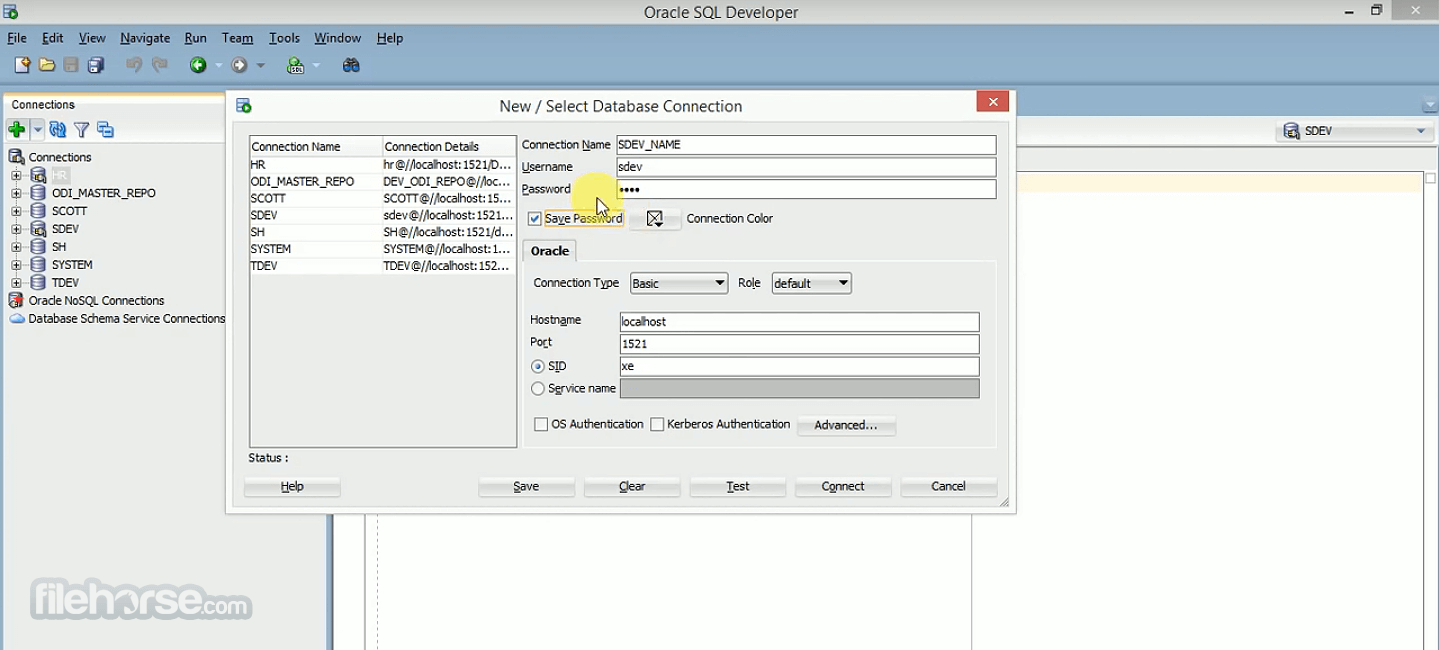
To connect to a database, launch the app and create a new database connection. You'll need to provide connection details such as hostname, port, username, and password. Once connected, you can start working with the database.
Writing SQL Queries
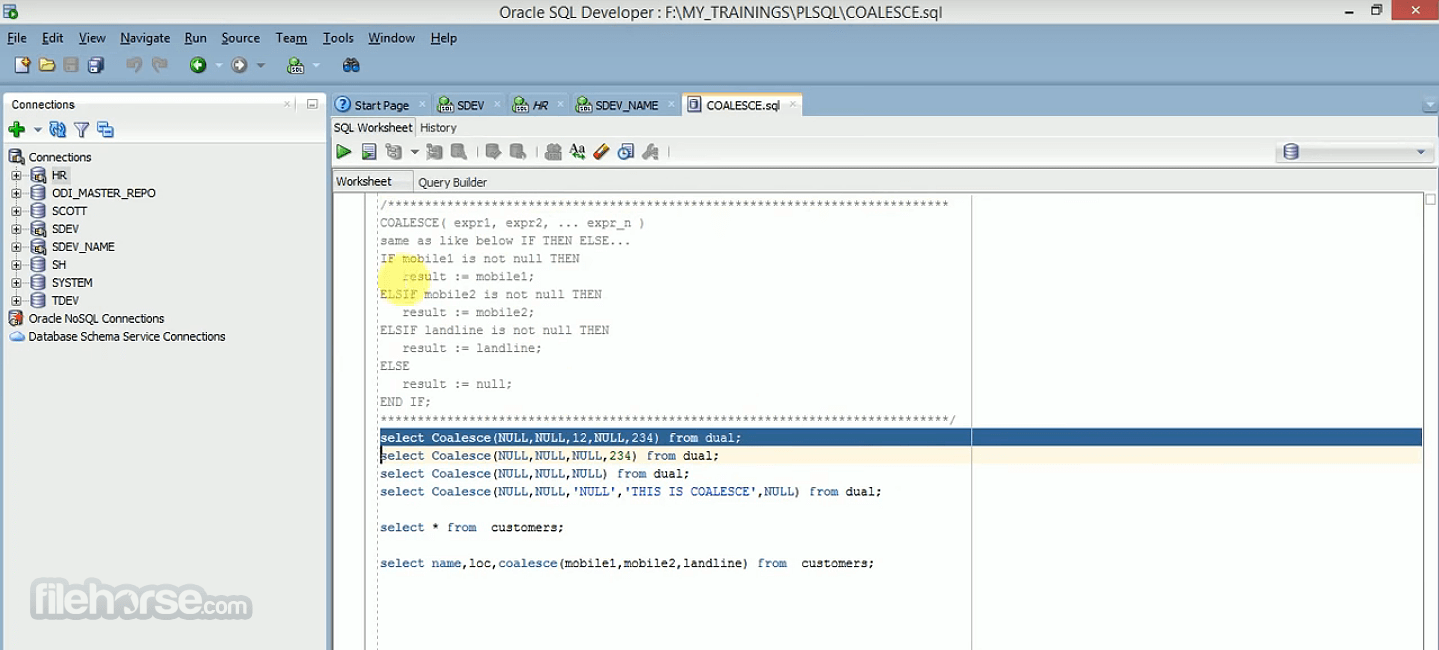
Open the SQL Worksheet and start writing SQL queries. The IDE offers features like code completion and syntax highlighting to assist you in writing accurate SQL statements.
Data Modeling
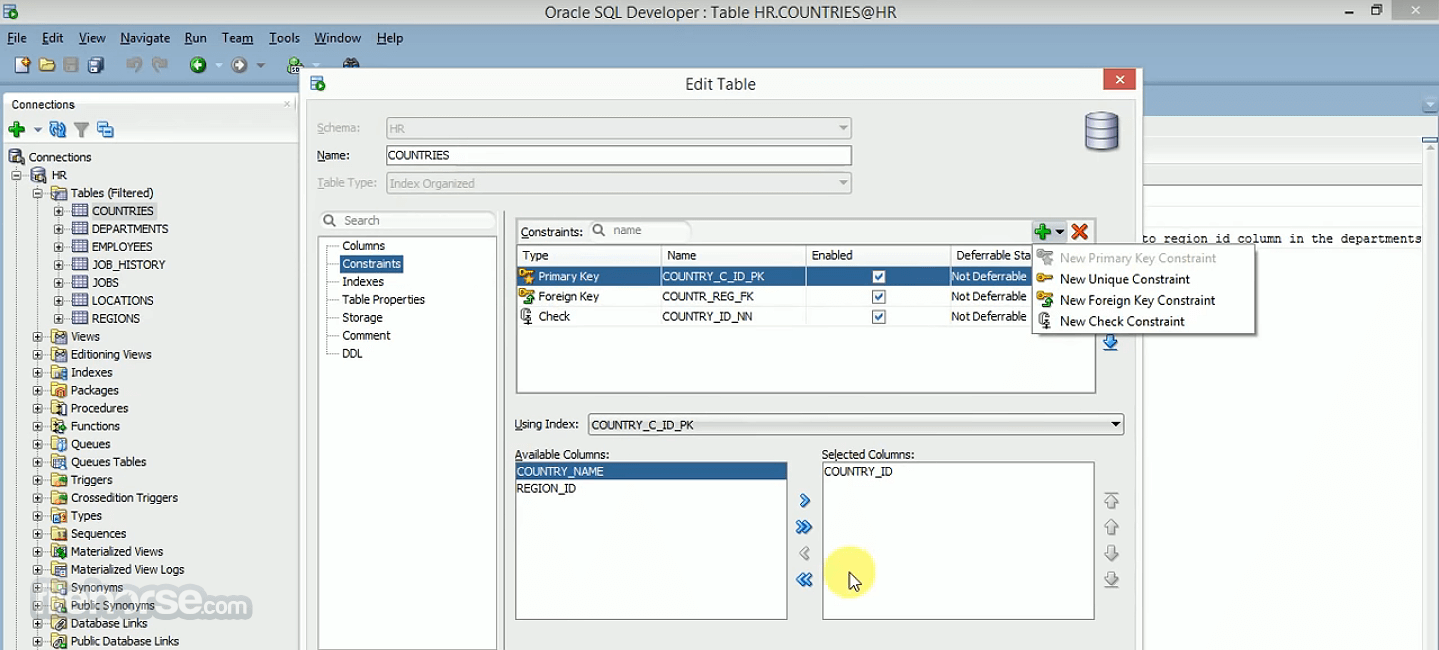
Use the data modeling tools to create and visualize your database schema. You can design tables, relationships, and constraints with ease.
Database Administration
For database administration tasks, navigate to the Database panel. Here, you can manage users and tablespaces, and perform backup and recovery operations.
Version Control
Integrate your project with version control by configuring your preferred system in the IDE's settings. This allows you to track changes and collaborate with team members effectively.
FAQs
Is Oracle SQL Developer FREE to use?
Yes, Oracle SQL Developer is FREE software provided by Oracle Corporation.
Can I use Oracle SQL Developer with databases other than Oracle?
While it's primarily designed for Oracle databases, it supports connections to other databases through third-party JDBC drivers.
Does Oracle SQL Developer work on macOS and Linux?
Yes, the app is compatible with Windows, macOS, and Linux operating systems.
Can I export query results to Excel format?
Yes, you can export query results to various formats, including Excel, CSV, and HTML.
Are there any licensing limitations for using Oracle SQL Developer?
Oracle SQL Developer is FREE to use for development and testing purposes. However, for production use, it's advisable to review Oracle's licensing terms.
Alternatives
SQL Server Management Studio (SSMS) - For Microsoft SQL Server databases, SSMS offers a similar range of features for database development and administration.
MySQL Workbench - Ideal for MySQL database development, it provides tools for modeling, querying, and administration.
Toad for Oracle - A paid alternative, Toad for Oracle, offers advanced features for Oracle database development and administration.
DBeaver - A free and open-source database tool that supports multiple database systems, making it versatile for cross-platform database development.
Navicat Premium - A commercial database management tool that supports various database systems, offering a user-friendly interface and robust features.
Pricing
Oracle SQL Developer is FREE to download and use for development and testing purposes.
However, for production use and access to advanced features, it's advisable to review Oracle's licensing options and pricing.
PROS
Oracle SQL Developer is a powerful and versatile IDE for Oracle database developers and administrators. Its rich feature set, including a robust SQL query editor, data modeling tools, and version control integration, makes it a valuable asset for database professionals.
While it excels in Oracle database development, it may not be the best choice for those working with other database systems.
Overall, Oracle SQL Developer is a reliable tool that simplifies database development and administration tasks, and its free availability is a significant advantage for developers and organizations seeking cost-effective solutions for Oracle database management.
Note: Requires JDK.
Also Available: Oracle SQL Developer (32-bit) and Oracle SQL Developer for Mac
Download Oracle SQL Developer (64-bit) Latest Version Why is this app published on FileHorse? (More info)
Oracle SQL Developer 64-bit encompasses a comprehensive spectrum of features, including seamless end-to-end development for PL/SQL applications, a versatile workspace for executing queries and scripts, a database management console for DBAs, a reporting interface, a comprehensive data modeling solution, and a migration platform for transferring third-party databases to Oracle.
The program is a leading solution for Oracle Database management and offers users three distinct interfaces: Desktop, Browser, and Command Line, catering to diverse preferences and needs.
Highlights
SQL Developer IDE
- Full-featured PL/SQL IDE
- Database AdministrationComplete Data Modeling Solution
- 3rd party DBMS migrations to Oracle
- Migrate Oracle On-Premises to Oracle Cloud
- Included in Oracle Autonomous Cloud Database
- Available with Oracle REST Data Services for your on-premises instances
- Run scripts, manage users, create/edit objects, import data, diagnose performance issues, visualize schemas, etc.
- Very small (25mb), download, unzip, and go!
- Automatic formatting (csv, xml, json, INSERTs, HTML, and more)
- SQL History
- Tab completion
- Build your commands
- Liquibase integration for schema versioning
- Features
- Supports Oracle Database, versions 11gR2, 19c, 21c
- Supports Oracle Database in the Oracle Cloud and On-Premises
- Query, load, and extract data
- Easy installation, no Oracle Client required
- Full PL/SQL IDE - compile, debug, document, test, source control, and more
- Click, browse, and manage the contents of your Oracle Database
- Manage your Oracle Database performance, security, storage, settings, and more
- RESTful Services Development and Oracle REST Services Integration
- Complete Data Modeling solution - ERDs, reports, SQL and DDL scripting, source control, DIFFs
- Modern, in-line editing of your SQL and PL/SQL statements and scripts
- Tab completion for Oracle keywords, commands, and object names
- SQL History - access to all of the queries and scripts you've already run
- Automatic Query Result Formatting - easy to read SQL results or format to JSON, XML, CSV, INSERTs, and HTML
- Generate object DDL or get object metadata with simple commands like DDL and INFO
- Liquibase integration for easy Oracle schema source control
- Extremely lightweight, with only a 25MB download and install footprint
- Nothing to install, simply open your browser to start working with your Oracle Database
- Run any Oracle SQL or PL/SQL in a fully functioning SQL Worksheet (SQL History, insight, explain plans, and more)
- Create or Edit your favorite Oracle schema objects with easy-to-use wizards
- Generate rich ERDs showing your current Oracle Schema designs
- Manage performance and general Database configuration
- Create and edit users
- Load data from CSV, JSON, and AVRO to new or existing Oracle tables
The user interface of Oracle SQL Developer is well-organized and intuitive. It features a customizable layout that allows users to arrange their workspace to suit their preferences.
The menus, toolbars, and panels are logically structured, making it easy to find and access the desired features. The dark theme option is a welcome addition for those who prefer a more visually appealing interface. Overall, the user interface is user-friendly and well-designed, catering to both beginners and experienced database professionals.
Installation and Setup
Installing the tool is a straightforward process. Users can download the software from the official Oracle website, and installation wizards guide them through the necessary steps.
During installation, users can configure database connections and other preferences. The setup process is well-documented, and Oracle provides helpful resources for troubleshooting common installation issues.
How to Use
Connecting to a Database
To connect to a database, launch the app and create a new database connection. You'll need to provide connection details such as hostname, port, username, and password. Once connected, you can start working with the database.
Writing SQL Queries
Open the SQL Worksheet and start writing SQL queries. The IDE offers features like code completion and syntax highlighting to assist you in writing accurate SQL statements.
Data Modeling
Use the data modeling tools to create and visualize your database schema. You can design tables, relationships, and constraints with ease.
Database Administration
For database administration tasks, navigate to the Database panel. Here, you can manage users and tablespaces, and perform backup and recovery operations.
Version Control
Integrate your project with version control by configuring your preferred system in the IDE's settings. This allows you to track changes and collaborate with team members effectively.
FAQs
Is Oracle SQL Developer FREE to use?
Yes, Oracle SQL Developer is FREE software provided by Oracle Corporation.
Can I use Oracle SQL Developer with databases other than Oracle?
While it's primarily designed for Oracle databases, it supports connections to other databases through third-party JDBC drivers.
Does Oracle SQL Developer work on macOS and Linux?
Yes, the app is compatible with Windows, macOS, and Linux operating systems.
Can I export query results to Excel format?
Yes, you can export query results to various formats, including Excel, CSV, and HTML.
Are there any licensing limitations for using Oracle SQL Developer?
Oracle SQL Developer is FREE to use for development and testing purposes. However, for production use, it's advisable to review Oracle's licensing terms.
Alternatives
SQL Server Management Studio (SSMS) - For Microsoft SQL Server databases, SSMS offers a similar range of features for database development and administration.
MySQL Workbench - Ideal for MySQL database development, it provides tools for modeling, querying, and administration.
Toad for Oracle - A paid alternative, Toad for Oracle, offers advanced features for Oracle database development and administration.
DBeaver - A free and open-source database tool that supports multiple database systems, making it versatile for cross-platform database development.
Navicat Premium - A commercial database management tool that supports various database systems, offering a user-friendly interface and robust features.
Pricing
Oracle SQL Developer is FREE to download and use for development and testing purposes.
However, for production use and access to advanced features, it's advisable to review Oracle's licensing options and pricing.
PROS
- Free to use for development and testing.
- Comprehensive feature set for Oracle database development.
- Intuitive user interface.
- Strong SQL query editor with code completion.
- Integration with version control systems.
- Data modeling and design tools.
- Focused primarily on Oracle databases.
- Some advanced features may require additional licensing.
- Learning curve for beginners, especially for complex tasks.
Oracle SQL Developer is a powerful and versatile IDE for Oracle database developers and administrators. Its rich feature set, including a robust SQL query editor, data modeling tools, and version control integration, makes it a valuable asset for database professionals.
While it excels in Oracle database development, it may not be the best choice for those working with other database systems.
Overall, Oracle SQL Developer is a reliable tool that simplifies database development and administration tasks, and its free availability is a significant advantage for developers and organizations seeking cost-effective solutions for Oracle database management.
Note: Requires JDK.
Also Available: Oracle SQL Developer (32-bit) and Oracle SQL Developer for Mac
Download Oracle SQL Developer (64-bit) Latest Version Why is this app published on FileHorse? (More info)
##
畫面截圖
- 2025-12-28 Oracle SQL Developer 24.3.1 (64-bit) 558.72 MB
- 2024-10-17 Oracle SQL Developer 24.3.0 (64-bit) 554.93 MB
- 2023-04-19 Oracle SQL Developer 23.1.0 (64-bit) 437.83 MB
- 2022-12-27 Oracle SQL Developer 22.2.1 (64-bit) 444.47 MB
- 2020-06-26 Oracle SQL Developer 20.2.0 (64-bit) 493.51 MB
- 2019-12-20 Oracle SQL Developer 19.4.0 (64-bit) 496.26 MB
- 2019-09-13 Oracle SQL Developer 19.2.1 (64-bit) 490.17 MB
- 2019-08-02 Oracle SQL Developer 19.2 (64-bit) 490.17 MB