
Paint 3D 6.2410.13017
v 6.2410.13017
Windows
免費軟體
8.6/10 (444)
- 目前版本6.2410.13017
- 更新日期2025-05-28
- 檔案大小64.4 MB
- 檔案名稱MSPaint_2024.2410.13017.AppxBundle
- 作業系統Windows 10 / Windows 11
- 支援語系English
- 授權型式免費軟體
- 開發商 Microsoft Corporation
- 軟體分類Windows 軟體 / 影像設計
##
編輯短評
Paint 3D 是微軟官方推出的 3D 建模工具,免費提供給 Windows 10 與 11 使用者,主打讓初學者也能輕鬆繪製簡單的 3D 物件與場景。它同時支援 2D 與 3D 內容創作,操作介面直覺,被視為市場上最容易上手的 3D 建模軟體之一。不過這款應用目前已停止更新,屬於微軟已退休的產品,但過去累積的評價普遍不錯,在同類工具中仍有一定聲量。
這款軟體適合想快速做出 3D 示意圖的入門者,或偶爾需要簡單立體圖形的使用者。相較於 Photoshop 等專業影像軟體,Paint 3D 功能較為陽春,但免費且學習曲線低,是輕量替代的好選擇。需要注意的是,它僅提供英文介面,且因已停止更新,在最新版 Windows 上可能遇到相容性問題。授權為免費軟體,僅限 Windows 平台使用。
##
軟體介紹
Paint 3D 是 Microsoft Corporation 的官方 3D 建模應用程式,免費提供給所有使用最新 Windows 10 或 Windows 11 作業系統的使用者。
這個應用程式從零開始打造,旨在讓新手和資深 3D 設計師都能輕鬆創建 3D 物件和環境的簡單視覺化,並以自己是當今市場上最容易上手的 3D 建模應用程式之一為傲。
Paint 3D 是微軟推出的現已退役的桌面圖形應用程式,最初隨 Windows 10 創作者更新推出。它支援 2D 和 3D 內容創作。
概述
除了提供極度精簡的工具和流程,用於建模、編輯和自訂 3D 物件之外,此應用程式還具備一些在更專業的應用程式中才有的進階選項。
最值得注意的是,它可以重播創作過程的每一步,產生引人注目的視覺效果,並可在線上分享。
雖然 Paint 3D 軟體使用者可以使用內建工具建立全新的 3D 物件,他們也可以利用名為 Capture 3D 的輔助應用程式,該應用程式可以錄製目標物件的影片檔,將影片片段轉換為詳細的點雲資料庫,重新格式化為實體 3D 物件,最後準備好匯入到目前的 Microsoft Paint 3D 工作階段中。
除了傳統控制方式外,易於使用的使用者介面也完全支援觸控指令(這對於配備觸控功能的 Windows 筆記型電腦和平板電腦使用者非常有用)。
其大型畫布和工具選單非常適合觸控操作,而且此應用程式甚至能處理有限的2D 物件操作(最值得注意的是,它無法擠出 2D 物件)。
雖然 Microsoft 本身將此應用程式宣傳為釋放創造力、將想法化為現實、並幫助您視覺化 3D 元素的最佳應用程式之一,但事實上,此應用程式最適合用作您簡單設計的測試畫布。Paint 3D 對所有 Windows 10 和 Windows 11 使用者 100% 免費。
這個應用程式從零開始打造,旨在讓新手和資深 3D 設計師都能輕鬆創建 3D 物件和環境的簡單視覺化,並以自己是當今市場上最容易上手的 3D 建模應用程式之一為傲。
Paint 3D 是微軟推出的現已退役的桌面圖形應用程式,最初隨 Windows 10 創作者更新推出。它支援 2D 和 3D 內容創作。
概述
除了提供極度精簡的工具和流程,用於建模、編輯和自訂 3D 物件之外,此應用程式還具備一些在更專業的應用程式中才有的進階選項。
最值得注意的是,它可以重播創作過程的每一步,產生引人注目的視覺效果,並可在線上分享。
雖然 Paint 3D 軟體使用者可以使用內建工具建立全新的 3D 物件,他們也可以利用名為 Capture 3D 的輔助應用程式,該應用程式可以錄製目標物件的影片檔,將影片片段轉換為詳細的點雲資料庫,重新格式化為實體 3D 物件,最後準備好匯入到目前的 Microsoft Paint 3D 工作階段中。
除了傳統控制方式外,易於使用的使用者介面也完全支援觸控指令(這對於配備觸控功能的 Windows 筆記型電腦和平板電腦使用者非常有用)。
其大型畫布和工具選單非常適合觸控操作,而且此應用程式甚至能處理有限的2D 物件操作(最值得注意的是,它無法擠出 2D 物件)。
雖然 Microsoft 本身將此應用程式宣傳為釋放創造力、將想法化為現實、並幫助您視覺化 3D 元素的最佳應用程式之一,但事實上,此應用程式最適合用作您簡單設計的測試畫布。Paint 3D 對所有 Windows 10 和 Windows 11 使用者 100% 免費。
##
畫面截圖
3 張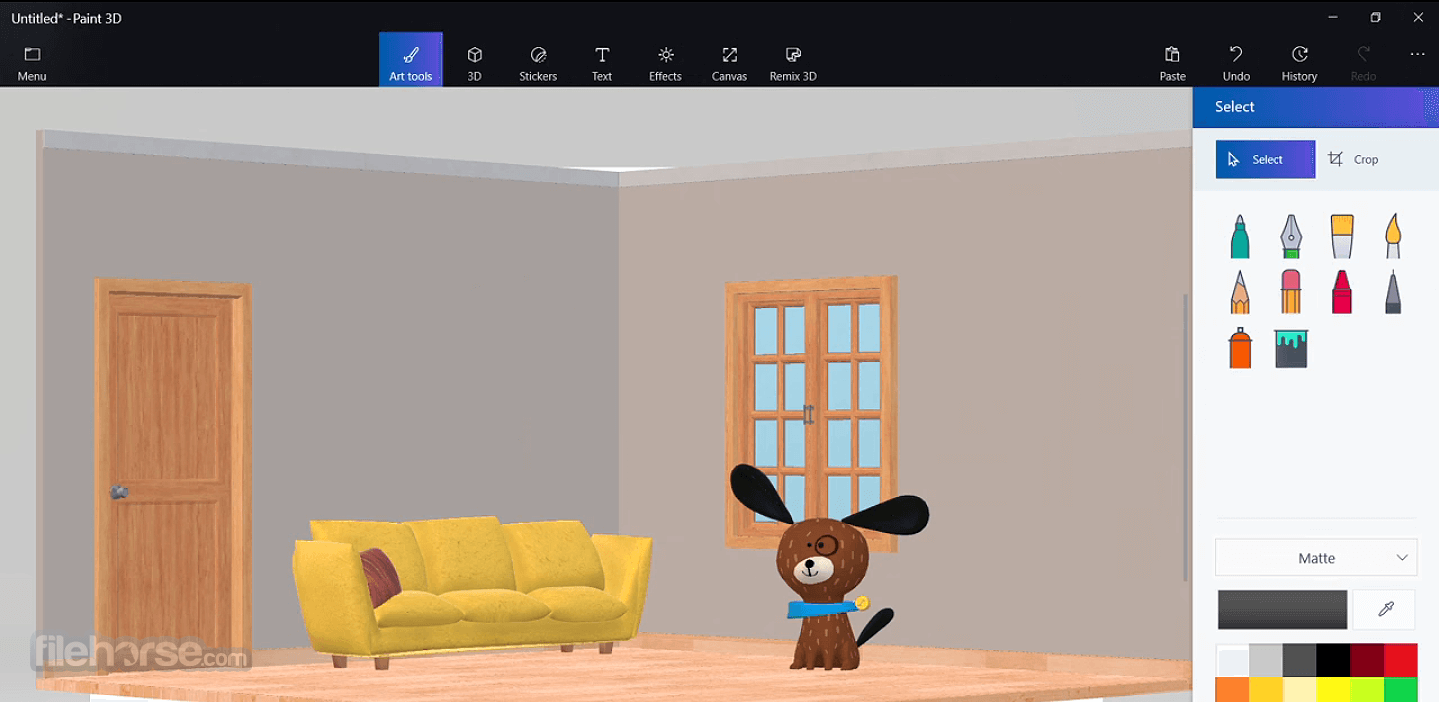



##
更新日誌
6.2410.13017
Introducing the innovative Tube brush, which allows you to effortlessly craft lengthy ribbons or compact dollops of volume. Select from a diverse range of shapes such as circles, stars, triangles, and beyond.
Effortlessly transfer your three-dimensional masterpiece into various Microsoft Office applications, such as Word and PowerPoint, as well as the Mixed Reality Viewer app, using simple copy-and-paste functionality.
Enhance your modeling experience by precisely rotating your 3D models. Gain a clear understanding of the extent to which your model has been rotated, as well as the precise measurement in degrees.
Features
2D and 3D Creation
It allows users to create and edit both 2D and 3D artwork, providing a versatile platform for expressing their artistic vision.
3D Models
The software provides an extensive library of pre-built 3D models that users can customize or use as a starting point for their projects.
Stickers and Text
It offers a collection of stickers and text tools to add flair and personalization to your creations.
Magic Select
This feature enables users to easily remove or separate objects from an image background, offering enhanced editing capabilities.
3D Doodle
With 3D doodling, users can draw in three dimensions, transforming their 2D sketches into immersive 3D objects.
User Interface
The user interface of Paint 3D is sleek and modern, incorporating the Fluent Design principles of Windows 11/10. The toolbar is well-organized, with intuitive icons and easy-to-access tools.
The workspace provides a clean canvas for your creations, and the 3D model library and object menu are conveniently located for quick access.
How to Use
Using Microsoft Paint 3D is straightforward, even for beginners. After launching the application, you can start creating by selecting a canvas size, importing an image, or choosing a pre-built 3D model.
The tool options are conveniently located in the toolbar, allowing for easy access to various editing functions. Experimenting with different tools, brushes, and effects will help you unleash your creativity and bring your ideas to life.
FAQ
Can I import existing 2D or 3D files into Paint 3D?
Yes, it supports importing 2D image files (such as JPEG, PNG, and BMP) and 3D files in the FBX or 3MF formats.
Can I export my creations in different formats?
Absolutely! It allows you to save your projects as 2D images (JPEG, PNG, BMP, or GIF) or 3D objects (3MF or STL).
Can I collaborate with others on a project in MS Paint 3D?
It does not include real-time collaboration features. However, you can save your project and share it with others for further collaboration.
Are there any advanced features for experienced users?
While the program is primarily aimed at beginners, it does offer some advanced features such as layers, textures, and the ability to customize 3D models.
Can I print my 3D creations using MS Paint 3D?
Yes, it supports 3D printing. You can export your 3D objects in the 3MF or STL format and use compatible 3D printers to bring your designs into the physical world.
Alternatives
Blender: A free and open-source 3D creation suite with robust features and advanced capabilities.
SketchUp: A user-friendly 3D modeling software for architectural and product design.
Autodesk 3ds Max: Make 2D masterpieces or 3D models that you can play with from all angles!
ZBrush: Enable you to use customizable 3D brushes to shape and texture
System Requirements
Microsoft Paint 3D is a commendable evolution of the classic Paint application, introducing users to the world of 3D creation while still retaining the simplicity that made its predecessor popular.
With an intuitive user interface, a wide array of tools, and the ability to create in both 2D and 3D, it provides an accessible platform for unleashing your creativity. The FileHorse review team highly recommends this outstanding modeling app.
While it may not cater to the needs of advanced artists or professionals seeking highly specialized features, it remains an excellent choice for beginners and enthusiasts looking to explore the exciting realm of 3D art.
Download Paint 3D Latest Version Why is this app published on FileHorse? (More info)
Effortlessly transfer your three-dimensional masterpiece into various Microsoft Office applications, such as Word and PowerPoint, as well as the Mixed Reality Viewer app, using simple copy-and-paste functionality.
Enhance your modeling experience by precisely rotating your 3D models. Gain a clear understanding of the extent to which your model has been rotated, as well as the precise measurement in degrees.
Features
2D and 3D Creation
It allows users to create and edit both 2D and 3D artwork, providing a versatile platform for expressing their artistic vision.
3D Models
The software provides an extensive library of pre-built 3D models that users can customize or use as a starting point for their projects.
Stickers and Text
It offers a collection of stickers and text tools to add flair and personalization to your creations.
Magic Select
This feature enables users to easily remove or separate objects from an image background, offering enhanced editing capabilities.
3D Doodle
With 3D doodling, users can draw in three dimensions, transforming their 2D sketches into immersive 3D objects.
User Interface
The user interface of Paint 3D is sleek and modern, incorporating the Fluent Design principles of Windows 11/10. The toolbar is well-organized, with intuitive icons and easy-to-access tools.
The workspace provides a clean canvas for your creations, and the 3D model library and object menu are conveniently located for quick access.
How to Use
Using Microsoft Paint 3D is straightforward, even for beginners. After launching the application, you can start creating by selecting a canvas size, importing an image, or choosing a pre-built 3D model.
The tool options are conveniently located in the toolbar, allowing for easy access to various editing functions. Experimenting with different tools, brushes, and effects will help you unleash your creativity and bring your ideas to life.
FAQ
Can I import existing 2D or 3D files into Paint 3D?
Yes, it supports importing 2D image files (such as JPEG, PNG, and BMP) and 3D files in the FBX or 3MF formats.
Can I export my creations in different formats?
Absolutely! It allows you to save your projects as 2D images (JPEG, PNG, BMP, or GIF) or 3D objects (3MF or STL).
Can I collaborate with others on a project in MS Paint 3D?
It does not include real-time collaboration features. However, you can save your project and share it with others for further collaboration.
Are there any advanced features for experienced users?
While the program is primarily aimed at beginners, it does offer some advanced features such as layers, textures, and the ability to customize 3D models.
Can I print my 3D creations using MS Paint 3D?
Yes, it supports 3D printing. You can export your 3D objects in the 3MF or STL format and use compatible 3D printers to bring your designs into the physical world.
Alternatives
Blender: A free and open-source 3D creation suite with robust features and advanced capabilities.
SketchUp: A user-friendly 3D modeling software for architectural and product design.
Autodesk 3ds Max: Make 2D masterpieces or 3D models that you can play with from all angles!
ZBrush: Enable you to use customizable 3D brushes to shape and texture
System Requirements
- Windows 11/10 operating system (Creators Update or later)
- Processor: 1 GHz or faster
- RAM: 2 GB or more
- Graphics card: DirectX 9 or later with WDDM 1.0 driver
- Storage: 16 GB of free space
- User-friendly interface suitable for beginners
- Integration with other Windows 11/10 applications
- Extensive library of 3D models and stickers
- 3D doodling offers a unique creative experience
- Magic Select tool provides easy background removal
- Advanced features may be limited for experienced users
- Lack of real-time collaboration features
- Some users may desire more sophisticated editing capabilities
- This product is not developed actively anymore
Microsoft Paint 3D is a commendable evolution of the classic Paint application, introducing users to the world of 3D creation while still retaining the simplicity that made its predecessor popular.
With an intuitive user interface, a wide array of tools, and the ability to create in both 2D and 3D, it provides an accessible platform for unleashing your creativity. The FileHorse review team highly recommends this outstanding modeling app.
While it may not cater to the needs of advanced artists or professionals seeking highly specialized features, it remains an excellent choice for beginners and enthusiasts looking to explore the exciting realm of 3D art.
Download Paint 3D Latest Version Why is this app published on FileHorse? (More info)