⚠ 這是歷史版本頁面 — 查看 PDFsam Basic 最新版本 →

- 目前版本5.3.0
- 更新日期2025-01-24
- 檔案大小79.3 MB
- 檔案名稱pdfsam-basic-5.3.0-windows-x64.msi
- 作業系統Windows 7 64 / Windows 8 64 / Windows 10 64 / Windows 11
- 支援語系English
- 授權型式開源軟體
- 開發商 Andrea Vacondio
- 軟體分類Windows 軟體 / 辦公商務
##
編輯短評
PDFsam Basic 是一套開放原始碼的 PDF 工具,主要解決合併、分割、擷取頁面、混合與旋轉等常見需求。它的核心特色是模組化操作,例如合併模組可將多個 PDF 檔案依序結合,分割模組則能依指定頁碼或預設範圍切分文件,混合功能則讓兩份文件交替取頁。開發者 Andrea Vacondio 持續維護,更新頻率相當活躍,在同類免費工具中屬於熱門選擇,雖然評分人數不多,但整體評價普遍不錯。
這套軟體適合需要偶爾處理 PDF 文件、但不想購買商業軟體的使用者,尤其是學生或小型辦公室。與 Adobe Acrobat 等付費方案相比,PDFsam Basic 功能較為基礎,沒有編輯或轉檔能力,但核心的合併分割操作直覺且免費。需要注意的是,目前介面僅提供英文,沒有中文版,但操作流程簡單,影響不大。授權為開源免費,Windows 與 macOS 皆有對應版本,免安裝版本也方便隨身攜帶使用。
##
翻譯排程處理中,以下暫以英文原文呈現
軟體介紹
PDFsam Basic is a free, open-source, multi-platform software designed to split, merge, extract pages, mix and rotate PDF files, PDFsam Basic will cover most of your PDF related needs.
Download and install PDFsam Basic for your Windows system, it's free and open-source! Amazing Split or merge PDF software!
Features and Highlights
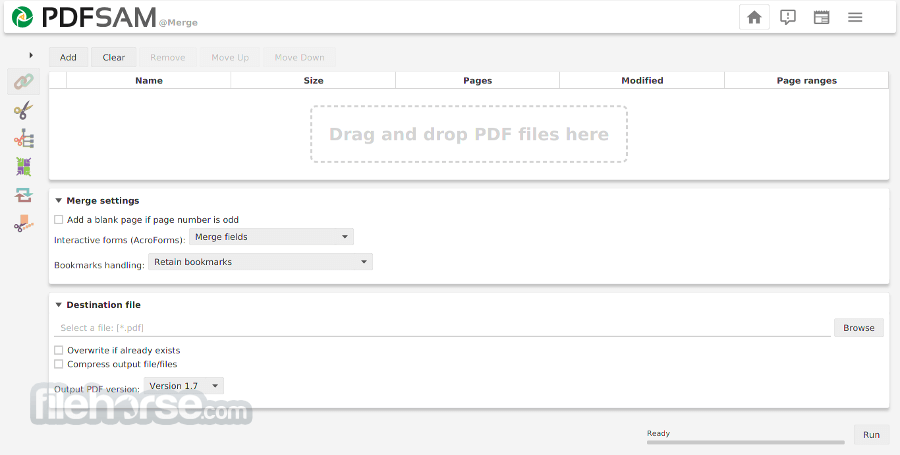
Merge PDF
PDF merge probably is the most used PDFsam module and lets you combine PDF files together.
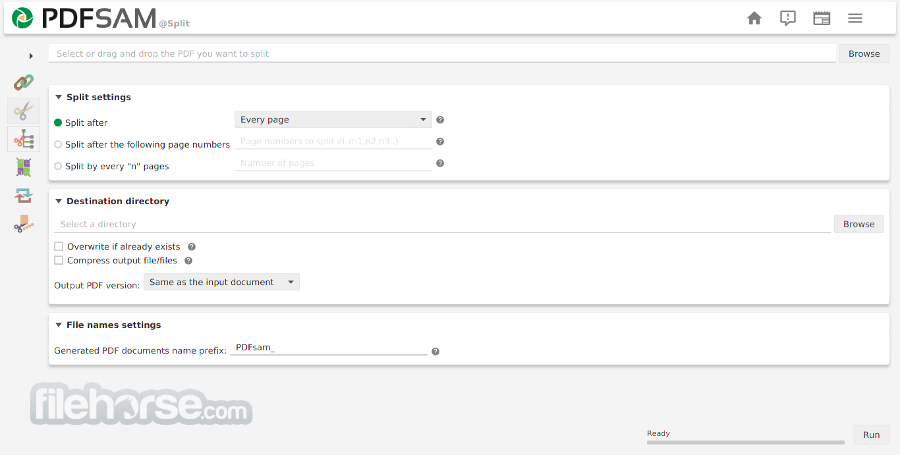
PDF Split
The Split module lets you split PDF files at predefined or specified page numbers.
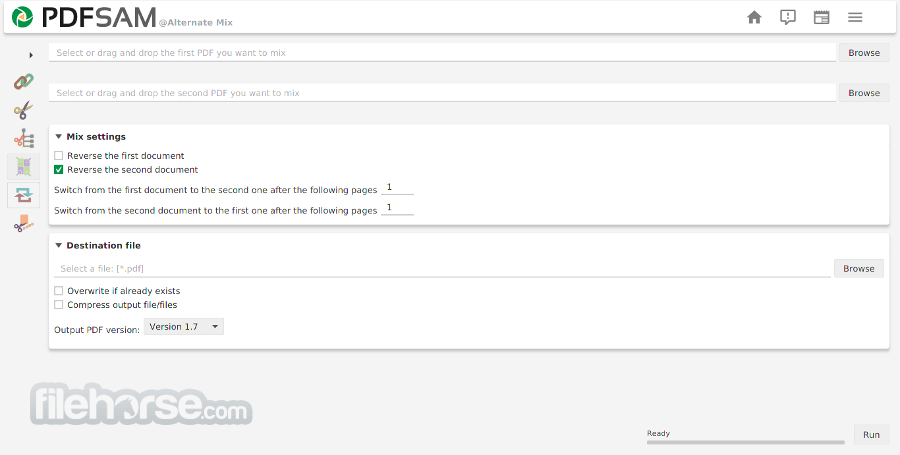
Mix PDF
The PDF mix module lets you merge two PDF files taking pages alternately in straight or reverse order. The perfect solution if you have two documents containing even and odd pages respectively and you want to rebuild the original document.
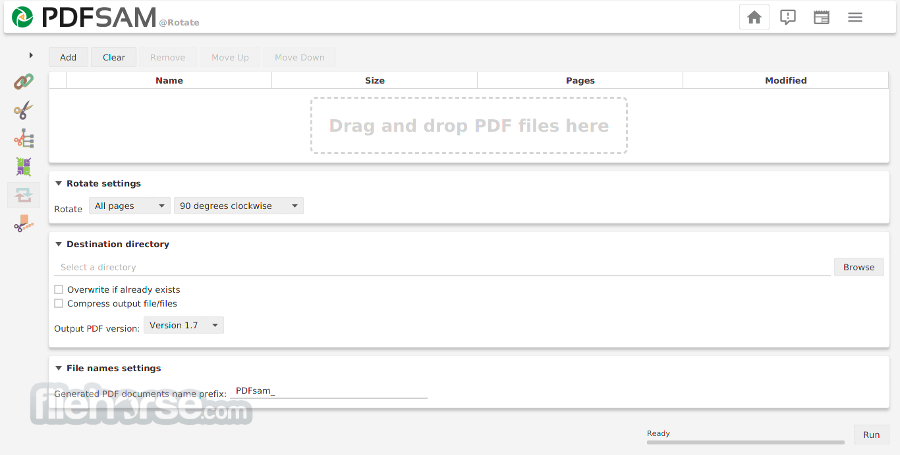
Rotate PDF
The Rotate module lets you rotate PDF files by simply selecting the PDF documents you want to rotate and apply a rotation of 90, 180, or 270 degrees to their pages.
Extract PDF pages
The Extract module lets you extract pages from a PDF file. Single pages or page ranges can be selected to create a new PDF file containing only the pages you need.
Alternatives
Adobe Acrobat Pro: A widely-used and feature-rich PDF editor that allows you to create, edit, convert, and annotate PDF files.
iTop PDF: Edit PDF with an easy and full-featured PDF editor on Windows PC. Simple, Powerful & Free PDF Editor!
PDF Candy: An online PDF editor that offers various tools for editing, converting, and merging PDF files.
pdfFiller: Change text, highlight or blackout content, add signatures in PDFs and more!
How to Use
OS: Windows 7, 8, 10, or 11
CPU: 1 GHz or faster processor
RAM: Minimum 256 MB (1 GB recommended)
Disk Space: At least 100 MB free space
Java: Java Runtime Environment 8 or higher
PROS
Download PDFsam Basic Latest Version Why is this app published on FileHorse? (More info)
Download and install PDFsam Basic for your Windows system, it's free and open-source! Amazing Split or merge PDF software!
Features and Highlights
Merge PDF
PDF merge probably is the most used PDFsam module and lets you combine PDF files together.
PDF Split
The Split module lets you split PDF files at predefined or specified page numbers.
Mix PDF
The PDF mix module lets you merge two PDF files taking pages alternately in straight or reverse order. The perfect solution if you have two documents containing even and odd pages respectively and you want to rebuild the original document.
Rotate PDF
The Rotate module lets you rotate PDF files by simply selecting the PDF documents you want to rotate and apply a rotation of 90, 180, or 270 degrees to their pages.
Extract PDF pages
The Extract module lets you extract pages from a PDF file. Single pages or page ranges can be selected to create a new PDF file containing only the pages you need.
Alternatives
Adobe Acrobat Pro: A widely-used and feature-rich PDF editor that allows you to create, edit, convert, and annotate PDF files.
iTop PDF: Edit PDF with an easy and full-featured PDF editor on Windows PC. Simple, Powerful & Free PDF Editor!
PDF Candy: An online PDF editor that offers various tools for editing, converting, and merging PDF files.
pdfFiller: Change text, highlight or blackout content, add signatures in PDFs and more!
How to Use
- Install the software by running the setup file
- Launch the program from the desktop or start menu
- Select a PDF task like Merge, Split, or Rotate
- Add PDF files using drag-and-drop or file browser
- Configure settings based on your desired output
- Click "Run" to process the PDF task
- Save the output file to your chosen location
OS: Windows 7, 8, 10, or 11
CPU: 1 GHz or faster processor
RAM: Minimum 256 MB (1 GB recommended)
Disk Space: At least 100 MB free space
Java: Java Runtime Environment 8 or higher
PROS
- Free and open source software
- Simple and user-friendly interface
- Supports batch processing
- No internet required to use
- Regular software updates
- Limited to basic PDF functions
- Requires Java to run
- No OCR or text editing tools
- Slower with large PDF files
- Dated interface design
Download PDFsam Basic Latest Version Why is this app published on FileHorse? (More info)
##
影片介紹
##
畫面截圖
- 2026-08-06 PDFsam Basic 6.0.5 94.8 MB
- 2026-07-11 PDFsam Basic 6.0.4 93.7 MB
- 2026-07-10 PDFsam Basic 6.0.3 93.7 MB
- 2026-05-01 PDFsam Basic 6.0.1 93.7 MB
- 2026-03-31 PDFsam Basic 6.0.0 93.2 MB
- 2026-01-27 PDFsam Basic 5.4.5 93.7 MB
- 2025-10-24 PDFsam Basic 5.4.1 92.6 MB
- 2025-09-25 PDFsam Basic 5.4.0 82.7 MB