Photo Stamp Remover 19.0
v 19.0
Windows
商業試用
6.78/10 (23)
- 目前版本19.0
- 更新日期2026-08-12
- 檔案大小1.71 MB
- 檔案名稱PhotoStampRemover-Setup.exe
- 作業系統Windows 7 / Windows 8 / Windows 10 / Windows 11
- 支援語系English
- 授權型式商業試用
- 開發商 SoftOrbits
- 軟體分類Windows 軟體 / 影像設計
##
翻譯排程處理中,以下暫以英文原文呈現
軟體介紹
Photo Stamp Remover is a photo correction utility that can remove watermarks, date stamps, and other unwanted objects that appear on photographs.
Offering a fully automatic process, the program uses an intelligent restoration technology to fill the selected area with the texture generated from the pixels around the selection, so that the defect blends into the rest of the image naturally.
What takes hours to correct using the clone tool can be accomplished in a minute using Photo Stamp Remover.
Using Watermark Remover, you can erase unwanted artifacts like date stamps, watermarks, logos, and undesirable objects. Face and skin imperfections, such as wrinkles, acne, and tattoos, can be cleaned up too.
The area with the removed artifact is filled with automatically generated texture. So, the photo looks natural, as if it had always looked like this.
Most families have hundreds of photos that they would like to preserve for a lifetime of enjoyment. Unfortunately, many of them sit in albums, books, or lie loose in boxes, getting scratches and accumulating dirt.
Fortunately, there's Photo Stamp Remover. Just scan photos into the computer and use the watermark remover to clean up scratches, cracks, and dust spots.
With the app, you can restore photos with the minimum of fuss. Just open a photo in the program, select the area that needs to be restored, and click Preview. If you like what you see, click Start. That's basically all you need to do. Using its advanced restoration algorithm, the program removes the imperfection automatically. Defects blend into the background cleanly.
With its batch mode support, a watermark remover enables you to process more than one photo at a time. For example, you can remove a date stamp, which your camera left on several photos.
Simply define the area where the stamp is located and begin the healing process. It will remove the date stamp on all photos automatically while you're sipping your coffee.
You can select the unwanted artifact manually, or select the color, and the watermark remover will remove the artifact that has the same color. For example, it can help you to remove text and date stamps from a photograph that have the same, solid black color.
Image Stamp Remover is primarily aimed at everyday, casual camera owners who just want to remove some imperfections from photos without having to buy a more feature-rich photo editing suite and mess around with its user manual to get started.
Main Features
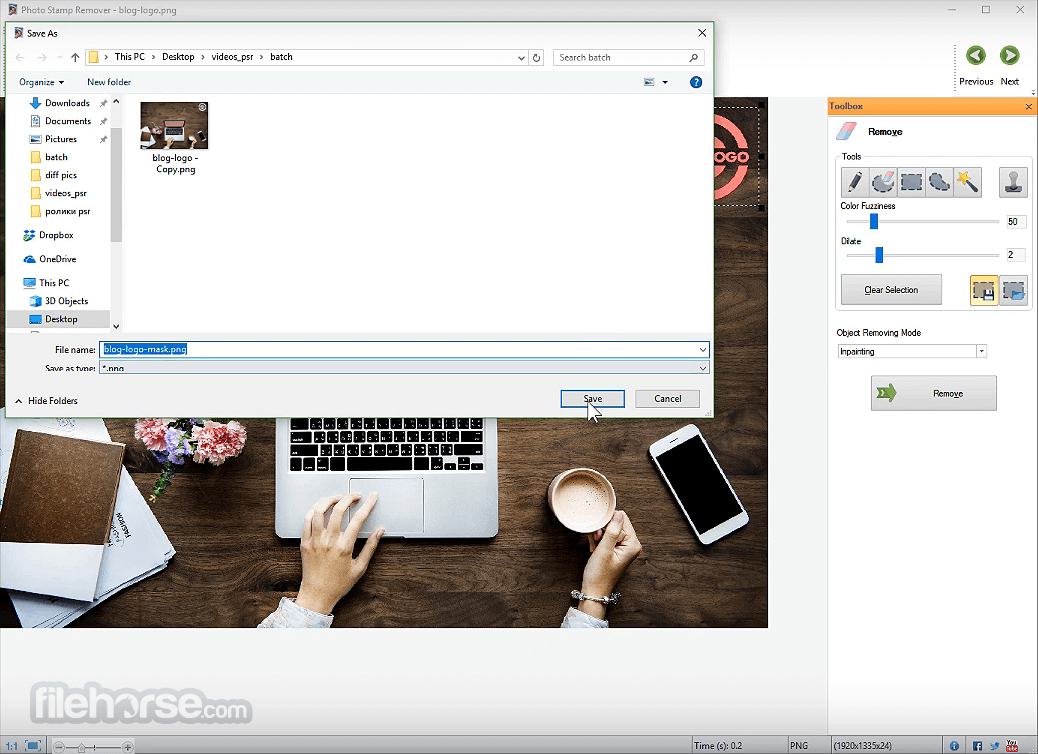
Launch the software on your Windows PC Click "Add Files" to import your image(s) Select the area with the watermark, date stamp, or object Choose a removal method: Inpainting, Texture Repair, etc. Click “Remove” to erase the selected area Preview the result and adjust if needed Click “Save As” to export the cleaned image FAQs
What is Photo Stamp Remover and what can it remove?
Photo Stamp Remover is a Windows desktop application that removes unwanted objects from photos, including watermarks, date stamps, text, logos, people, and other distracting elements. It uses AI-assisted inpainting technology to reconstruct the background after removing the selected object, helping the edited area blend naturally with the rest of the image.
Can Photo Stamp Remover process multiple images at once?
Yes. One of the software's main advantages is batch processing, allowing users to remove date stamps, logos, or other unwanted objects from multiple photos in a single operation. This makes it especially useful for photographers or anyone restoring large photo collections.
Does Photo Stamp Remover preserve image quality?
In most cases, yes. The software uses AI-powered object removal and background reconstruction to preserve image quality while minimizing visible editing artifacts. The final result depends on the complexity of the background and the size of the object being removed, but simple watermarks and date stamps are typically removed very cleanly.
Is Photo Stamp Remover still worth using in 2026?
Yes, particularly for users who want an offline Windows application instead of an online watermark remover. The desktop version continues to receive updates and remains useful for batch editing, local processing, and privacy-conscious workflows where images never need to be uploaded to a cloud service. However, newer AI-powered online tools may deliver better results on highly complex removals.
System Requirements
Download Photo Stamp Remover Latest Version Why is this app published on FileHorse? (More info)
Offering a fully automatic process, the program uses an intelligent restoration technology to fill the selected area with the texture generated from the pixels around the selection, so that the defect blends into the rest of the image naturally.
What takes hours to correct using the clone tool can be accomplished in a minute using Photo Stamp Remover.
Using Watermark Remover, you can erase unwanted artifacts like date stamps, watermarks, logos, and undesirable objects. Face and skin imperfections, such as wrinkles, acne, and tattoos, can be cleaned up too.
The area with the removed artifact is filled with automatically generated texture. So, the photo looks natural, as if it had always looked like this.
Most families have hundreds of photos that they would like to preserve for a lifetime of enjoyment. Unfortunately, many of them sit in albums, books, or lie loose in boxes, getting scratches and accumulating dirt.
Fortunately, there's Photo Stamp Remover. Just scan photos into the computer and use the watermark remover to clean up scratches, cracks, and dust spots.
With the app, you can restore photos with the minimum of fuss. Just open a photo in the program, select the area that needs to be restored, and click Preview. If you like what you see, click Start. That's basically all you need to do. Using its advanced restoration algorithm, the program removes the imperfection automatically. Defects blend into the background cleanly.
With its batch mode support, a watermark remover enables you to process more than one photo at a time. For example, you can remove a date stamp, which your camera left on several photos.
Simply define the area where the stamp is located and begin the healing process. It will remove the date stamp on all photos automatically while you're sipping your coffee.
You can select the unwanted artifact manually, or select the color, and the watermark remover will remove the artifact that has the same color. For example, it can help you to remove text and date stamps from a photograph that have the same, solid black color.
Image Stamp Remover is primarily aimed at everyday, casual camera owners who just want to remove some imperfections from photos without having to buy a more feature-rich photo editing suite and mess around with its user manual to get started.
Main Features
- AI Watermark Removal — Automatically detects and removes text, logos, signatures, and date stamps from photos.
- Generative AI Inpainting — Reconstructs the background naturally without noticeable artifacts or blur.
- Automatic Watermark Detection — Identifies complex, rotated, and semi-transparent watermarks with AI assistance.
- Manual AI Brush — Lets you manually select specific areas for more precise removal.
- Batch Processing — Remove watermarks from multiple images in a single operation.
- Image & Video Support — Handles both photo and video watermark removal.
- Wide File Format Compatibility — Supports JPEG, PNG, WEBP, GIF, TIFF, and other popular formats.
- Preserved Image Quality — Maintains sharpness and detail after watermark removal.
- Private & Secure Processing — Protects user privacy with automatic file deletion for online uploads and local desktop processing options.
- Desktop & Online Versions — Available as both a browser-based tool and a Windows desktop application for high-volume workflows.
What is Photo Stamp Remover and what can it remove?
Photo Stamp Remover is a Windows desktop application that removes unwanted objects from photos, including watermarks, date stamps, text, logos, people, and other distracting elements. It uses AI-assisted inpainting technology to reconstruct the background after removing the selected object, helping the edited area blend naturally with the rest of the image.
Can Photo Stamp Remover process multiple images at once?
Yes. One of the software's main advantages is batch processing, allowing users to remove date stamps, logos, or other unwanted objects from multiple photos in a single operation. This makes it especially useful for photographers or anyone restoring large photo collections.
Does Photo Stamp Remover preserve image quality?
In most cases, yes. The software uses AI-powered object removal and background reconstruction to preserve image quality while minimizing visible editing artifacts. The final result depends on the complexity of the background and the size of the object being removed, but simple watermarks and date stamps are typically removed very cleanly.
Is Photo Stamp Remover still worth using in 2026?
Yes, particularly for users who want an offline Windows application instead of an online watermark remover. The desktop version continues to receive updates and remains useful for batch editing, local processing, and privacy-conscious workflows where images never need to be uploaded to a cloud service. However, newer AI-powered online tools may deliver better results on highly complex removals.
System Requirements
- Operating System: Windows 11 / 10 / 8 / 7
- Processor: 1 GHz or faster
- RAM: 512 MB minimum
- Disk Space: 100 MB free disk space
- Display: 1024x768 resolution or higher
- Easy-to-use interface for beginners
- Supports batch image processing
- Multiple object removal methods
- Quick preview of edited results
- Lightweight and fast performance
- Limited features in trial version
- No support for RAW photo formats
- May blur complex backgrounds
- No mobile version available
- Occasional crashes with large files
Download Photo Stamp Remover Latest Version Why is this app published on FileHorse? (More info)
##
影片介紹
##
畫面截圖