⚠ 這是歷史版本頁面 — 查看 PictoBlox 9.2.1 (64-bit) 最新版本 →

- 目前版本6.0.0 (64-bit)
- 更新日期2022-10-16
- 檔案大小582 MB
- 檔案名稱PictoBloxSetup6.0.0x64bit.exe
- 作業系統Windows 7 64 / Windows 8 64 / Windows 10 64 / Windows 11
- 支援語系English
- 授權型式免費軟體
- 開發商 Agilo Research Pvt. Ltd.
- 軟體分類Windows 軟體 / 開發者工具
##
編輯短評
PictoBlox 是一款以圖形化積木為核心的程式設計工具,主要鎖定程式初學者與年輕學習者,讓使用者透過拖曳、組合程式積木的方式,就能完成互動遊戲或動畫專案。它奠基於 Scratch 的設計邏輯,並加入雙模式切換,除了積木編程外也能接觸文字程式,是辨識度相當高的特色。這套軟體由 Agilo Research 持續維護,更新頻率穩定,在同類開發者工具中屬於評價普遍不錯的小眾選擇,雖然評分人數不多,但口碑偏向正面。
如果你正在尋找一套能引導孩子或自己踏入程式設計領域的入門工具,PictoBlox 會是合適的起點,特別適合用於自學、課堂教學或機器人相關的專案發想。與 BlueStacks、Turbo C++ 等替代軟體相比,它不強調模擬器或傳統編譯環境,而是專注於視覺化學習體驗,取捨之間更偏向教育用途。軟體本身免費,提供 Windows 與 macOS 版本,但介面僅有英文,且需要較大的下載空間,安裝前建議確認硬體環境是否足夠。
##
翻譯排程處理中,以下暫以英文原文呈現
軟體介紹
PictoBlox is a graphical programming software for Windows designed to make coding accessible and enjoyable, particularly for beginners and young learners.
Based on the latest version of Scratch Desktop, PictoBlox offers a user-friendly interface with drag-and-drop functionality, making it an ideal companion for those setting their first steps into the world of programming.
Key Features
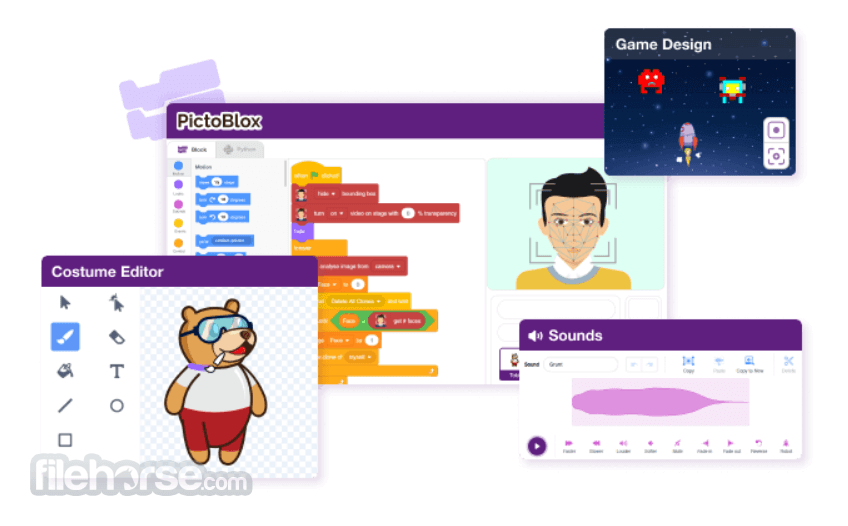
Block-Based Programming: Utilizes a visual, block-based coding system, allowing users to create programs by simply dragging and connecting code blocks.
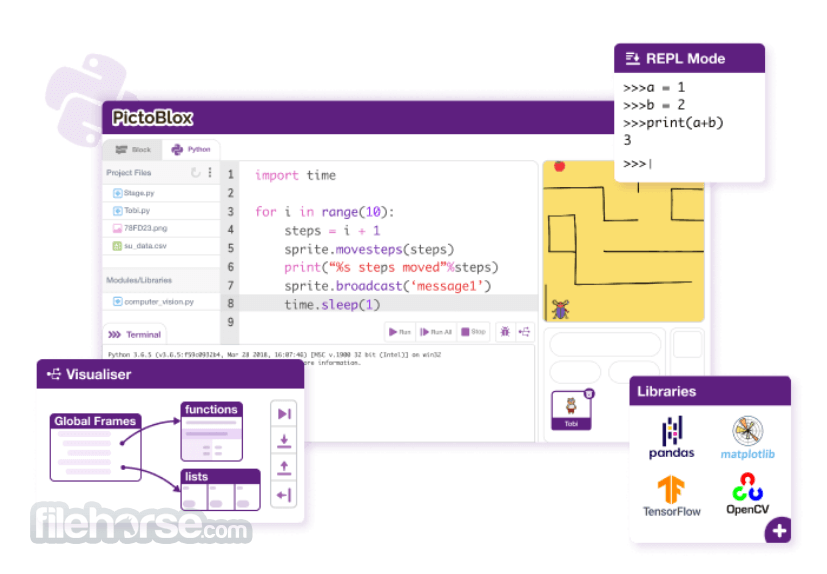
Dual Coding Modes: Offers both graphical block-based coding and text-based Python programming, catering to beginners and advanced users alike.
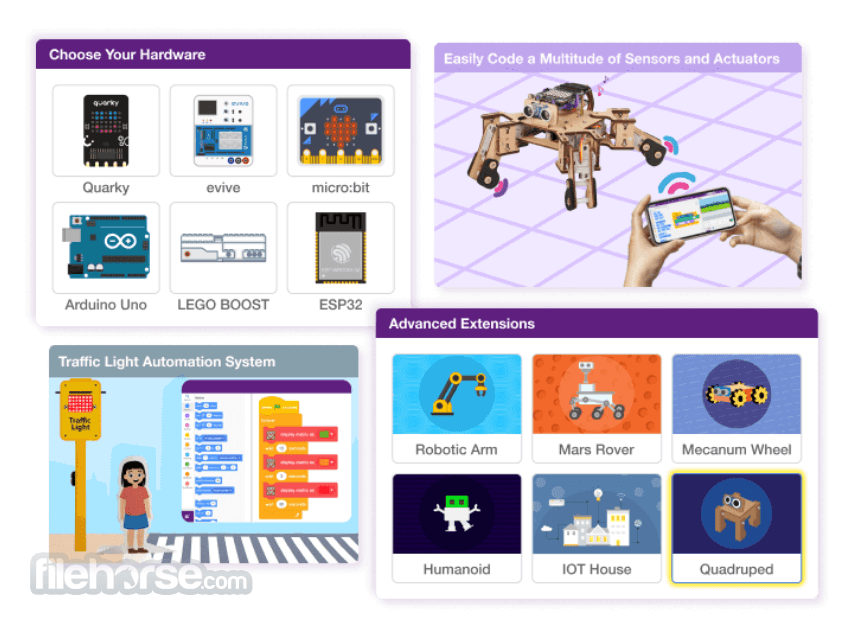
Hardware Interaction: Supports interaction with various hardware components, enabling users to program robots and IoT devices, thereby bridging the gap between software and hardware learning. Supports programming of various prototyping boards, including Arduino Uno, Mega, Nano, ESP32, evive, and Quarky, facilitating interactive hardware projects.
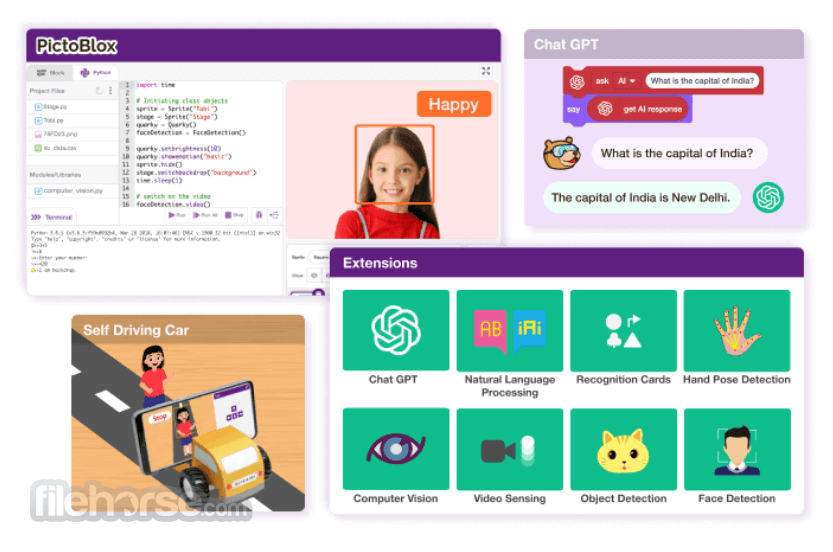
AI and Machine Learning Integration: Enables users to create projects involving computer vision, face detection and recognition, text detection, speech recognition, and custom machine learning models.
Interactive Tutorials and Projects: PictoBlox offers a variety of tutorials and templates that guide users through creating interactive animations, games, and projects, enhancing the learning experience.
Cross-Platform Accessibility: Available as both desktop software and a mobile application, allowing users to learn and code on-the-go.
Unlock the Possibilities of 21st Century Learning!
Block Coding
Learn coding with fun, colorful puzzles using a drag-and-drop block-based system designed for kids.
Junior Blocks
Introduce kids aged 4–7 to coding through interactive activities that enhance creativity, critical thinking, and problem-solving skills.
Python Coding
Develop strong programming skills with simplified, interactive Python coding designed for teens.
Machine Learning
Explore the world of data science by analyzing complex data, training models, and integrating them into coding environments with ease.
3D and XR Studio
Create 3D models and unlock new creative possibilities using Augmented Reality (AR) and Virtual Reality (VR).
User Interface
PictoBlox boasts a clean and intuitive interface designed with young learners in mind.
Each action is represented by a distinct color, and the drag-and-drop mechanism simplifies the coding process, making it accessible even to those without prior technical knowledge.
Installation and Setup
Game & Animation Creation with Blocks – User-friendly interface to build interactive games and animations with customizable costumes and sounds. Snap together colorful blocks to create scripts, export blocks, save scripts, and record outputs as videos.
Python Programming for Kids – Feature-rich Python 3 editor with sprite support, project files, and libraries. Includes a step-by-step visualizer, debugger, auto-complete, REPL mode, and built-in PIP package manager for an interactive coding experience.
AI-Powered Interactive Projects – Easily add AI features to projects using Block or Python coding. Integrate AI for self-driving cars, attendance systems, chatbots with ChatGPT, speech recognition, and text-to-speech.
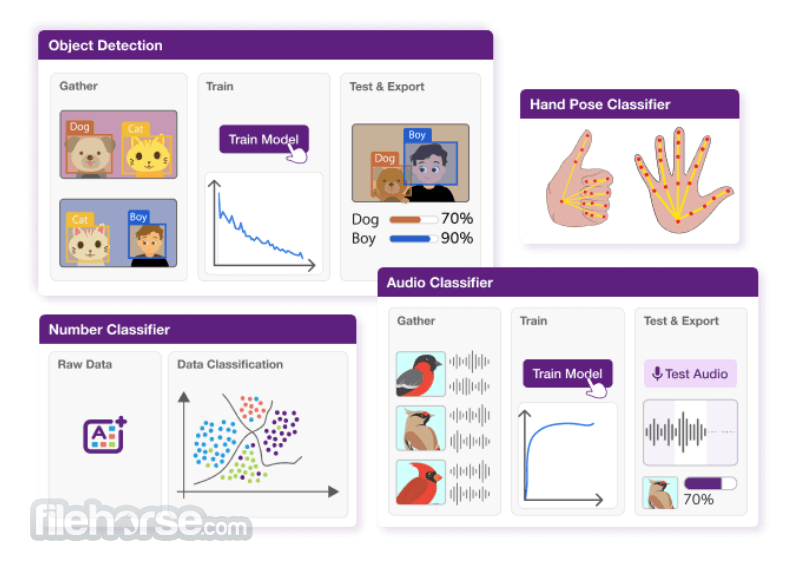
Machine Learning for Kids – Simplified ML model creation with data import, training, testing, and export. Supports seven types of ML models, including Image, Object, Hand Pose, Pose, Audio, Text, and Number classification, with no prior coding experience needed.
Hardware Programming Made Easy – Control hardware in real-time via USB or Bluetooth. Upload code to microcontroller boards like Arduino, Micro:bit, evive, and Lego. Supports both Block-based and Python coding.
Python Notebook for Kids 12+ – An interactive Python notebook to test and tweak code in real-time, visualize data with graphs and charts, and share projects with classmates for collaboration.
Junior Blocks for Kids (Ages 4-7) – Play-based AI activities for young learners to explore coding, AI, and robotics. Develop creativity with an intuitive interface, AI hand gestures, and face detection animations.
3D & XR Studio for AR/VR Creation – Build immersive 3D, AR, and VR projects using 3D models, animations, and physics. Create VR games, AR filters, and simulations, and export projects to devices like Google Cardboard VR, Pico VR, and Meta Quest.
How to Use
After installation:
What age group is PictoBlox suitable for?
PictoBlox is primarily targeted at school-going children aged 8-16, but anyone interested in learning coding in a fun and interactive way can use it.
Can PictoBlox be used without any prior coding experience?
Yes, this program is designed for beginners and does not require any prior coding knowledge.
Does PictoBlox support hardware other than robots?
Yes, it supports interaction with various hardware components, including IoT devices, allowing users to create diverse projects.
Is PictoBlox available on platforms other than Windows?
Yes, PictoBlox is available for Mac, Linux, iOS, and Android platforms.
Are there any costs associated with using PictoBlox?
It offers a free version with basic features and paid versions that unlock additional functionalities.
System Requirements
PictoBlox serves as an excellent platform for introducing coding to beginners, especially young learners. Its intuitive interface, coupled with support for hardware interaction and emerging technologies like AI and ML, makes it a versatile tool for both educators and students.
While it may have limitations for advanced users, its comprehensive features make it a valuable resource for foundational programming education.
Also Available: PictoBlox for Mac
Download PictoBlox Latest Version Why is this app published on FileHorse? (More info)
Based on the latest version of Scratch Desktop, PictoBlox offers a user-friendly interface with drag-and-drop functionality, making it an ideal companion for those setting their first steps into the world of programming.
Key Features
Block-Based Programming: Utilizes a visual, block-based coding system, allowing users to create programs by simply dragging and connecting code blocks.
Dual Coding Modes: Offers both graphical block-based coding and text-based Python programming, catering to beginners and advanced users alike.
Hardware Interaction: Supports interaction with various hardware components, enabling users to program robots and IoT devices, thereby bridging the gap between software and hardware learning. Supports programming of various prototyping boards, including Arduino Uno, Mega, Nano, ESP32, evive, and Quarky, facilitating interactive hardware projects.
AI and Machine Learning Integration: Enables users to create projects involving computer vision, face detection and recognition, text detection, speech recognition, and custom machine learning models.
Interactive Tutorials and Projects: PictoBlox offers a variety of tutorials and templates that guide users through creating interactive animations, games, and projects, enhancing the learning experience.
Cross-Platform Accessibility: Available as both desktop software and a mobile application, allowing users to learn and code on-the-go.
Unlock the Possibilities of 21st Century Learning!
Block Coding
Learn coding with fun, colorful puzzles using a drag-and-drop block-based system designed for kids.
Junior Blocks
Introduce kids aged 4–7 to coding through interactive activities that enhance creativity, critical thinking, and problem-solving skills.
Python Coding
Develop strong programming skills with simplified, interactive Python coding designed for teens.
Machine Learning
Explore the world of data science by analyzing complex data, training models, and integrating them into coding environments with ease.
3D and XR Studio
Create 3D models and unlock new creative possibilities using Augmented Reality (AR) and Virtual Reality (VR).
User Interface
PictoBlox boasts a clean and intuitive interface designed with young learners in mind.
Each action is represented by a distinct color, and the drag-and-drop mechanism simplifies the coding process, making it accessible even to those without prior technical knowledge.
Installation and Setup
- Visit the official STEMpedia website or FileHorse.com and download the Windows installer.
- Run the installer and follow the on-screen instructions to complete the setup.
- Launch the application and explore the tutorials to familiarize yourself with its features.
Game & Animation Creation with Blocks – User-friendly interface to build interactive games and animations with customizable costumes and sounds. Snap together colorful blocks to create scripts, export blocks, save scripts, and record outputs as videos.
Python Programming for Kids – Feature-rich Python 3 editor with sprite support, project files, and libraries. Includes a step-by-step visualizer, debugger, auto-complete, REPL mode, and built-in PIP package manager for an interactive coding experience.
AI-Powered Interactive Projects – Easily add AI features to projects using Block or Python coding. Integrate AI for self-driving cars, attendance systems, chatbots with ChatGPT, speech recognition, and text-to-speech.
Machine Learning for Kids – Simplified ML model creation with data import, training, testing, and export. Supports seven types of ML models, including Image, Object, Hand Pose, Pose, Audio, Text, and Number classification, with no prior coding experience needed.
Hardware Programming Made Easy – Control hardware in real-time via USB or Bluetooth. Upload code to microcontroller boards like Arduino, Micro:bit, evive, and Lego. Supports both Block-based and Python coding.
Python Notebook for Kids 12+ – An interactive Python notebook to test and tweak code in real-time, visualize data with graphs and charts, and share projects with classmates for collaboration.
Junior Blocks for Kids (Ages 4-7) – Play-based AI activities for young learners to explore coding, AI, and robotics. Develop creativity with an intuitive interface, AI hand gestures, and face detection animations.
3D & XR Studio for AR/VR Creation – Build immersive 3D, AR, and VR projects using 3D models, animations, and physics. Create VR games, AR filters, and simulations, and export projects to devices like Google Cardboard VR, Pico VR, and Meta Quest.
How to Use
After installation:
- Open PictoBlox and start a new project.
- Drag code blocks from the palette on the left to the scripting area to create your program.
- Utilize the stage area to see your code in action, whether it's an animation, game, or hardware interaction.
What age group is PictoBlox suitable for?
PictoBlox is primarily targeted at school-going children aged 8-16, but anyone interested in learning coding in a fun and interactive way can use it.
Can PictoBlox be used without any prior coding experience?
Yes, this program is designed for beginners and does not require any prior coding knowledge.
Does PictoBlox support hardware other than robots?
Yes, it supports interaction with various hardware components, including IoT devices, allowing users to create diverse projects.
Is PictoBlox available on platforms other than Windows?
Yes, PictoBlox is available for Mac, Linux, iOS, and Android platforms.
Are there any costs associated with using PictoBlox?
It offers a free version with basic features and paid versions that unlock additional functionalities.
System Requirements
- Operating System: Windows 11, 10, 8 or 7
- Processor: Intel or AMD processor
- RAM: At least 2 GB
- Storage: Minimum 500 MB of free disk space
- User-friendly interface suitable for beginners
- Supports hardware interaction, enhancing practical learning
- Incorporates AI and ML extensions for advanced projects
- Offers interactive tutorials and templates
- Advanced users may find it limiting for complex projects
- Some features require a paid subscription
PictoBlox serves as an excellent platform for introducing coding to beginners, especially young learners. Its intuitive interface, coupled with support for hardware interaction and emerging technologies like AI and ML, makes it a versatile tool for both educators and students.
While it may have limitations for advanced users, its comprehensive features make it a valuable resource for foundational programming education.
Also Available: PictoBlox for Mac
Download PictoBlox Latest Version Why is this app published on FileHorse? (More info)
##
影片介紹
##
畫面截圖
- 2026-07-18 PictoBlox 9.2.1 (64-bit) 717 MB
- 2026-05-29 PictoBlox 9.2.0 (32-bit) 747 MB
- 2026-05-29 PictoBlox 9.2.0 (64-bit) 717 MB
- 2026-05-03 PictoBlox 9.1.0 (64-bit) 815 MB
- 2026-03-10 PictoBlox 9.0.1 (64-bit) 831 MB
- 2025-10-09 PictoBlox 9.0.0 (32-bit) 816 MB
- 2024-07-25 PictoBlox 7.1.0 (32-bit) 711 MB
- 2024-07-25 PictoBlox 7.1.0 (64-bit) 713 MB