
- 目前版本2.3.0
- 更新日期2007-11-27
- 檔案大小11.82MB
- 檔案名稱pidgin-2.3.0.exe
- 作業系統Windows XP / Vista / Windows 7 / Windows 8 / Windows 10 / Windows 11
- 支援語系English
- 授權型式開源軟體
- 開發商 Pidgin Team
- 軟體分類Windows 軟體 / 社群通訊
編輯短評
Pidgin 是一款整合多種即時通訊協定的開源軟體,讓你在單一介面中同時登入 MSN、Yahoo! 即時通、ICQ、QQ 等帳號,省去安裝多套客戶端的麻煩。它的介面走樸實路線,沒有花俏裝飾,但對純聊天用途來說已經足夠,而且乾淨無廣告,是許多人懷念的經典工具。開發團隊長期持續維護,在同類工具中屬於穩定且有一定歷史地位的选择,雖然近年熱度不如主流通訊軟體,但仍有固定使用者依賴它來集中管理多個舊式帳號。
這套軟體適合需要同時處理多個即時通訊帳號、又不想被各家客戶端綁住的人,尤其是還在沿用舊協定的使用者。與 WhatsApp 或 Yahoo! Messenger 等單一服務的軟體相比,Pidgin 的優勢在於整合與輕量,但代價是介面較陽春、部分新功能支援較慢。它採開源授權,Windows 平台可免費使用,不過官方僅提供英文介面,若需要中文得靠社群語言包;下載時建議留意版本更新頻率,目前維護步調不算快,但基本功能仍能正常運作。
軟體介紹
最初於 1998 年以「Gaim」之名推出,後來因法律問題更名為 Pidgin。
它透過原生支援或第三方外掛,支援多種訊息協定,例如 XMPP (Jabber)、IRC、AIM 等。
主要設計用於桌面環境,Pidgin 以簡潔、可擴充性高,以及對舊版與現代 Windows 作業系統的相容性著稱。
主要特色
- 多協定支援:在單一介面中與來自不同服務的聯絡人聊天。
- 外掛系統:透過外掛擴充功能,例如離線記錄(OTR)訊息、拼字檢查、訊息通知等。
- 整合聯絡人清單:將不同服務的聯絡人合併到單一好友清單中。
- 群組聊天與檔案傳輸:依所使用的協定,支援基本群組聊天與檔案分享。
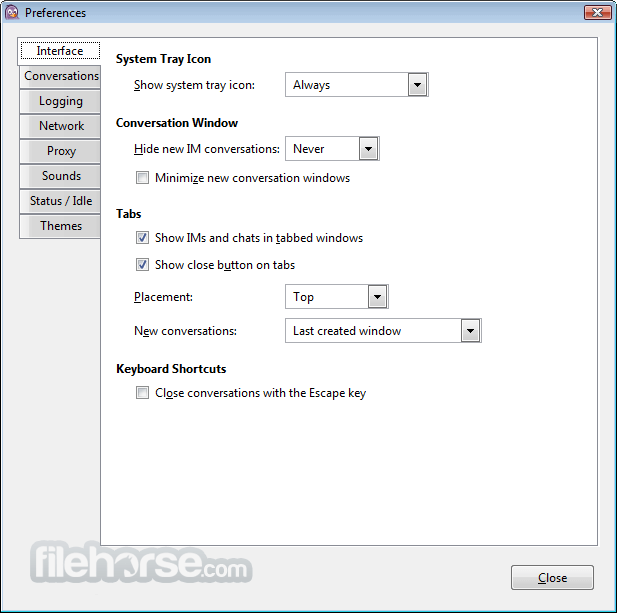
- 可自訂介面:可個人化主題、音效與通知。
- 加密選項:可加入 OTR 或其他安全外掛,進行加密對話。
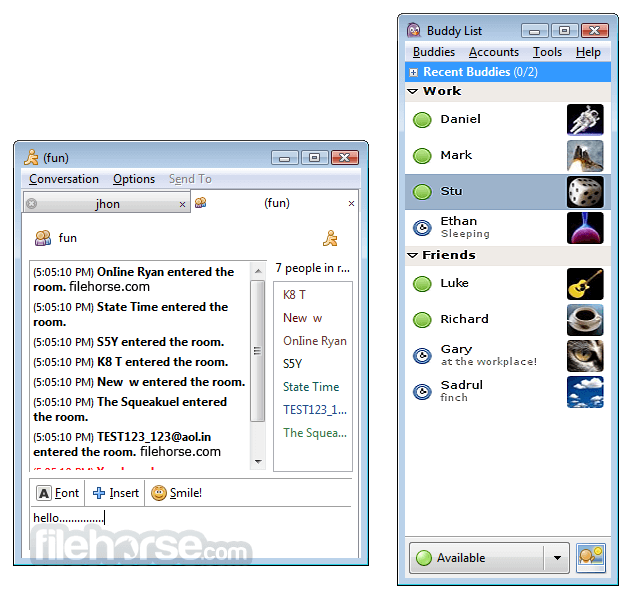
它擁有極簡且功能導向的介面。其 UI 設計著重於實用性,而非現代美學。主視窗顯示好友清單,聊天視窗則簡單、以分頁呈現,易於瀏覽。
雖然與現代通訊軟體相比可能顯得過時,但其簡潔性可減少干擾,並快速存取核心功能。
安裝與設定
- 執行安裝程式,並依照引導步驟操作。
- 在安裝過程中選擇所需的協定,或之後透過外掛選單新增。
- 使用各聊天網路現有的登入憑證來設定帳號。
- 也提供靜默安裝選項,供進階使用者或 IT 管理員使用。
Pidgin 支援 WhatsApp 或 Telegram 等現代通訊應用程式嗎?
原生不支援,但第三方外掛可能提供有限度的支援。
Pidgin 對私人對話安全嗎?
基本版 Pidgin 未加密,但可透過 OTR 等外掛加入端對端加密。
我可以用 Pidgin 進行工作聊天嗎?
可以,只要你的工作環境使用 XMPP、IRC 或類似受支援的協定即可。
Pidgin 仍在維護中嗎?
是的,雖然更新頻率不高,但社群仍持續維護。
Pidgin 可以跨裝置同步嗎?
無法直接同步。設定與紀錄僅儲存在本機,除非手動透過雲端工具同步。
Pidgin 在 2026 年仍具相關性嗎?
在 2026 年,Pidgin 仍可使用,但由於現代訊息平台多為封閉生態系且內建功能更強大,其主流相關性已有限。它主要仍適用於 XMPP、IRC 與自訂伺服器,但多數使用者偏好更新、整合更完整的聊天應用程式。
價格
此工具100% 免費且開放原始碼。沒有付費版本、廣告或鎖定功能。
系統需求
- 作業系統:Windows 11、10、8 或 7
- 記憶體:最低 512MB
- 儲存空間:約 50MB
- 網路:需連線以進行聊天
- 相依元件:安裝程式中包含 GTK+ 執行環境
- 免費且開放原始碼
- 支援多個聊天網路
- 輕量且資源占用低
- 可透過外掛擴充
- 介面簡潔且無干擾
- 介面過時
- 原生不支援現代通訊軟體
- 缺乏行動裝置支援
- 需外掛才能加密
- 檔案傳輸功能有限
Pidgin 對於重視開放原始碼彈性,且需要統一管理舊版與開放協定訊息的使用者來說,仍是一款強大的工具。雖然其介面可能顯得老舊,且缺乏對某些現代服務的支援,但其可擴充性、低系統負擔與外掛支援,使其成為開發者、注重隱私的使用者,或需要極簡聊天解決方案者的理想選擇。
如果你正在管理多個舊版聊天帳號,或在使用 XMPP 或 IRC 的環境中工作,這款應用程式仍是 Windows 電腦上可靠的選擇。
下載 Pidgin 最新版本 為什麼此應用程式發布在 FileHorse 上?(更多資訊)
畫面截圖
更新日誌
2.3.0 Notes:
2.3.0 (11/24/2007):
Luke: While this does not have the new MSN code, rest assured that
we are working on it and that it is nearing release. This contains
a significant number of fixes, including some that were marked as
fixed for earlier releases. Happy Thanksgiving!
John: This is my first NEWS entry! So, this time around we have an
updated man page (the old one hadn't been really updated since
before the GTK+ 2.0 migration!), lots of bug fixes, and some new
features for you all. Enjoy!
Changes:
version 2.3.0 (11/24/2007):
http://developer.pidgin.im/query?status=closed&milestone=2.3.0
NOTE: Some bugs marked fixed in 2.2.1, 2.2.2 or 2.2.3 may not
have been fixed until this release (2.3.0).
libpurple:
* Real usernames are now shown in the system log.
* We now honor a PURPLE_DISABLE_DEPRECATED define to allow plugins to
catch deprecated functions earlier rather than later.
* Thanks to a patch from Intel, the Bonjour prpl now supports file
transfers using XEP-0096 and XEP-0065. This should enable file
transfers between libpurple clients and Gajim clients, but will not
work with iChat or Adium as they use a different file transfer
implementation.
* XMPP password changes that return errors no longer cause the saved
password to be changed.
* XMPP file transfer support has been enhanced to support sending
files through a proxy when the server supports discovering a
a bytestream proxy. This should make file transfers much more
reliable. The next release will add support for manually specifying
a proxy when the server doesn't advertise one.
Pidgin:
* If a plugin says it can't be unloaded, we now display an error and
remove the plugin from the list of saved plugins so it won't load
at the next startup. Previously, we were ignoring this case, which
could lead to crashes.
* Mark dialog windows as transient for appropriate parent windows to
help window managers do the right thing (Gabriel Schulhof)
* Connection errors are now reported in mini-dialogs inside the buddy
list, rather than as buttons in the buddy list and with dialog
boxes. If several accounts are disabled when you sign on elsewhere,
you can now re-enable them all with a single click.
* Added tooltips to the Room List window to show full topics
* Added buttons in preferences to access GNOME network and browser
preferences configuration dialogs when running under GNOME
* If you alias a buddy to an alias that is already present within
a particular group, we now offer to merge the buddies into the
same contact.
* A music emblem is now displayed in the buddy list for a buddy if we
know she is listening to some soothing music.
* Added a 'Move to' menu in buddy list context menu for moving buddies
to other groups as an alternative to dragging.
* Group headings are now marked via an underline instead of a
different color background.
* It is now possible to mark a chat on your buddy list as "Persistent"
so you do not leave the chat when the window or tab is closed.
* The auto-join option for chats is now listed in the "Add Chat"
dialog along with the new persistence option.
* Closing an IM no longer immediately closes your conversation. It
will now remain active for a short time so that if the conversation
resumes, the history will be retained. A preference has been added
to toggle this behavior.
* The "Smiley" menu has been moved to the top-level of the toolbar.
* Pidgin's display is now saved with the command line for session
restoration. (David Mohr)
* ICQ Birthday notifications are shown as buddy list emblems.
* Plugin actions are now available from the docklet context menu
in addition to the Tool menu of the buddy list.
* The manual page has been heavily rewritten to bring it in line
with current functionality.
Finch:
* If a plugin says it can't be unloaded, we now display an error and
remove the plugin from the list of saved plugins so it won't load
at the next startup. Previously, we were ignoring this case, which
could lead to crashes.
* It's possible to bind key-strokes to specific menuitems in the windows.
Read the 'Menus' section in the man-page for details.
* 'transpose-chars' operation for the entry boxes. The default key-binding
is ctrl+t.
* 'yank' operation for the entry boxes. The default binding is ctrl+y.
- 2026-02-17 Pidgin 2.14.14 30.85 MB
- 2024-02-24 Pidgin 2.14.13 30.84 MB
- 2023-01-02 Pidgin 2.14.12 33.39 MB
- 2022-06-03 Pidgin 2.14.10 33.49 MB
- 2022-04-29 Pidgin 2.14.9 33.48 MB
- 2021-10-15 Pidgin 2.14.8 33.49 MB
- 2021-09-17 Pidgin 2.14.7 33.48 MB
- 2021-07-09 Pidgin 2.14.6 33.49 MB