
- 軟體名稱Pidgin
- 目前版本2.6.4
- 更新日期2009-11-30
- 檔案大小13.85MB
- 檔案名稱pidgin-2.6.4.exe
- 作業系統Windows XP / Vista / Windows 7 / Windows 8 / Windows 10 / Windows 11
- 支援語系English
- 授權型式開源軟體
- 開發商 Pidgin Team
- 軟體分類Windows 軟體 / 社群通訊
編輯短評
Pidgin 是一款整合多種即時通訊協定的開源軟體,讓你在單一介面中同時登入 MSN、Yahoo! 即時通、ICQ、QQ 等帳號,省去安裝多套客戶端的麻煩。它的介面走樸實路線,沒有花俏裝飾,但對純聊天用途來說已經足夠,而且乾淨無廣告,是許多人懷念的經典工具。開發團隊長期持續維護,在同類工具中屬於穩定且有一定歷史地位的选择,雖然近年熱度不如主流通訊軟體,但仍有固定使用者依賴它來集中管理多個舊式帳號。
這套軟體適合需要同時處理多個即時通訊帳號、又不想被各家客戶端綁住的人,尤其是還在沿用舊協定的使用者。與 WhatsApp 或 Yahoo! Messenger 等單一服務的軟體相比,Pidgin 的優勢在於整合與輕量,但代價是介面較陽春、部分新功能支援較慢。它採開源授權,Windows 平台可免費使用,不過官方僅提供英文介面,若需要中文得靠社群語言包;下載時建議留意版本更新頻率,目前維護步調不算快,但基本功能仍能正常運作。
軟體介紹
最初於 1998 年以「Gaim」之名推出,後來因法律問題更名為 Pidgin。
它透過原生支援或第三方外掛,支援多種訊息協定,例如 XMPP (Jabber)、IRC、AIM 等。
主要設計用於桌面環境,Pidgin 以簡潔、可擴充性高,以及對舊版與現代 Windows 作業系統的相容性著稱。
主要特色
- 多協定支援:在單一介面中與來自不同服務的聯絡人聊天。
- 外掛系統:透過外掛擴充功能,例如離線記錄(OTR)訊息、拼字檢查、訊息通知等。
- 整合聯絡人清單:將不同服務的聯絡人合併到單一好友清單中。
- 群組聊天與檔案傳輸:依所使用的協定,支援基本群組聊天與檔案分享。
- 可自訂介面:可個人化主題、音效與通知。
- 加密選項:可加入 OTR 或其他安全外掛,進行加密對話。
它擁有極簡且功能導向的介面。其 UI 設計著重於實用性,而非現代美學。主視窗顯示好友清單,聊天視窗則簡單、以分頁呈現,易於瀏覽。
雖然與現代通訊軟體相比可能顯得過時,但其簡潔性可減少干擾,並快速存取核心功能。
安裝與設定
- 執行安裝程式,並依照引導步驟操作。
- 在安裝過程中選擇所需的協定,或之後透過外掛選單新增。
- 使用各聊天網路現有的登入憑證來設定帳號。
- 也提供靜默安裝選項,供進階使用者或 IT 管理員使用。
Pidgin 支援 WhatsApp 或 Telegram 等現代通訊應用程式嗎?
原生不支援,但第三方外掛可能提供有限度的支援。
Pidgin 對私人對話安全嗎?
基本版 Pidgin 未加密,但可透過 OTR 等外掛加入端對端加密。
我可以用 Pidgin 進行工作聊天嗎?
可以,只要你的工作環境使用 XMPP、IRC 或類似受支援的協定即可。
Pidgin 仍在維護中嗎?
是的,雖然更新頻率不高,但社群仍持續維護。
Pidgin 可以跨裝置同步嗎?
無法直接同步。設定與紀錄僅儲存在本機,除非手動透過雲端工具同步。
Pidgin 在 2026 年仍具相關性嗎?
在 2026 年,Pidgin 仍可使用,但由於現代訊息平台多為封閉生態系且內建功能更強大,其主流相關性已有限。它主要仍適用於 XMPP、IRC 與自訂伺服器,但多數使用者偏好更新、整合更完整的聊天應用程式。
價格
此工具100% 免費且開放原始碼。沒有付費版本、廣告或鎖定功能。
系統需求
- 作業系統:Windows 11、10、8 或 7
- 記憶體:最低 512MB
- 儲存空間:約 50MB
- 網路:需連線以進行聊天
- 相依元件:安裝程式中包含 GTK+ 執行環境
- 免費且開放原始碼
- 支援多個聊天網路
- 輕量且資源占用低
- 可透過外掛擴充
- 介面簡潔且無干擾
- 介面過時
- 原生不支援現代通訊軟體
- 缺乏行動裝置支援
- 需外掛才能加密
- 檔案傳輸功能有限
Pidgin 對於重視開放原始碼彈性,且需要統一管理舊版與開放協定訊息的使用者來說,仍是一款強大的工具。雖然其介面可能顯得老舊,且缺乏對某些現代服務的支援,但其可擴充性、低系統負擔與外掛支援,使其成為開發者、注重隱私的使用者,或需要極簡聊天解決方案者的理想選擇。
如果你正在管理多個舊版聊天帳號,或在使用 XMPP 或 IRC 的環境中工作,這款應用程式仍是 Windows 電腦上可靠的選擇。
下載 Pidgin 最新版本 為什麼此應用程式發布在 FileHorse 上?(更多資訊)
畫面截圖
2 張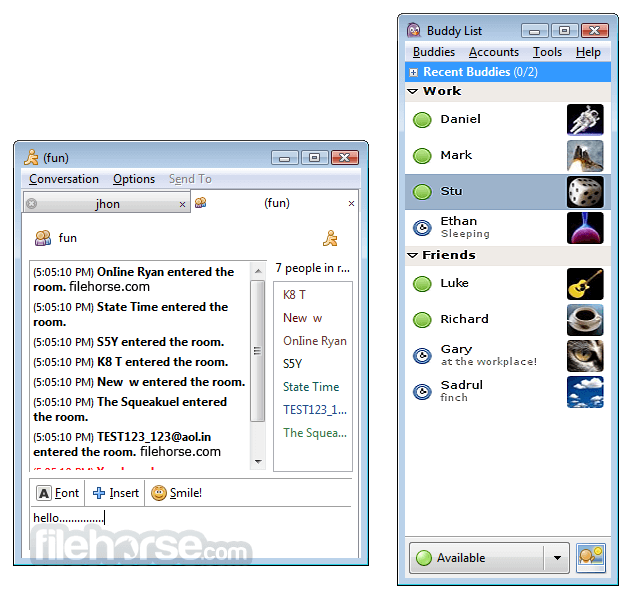

更新日誌
2.6.4 * libpurple
- Actually emit the hold signal for media calls.
- Fix building the GnuTLS plugin with older versions of GnuTLS.
- Fix DNS TXT query resolution.
- Don't send Proxy-Authorization headers to HTTP proxy servers until we've received a "407 Proxy Authentication Required" response from the server. (thecrux)
- Added "MXit" protocol plugin, supported and maintained by the MXit folks themselves (MXit Lifestyle (Pty) Ltd.)
* General
- New 'plugins' sub-command to 'debug' command (i.e. '/debug plugins') to announce the list of loaded plugins (in both Finch and Pidgin).
- Always rejoin open chats after an account reconnects.
* AIM and ICQ
- Better rate limit calculations and other improvements. (Aman Gupta)
- More detailed error messages when messages fail to send. (Aman Gupta)
- The simultaneous login account option is respected when using the clientLogin authentication method.
- Fix offline message retrieval (broken in 2.6.3)
- Fix handling of markup on some messages (broken in 2.6.2)
- Fix SSL when clientLogin is enabled.
- Fix sending and receiving Unicode characters in a Direct IM
* MSN
- Don't forget display names for buddies.
- Fix a random crash that might occur when idle.
- Fix more FQY 240 connection errors.
- Fix a crash that could occur when adding a buddy.
- Fix an occasional crash when sending message to an offline user.
- Fix a random crash that might occur when idle.
- Fix a crash when logging in with some long non-ASCII passwords. (Shaun Lindsay)
- Cache our own friendly name as the server no longer does that for us. Users of older versions may need to re-set their friendly name as it has probably been reset.
* XMPP
- Users connecting to Google Talk now have an "Initiate Chat" context menu option for their buddies. (Eion Robb)
- Fix a crash when attempting to validate an invalid JID.
- Resolve an issue when connecting to iChat Server when no resource is specified.
- Try to automatically find a STUN server by using an SRV lookup on the account's domain, and use that for voice and video if found and the user didn't set one manually in prefs.
- Fix a crash when adding a buddy without an '@'.
- Don't show the option to send a file to a buddy if we know for certain they don't support any file transfer method supported by libpurple.
- Keep the avatar on the server if one is not set locally.
* Yahoo
- Fix sending /buzz.
- Fix blocking behavior for federated (MSN/OCS/Sametime) service users. (Jason Cohen)
- Add support for adding OCS and Sametime buddies. OCS users are added as "ocs/user@…" and Sametime users are added as "ibm/sametime_id". (Jason Cohen)
* Finch
- The TinyURL plugin now creates shorter URLs for long non-conversation URLs, e.g. URLs to open Inbox in Yahoo/MSN protocols, or the Yahoo Captcha when joining chat rooms.
- Fix displaying umlauts etc. in non-utf8 locale (fix in libgnt).
* Pidgin
- The userlist in a multiuser chat can be styled via gtkrc by using the widget name "pidgin_conv_userlist". (Heiko Schmitt)
- Add a hold button to the media window.
- Fix a bug where the conversation backlog stops scrolling in a very busy chat room.
- In the Conversation "Send To" menu, offline buddies appear grayed out (but are still selectable). Previously, only offline buddies on accounts that do not support offline messaging appeared grayed out.
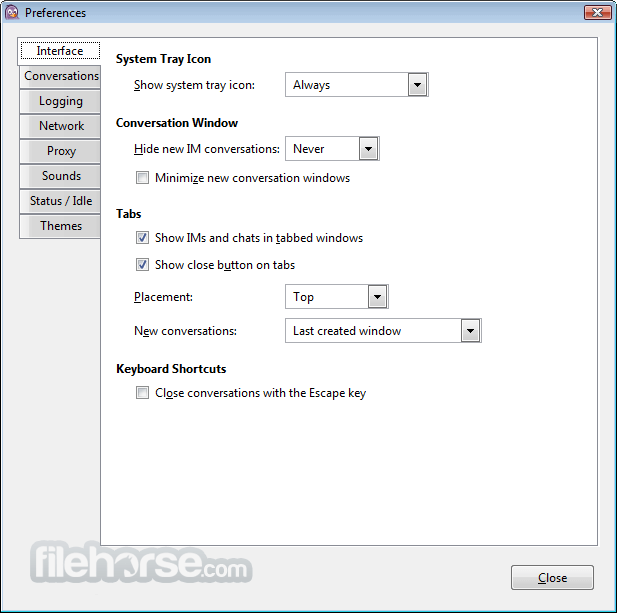
* Pidgin Preference and Preference Window Changes
- Removed the "Use font from theme" and "Conversation Font" preferences for everyone except Windows users. The font can be controlled from the Pidgin GTK+ Theme Control plugin.
- Tabs in the Preferences window are now on the left side.
- The Browser tab is now visible for GNOME users.
- Added a Proxy tab shown no matter what environment Pidgin runs in.
- The Browser and Proxy tabs show appropriate GNOME-specific messages and allow launching the correct applications to change the relevant GNOME preferences if found. These were previously together on the Network tab.
- Moved the port range spin buttons on the Network tab to be beside the checkbox that enables/disables them.
- Reorganized preferences on the Status/Idle tab to have one less "section."
- Reorganized preferences on the Sounds tab to have one less "section."
- Renamed Smiley Themes tab to Themes.
- Moved Buddy List Theme and Status Icon Theme selectors from Interface tab to Themes tab.
- Moved Sound Theme selector from Sounds tab to Themes tab.
- Changed the Smiley Theme selector to be consistent with the other theme selectors.
- Rearranged tabs such that Interface is first and all remaining tabs are alphabetized in English.
歷史版本
完整清單 →- 2026-02-17 Pidgin 2.14.14 30.85 MB
- 2024-02-24 Pidgin 2.14.13 30.84 MB
- 2023-01-02 Pidgin 2.14.12 33.39 MB
- 2022-06-03 Pidgin 2.14.10 33.49 MB
- 2022-04-29 Pidgin 2.14.9 33.48 MB
- 2021-10-15 Pidgin 2.14.8 33.49 MB
- 2021-09-17 Pidgin 2.14.7 33.48 MB
- 2021-07-09 Pidgin 2.14.6 33.49 MB