
Plotagon Studio 1.10.5
v 1.10.5- 目前版本1.10.5
- 更新日期2020-12-15
- 檔案大小612 MB
- 檔案名稱Plotagon+Studio-1-10-5.exe
- 作業系統Windows 7 / Windows 7 64 / Windows 8 / Windows 8 64 / Windows 10 / Windows 10 64
- 支援語系English
- 授權型式商業試用
- 開發商 Plotagon AB
- 軟體分類Windows 軟體 / 影片軟體
編輯短評
Plotagon Studio 是一款把文字直接轉成動畫影片的製作工具,核心概念是「打字就能演戲」——你輸入對白、選好角色與場景,程式就會自動生成角色嘴型與動作,省去逐格調整的繁瑣流程。它內建的角色、道具與背景素材庫相當豐富,讓沒有動畫基礎的人也能快速產出有模有樣的劇情短片。這套軟體由 Plotagon AB 開發,近年仍持續更新,在同類工具中屬於評價普遍不錯的熱門選擇,但整體定位偏向入門與快速產出,而非專業動畫軟體。
如果你需要替教學簡報、社群短片或內部溝通製作簡單的動畫說明,又不想花時間學專業動畫軟體,Plotagon Studio 會是順手的選擇。它與 KMPlayer 或 K-Lite 這類播放工具不同,是「創作端」的軟體,替代方案多半是其他動畫編輯器,取捨在於它犧牲了精細控制換取操作門檻低。要注意的是,目前僅提供英文介面,且為試用版授權,Windows 平台使用者可直接下載試用,但若需要完整功能或長期使用,得先確認授權方案是否符合需求。
軟體介紹
With its user-friendly interface and extensive library of characters, props, and backgrounds, it empowers users to unleash their creativity and produce professional-quality animations without the need for complex animation skills.
With Plotagon for Windows PC, you can turn ordinary text into video and communicate in a way that resonates. Converse with your audience using friendly, empathetic faces and familiar spaces. Show, don’t tell, with scenario-based instruction and demonstrations.
Convert written messages into memorable multimedia experiences. Turn ideas into animated videos. No experience required! Plotagon Studio for Desktop includes everything you need to get started.
Make your videos stand out with Plotagon Studio 3D animation app, including customizable characters and 200+ original scenes. Plotagon’s easy User Interface features point-and-click characters and drag-and-drop scripts. Start making animated videos in no time. Produce 3D animated videos in up to 4K resolution.
All your scripts and characters remain private, safe, and secure behind your encryption program, corporate network, or firewall. Make your movies with confidence that you comply with your company, industry, or government rules and regulations.
Highlights
- Original 3D scenes, characters, and clothing
- Friendly faces and stylish clothes to star in your movies
- Over 200 scenes, including offices, hospitals, schools, restaurants, and everyday life.
- Point and click to combine faces, hair, skin tones, and clothing into diverse characters
- Drag-and-drop interface. With no animation training, you can write your own scripts and watch them come to life
- Customize videos with background images, music, sound effects, and voice files
- Export stunning 4K resolution MP4 video
- Record your own voice or import voice recordings, and the app will automatically sync the characters’ lips to the sound of your voice — in any language. Also includes 2 lifelike digital voices.
- Downloadable application offers maximum performance and security
- Easily invite team members to join your account using our online admin portal.
- Collaborate with colleagues on Import/Export tools.
- Each license includes commercial rights to use your videos in public or to generate revenue.
- Export MP4 video in up to 4K resolution for use in e-learning courses, digital marketing, or display on screens large and small.
- Automatically include subtitles or closed captions for accessibility.
- Character Creator: Customize characters with a variety of facial expressions, gestures, and clothing options.
- Scene Builder: Choose from a range of pre-designed scenes or create your own custom backgrounds.
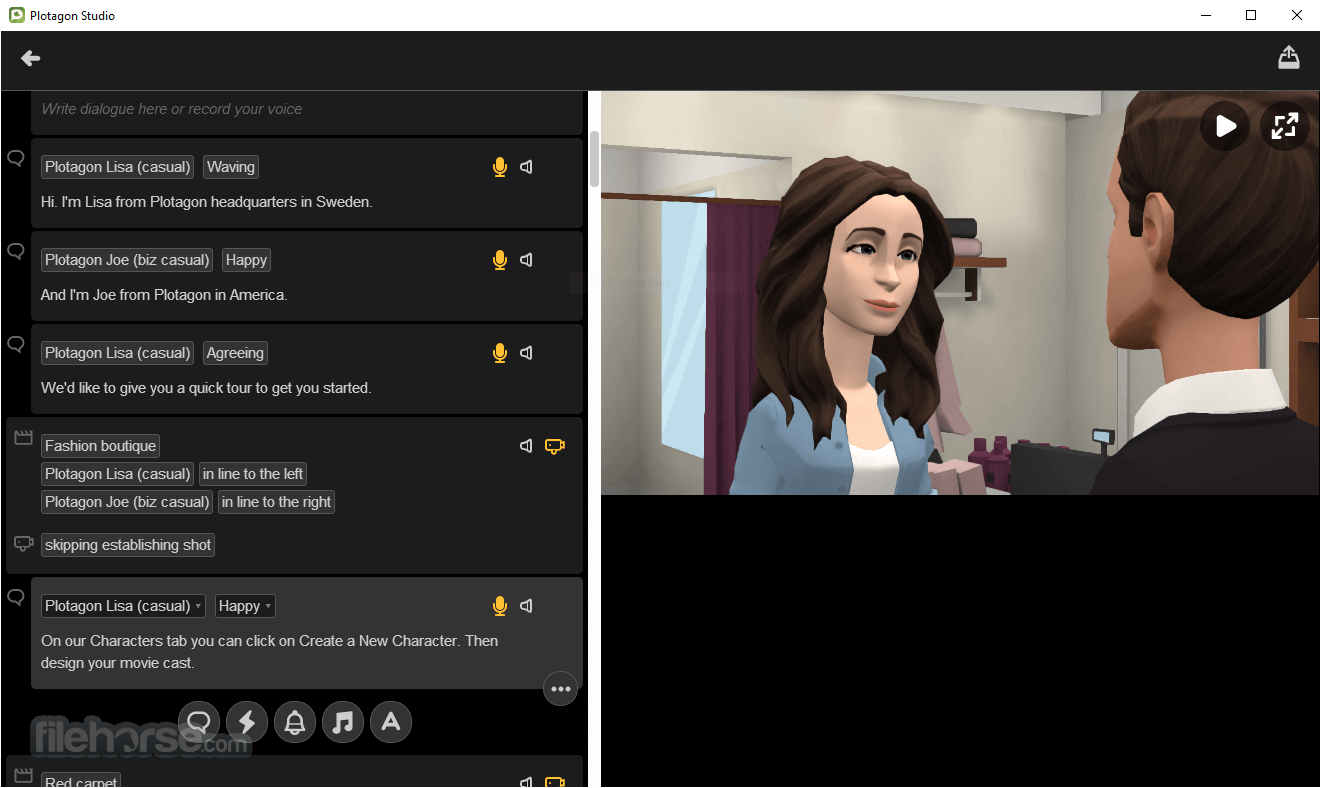
- Dialogue System: Write scripts and add voiceovers using the built-in text-to-speech feature or record your own voice.
- Animation Tools: Add gestures, movements, and emotions to characters to convey the desired tone and mood.
- Export Options: Export finished animations in various formats, including video files and GIFs, for easy sharing on social media platforms or websites.
It features a sleek and intuitive user interface that makes navigation and creation a breeze. The toolbar provides easy access to essential tools, while the drag-and-drop functionality simplifies the process of adding characters, props, and scenes to your storyboard.
Installation and Setup
Installing this program is straightforward. Simply download the software from the official website or FileHorse and follow the on-screen instructions to complete the installation process. Once installed, launch the application and sign in or create a new account to start creating animations.
How to Use
- Start by selecting a scene template or creating a custom background.
- Add characters to your scene and customize them to your liking.
- Write dialogue for your characters using the built-in text editor.
- Add gestures and movements to bring your characters to life.
- Preview your animation and make any necessary adjustments.
- Export your finished animation in your preferred format.
Can I add my own voice to the characters?
Yes, it allows users to record their own voiceovers or use the built-in text-to-speech feature.
Are there any limitations on the number of characters or scenes I can use?
It offers different subscription plans with varying limits on characters and scenes. Check the pricing section for more details.
Can I import custom props or backgrounds into Plotagon for PC?
Currently, it does not support importing custom props or backgrounds.
Is Plotagon suitable for professional use?
While Plotagon is primarily designed for amateur storytellers, it can also be used for professional purposes such as educational videos or marketing content.
Does Plotagon offer any tutorials or guides for beginners?
Yes, it provides tutorials and guides on its website to help users get started with the utility.
Alternatives
Animaker - An online animation software with a wide range of templates and animation effects.
Toon Boom Harmony - A professional animation software used by studios to create 2D animations.
Cartoon Animator - Professional 2D Creativity & Animation Design for Windows PC.
Vyond (formerly GoAnimate) - Vyond is another powerful animation tool that enables users to create professional-quality animations easily.
Pricing
It offers both Standard and Academic subscription plans. The Standard plan, available to individuals, nonprofit organizations, and government organizations, is priced at $7 per month. The Academic plan is available to faculty, staff, and students with a valid academic email, and is priced at $3 per month. Both plans provide access to the platform's features, with pricing tailored to different user groups.
System Requirements
- Operating System: Windows 11, 10, 8, or 7
- Processor: Intel Core i3 or equivalent
- RAM: 4GB or more
- Graphics: DirectX 10 compatible GPU
- Storage: 2GB of available space
PROS
- Intuitive user interface
- Extensive library of characters and scenes
- Text-to-speech feature for voiceovers
- Export options for various formats
- Suitable for both beginners and professionals
CONS
- Limited customization options for props and backgrounds
- Subscription-based pricing model
- Requires a stable internet connection for some features
- Lack of official support and updates
Conclusion
Overall, Plotagon is a versatile software application that simplifies the process of creating animated stories. With its user-friendly interface, extensive library of characters, and intuitive animation tools, it empowers users to unleash their creativity and produce professional-quality animations with ease.
Whether you're an aspiring filmmaker, educator, or content creator, it provides the tools you need to bring your stories to life in a visually engaging way.
Note: 7-day trial version.
Download Plotagon for PC Latest Version
Why is this app published on FileHorse? (More info)
畫面截圖
- 2026-05-05 Plotagon Studio 1.11.0 614 MB
- 2020-12-15 Plotagon Studio 1.10.5 612 MB