⚠ 這是歷史版本頁面 — 查看 PuTTY 0.84 (32-bit) 最新版本 →

PuTTY 0.78 (32-bit)
v 0.78 (32-bit)
Windows
開源軟體
7.8/10 (34)
- 目前版本0.78 (32-bit)
- 更新日期2022-10-30
- 檔案大小3.25 MB
- 檔案名稱putty-0.78-installer.msi
- 作業系統Windows 7 / Windows 8 / Windows 10
- 支援語系English
- 授權型式開源軟體
- 開發商 Simon Tatham
- 軟體分類Windows 軟體 / 檔案傳輸與網路
##
編輯短評
PuTTY 是長年維護的開源 Telnet 與 SSH 用戶端,同時具備 xterm 終端模擬功能,主要用來安全連線遠端伺服器或設備。它的最大辨識度在於輕量、跨平台,以及對加密協定的完整支援,雖然介面樸素,但穩定可靠,在同類工具中屬於經典的熱門選擇。開發者 Simon Tatham 持續維護,更新頻率不算高,但仍有定期釋出,評價普遍不錯,只是參與評分的人數不多。
這套軟體適合需要透過 SSH 或 Telnet 管理主機的系統管理員、開發者,以及使用序列埠連線嵌入式裝置的工程師。與 Internet Download Manager 或 uTorrent 等傳輸工具不同,PuTTY 專注於遠端終端連線,功能單純,沒有圖形化檔案傳輸介面,但資源占用極低。此版本僅提供英文介面,沒有中文版,下載時需留意平台與位元數相容性;授權為開源,可自由使用與散布。
##
翻譯排程處理中,以下暫以英文原文呈現
軟體介紹
PuTTY is a free implementation of Telnet and SSH for Windows and Unix platforms, along with an xterm terminal emulator. It is written and maintained primarily by Simon Tatham.
PuTTY 32bit is a free and open-source terminal emulator for Windows 11/10 and a network file transfer application. Its primary purpose is to provide a secure and reliable way to establish SSH, Telnet, and serial connections to remote servers and devices.
The tool is renowned for its lightweight nature, cross-platform compatibility, and robust encryption protocols, making it a go-to choice for anyone needing to access remote machines securely.
Main Features
SSH, Telnet, and Serial support: It provides support for secure shell (SSH), Telnet, and serial connections, making it versatile for connecting to various types of systems and devices.
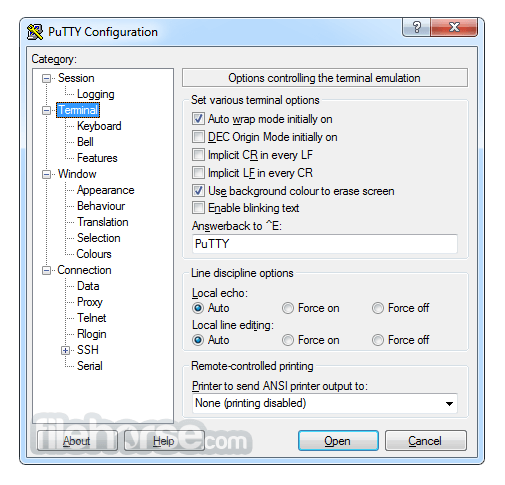
Terminal emulation: It emulates various terminal types, including VT100, VT102, VT220, and xterm, allowing you to work with different systems and applications as if you were using a physical terminal.
Portability: PuTTY is a standalone application and doesn't require installation. You can run it directly from an executable file, making it portable and easy to carry on a USB drive or other storage devices.
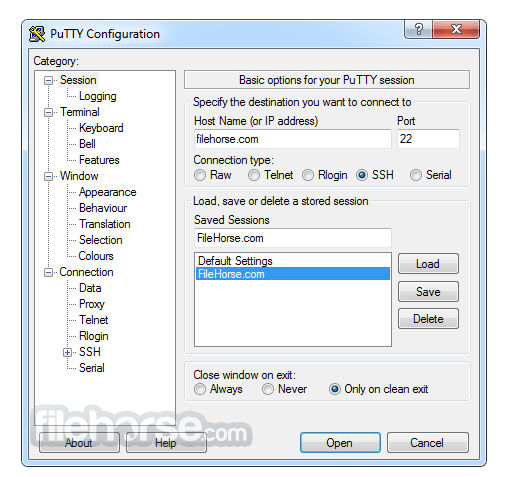
Session management: It allows you to save connection details and configurations as sessions, making it convenient to connect to frequently used hosts with specific settings.
Keyboard customization: You can customize keyboard shortcuts, control sequences, and key combinations to suit your preferences and work efficiently within the terminal.
X11 forwarding: It supports X11 forwarding, allowing you to run graphical applications on a remote server and display them on your local system.
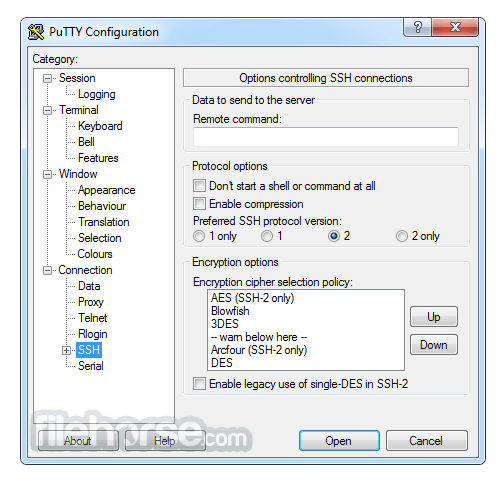
Secure connections: It uses encryption for SSH connections, providing a secure way to access remote systems and protect sensitive data during transmission.
Proxy support: It supports various proxy types (HTTP, SOCKS4, SOCKS5) for tunnelling connections through intermediary servers or firewalls.
SCP and SFTP support: The tool includes command-line tools (PSCP and PSFTP) for securely transferring files between your local system and remote servers using SCP (Secure Copy Protocol) and SFTP (SSH File Transfer Protocol).
SSH key management: PuTTYgen, a companion tool, allows you to generate, import, and manage SSH keys for secure authentication.
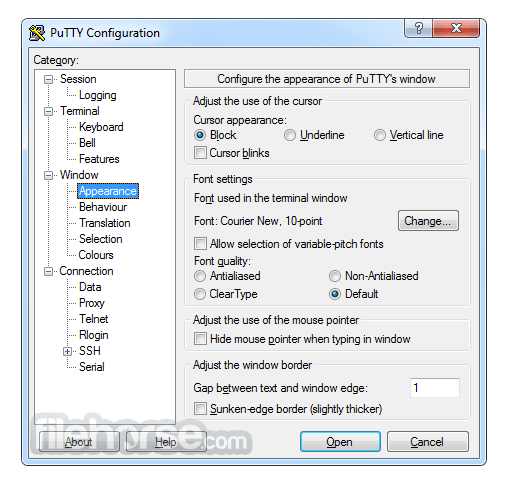
Configurability: The software offers extensive options and settings to customize your terminal environment, including text colors, fonts, window size, and behavior.
Multiple terminal windows: You can open multiple terminal windows within a single PuTTY instance, making it easy to multitask and manage multiple connections simultaneously.
UTF-8 support: It supports UTF-8 character encoding, enabling you to work with international character sets and languages.
Scripting and automation: It can be used in batch scripts or automated tasks, allowing you to automate repetitive tasks and interactions with remote systems.
Active development: The program is actively maintained and updated by the open-source community, ensuring compatibility with modern systems and security standards.
This download includes the following tools
What is PuTTY used for?
PuTTY is a free and open-source SSH and Telnet client primarily used to establish secure remote connections to servers, network devices, and other systems. It is widely used by system administrators and developers to manage Linux/Unix servers from Windows machines.
Is PuTTY secure for remote connections?
Yes. PuTTY supports SSH (Secure Shell), which encrypts communication between your computer and the remote server. When configured properly with key-based authentication, it provides a secure method for remote access and server management.
Does PuTTY require installation?
PuTTY is available both as a standard installer and as a standalone executable. The portable version can run without installation, making it convenient for technicians or users who need quick remote access without modifying the system.
Is PuTTY still relevant in 2026?
Yes. In 2026, PuTTY remains widely used due to its lightweight design, reliability, and open-source nature. Although modern alternatives exist, PuTTY continues to be a trusted tool for SSH connections, especially on Windows systems.
Alternatives
SecureCRT - A commercial terminal emulator with advanced features, including scripting and session management.
MobaXterm - A feature-rich terminal emulator and SSH client for Windows with built-in X11 support and remote desktop capabilities.
ZOC Terminal - Professional SSH, Telnet, Serial/Modem Terminal Emulator
PROS
Download PuTTY (32-bit) Latest Version Why is this app published on FileHorse? (More info)
PuTTY 32bit is a free and open-source terminal emulator for Windows 11/10 and a network file transfer application. Its primary purpose is to provide a secure and reliable way to establish SSH, Telnet, and serial connections to remote servers and devices.
The tool is renowned for its lightweight nature, cross-platform compatibility, and robust encryption protocols, making it a go-to choice for anyone needing to access remote machines securely.
Main Features
SSH, Telnet, and Serial support: It provides support for secure shell (SSH), Telnet, and serial connections, making it versatile for connecting to various types of systems and devices.
Terminal emulation: It emulates various terminal types, including VT100, VT102, VT220, and xterm, allowing you to work with different systems and applications as if you were using a physical terminal.
Portability: PuTTY is a standalone application and doesn't require installation. You can run it directly from an executable file, making it portable and easy to carry on a USB drive or other storage devices.
Session management: It allows you to save connection details and configurations as sessions, making it convenient to connect to frequently used hosts with specific settings.
Keyboard customization: You can customize keyboard shortcuts, control sequences, and key combinations to suit your preferences and work efficiently within the terminal.
X11 forwarding: It supports X11 forwarding, allowing you to run graphical applications on a remote server and display them on your local system.
Secure connections: It uses encryption for SSH connections, providing a secure way to access remote systems and protect sensitive data during transmission.
Proxy support: It supports various proxy types (HTTP, SOCKS4, SOCKS5) for tunnelling connections through intermediary servers or firewalls.
SCP and SFTP support: The tool includes command-line tools (PSCP and PSFTP) for securely transferring files between your local system and remote servers using SCP (Secure Copy Protocol) and SFTP (SSH File Transfer Protocol).
SSH key management: PuTTYgen, a companion tool, allows you to generate, import, and manage SSH keys for secure authentication.
Configurability: The software offers extensive options and settings to customize your terminal environment, including text colors, fonts, window size, and behavior.
Multiple terminal windows: You can open multiple terminal windows within a single PuTTY instance, making it easy to multitask and manage multiple connections simultaneously.
UTF-8 support: It supports UTF-8 character encoding, enabling you to work with international character sets and languages.
Scripting and automation: It can be used in batch scripts or automated tasks, allowing you to automate repetitive tasks and interactions with remote systems.
Active development: The program is actively maintained and updated by the open-source community, ensuring compatibility with modern systems and security standards.
This download includes the following tools
- PuTTY (the Telnet and SSH client itself)
- PSCP (an SCP client, i.e. command-line secure file copy)
- PSFTP (an SFTP client, i.e. general file transfer sessions much like FTP)
- PuTTYtel (a Telnet-only client)
- Plink (a command-line interface to the PuTTY back ends)
- Pageant (an SSH authentication agent for PuTTY, PSCP, and Plink)
- PuTTYgen (an RSA and DSA key generation utility).
What is PuTTY used for?
PuTTY is a free and open-source SSH and Telnet client primarily used to establish secure remote connections to servers, network devices, and other systems. It is widely used by system administrators and developers to manage Linux/Unix servers from Windows machines.
Is PuTTY secure for remote connections?
Yes. PuTTY supports SSH (Secure Shell), which encrypts communication between your computer and the remote server. When configured properly with key-based authentication, it provides a secure method for remote access and server management.
Does PuTTY require installation?
PuTTY is available both as a standard installer and as a standalone executable. The portable version can run without installation, making it convenient for technicians or users who need quick remote access without modifying the system.
Is PuTTY still relevant in 2026?
Yes. In 2026, PuTTY remains widely used due to its lightweight design, reliability, and open-source nature. Although modern alternatives exist, PuTTY continues to be a trusted tool for SSH connections, especially on Windows systems.
Alternatives
SecureCRT - A commercial terminal emulator with advanced features, including scripting and session management.
MobaXterm - A feature-rich terminal emulator and SSH client for Windows with built-in X11 support and remote desktop capabilities.
ZOC Terminal - Professional SSH, Telnet, Serial/Modem Terminal Emulator
PROS
- Free and open-source.
- Secure SSH and Telnet connections.
- Lightweight and resource-efficient.
- Cross-platform compatibility.
- Active community and regular updates.
- Versatile with scripting and automation capabilities.
- Basic user interface without advanced features.
- Limited to terminal emulation and network connections.
- May require additional tools for file transfers and other tasks.
Download PuTTY (32-bit) Latest Version Why is this app published on FileHorse? (More info)
##
畫面截圖
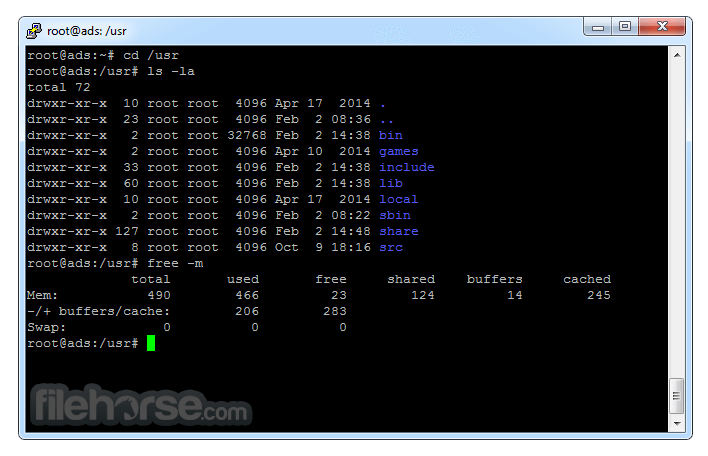
- 2026-05-22 PuTTY 0.84 (32-bit) 3.36 MB
- 2025-02-09 PuTTY 0.83 (32-bit) 3.35 MB
- 2024-11-28 PuTTY 0.82 (32-bit) 3.32 MB
- 2024-04-16 PuTTY 0.81 (32-bit) 3.27 MB
- 2023-12-19 PuTTY 0.80 (32-bit) 3.26 MB
- 2023-08-27 PuTTY 0.79 (32-bit) 3.26 MB
- 2022-10-30 PuTTY 0.78 (32-bit) 3.25 MB
- 2022-05-30 PuTTY 0.77 (32-bit) 3.04 MB