⚠ 這是歷史版本頁面 — 查看 Qt Creator 最新版本 →

Qt Creator 19.0.2
v 19.0.2
Windows
開源軟體
8.18/10 (109)
- 目前版本19.0.2
- 更新日期2026-05-13
- 檔案大小371 MB
- 檔案名稱qt-creator-opensource-windows-x86_64-19.0.2.exe
- 作業系統Windows 7 64 / Windows 8 64 / Windows 10 64 / Windows 11
- 支援語系English
- 授權型式開源軟體
- 開發商 The Qt Company
- 軟體分類Windows 軟體 / 開發者工具
##
編輯短評
Qt Creator 是專為 Qt 框架量身打造的整合開發環境,主要解決 C++ 開發者在建置 Qt 應用程式時,需要同時處理程式碼編輯、除錯、版本控制與 UI 設計的繁瑣流程。它最鮮明的特色是內建所見即所得的介面設計工具,讓開發者能直接在 IDE 中調整視窗元件,不必頻繁切換外部軟體。這套工具由 The Qt Company 長期維護,更新相當活躍,在同類開發者工具中屬於主流首選,評價普遍不錯。
這套軟體適合以 C++ 和 Qt 為主要技術棧的開發者,尤其是需要跨桌面、嵌入式或行動平台開發的專案。與 BlueStacks 或 Turbo C++ 等替代工具相比,Qt Creator 的取捨在於它深度綁定 Qt 生態系,若你的專案不使用 Qt 框架,學習效益會打折。它採用開源授權,對個人或商業使用都相對友善,但介面僅提供英文,且需留意 Windows 版本與其他平台的專案相容性,下載前建議先確認團隊的開發環境需求。
##
翻譯排程處理中,以下暫以英文原文呈現
軟體介紹
For developers working with C++ and Qt, having a robust and feature-rich integrated development environment (IDE) is essential.
Qt Creator is a powerful and versatile IDE for Windows specifically designed for building Qt applications.
It is widely used for desktop, embedded, and mobile application development, offering an intuitive interface and a strong set of features.
Qt Creator is an open-source IDE designed to streamline Qt application development across multiple platforms, including Windows, macOS, and Linux.
It provides code editing, debugging, version control, and UI design tools, making it a comprehensive solution for Qt-based software development.
With its CMake, QMake, and Meson support, it caters to developers working on both simple and complex projects.
Main Features
Cross-Platform Support – Develop and deploy applications on Windows, Linux, macOS, and embedded systems.
Advanced Code Editor – Syntax highlighting, auto-completion, refactoring tools, and smart indentation for C++, QML, JavaScript, and Python.
Integrated Debugger – Supports GDB, LLDB, and Microsoft Debugger for seamless debugging of C++ applications.
Graphical UI Designer – Drag-and-drop UI design with Qt Quick Designer and Qt Widgets.
Built-in Version Control – Integration with Git, Subversion, and Perforce.
Project Management – Supports multiple build systems like CMake, QMake, and Meson.
Embedded Development – Debug and deploy applications for embedded platforms like Raspberry Pi and MCUs.
User Interface
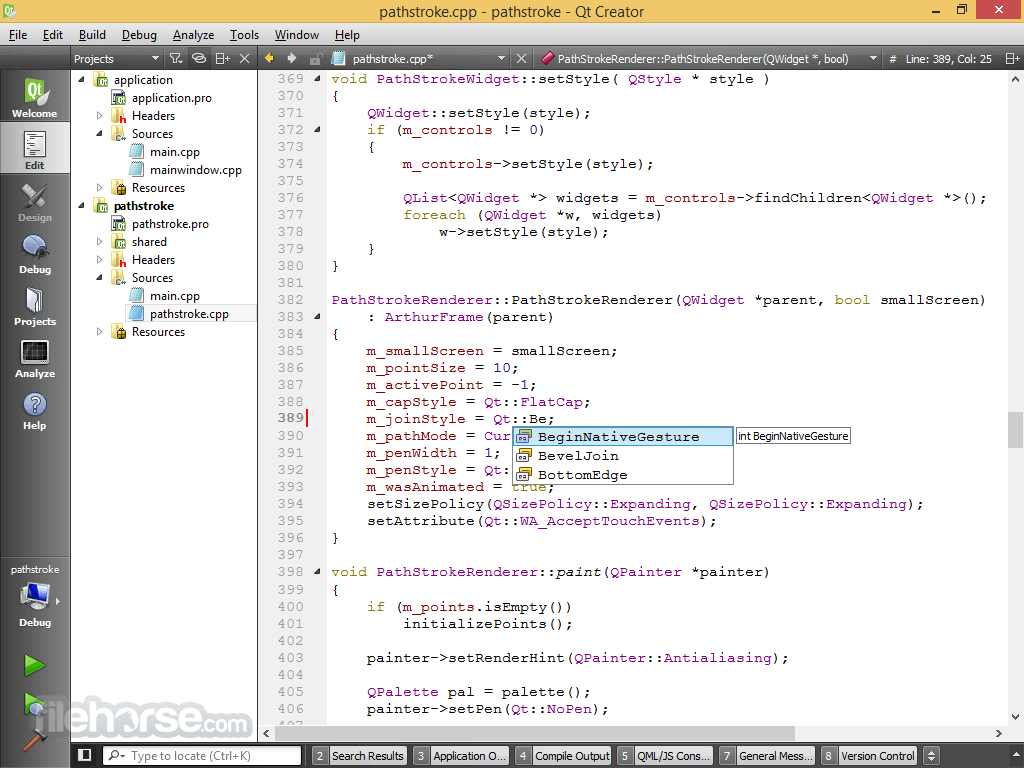
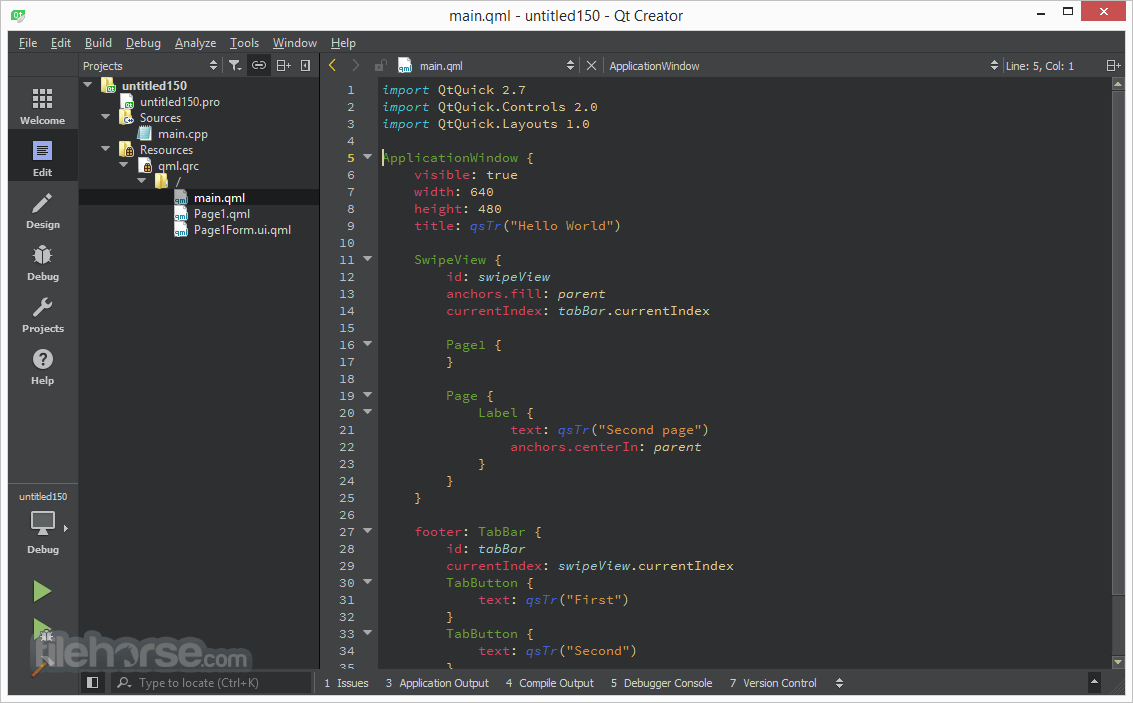
Qt Creator features a clean and modern interface designed for efficiency. The IDE includes a split-pane view for working on multiple files simultaneously and provides customizable layouts.
It also features a powerful search and navigation system, making it easy to locate files, classes, and functions.
Installation and Setup
Create a New Project – Use the project wizard to start a new Qt Widgets or Qt Quick application.
Write Code – Utilize the advanced editor with syntax highlighting and code completion.
Design UI – Use the drag-and-drop UI designer for easy interface building.
Compile & Build – Choose a build configuration and compile your project.
Debug & Test – Use the integrated debugger to troubleshoot issues.
Deploy – Package and deploy your application to the target platform.
FAQ
Is Qt Creator free?
Yes, this program is open-source, but the Qt framework has both free and commercial licensing options.
Can I use Qt Creator for Python development?
Yes, it supports Python with PyQt and PySide, but C++ is its primary language.
Does Qt Creator support CMake?
Yes, it fully supports CMake, making it compatible with modern C++ projects.
Can I use Qt Creator for non-Qt projects?
Yes, you can use Qt Creator as a general C++ IDE even for non-Qt applications.
Is Qt Creator good for beginners?
While Qt Creator is feature-rich, beginners may find it complex compared to simpler IDEs like Eclipse or Visual Studio Code.
Alternatives
Microsoft Visual Studio – A popular C++ IDE with powerful debugging tools.
Eclipse IDE – A versatile, extensible C++ IDE.
Pricing
Open-Source Version – Free for personal and non-commercial use.
Commercial License – Pricing varies depending on Qt Company’s licensing model for professional developers.
System Requirements
Qt Creator is a powerful, cross-platform IDE that excels in Qt and C++ development. With an intuitive code editor, robust debugging tools, and excellent UI design capabilities, it is the preferred choice for developers working on Qt applications. While it may have a steeper learning curve for beginners, it provides all the necessary tools to build, test, and deploy high-quality software.
Download Qt Creator Latest Version Why is this app published on FileHorse? (More info)
Qt Creator is a powerful and versatile IDE for Windows specifically designed for building Qt applications.
It is widely used for desktop, embedded, and mobile application development, offering an intuitive interface and a strong set of features.
Qt Creator is an open-source IDE designed to streamline Qt application development across multiple platforms, including Windows, macOS, and Linux.
It provides code editing, debugging, version control, and UI design tools, making it a comprehensive solution for Qt-based software development.
With its CMake, QMake, and Meson support, it caters to developers working on both simple and complex projects.
Main Features
Cross-Platform Support – Develop and deploy applications on Windows, Linux, macOS, and embedded systems.
Advanced Code Editor – Syntax highlighting, auto-completion, refactoring tools, and smart indentation for C++, QML, JavaScript, and Python.
Integrated Debugger – Supports GDB, LLDB, and Microsoft Debugger for seamless debugging of C++ applications.
Graphical UI Designer – Drag-and-drop UI design with Qt Quick Designer and Qt Widgets.
Built-in Version Control – Integration with Git, Subversion, and Perforce.
Project Management – Supports multiple build systems like CMake, QMake, and Meson.
Embedded Development – Debug and deploy applications for embedded platforms like Raspberry Pi and MCUs.
User Interface
Qt Creator features a clean and modern interface designed for efficiency. The IDE includes a split-pane view for working on multiple files simultaneously and provides customizable layouts.
It also features a powerful search and navigation system, making it easy to locate files, classes, and functions.
Installation and Setup
- Download Qt Creator from the official Qt website.
- Run the installer and select the required Qt components and dependencies.
- Configure the build environment (choose CMake, QMake, or another build system).
- Set up compilers and debuggers (MinGW, MSVC, Clang, etc.).
- Start coding your Qt-based applications.
Create a New Project – Use the project wizard to start a new Qt Widgets or Qt Quick application.
Write Code – Utilize the advanced editor with syntax highlighting and code completion.
Design UI – Use the drag-and-drop UI designer for easy interface building.
Compile & Build – Choose a build configuration and compile your project.
Debug & Test – Use the integrated debugger to troubleshoot issues.
Deploy – Package and deploy your application to the target platform.
FAQ
Is Qt Creator free?
Yes, this program is open-source, but the Qt framework has both free and commercial licensing options.
Can I use Qt Creator for Python development?
Yes, it supports Python with PyQt and PySide, but C++ is its primary language.
Does Qt Creator support CMake?
Yes, it fully supports CMake, making it compatible with modern C++ projects.
Can I use Qt Creator for non-Qt projects?
Yes, you can use Qt Creator as a general C++ IDE even for non-Qt applications.
Is Qt Creator good for beginners?
While Qt Creator is feature-rich, beginners may find it complex compared to simpler IDEs like Eclipse or Visual Studio Code.
Alternatives
Microsoft Visual Studio – A popular C++ IDE with powerful debugging tools.
Eclipse IDE – A versatile, extensible C++ IDE.
Pricing
Open-Source Version – Free for personal and non-commercial use.
Commercial License – Pricing varies depending on Qt Company’s licensing model for professional developers.
System Requirements
- OS: Windows 10/11 (64-bit)
- Processor: Intel or AMD (x86_64 architecture)
- RAM: 4GB (8GB recommended)
- Disk Space: 2GB minimum
- Graphics: OpenGL 2.0 support required for Qt Quick applications
- Excellent Qt integration for rapid development
- Cross-platform support for Windows, Linux, and macOS
- Powerful code editor with auto-completion and debugging tools
- Great UI design tools for Qt Widgets and Qt Quick
- Good support for embedded and mobile development
- The free version lacks some commercial features
- Limited third-party plugin ecosystem compared to Visual Studio
- Can be resource-intensive for large projects
- Commercial licensing can be expensive for professional use
Qt Creator is a powerful, cross-platform IDE that excels in Qt and C++ development. With an intuitive code editor, robust debugging tools, and excellent UI design capabilities, it is the preferred choice for developers working on Qt applications. While it may have a steeper learning curve for beginners, it provides all the necessary tools to build, test, and deploy high-quality software.
Download Qt Creator Latest Version Why is this app published on FileHorse? (More info)
##
畫面截圖
- 2026-07-31 Qt Creator 20.0.1 381 MB
- 2026-06-17 Qt Creator 20.0.0 382 MB
- 2026-05-13 Qt Creator 19.0.2 371 MB
- 2026-04-24 Qt Creator 19.0.1 371 MB
- 2026-03-12 Qt Creator 19.0.0 367 MB
- 2026-01-26 Qt Creator 18.0.2 360 MB
- 2025-12-11 Qt Creator 18.0.1 360 MB
- 2025-10-30 Qt Creator 18.0.0 360 MB