⚠ 這是歷史版本頁面 — 查看 QTranslate 最新版本 →

- 目前版本6.8.0.1
- 更新日期2020-09-22
- 檔案大小1003.86 KB
- 檔案名稱QTranslate.6.8.0.1.exe
- 作業系統Windows XP / Vista / Windows 7 / Windows 8 / Windows 10
- 支援語系English
- 授權型式免費軟體
- 開發商 QuestSoft
- 軟體分類Windows 軟體 / 辦公商務
##
編輯短評
QTranslate 是一款專為 Windows 設計的免費翻譯小工具,核心用法是選取文字後按下快捷鍵,即可在彈出視窗或主視窗中快速查看翻譯結果,省去切換視窗或複製貼上的麻煩。除了翻譯,它還支援朗讀文字與字典查詢,並可手動輸入內容,功能相當集中。這款軟體過去評價普遍不錯,但開發商已停止更新,屬於小眾但實用的工具,使用時需留意其維護狀態。
它特別適合需要頻繁查閱外文文件、網頁或程式的使用者,尤其是偏好鍵盤操作、追求效率的人。與其他翻譯軟體相比,QTranslate 的優勢在於輕量與快捷,但因為已停止更新,可能無法應對新版作業系統或線上翻譯服務的變動。軟體本身免費,僅提供 Windows 版本,介面為英文,使用上沒有語言障礙,但若仰賴最新翻譯引擎,建議搭配其他持續維護的替代方案。
##
翻譯排程處理中,以下暫以英文原文呈現
軟體介紹
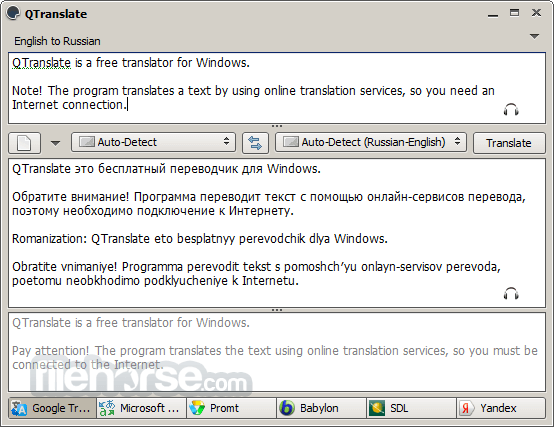
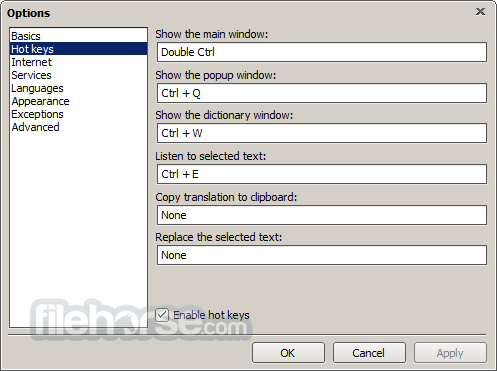
QTranslate is a free translator for Windows. With this small app, you simply select the text you want to translate and then press the hotkey (Ctrl+Q to show translation in the pop-up window or Double Ctrl click to show the translation in the main window).
Note: This product is discontinued.
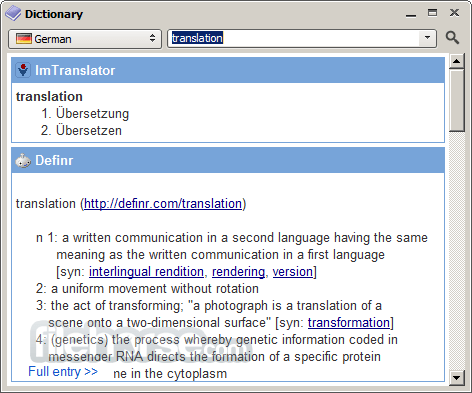
QTranslate for PC can also speak text Ctrl+E and perform a dictionary search Ctrl+Shift+Q. Also, you can open the main window and type text manually.
QTranslate is a versatile translation tool for Windows users, designed to facilitate seamless translation between languages. Developed by QuestSoft, it offers a range of features aimed at making translation tasks efficient and accessible to users of all levels.
The following translation services are supported:
It boasts a simple and intuitive user interface. Upon launching the application, users are greeted with a compact window that provides access to all essential features.
The interface is clean, with translation options prominently displayed, making it easy for users to navigate and perform translation tasks without any hassle.
Installation and Setup
Installing this program is a straightforward process. Users can download the installation package from the official website (if it still exists) or trusted sources like FileHorse.
The setup wizard guides users through the installation steps, and the software can be up and running within minutes. Additionally, it offers portable versions for users who prefer not to install software on their system.
How to Use
Can I translate text from any application?
Yes, it allows you to translate text from any application by simply copying it to the clipboard.
Is QTranslate for PC compatible with offline translation?
No, it requires an internet connection as it relies on online translation services.
Can I customize the hotkeys for translation?
Absolutely, it offers customizable hotkeys, allowing users to define their preferred shortcuts for translation.
Does QTranslate support translation of entire documents?
While the app primarily focuses on text translation, users can copy and paste content from documents into the application for translation.
Is QTranslate available for platforms other than Windows?
Unfortunately, the translation tool is currently only available for Windows operating systems.
Alternatives
Google Translate - Google Translate is a popular web-based translation service offering similar features to this app. It supports a wide range of languages and provides translation for text, documents, and even real-time conversations.
DeepL Translator - DeepL Translator is known for its high-quality translations powered by artificial intelligence. It offers a user-friendly interface and supports the translation of text, documents, and websites.
Pricing
The program is available for 100% FREE, making it an attractive option for users looking for a cost-effective translation solution. There are no hidden fees or subscription plans, and users can enjoy all features without any limitations.
System Requirements
Download QTranslate Latest Version Why is this app published on FileHorse? (More info)
Note: This product is discontinued.
QTranslate for PC can also speak text Ctrl+E and perform a dictionary search Ctrl+Shift+Q. Also, you can open the main window and type text manually.
QTranslate is a versatile translation tool for Windows users, designed to facilitate seamless translation between languages. Developed by QuestSoft, it offers a range of features aimed at making translation tasks efficient and accessible to users of all levels.
The following translation services are supported:
- Google Translate
- Bing Translator
- Promt
- Babylon
- SDL FreeTranslation.com
- Yandex.Translate
- youdao
- Baidu
- Naver
- Text translation in any application that supports text selection
- Speech recognition
- Image text recognition (OCR API provided by OCR.SPACE)
- Text-to-speech synthesis
- Search in online dictionaries
- Search in offline XDXF dictionaries
- Spell checking
- Word suggestion/autocomplete
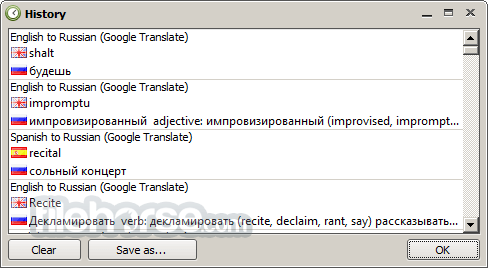
- History of translations
- Virtual keyboard
- Multiple Translation Engines: It integrates with various translation services, including Google Translate, Microsoft Translator, Yandex Translate, and Babylon, allowing users to choose their preferred engine.
- Text Translation: Users can translate text instantly by simply selecting and copying it to the clipboard, or by typing directly into the application's interface.
- Translation Hotkeys: It offers customizable hotkeys for quick translation, making the process even more efficient.
- Dictionary and Thesaurus: The software includes built-in dictionaries and thesauruses, enabling users to look up definitions, synonyms, and antonyms in multiple languages.
- Text-to-Speech (TTS): It supports text-to-speech functionality, allowing users to listen to translated text in various languages.
It boasts a simple and intuitive user interface. Upon launching the application, users are greeted with a compact window that provides access to all essential features.
The interface is clean, with translation options prominently displayed, making it easy for users to navigate and perform translation tasks without any hassle.
Installation and Setup
Installing this program is a straightforward process. Users can download the installation package from the official website (if it still exists) or trusted sources like FileHorse.
The setup wizard guides users through the installation steps, and the software can be up and running within minutes. Additionally, it offers portable versions for users who prefer not to install software on their system.
How to Use
- Launch the program.
- Select the text you want to translate or type it directly into the provided field.
- Choose the target language.
- Click on the translation engine or use the hotkey to initiate the translation.
- View the translated text along with relevant options such as dictionary lookup and text-to-speech.
Can I translate text from any application?
Yes, it allows you to translate text from any application by simply copying it to the clipboard.
Is QTranslate for PC compatible with offline translation?
No, it requires an internet connection as it relies on online translation services.
Can I customize the hotkeys for translation?
Absolutely, it offers customizable hotkeys, allowing users to define their preferred shortcuts for translation.
Does QTranslate support translation of entire documents?
While the app primarily focuses on text translation, users can copy and paste content from documents into the application for translation.
Is QTranslate available for platforms other than Windows?
Unfortunately, the translation tool is currently only available for Windows operating systems.
Alternatives
Google Translate - Google Translate is a popular web-based translation service offering similar features to this app. It supports a wide range of languages and provides translation for text, documents, and even real-time conversations.
DeepL Translator - DeepL Translator is known for its high-quality translations powered by artificial intelligence. It offers a user-friendly interface and supports the translation of text, documents, and websites.
Pricing
The program is available for 100% FREE, making it an attractive option for users looking for a cost-effective translation solution. There are no hidden fees or subscription plans, and users can enjoy all features without any limitations.
System Requirements
- Operating System: Windows 7/8/10/11
- Processor: Intel Pentium 4 or later
- RAM: 512MB or higher
- Disk Space: 20MB of free space
- Intuitive user interface
- Integration with multiple translation engines
- Customizable hotkeys for quick translation
- Built-in dictionaries and thesauruses
- Text-to-speech functionality
- This application has been discontinued
- Limited to the Windows platform
- Requires an internet connection for translation
Download QTranslate Latest Version Why is this app published on FileHorse? (More info)
##
畫面截圖
- 2026-03-20 QTranslate 6.10.0 908.92 KB
- 2021-08-30 QTranslate 6.9.0 1010.09 KB
- 2020-09-22 QTranslate 6.8.0.1 1003.86 KB
- 2020-09-21 QTranslate 6.8.0 1004.3 KB
- 2020-03-19 QTranslate 6.7.5.1 994.3 KB