⚠ 這是歷史版本頁面 — 查看 RAMDisk 4.4.0 RC 最新版本 →

- 目前版本17
- 更新日期2011-01-06
- 檔案大小2.98 MB
- 檔案名稱Dataram_RAMDisk_V3.5.130R17.msi
- 作業系統Windows XP / Vista / Windows 7 / Windows 8
- 支援語系English
- 授權型式試用版
- 開發商 Dataram
- 軟體分類Windows 軟體 / 系統優化
##
編輯短評
RAMDisk 是一款把系統記憶體劃出一部分當作虛擬磁碟機使用的工具,核心價值在於利用記憶體遠高於傳統硬碟的讀寫速度,來加速特定應用程式的運作。它的辨識度在於操作直覺,只要電腦記憶體夠大,就能建立容量可觀的虛擬磁碟,特別適合處理那些體積不大、卻極度依賴磁碟讀寫效能的程式。這款軟體目前已被開發商停止積極維護與銷售,但檔案仍可下載使用,屬於同類工具中的小眾選擇,評價人數不多,整體評價中等偏上。
它適合進階使用者,尤其是當你手上剛好有「小到能放進記憶體、卻又卡在磁碟效能」的應用,例如暫存檔、瀏覽器快取或遊戲模擬器。與同分類的熱門工具相比,RAMDisk 專注在記憶體虛擬磁碟這個單一功能,不像 Rufus 或 Glary Utilities 涵蓋其他系統工具,取捨上更為單純。需要注意的是,它為試用版、僅提供英文介面,且因停止更新,在新版 Windows 上可能遇到相容性問題,使用前最好先確認你的系統環境能否正常運作。
##
翻譯排程處理中,以下暫以英文原文呈現
軟體介紹
RAMDisk is a free app that takes a portion of your system memory and uses it as a disk drive. The more RAM your Windows computer has, the larger the RAM Disk you can create.
Note: This software is no longer actively supported or sold by its developer, but it may still be available for download and can be used.
The program is the right product for you if you have a disk I/O bound application that is small enough to fit in main memory.
A powerful utility software that transforms a portion of your computer's RAM into a virtual disk drive.
This innovative tool leverages the blazing-fast read and write speeds of your computer's memory to significantly enhance performance and efficiency for various tasks.
RAMDisk for PC is also great for storing frequently accessed data such as temp files, page files, and database index files.
It is offered as "freeware" for personal use and will allow you to create disks up to 1 GB in size. Some features are not enabled and require the purchase of a license key to be enabled. For personal use only.
Most users use RAMDisk to speed up applications like:
It boasts an intuitive and user-friendly interface, allowing users to effortlessly create, manage, and optimize virtual disk drives. The software's clean layout and straightforward controls make it accessible to users of all skill levels.
Installation and Setup
Installing this tool is a breeze, thanks to its streamlined installation process. Users can simply download the software from the official website or FileHorse and follow the step-by-step instructions provided in the setup wizard. Within minutes, it can be up and running on your system, ready to supercharge your PC's performance.
How to Use
Can I use RAMDisk to accelerate specific applications?
Yes, it can be configured to allocate dedicated memory for individual applications, resulting in faster loading times and improved responsiveness.
Will data stored in RAMDisk be retained after system shutdown?
It offers both persistent and volatile storage options. Persistent storage ensures that data remains intact even after system restarts, while volatile storage clears data upon shutdown.
What happens if I allocate more RAM than my system has available?
The tool dynamically manages RAM resources, ensuring optimal performance without exceeding available memory capacity. However, allocating excessive RAM may impact overall system stability.
Can RAMDisk be used in conjunction with existing storage drives?
Yes, it seamlessly integrates with traditional storage devices, allowing users to leverage the benefits of high-speed RAM alongside standard HDDs or SSDs.
Is RAMDisk compatible with virtualization software?
RAMDisk is compatible with popular virtualization platforms such as VMware and VirtualBox, enabling enhanced performance for virtual machines and hypervisor environments.
Pricing
RAMDisk was once a powerful utility for users looking to boost performance by leveraging system memory for ultra-fast storage. It offered noticeable improvements in load times and workflow efficiency, particularly for advanced users and specific high-performance scenarios.
However, since the application is no longer actively developed or supported, it cannot be considered a long-term or future-proof solution. While it may still function in certain environments, users should carefully evaluate compatibility and security considerations before relying on it today, and may want to explore actively maintained alternatives for sustained performance optimization.
Note: 4 GB disk size limit. Disks larger than 4 GB require registration and a license that can be purchased.
Download RAMDisk Latest Version Why is this app published on FileHorse? (More info)
Note: This software is no longer actively supported or sold by its developer, but it may still be available for download and can be used.
The program is the right product for you if you have a disk I/O bound application that is small enough to fit in main memory.
A powerful utility software that transforms a portion of your computer's RAM into a virtual disk drive.
This innovative tool leverages the blazing-fast read and write speeds of your computer's memory to significantly enhance performance and efficiency for various tasks.
RAMDisk for PC is also great for storing frequently accessed data such as temp files, page files, and database index files.
It is offered as "freeware" for personal use and will allow you to create disks up to 1 GB in size. Some features are not enabled and require the purchase of a license key to be enabled. For personal use only.
Most users use RAMDisk to speed up applications like:
- Games
- Internet Explorer cache for faster web surfing
- Audio and Video editing
- CAD programs
- Software compilers
- Databases
- Speeding up CD duplication
- SETI processing
- TEMP files
- Swap space
- Web server cache
- Custom applications with high I/O, high bandwidth, or high-security requirements
- Utilizes RAM as a high-speed storage medium.
- Supports creation of virtual disk drives with customizable sizes.
- Boosts application loading times and overall system performance.
- Enables faster data access and transfer speeds.
- Provides options for persistent or volatile disk storage.
- Supports dynamic allocation of RAM resources.
- Offers seamless integration with Windows operating systems.
- Compatible with a wide range of applications and workflows.
It boasts an intuitive and user-friendly interface, allowing users to effortlessly create, manage, and optimize virtual disk drives. The software's clean layout and straightforward controls make it accessible to users of all skill levels.
Installation and Setup
Installing this tool is a breeze, thanks to its streamlined installation process. Users can simply download the software from the official website or FileHorse and follow the step-by-step instructions provided in the setup wizard. Within minutes, it can be up and running on your system, ready to supercharge your PC's performance.
How to Use
- Launch the app after installation.
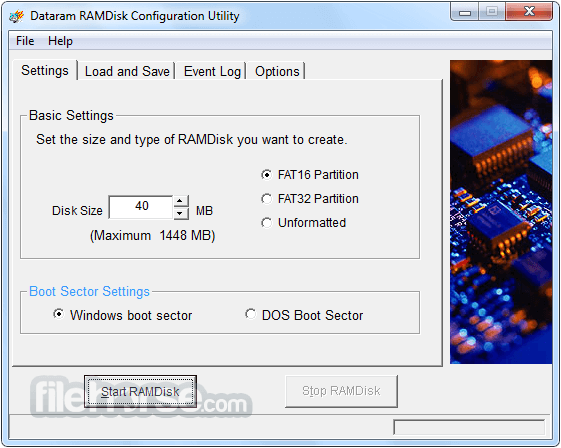
- Select the desired amount of RAM to allocate for the virtual disk drive.
- Customize disk settings such as size, file system, and persistence.
- Click "Create Disk" to generate the virtual drive.
- Mount the newly created disk and start using it for enhanced performance.
Can I use RAMDisk to accelerate specific applications?
Yes, it can be configured to allocate dedicated memory for individual applications, resulting in faster loading times and improved responsiveness.
Will data stored in RAMDisk be retained after system shutdown?
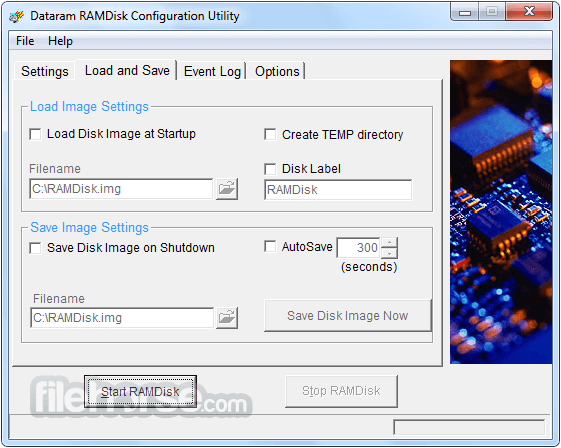
It offers both persistent and volatile storage options. Persistent storage ensures that data remains intact even after system restarts, while volatile storage clears data upon shutdown.
What happens if I allocate more RAM than my system has available?
The tool dynamically manages RAM resources, ensuring optimal performance without exceeding available memory capacity. However, allocating excessive RAM may impact overall system stability.
Can RAMDisk be used in conjunction with existing storage drives?
Yes, it seamlessly integrates with traditional storage devices, allowing users to leverage the benefits of high-speed RAM alongside standard HDDs or SSDs.
Is RAMDisk compatible with virtualization software?
RAMDisk is compatible with popular virtualization platforms such as VMware and VirtualBox, enabling enhanced performance for virtual machines and hypervisor environments.
Pricing
- Extreme Plan - Up to 64 GB! - $21.99 USD
- Business Plan - Licenses start at just $39 USD
- Lite Plan - Up to 12 GB! - $12.99 USD
- Operating System: Windows 7/8/10/11 (32-bit or 64-bit)
- Processor: Intel or AMD compatible CPU
- RAM: Minimum 512MB (2GB or more recommended)
- Disk Space: 10MB for installation
- Lightning-fast performance
- Enhanced system responsiveness
- Reduced disk access time
- Efficient caching of frequently accessed data
- Increased data security
- This app has been discontinued
- Limited storage capacity
- Temporary data storage only
- High memory usage
RAMDisk was once a powerful utility for users looking to boost performance by leveraging system memory for ultra-fast storage. It offered noticeable improvements in load times and workflow efficiency, particularly for advanced users and specific high-performance scenarios.
However, since the application is no longer actively developed or supported, it cannot be considered a long-term or future-proof solution. While it may still function in certain environments, users should carefully evaluate compatibility and security considerations before relying on it today, and may want to explore actively maintained alternatives for sustained performance optimization.
Note: 4 GB disk size limit. Disks larger than 4 GB require registration and a license that can be purchased.
Download RAMDisk Latest Version Why is this app published on FileHorse? (More info)
##
畫面截圖
- 2026-03-03 RAMDisk 4.4.0 RC 36 7.11 MB
- 2015-07-30 RAMDisk 4.4.0 RC 34 6.94 MB
- 2015-03-09 RAMDisk 4.4.0 RC 33 6.38 MB
- 2013-04-26 RAMDisk 4.1.0 RC 24 3.16 MB
- 2013-04-15 RAMDisk 4.1.0 RC 23 3.16 MB
- 2013-03-05 RAMDisk 4.0.5 RC 0 5.31 MB
- 2013-01-23 RAMDisk 4.0.4 RC 2 5.31 MB
- 2012-12-13 RAMDisk 4.0.1 RC 9 5.32 MB