⚠ 這是歷史版本頁面 — 查看 Realtek High Definition Audio 2.74 (XP) 最新版本 →

Realtek High Definition Audio 2.68 (XP)
v 2.68 (XP)
Windows
免費軟體
7.62/10 (200)
- 目前版本2.68 (XP)
- 更新日期2012-04-02
- 檔案大小31.06 MB
- 檔案名稱WDM_R268.exe
- 作業系統Windows XP / Vista
- 支援語系English
- 授權型式免費軟體
- 開發商 Realtek
- 軟體分類Windows 軟體 / 驅動程式
##
編輯短評
Realtek High Definition Audio 是瑞昱半導體為 Windows XP 系統推出的音效驅動程式,主要解決主機板內建音效晶片在舊系統上的相容性問題。這套驅動支援微軟的 UAA 通用音效架構,最高可提供 10 個 DAC 通道,同時對應 7.1 聲道播放與前置面板的雙聲道獨立輸出,並內建混音、靜音與細部增益控制,搭配 Realtek HD Audio Manager 管理介面,算是老 XP 機器上相當完整的音效解決方案。此軟體在站上收錄多年,近期仍有更新,評價普遍不錯,在同類驅動程式中屬於熱門選擇。
這套驅動適合還在用 Windows XP 的老電腦使用者,尤其是主機板內建瑞昱音效晶片、但系統音效異常或需要多聲道輸出的場合。與 Vista 版或 Intel 無線驅動等替代方案相比,XP 版專注於舊系統的穩定支援,功能上較為精簡,但對老硬體來說反而更單純可靠。需要注意的是,此版本僅提供英文介面,沒有中文版,安裝時若遇到語系問題需自行對照;授權為免費軟體,可直接下載使用,免安裝版則需另尋管道。
##
翻譯排程處理中,以下暫以英文原文呈現
軟體介紹
The Realtek High Definition Audio XP codecs are compliant with Microsoft's UAA (Universal Audio Architecture). The top series provides 10 DAC channels that simultaneously support 7.1 sound playback, plus 2 channels of independent stereo sound output (multiple streaming) through the front panel stereo output.
Flexible mixing, mute, and fine gain control functions provide a complete integrated audio solution for home entertainment PCs. Use Realtek HD Audio Manager to boost your Windows PC Sound!
Realtek High Definition Audio (XP) refers to the audio driver software developed by Realtek Semiconductor Corp. for use with the Microsoft Windows XP operating system. This software is designed to provide high-quality audio playback and recording capabilities for computers running Windows XP.
Main Features
Audio Driver: It includes the necessary drivers and software components to enable and manage audio devices on a Windows XP-based computer. It supports a wide range of audio codecs and hardware configurations.
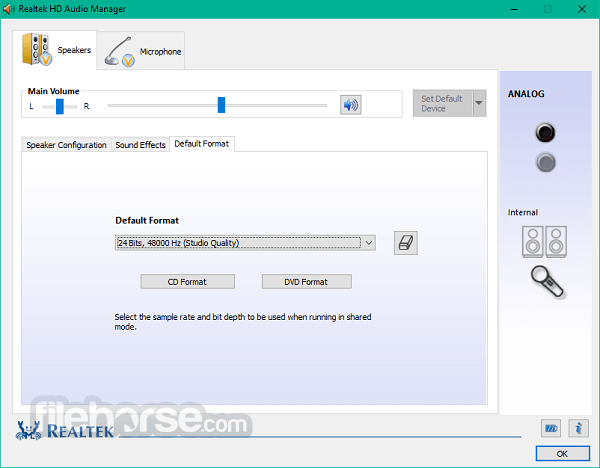
High Definition Audio: The term "High Definition Audio" suggests that this software is capable of delivering high-quality audio output with better clarity and fidelity compared to standard audio drivers. It supports features like 24-bit audio resolution and various audio enhancements.
Audio Playback: It allows users to play audio content such as music, videos, and games with clear and accurate sound reproduction. It supports multiple audio channels for surround sound setups.
Audio Recording: This software also facilitates audio recording through microphones or other input devices, enabling users to capture sound for various purposes, including voice recording, video conferencing, and more.
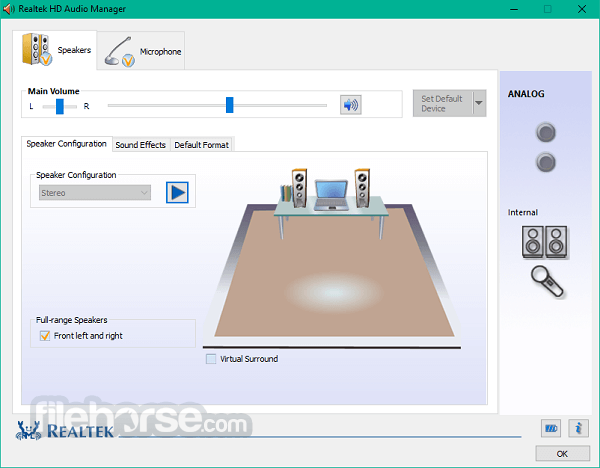
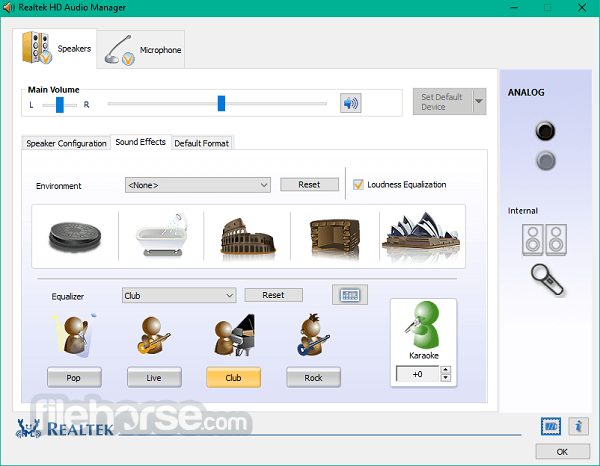
Control Panel: Realtek typically provides a control panel or configuration utility that allows users to adjust audio settings, such as equalization, volume levels, and audio effects. Users can customize their audio experience to suit their preferences.
Compatibility: Realtek High Definition Audio (XP) is designed to work with a wide range of Realtek audio chipsets commonly found in motherboards and sound cards. It is optimized for Windows XP but may also work with some later versions of the Windows operating system.
Updates: It's important to keep audio drivers up to date to ensure compatibility with the latest hardware and software. Realtek periodically releases updates and new versions of its audio drivers to address bugs, improve performance, and add features.
Troubleshooting: It may come with troubleshooting tools to diagnose and resolve common audio-related issues, such as sound playback problems or driver conflicts.
Overview
After many years of supporting the original AC'97 Audio Codec, Intel decided that the new codec has to surpass it, and this High Definition Audio codec was born.
With it came support for not only a wider sound reproduction range and the ability to work with 15 incoming and 15 outgoing streams, but also support for features that enabled much-streamlined use of audio PC equipment by end-users.
Most famously, this can be seen in the ability of the app drivers to automatically detect audio jack states (plugging jacks in and out) and presenting users with an instant interface for the retasking current port for other uses (however the stream for a microphone cannot be tasked to be used on all 6 ports that are usually resent on the back of the motherboard).
These chipsets are supported in Windows XP and Windows 2000: ALC880, ALC882, ALC883, ALC885, ALC886, ALC887, ALC888, ALC889, ALC892, ALC899, ALC861VC, ALC861VD, ALC900, ALC660, ALC662, ALC663, ALC665, ALC668, ALC670, ALC671, ALC672, ALC676, ALC680, ALC221, ALC231, ALC233, ALC260, ALC262, ALC267, ALC268, ALC269, ALC270, ALC272, ALC273, ALC275, ALC276, ALC280, ALC282, ALC283, ALC284, ALC286, ALC290, ALC292, and ALC383.
Realtek High Definition Audio is supported for all modern Windows operating systems, starting from Microsoft Windows XP SP3 and beyond.
Download Realtek High Definition Audio (XP) Latest Version Why is this app published on FileHorse? (More info)
Flexible mixing, mute, and fine gain control functions provide a complete integrated audio solution for home entertainment PCs. Use Realtek HD Audio Manager to boost your Windows PC Sound!
Realtek High Definition Audio (XP) refers to the audio driver software developed by Realtek Semiconductor Corp. for use with the Microsoft Windows XP operating system. This software is designed to provide high-quality audio playback and recording capabilities for computers running Windows XP.
Main Features
Audio Driver: It includes the necessary drivers and software components to enable and manage audio devices on a Windows XP-based computer. It supports a wide range of audio codecs and hardware configurations.
High Definition Audio: The term "High Definition Audio" suggests that this software is capable of delivering high-quality audio output with better clarity and fidelity compared to standard audio drivers. It supports features like 24-bit audio resolution and various audio enhancements.
Audio Playback: It allows users to play audio content such as music, videos, and games with clear and accurate sound reproduction. It supports multiple audio channels for surround sound setups.
Audio Recording: This software also facilitates audio recording through microphones or other input devices, enabling users to capture sound for various purposes, including voice recording, video conferencing, and more.
Control Panel: Realtek typically provides a control panel or configuration utility that allows users to adjust audio settings, such as equalization, volume levels, and audio effects. Users can customize their audio experience to suit their preferences.
Compatibility: Realtek High Definition Audio (XP) is designed to work with a wide range of Realtek audio chipsets commonly found in motherboards and sound cards. It is optimized for Windows XP but may also work with some later versions of the Windows operating system.
Updates: It's important to keep audio drivers up to date to ensure compatibility with the latest hardware and software. Realtek periodically releases updates and new versions of its audio drivers to address bugs, improve performance, and add features.
Troubleshooting: It may come with troubleshooting tools to diagnose and resolve common audio-related issues, such as sound playback problems or driver conflicts.
Overview
After many years of supporting the original AC'97 Audio Codec, Intel decided that the new codec has to surpass it, and this High Definition Audio codec was born.
With it came support for not only a wider sound reproduction range and the ability to work with 15 incoming and 15 outgoing streams, but also support for features that enabled much-streamlined use of audio PC equipment by end-users.
Most famously, this can be seen in the ability of the app drivers to automatically detect audio jack states (plugging jacks in and out) and presenting users with an instant interface for the retasking current port for other uses (however the stream for a microphone cannot be tasked to be used on all 6 ports that are usually resent on the back of the motherboard).
These chipsets are supported in Windows XP and Windows 2000: ALC880, ALC882, ALC883, ALC885, ALC886, ALC887, ALC888, ALC889, ALC892, ALC899, ALC861VC, ALC861VD, ALC900, ALC660, ALC662, ALC663, ALC665, ALC668, ALC670, ALC671, ALC672, ALC676, ALC680, ALC221, ALC231, ALC233, ALC260, ALC262, ALC267, ALC268, ALC269, ALC270, ALC272, ALC273, ALC275, ALC276, ALC280, ALC282, ALC283, ALC284, ALC286, ALC290, ALC292, and ALC383.
Realtek High Definition Audio is supported for all modern Windows operating systems, starting from Microsoft Windows XP SP3 and beyond.
- Meets Microsoft WLP 3.10 and future WLP audio requirements
- WaveRT-based audio function driver for Windows Vista
- High-quality differential CD analog input
- Direct Sound 3D compatible
- 10-band Software Equalizer
- Multiple bands of software equalizer and tools are provided
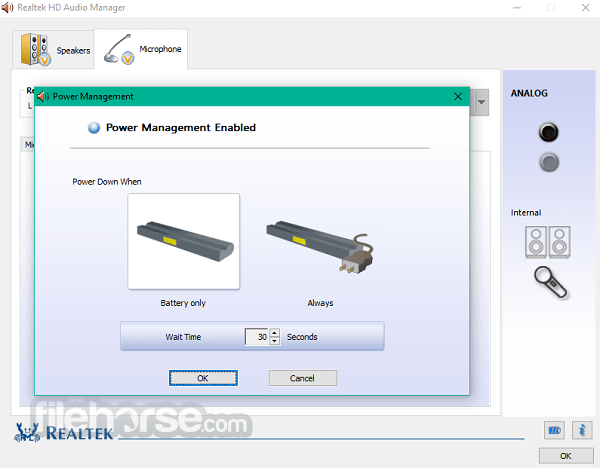
- Power Management setting
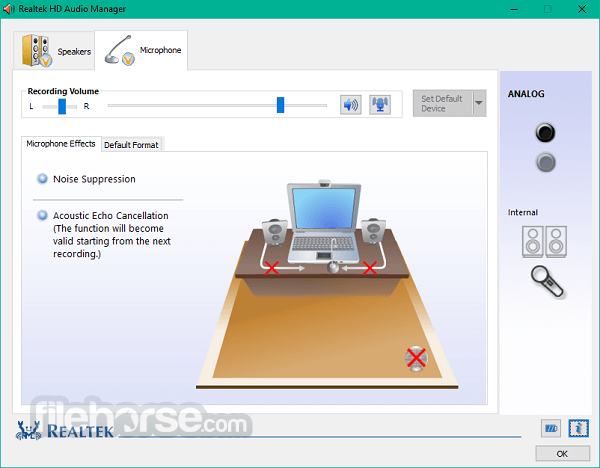
- Microphone Acoustic Echo Cancellation (AEC) and Beam Forming (BF) technology for voice applications
- Mono/Stereo Microphone Noise Suppression
- And more...
- Provides high-fidelity audio playback and recording capabilities.
- Offers a range of advanced audio effects and customization options.
- Intuitive user interface for easy navigation and control.
- Seamless integration with Windows-based systems.
- Compatible with a wide range of audio hardware.
- Limited official support for Mac and Linux platforms.
- Lack of support for advanced audio technologies like Dolby Atmos or DTS:X.
- Updates and driver compatibility can vary based on device manufacturers.
Download Realtek High Definition Audio (XP) Latest Version Why is this app published on FileHorse? (More info)
##
畫面截圖
- 2025-11-20 Realtek High Definition Audio 2.74 (XP) 30.5 MB
- 2013-11-12 Realtek High Definition Audio 2.73 (XP) 30.42 MB
- 2013-10-30 Realtek High Definition Audio 2.72 (XP) 30.41 MB
- 2013-04-10 Realtek High Definition Audio 2.71 (XP) 30.96 MB
- 2012-06-23 Realtek High Definition Audio 2.69 (XP) 31.12 MB
- 2012-04-02 Realtek High Definition Audio 2.68 (XP) 31.06 MB
- 2011-12-17 Realtek High Definition Audio 2.67 (XP) 31.29 MB
- 2011-10-22 Realtek High Definition Audio 2.66 (XP) 30.8 MB