Restore Windows Photo Viewer 1.23
v 1.23
Windows
免費軟體
9.18/10 (16)
- 目前版本1.23
- 更新日期2026-04-07
- 檔案大小1.26 MB
- 檔案名稱RestoreWindowsPhotoViewerSetup.exe
- 作業系統Windows 10 / Windows 11
- 支援語系English
- 授權型式免費軟體
- 開發商 Authorsoft Corporation
- 軟體分類Windows 軟體 / 影像設計
##
翻譯排程處理中,以下暫以英文原文呈現
軟體介紹
Restore Windows Photo Viewer is a lightweight system utility app that can help users of the Windows 10/11 operating system to restore the presence of the classic and much beloved Windows Photo Viewer application.
Instead of giving everyone access to this software, Windows 11/Windows 10 has sent this app into retirement by introducing a brand-new Universal Windows Platform app called Photos.
But not everyone likes that app, and they prefer to get the classic application back. The old Photo Viewer app can effortlessly handle many commonly used image formats such as t JPEG, JPG, JPE, JFIF, BMP, DIB, ICO, PNG, TIFF, TIF, GIF, WDP, and JXR.
The classic Windows Photo Viewer was originally introduced in the Windows NT family of operating systems and has been used by hundreds of millions of people since it was added to Windows XP as the default photo viewing app.
After being temporarily removed in Windows Vista, it returned to Windows 8, only to be once again lost in Windows 10/Windows 11.
Many people who are not satisfied with Windows 10/11 default photo viewing apps are trying to install other similar applications, never knowing that the classic Windows Photo Viewer is still part of their OS, only deeply hidden and not easily accessible.
It allows users to set Windows Photo Viewer again as their default photo viewing app, and it does so in mere seconds!
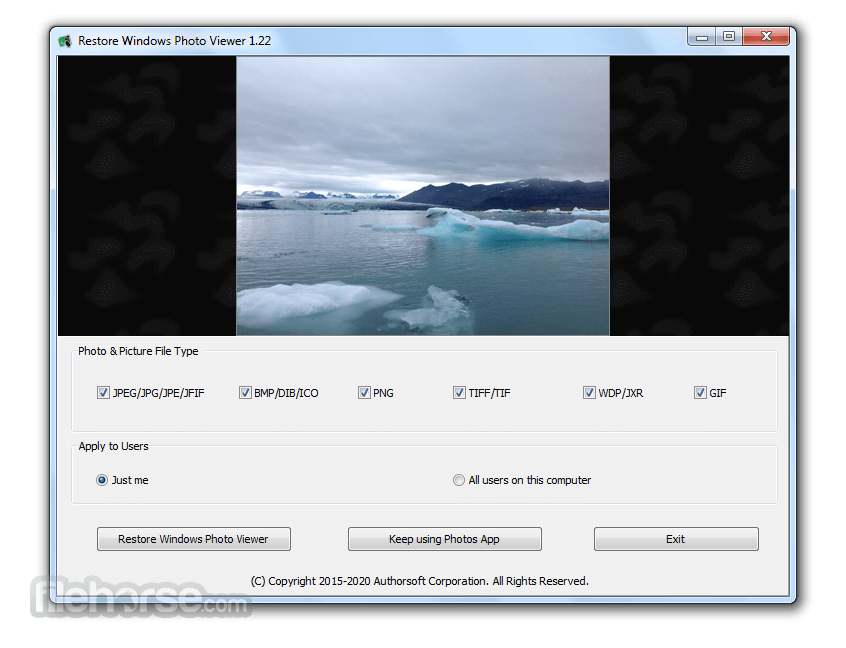
The Restore Windows Photo Viewer weighs in at less than 2 MB in size. Since its target is just to resurface the hidden image viewer app, the app features an extremely simple interface whose only function is to change the default image file association from the Photo image viewer app to the classic Windows Photo Viewer.
The user can pick which file formats they want to associate with the old viewer app, pick if this change will affect just the current Windows 10/Windows 11 account or all users on the computer, and simply click on the “Restore” button to finish the procedure.
If at any time the user wants to return the file association to the new Photos viewer, they can also do so from within this app.
FAQs
What does Restore Windows Photo Viewer actually do on modern Windows systems?
This tool re-enables the classic Windows Photo Viewer that is hidden by default in Windows 10 and 11. It doesn’t install new software, but modifies system settings/registry to make the old viewer available again in “Open with” options.
Is Restore Windows Photo Viewer safe to use?
Yes, when downloaded from the official site. The tool performs controlled registry changes to restore existing Windows functionality rather than adding unknown components, but as with any system tweak, it’s recommended to create a restore point before use.
Why would someone prefer Windows Photo Viewer over the default Photos app?
The classic viewer is much faster and lighter, especially for quickly opening large numbers of images. Users often switch back because the default Photos app can feel slower and more resource-heavy compared to the old viewer.
PROS
Download Restore Windows Photo Viewer Latest Version Why is this app published on FileHorse? (More info)
Instead of giving everyone access to this software, Windows 11/Windows 10 has sent this app into retirement by introducing a brand-new Universal Windows Platform app called Photos.
But not everyone likes that app, and they prefer to get the classic application back. The old Photo Viewer app can effortlessly handle many commonly used image formats such as t JPEG, JPG, JPE, JFIF, BMP, DIB, ICO, PNG, TIFF, TIF, GIF, WDP, and JXR.
The classic Windows Photo Viewer was originally introduced in the Windows NT family of operating systems and has been used by hundreds of millions of people since it was added to Windows XP as the default photo viewing app.
After being temporarily removed in Windows Vista, it returned to Windows 8, only to be once again lost in Windows 10/Windows 11.
Many people who are not satisfied with Windows 10/11 default photo viewing apps are trying to install other similar applications, never knowing that the classic Windows Photo Viewer is still part of their OS, only deeply hidden and not easily accessible.
- Support JPEG, JPG, JPE, JFIF format.
- Support BMP, DIB, and ICO formats.
- Support PNG, TIFF, TIF.
- Support GIF, WDP, JXR.
- Apply changes to either the current user or all users on a computer.
- Restore the missing Windows Photo Viewer to Windows 10 and Windows 11.
- Set Windows Photo Viewer as the default photo viewer.
- Revert to the Microsoft Photos App at any time.
It allows users to set Windows Photo Viewer again as their default photo viewing app, and it does so in mere seconds!
The Restore Windows Photo Viewer weighs in at less than 2 MB in size. Since its target is just to resurface the hidden image viewer app, the app features an extremely simple interface whose only function is to change the default image file association from the Photo image viewer app to the classic Windows Photo Viewer.
The user can pick which file formats they want to associate with the old viewer app, pick if this change will affect just the current Windows 10/Windows 11 account or all users on the computer, and simply click on the “Restore” button to finish the procedure.
If at any time the user wants to return the file association to the new Photos viewer, they can also do so from within this app.
FAQs
What does Restore Windows Photo Viewer actually do on modern Windows systems?
This tool re-enables the classic Windows Photo Viewer that is hidden by default in Windows 10 and 11. It doesn’t install new software, but modifies system settings/registry to make the old viewer available again in “Open with” options.
Is Restore Windows Photo Viewer safe to use?
Yes, when downloaded from the official site. The tool performs controlled registry changes to restore existing Windows functionality rather than adding unknown components, but as with any system tweak, it’s recommended to create a restore point before use.
Why would someone prefer Windows Photo Viewer over the default Photos app?
The classic viewer is much faster and lighter, especially for quickly opening large numbers of images. Users often switch back because the default Photos app can feel slower and more resource-heavy compared to the old viewer.
PROS
- Restores classic Windows Photo Viewer
- Supports various image formats
- Lightweight, less than 2 MB
- Simple interface for easy use
- Can be set as the default viewer
- Reversible to Microsoft Photos
- Limited to Windows 10/11 users
Download Restore Windows Photo Viewer Latest Version Why is this app published on FileHorse? (More info)
##
畫面截圖