- 目前版本0.8.5165
- 更新日期2026-07-15
- 檔案大小48.3 MB
- 檔案名稱rive_editor.msix
- 作業系統Windows 10 / Windows 11
- 支援語系English
- 授權型式試用版
- 開發商 Rive, Inc.
- 軟體分類Windows 軟體 / 影像設計
##
翻譯排程處理中,以下暫以英文原文呈現
軟體介紹
Rive Editor is a professional design and animation application for creating interactive, production-ready graphics.
Unlike conventional motion-design programs that mainly export videos or image sequences, Rive produces lightweight animations that can respond to clicks, gestures, application data, and interface states in real time.
The Rive Editor for Windows PC software is particularly suitable for animated icons, buttons, menus, characters, onboarding screens, game interfaces, website elements, loading indicators, and responsive product illustrations.
Designers can create vector artwork, animate it, add interaction logic, and prepare the finished project for implementation without rebuilding the animation in code.
Features
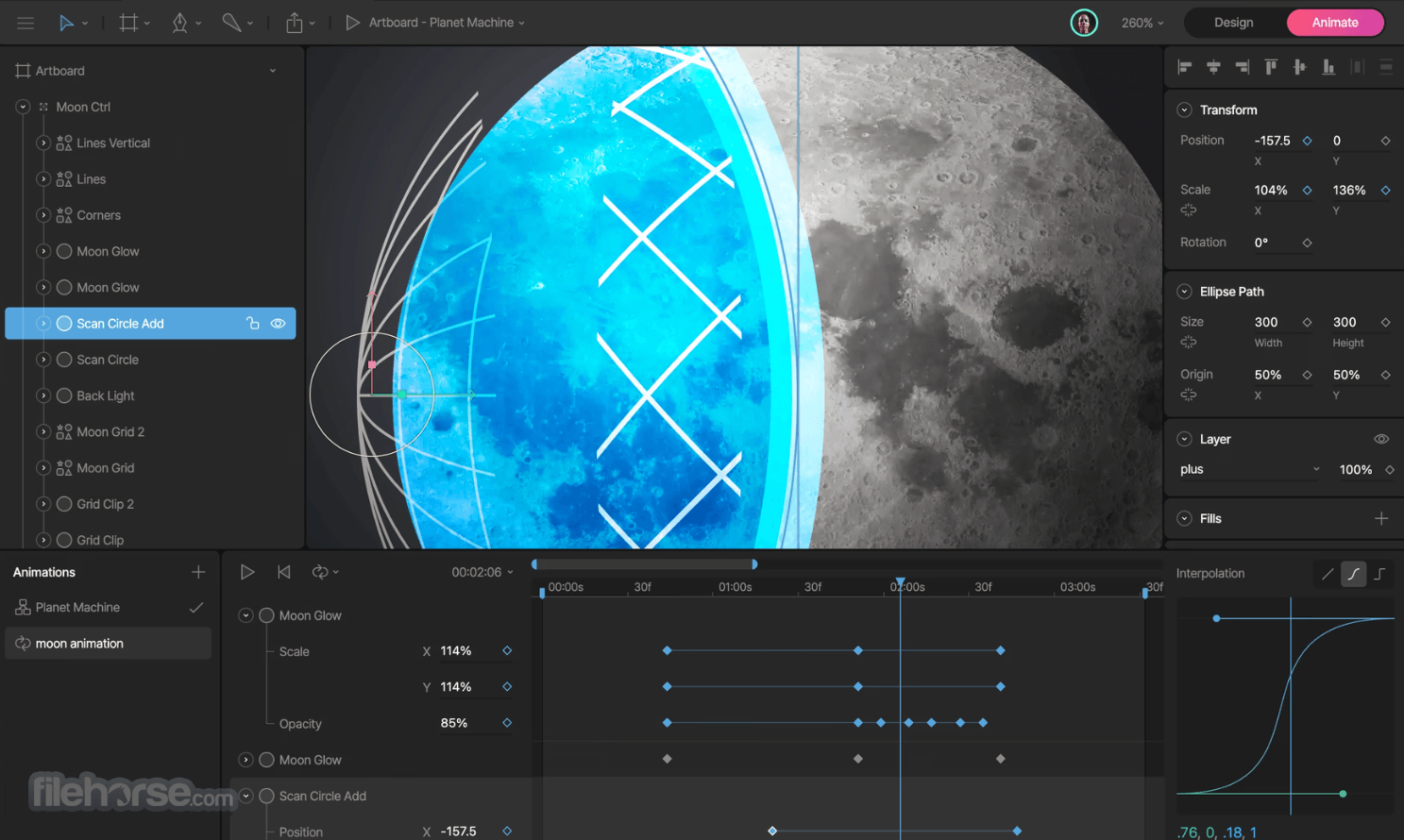
Rive Editor uses a modern workspace that combines vector design and motion controls.
The canvas occupies the central area, while tools, object hierarchy, properties, timelines, and animation controls are positioned around it.
Users familiar with design applications should quickly understand the drawing tools and layers. However, State Machines, Data Binding, constraints, and runtime-oriented workflows require additional learning.
The interface remains organized even in complex projects, although deeply nested components can become difficult to manage without clear naming.
Installation and SetupDownload the Windows desktop installer from FileHorse. Run the setup file and follow the installation instructions. Launch Rive Editor and sign in or create an account. Create a new personal or collaborative project. Open a blank file, template, or existing Rive project. Configure the artboard dimensions and project structure.
The desktop version provides a focused environment without browser tabs or unrelated web content.
An internet connection is still useful for account synchronization, collaboration, updates, and online project management.
How to Use
Is Rive Editor free?
A free plan is available for learning, designing, animating, and testing projects. Production export and advanced team functionality may require a paid subscription.
Can Rive replace After Effects?
It can replace After Effects for many interactive interface animations. However, it is not intended for cinematic compositing, video effects, or traditional post-production work.
Does Rive require programming knowledge?
Basic animation work does not require coding. Developers are usually needed when animations must exchange data with a website, application, or game.
What is a State Machine?
A State Machine is a visual logic system that controls transitions between animations according to inputs, events, conditions, and user interaction.
Can Rive animations run offline?
Yes. Exported Rive files can be packaged with applications and played locally through a compatible runtime.
Alternatives
Adobe After Effects – Advanced motion graphics and video compositing software.
Figma – Collaborative interface design platform with basic prototyping and animation.
Pricing
Free: $0 per user per month with limited collaborative files and restricted production capabilities.
Cadet: From $9 per user per month with annual billing, including production exports and unlimited projects.
Voyager: From $32 per user per month with annual billing, adding team libraries, collaboration features, hosted embeds, and expanded AI tools.
Enterprise: From approximately $120 per user per month, with advanced administration, security, support, and organizational controls.
Monthly billing may cost more than the displayed annual rates.
System Requirements
Rive Editor is an impressive Windows application for producing lightweight, interactive graphics that can move directly from design into a finished digital product.
Its vector tools, animation timeline, State Machines, and multi-platform runtimes make it especially valuable for interface designers, game developers, and teams building modern applications.
Download Rive Editor Latest Version Why is this app published on FileHorse? (More info)
Unlike conventional motion-design programs that mainly export videos or image sequences, Rive produces lightweight animations that can respond to clicks, gestures, application data, and interface states in real time.
The Rive Editor for Windows PC software is particularly suitable for animated icons, buttons, menus, characters, onboarding screens, game interfaces, website elements, loading indicators, and responsive product illustrations.
Designers can create vector artwork, animate it, add interaction logic, and prepare the finished project for implementation without rebuilding the animation in code.
Features
- Vector Design Tools: Create scalable shapes, paths, gradients, text, and reusable visual elements.
- Timeline Animation: Animate position, rotation, scale, opacity, colors, paths, and other properties.
- Graph Editor: Adjust easing curves and timing for smoother, more natural movement.
- State Machines: Connect animations and define how graphics respond to user actions or changing conditions.
- Data Binding: Link visual properties and animation states to dynamic application data.
- Bones and Rigging: Build skeleton-based character animations with joints, weights, and constraints.
- Animation Mixing: Blend multiple animations to produce seamless transitions between states.
- Responsive Layouts: Arrange interface elements that adapt to different screen sizes and containers.
- Reusable Components: Create repeatable animated elements that remain consistent across larger projects.
- Runtime Support: Deploy animations across web, mobile, desktop, game-engine, and embedded environments.
Rive Editor uses a modern workspace that combines vector design and motion controls.
The canvas occupies the central area, while tools, object hierarchy, properties, timelines, and animation controls are positioned around it.
Users familiar with design applications should quickly understand the drawing tools and layers. However, State Machines, Data Binding, constraints, and runtime-oriented workflows require additional learning.
The interface remains organized even in complex projects, although deeply nested components can become difficult to manage without clear naming.
Installation and Setup
An internet connection is still useful for account synchronization, collaboration, updates, and online project management.
How to Use
- Create a new file and add an artboard.
- Draw objects with the vector tools or import supported artwork.
- Organize shapes into clearly named groups and components.
- Switch to Animate mode and create a new timeline.
- Add keyframes for the properties you want to animate.
- Refine the motion with easing and graph controls.
- Build a State Machine for interactive behavior.
- Add triggers, Boolean values, numbers, listeners, or data-bound properties.
- Preview clicks, pointer movement, transitions, and animation blending.
- Export the project as a Rive file and integrate it through the appropriate runtime.
Is Rive Editor free?
A free plan is available for learning, designing, animating, and testing projects. Production export and advanced team functionality may require a paid subscription.
Can Rive replace After Effects?
It can replace After Effects for many interactive interface animations. However, it is not intended for cinematic compositing, video effects, or traditional post-production work.
Does Rive require programming knowledge?
Basic animation work does not require coding. Developers are usually needed when animations must exchange data with a website, application, or game.
What is a State Machine?
A State Machine is a visual logic system that controls transitions between animations according to inputs, events, conditions, and user interaction.
Can Rive animations run offline?
Yes. Exported Rive files can be packaged with applications and played locally through a compatible runtime.
Alternatives
Adobe After Effects – Advanced motion graphics and video compositing software.
Figma – Collaborative interface design platform with basic prototyping and animation.
Pricing
Free: $0 per user per month with limited collaborative files and restricted production capabilities.
Cadet: From $9 per user per month with annual billing, including production exports and unlimited projects.
Voyager: From $32 per user per month with annual billing, adding team libraries, collaboration features, hosted embeds, and expanded AI tools.
Enterprise: From approximately $120 per user per month, with advanced administration, security, support, and organizational controls.
Monthly billing may cost more than the displayed annual rates.
System Requirements
- Operating System: Windows 10 or Windows 11, 64-bit recommended.
- Processor: Modern dual-core Intel or AMD processor.
- Memory: 4 GB RAM minimum; 8 GB or more recommended.
- Graphics: Integrated or dedicated GPU with modern graphics-driver support.
- Storage: Approximately 1 GB of available space.
- Display: 1280 × 720 minimum; Full HD or higher recommended.
- Internet: Required for account services, synchronization, collaboration, and updates.
- Creates genuinely interactive animations.
- Combines design, animation, and logic.
- Produces compact and scalable graphics.
- Excellent State Machine system.
- Supports numerous development platforms.
- Suitable for responsive application interfaces.
- Strong collaboration between designers and developers.
- State Machines require practice.
- Not intended for video editing.
- Advanced integration may require coding.
- Complex projects need careful organization.
- Production exports require a paid plan.
- Some runtime features may differ by platform.
- Less suitable for photo-based animation.
Rive Editor is an impressive Windows application for producing lightweight, interactive graphics that can move directly from design into a finished digital product.
Its vector tools, animation timeline, State Machines, and multi-platform runtimes make it especially valuable for interface designers, game developers, and teams building modern applications.
Download Rive Editor Latest Version Why is this app published on FileHorse? (More info)
##
畫面截圖