Samsung Printer Experience
v Samsung Printer Experience
Windows
免費軟體
10/10 (1)
- 目前版本Samsung Printer Experience
- 更新日期2026-06-19
- 檔案大小1.2 MB
- 檔案名稱Samsung Printer Experience Installer.exe
- 作業系統Windows 10 / Windows 11
- 支援語系English
- 授權型式免費軟體
- 開發商 HP Inc.
- 軟體分類Windows 軟體 / 驅動程式
##
翻譯排程處理中,以下暫以英文原文呈現
軟體介紹
Samsung Printer Experience is a free Windows application designed to simplify the management of compatible Samsung printers and multifunction devices.
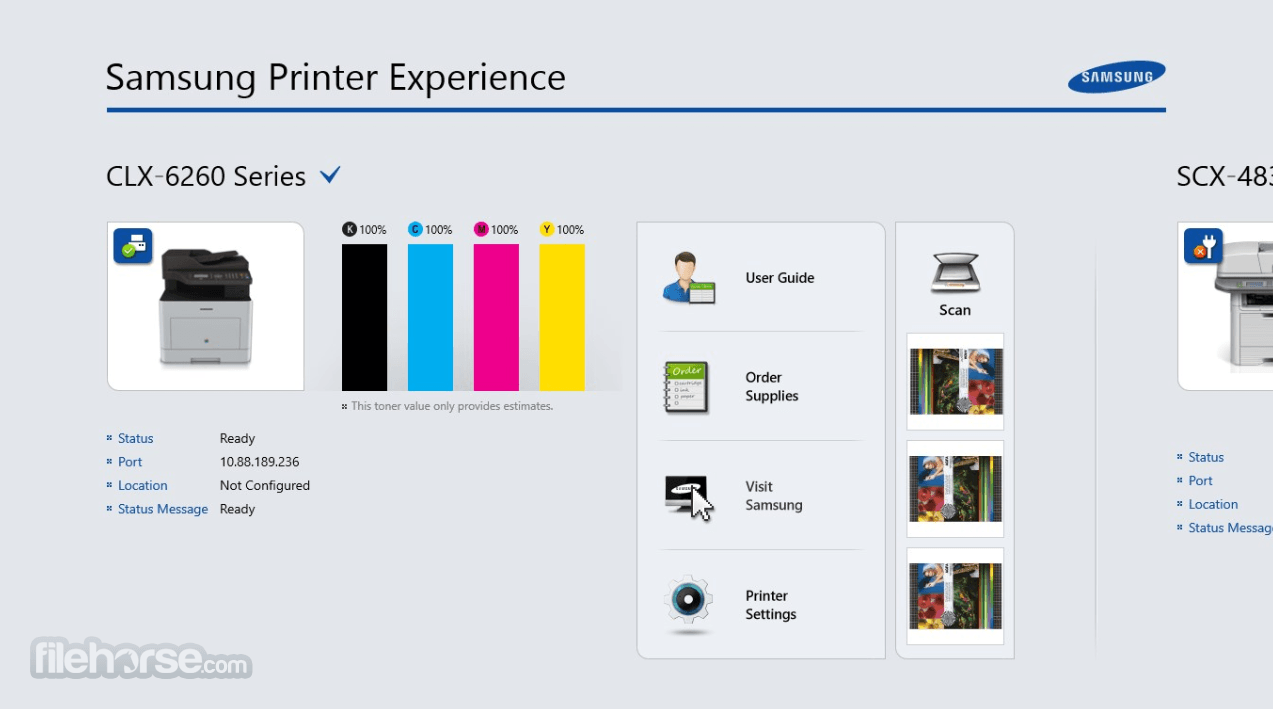
Instead of navigating through multiple Windows menus, users can access printer information, printing controls, scanning tools, device settings, and basic troubleshooting options from one centralized interface.
The Samsung Printer Experience program is particularly useful for owners of older Samsung laser printers who want a straightforward desktop utility for everyday printing and maintenance.
However, compatibility varies between printer models, Windows versions, drivers, and connection types.
It should therefore be considered a companion application rather than a replacement for the correct printer and scanner drivers.
HP acquired Samsung’s printer business in 2017. As a result, HP now provides drivers, software updates, and support for many Samsung-branded printers.
Features
User Interface
The interface is clean and focused on essential printer functions.
Connected devices and their status information are displayed prominently, while printing, scanning, supplies, and settings are organized into accessible sections.
Its design is easier to understand than traditional driver configuration panels, making it suitable for home users and small offices.
Some screens may appear dated on modern Windows installations, and the exact controls available depend on the connected printer.
Installation and Setup
Samsung Printer Experience can be installed through the Microsoft Store or FileHorse.
Select the installation option, allow Windows to download the app, and launch it from the Start menu.
The appropriate Samsung printer driver should already be installed.
Connect the printer to the same network as the PC, turn it on, and allow Windows to detect it. Network-connected models generally offer the most reliable device discovery, while USB support may vary.
How to Use
FAQs
Is Samsung Printer Experience free?
Yes. The application can be downloaded and used without a subscription or license fee.
Does it work with every Samsung printer?
No. Support depends on the printer model, driver availability, Windows version, and connection method.
Can it scan documents?
Yes, but scanning requires a compatible Samsung multifunction printer and an installed scanner driver.
Why is my printer not detected?
Confirm that the printer is powered on, connected to the same network, and properly installed in Windows. Updating or reinstalling the driver may also help.
Does the application replace printer drivers?
No. The correct drivers are still required for dependable printing, scanning, and device communication.
Alternatives
HP Smart - Modern printer management, scanning, setup, and maintenance software for HP devices.
Samsung Easy Printer Manager - A more detailed management utility for supported legacy Samsung printers.
Windows Scan - A lightweight Microsoft application for scanning documents and photos.
NAPS2 - A flexible scanning application with PDF creation, profiles, OCR, and image adjustment tools.
Pricing
Samsung Printer Experience is completely FREE.
There are no premium plans, advertisements, subscriptions, or in-app purchases.
System Requirements
Samsung Printer Experience provides a convenient control center for compatible Samsung printers and multifunction devices.
Its printing, scanning, toner monitoring, and device information tools cover essential everyday requirements.
Although aging drivers and model limitations may affect Windows compatibility, it remains a practical free utility for supported Samsung printer owners.
Download Samsung Printer Experience Latest Version Why is this app published on FileHorse? (More info)
Instead of navigating through multiple Windows menus, users can access printer information, printing controls, scanning tools, device settings, and basic troubleshooting options from one centralized interface.
The Samsung Printer Experience program is particularly useful for owners of older Samsung laser printers who want a straightforward desktop utility for everyday printing and maintenance.
However, compatibility varies between printer models, Windows versions, drivers, and connection types.
It should therefore be considered a companion application rather than a replacement for the correct printer and scanner drivers.
HP acquired Samsung’s printer business in 2017. As a result, HP now provides drivers, software updates, and support for many Samsung-branded printers.
Features
- Printer Management: Add, remove, select, and manage compatible Samsung printers.
- Device Information: View the printer name, current status, location, and IP address.
- Toner Monitoring: Check the estimated remaining toner level without using the printer display.
- Document Printing: Print documents and configure basic output settings.
- Image Printing: Select and print photos stored on the computer.
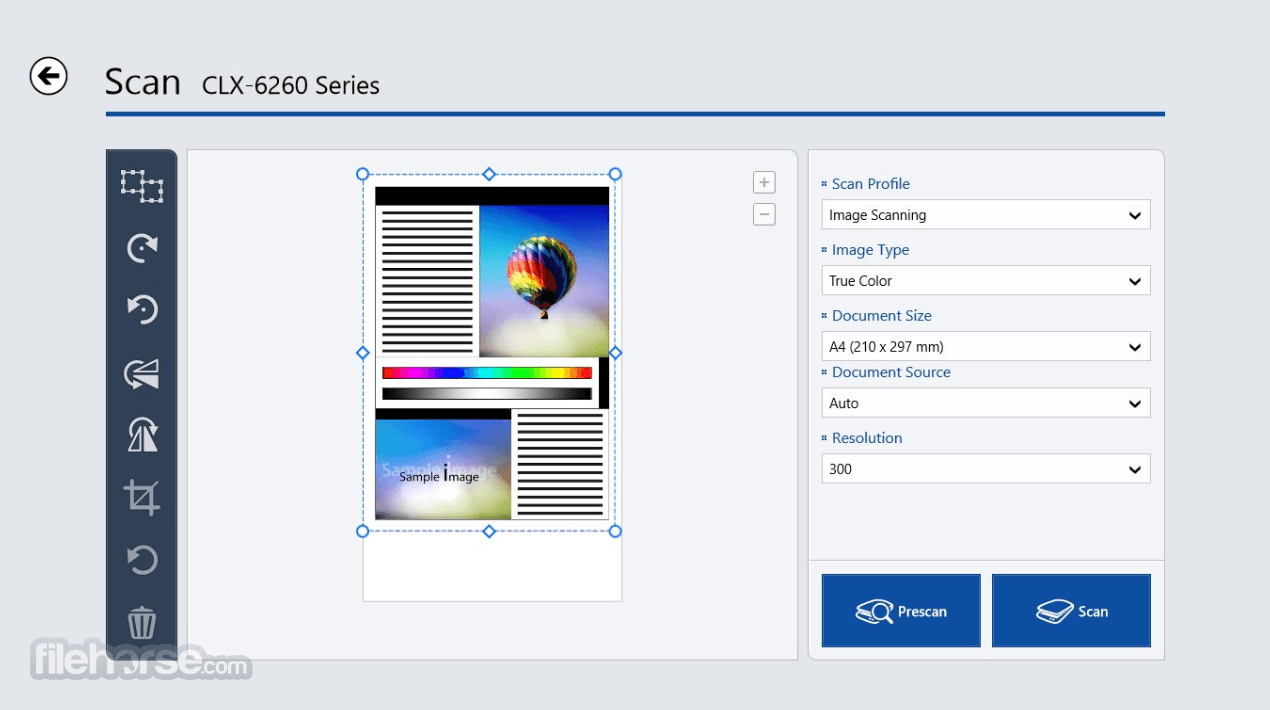
- Document Scanning: Scan pages directly from supported multifunction printers.
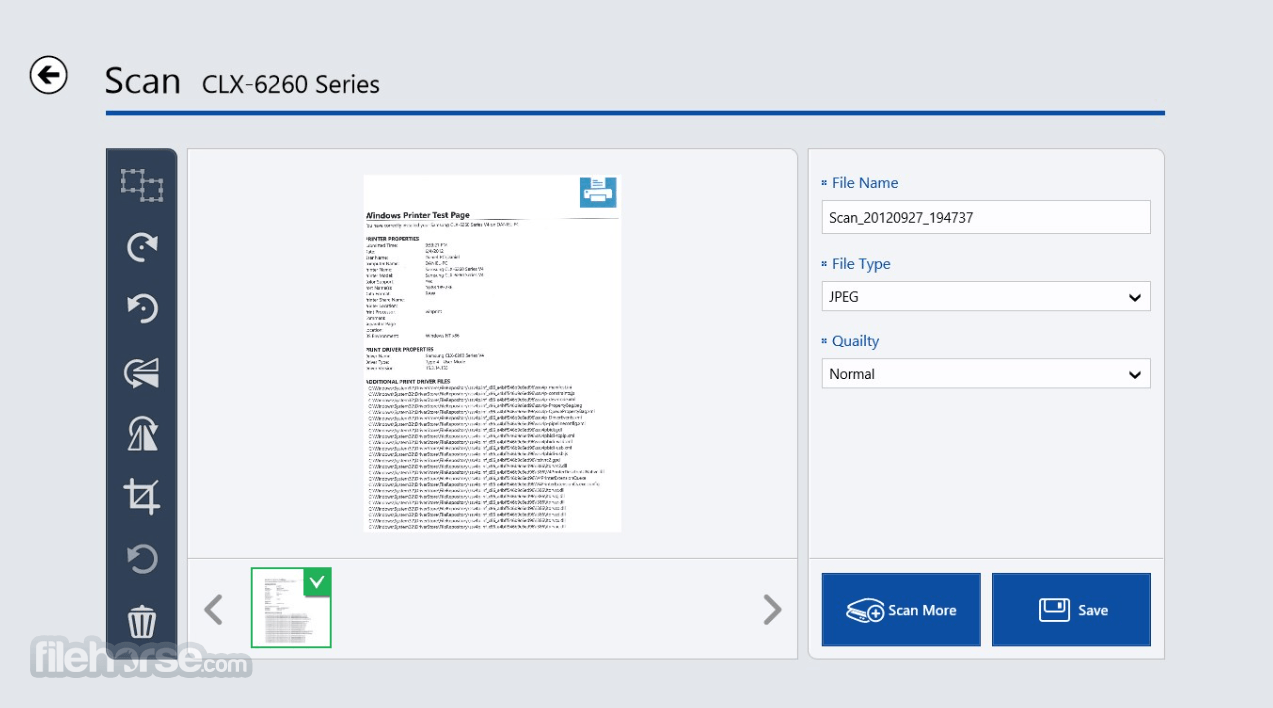
- Scan Preview: Review the scanned page before saving the final file.
- Printer Settings: Access available paper, layout, quality, and device options.
- Error Information: View basic warnings when the printer requires attention.
- Multiple Printer Support: Switch between several detected Samsung devices.
User Interface
The interface is clean and focused on essential printer functions.
Connected devices and their status information are displayed prominently, while printing, scanning, supplies, and settings are organized into accessible sections.
Its design is easier to understand than traditional driver configuration panels, making it suitable for home users and small offices.
Some screens may appear dated on modern Windows installations, and the exact controls available depend on the connected printer.
Installation and Setup
Samsung Printer Experience can be installed through the Microsoft Store or FileHorse.
Select the installation option, allow Windows to download the app, and launch it from the Start menu.
The appropriate Samsung printer driver should already be installed.
Connect the printer to the same network as the PC, turn it on, and allow Windows to detect it. Network-connected models generally offer the most reliable device discovery, while USB support may vary.
How to Use
- Turn on the Samsung printer and connect it to the PC or local network.
- Install the required printer and scanner drivers.
- Open Samsung Printer Experience from the Windows Start menu.
- Select the plus button or the Add Printer option.
- Choose the detected Samsung printer from the available devices.
- Open the printer information area to review its status and toner level.
- Select Print to choose a document, image, or other supported content.
- Adjust paper size, orientation, copies, and print quality.
- Select Scan when using a compatible multifunction printer.
- Configure the scan resolution, color mode, file type, and destination.
FAQs
Is Samsung Printer Experience free?
Yes. The application can be downloaded and used without a subscription or license fee.
Does it work with every Samsung printer?
No. Support depends on the printer model, driver availability, Windows version, and connection method.
Can it scan documents?
Yes, but scanning requires a compatible Samsung multifunction printer and an installed scanner driver.
Why is my printer not detected?
Confirm that the printer is powered on, connected to the same network, and properly installed in Windows. Updating or reinstalling the driver may also help.
Does the application replace printer drivers?
No. The correct drivers are still required for dependable printing, scanning, and device communication.
Alternatives
HP Smart - Modern printer management, scanning, setup, and maintenance software for HP devices.
Samsung Easy Printer Manager - A more detailed management utility for supported legacy Samsung printers.
Windows Scan - A lightweight Microsoft application for scanning documents and photos.
NAPS2 - A flexible scanning application with PDF creation, profiles, OCR, and image adjustment tools.
Pricing
Samsung Printer Experience is completely FREE.
There are no premium plans, advertisements, subscriptions, or in-app purchases.
System Requirements
- Operating System: Windows 11 or Windows 10.
- Processor: Standard x86, x64, or supported Windows-compatible processor.
- Memory: At least 2 GB of RAM recommended.
- Storage: Approximately 100 MB of available storage.
- Hardware: Compatible Samsung printer or multifunction device.
- Drivers: Correct printer and scanner drivers for the connected model.
- Network: Local network connection recommended for printer discovery.
- Free to download and use.
- Simple printer management interface.
- Displays useful device information.
- Provides estimated toner levels.
- Supports printing and scanning.
- Convenient for compatible Samsung printers.
- Suitable for home and small-office use.
- Limited to supported Samsung devices.
- Compatibility varies between models.
- Some interface elements feel outdated.
- Requires separate printer drivers.
- USB detection may be inconsistent.
Samsung Printer Experience provides a convenient control center for compatible Samsung printers and multifunction devices.
Its printing, scanning, toner monitoring, and device information tools cover essential everyday requirements.
Although aging drivers and model limitations may affect Windows compatibility, it remains a practical free utility for supported Samsung printer owners.
Download Samsung Printer Experience Latest Version Why is this app published on FileHorse? (More info)
##
畫面截圖