⚠ 這是歷史版本頁面 — 查看 SIW 2026 最新版本 →

- 目前版本15.3.0503
- 更新日期2025-05-04
- 檔案大小28.63 MB
- 檔案名稱siwtrial-setup.exe
- 作業系統Windows 7 / Windows 8 / Windows 10 / Windows 11
- 支援語系English
- 授權型式商業試用
- 開發商 Gabriel Topala
- 軟體分類Windows 軟體 / 系統優化
##
編輯短評
SIW 是一款專門用來偵測 Windows 系統硬體與軟體資訊的工具,能將作業系統、軟體授權金鑰、硬體規格等細節整理成容易閱讀的報告。它最大的特色是支援多種報告格式輸出,並提供批次模式,方便在大量電腦上執行資產盤點或安全稽核。這套軟體由單一開發者長期維護,更新相當活躍,在同類工具中屬於有固定使用者群眾的選擇,不過整體評價算是中等,並非壓倒性的主流首選。
如果你需要管理多台電腦的軟體授權、進行硬體盤點,或是想快速收集系統資訊製作報表,SIW 會比一般系統優化工具更對口。與 Glary Utilities 這類偏重清理與最佳化的軟體相比,SIW 專注在資訊收集而非系統調校,取捨上較為單純。要注意的是它僅提供英文介面,且為試用版授權,若需長期使用或進階功能得考慮付費;下載時也請留意版本更新頻率,目前仍持續維護中。
##
翻譯排程處理中,以下暫以英文原文呈現
軟體介紹
SIW is an Advanced System Information for Windows tool that analyzes your computer and gathers detailed information about system properties and settings and displays it in an extremely comprehensible manner.
SIW can create a report file (HTML, JSON, CSV, TXT or XML), and you can run it in batch mode (for Computer Inventory - Software and Hardware Inventory, Asset Inventory, Software License Management, Security Audit, Server Configuration Management).
The System Information is divided into few major categories:
Software Information
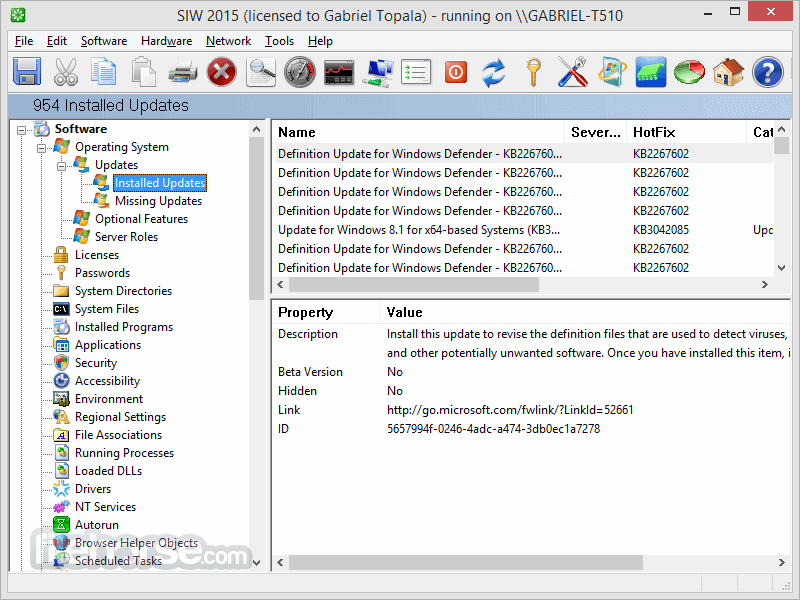
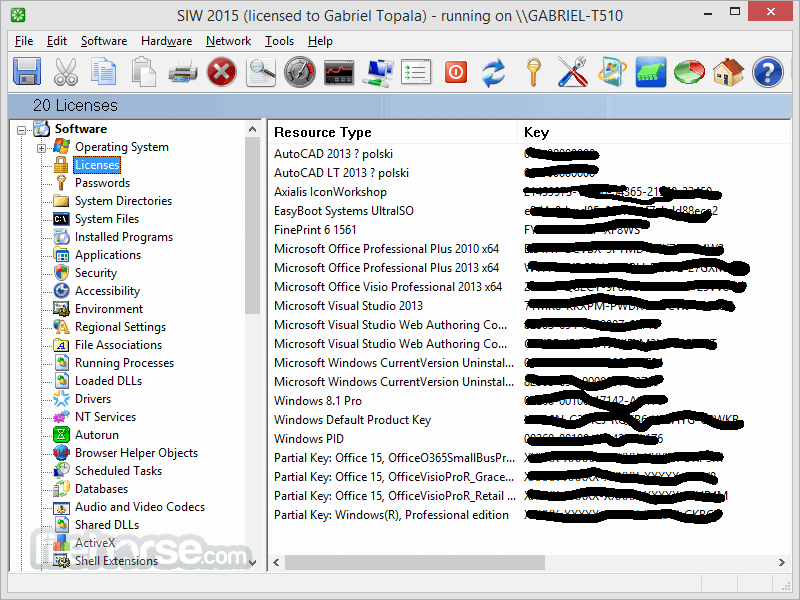
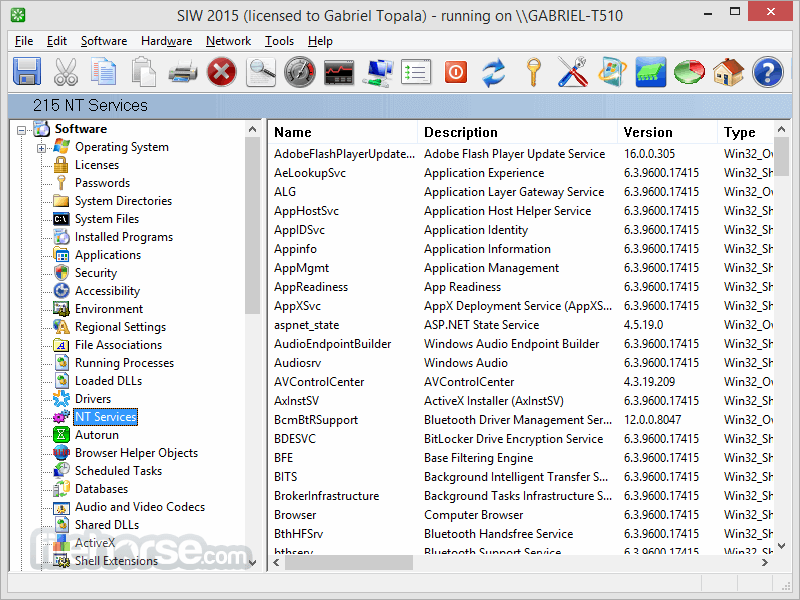
Operating System, Software Licenses (Product Keys / Serial Numbers / CD Key), Passwords Recovery, Installed Software and Hotfixes, Processes, Services, System Uptime, Audio, and Video Codecs, Server Configuration, etc.
Hardware Information
Motherboard, CPU, Sensors, BIOS, chipset, PCI/AGP, USB, and ISA/PnP Devices, Memory, Video Card, Monitor, Disk Drives, CD/DVD Devices, SCSI Devices, S.M.A.R.T., Network Cards, Ports, Printers, PCI, etc.
Network Information
Basic/Extended Information about Network Configuration, Network Statistics, Active Directory (Computers, Groups, and Users), Network Connections, Network Shares, Open Ports, etc.
Network Tools
MAC Address Changer, Neighborhood Scan, Ping, Trace, Open Files, etc.
Miscellaneous Tools: Eureka! (Reveal lost passwords hidden behind asterisks), Wake-On-LAN, URL Explorer, Monitor Test, Shutdown / Restart, etc.
Real-time monitors
CPU, Memory, Page File usage, and Network Traffic.
FAQs
What is SIW and what does it do?
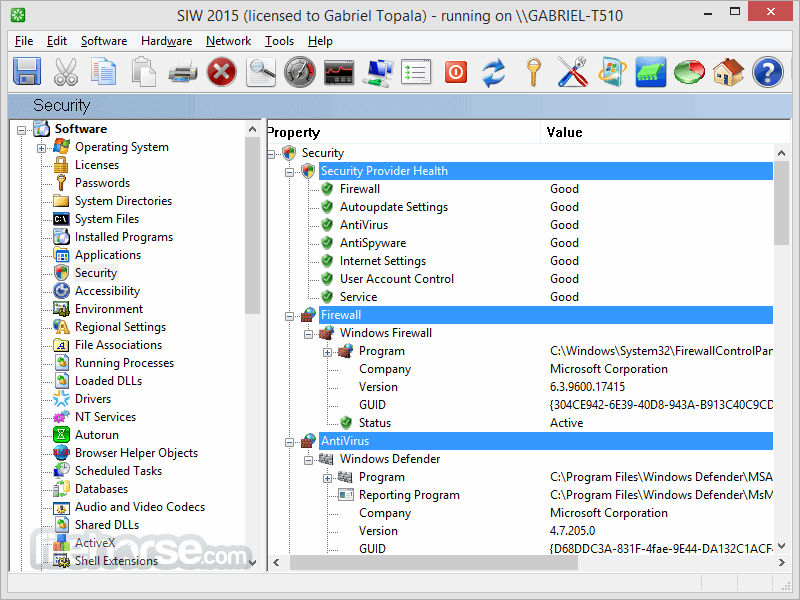
SIW (System Information for Windows) is a powerful diagnostic and system information tool for Windows. It provides detailed data about your system’s hardware, software, network, and security settings. This includes information such as the motherboard, CPU, RAM, operating system, installed software, product keys, running processes, network configuration, and much more—all in a user-friendly interface or exportable report.
Is SIW free to use?
No, SIW is a commercial product. While it used to have a free version in the past, it now offers Professional, Technician, and Business editions with varying features and licensing terms. However, a free trial is available with limited features, allowing users to evaluate the software before purchasing.
Can SIW retrieve product keys and passwords?
Yes, SIW can retrieve software product keys for Windows and many installed applications. It can also recover saved passwords (e.g., from browsers, email clients, and network settings), but this feature may be limited based on user permissions and Windows security restrictions.
Is SIW portable or does it require installation?
SIW is available in both installer and portable versions. The Technician's Version is completely portable and designed to run from a USB flash drive, making it ideal for IT professionals and technicians who need to diagnose multiple systems without leaving a software footprint.
Can I export system reports with SIW?
Yes, SIW allows users to generate detailed reports in multiple formats including HTML, CSV, TXT, and XML. Reports can be customized to include specific sections and are especially useful for audits, support diagnostics, or hardware/software inventory documentation.
How to Use
Download SIW from the official website or FileHorse.com
Install the software on your Windows PC
Launch the application after installation
Navigate through the system info categories
Export reports for later review or analysis
System Requirements
Download SIW Latest Version Why is this app published on FileHorse? (More info)
SIW can create a report file (HTML, JSON, CSV, TXT or XML), and you can run it in batch mode (for Computer Inventory - Software and Hardware Inventory, Asset Inventory, Software License Management, Security Audit, Server Configuration Management).
The System Information is divided into few major categories:
Software Information
Operating System, Software Licenses (Product Keys / Serial Numbers / CD Key), Passwords Recovery, Installed Software and Hotfixes, Processes, Services, System Uptime, Audio, and Video Codecs, Server Configuration, etc.
Hardware Information
Motherboard, CPU, Sensors, BIOS, chipset, PCI/AGP, USB, and ISA/PnP Devices, Memory, Video Card, Monitor, Disk Drives, CD/DVD Devices, SCSI Devices, S.M.A.R.T., Network Cards, Ports, Printers, PCI, etc.
Network Information
Basic/Extended Information about Network Configuration, Network Statistics, Active Directory (Computers, Groups, and Users), Network Connections, Network Shares, Open Ports, etc.
Network Tools
MAC Address Changer, Neighborhood Scan, Ping, Trace, Open Files, etc.
Miscellaneous Tools: Eureka! (Reveal lost passwords hidden behind asterisks), Wake-On-LAN, URL Explorer, Monitor Test, Shutdown / Restart, etc.
Real-time monitors
CPU, Memory, Page File usage, and Network Traffic.
FAQs
What is SIW and what does it do?
SIW (System Information for Windows) is a powerful diagnostic and system information tool for Windows. It provides detailed data about your system’s hardware, software, network, and security settings. This includes information such as the motherboard, CPU, RAM, operating system, installed software, product keys, running processes, network configuration, and much more—all in a user-friendly interface or exportable report.
Is SIW free to use?
No, SIW is a commercial product. While it used to have a free version in the past, it now offers Professional, Technician, and Business editions with varying features and licensing terms. However, a free trial is available with limited features, allowing users to evaluate the software before purchasing.
Can SIW retrieve product keys and passwords?
Yes, SIW can retrieve software product keys for Windows and many installed applications. It can also recover saved passwords (e.g., from browsers, email clients, and network settings), but this feature may be limited based on user permissions and Windows security restrictions.
Is SIW portable or does it require installation?
SIW is available in both installer and portable versions. The Technician's Version is completely portable and designed to run from a USB flash drive, making it ideal for IT professionals and technicians who need to diagnose multiple systems without leaving a software footprint.
Can I export system reports with SIW?
Yes, SIW allows users to generate detailed reports in multiple formats including HTML, CSV, TXT, and XML. Reports can be customized to include specific sections and are especially useful for audits, support diagnostics, or hardware/software inventory documentation.
How to Use
Download SIW from the official website or FileHorse.com
Install the software on your Windows PC
Launch the application after installation
Navigate through the system info categories
Export reports for later review or analysis
System Requirements
- Operating System: Windows 10/11 (32-bit or 64-bit)
- Processor: 1 GHz or faster
- RAM: 512 MB or more
- Disk Space: 50 MB available
- Internet: Required for updates and license activation
- Detailed system hardware insights
- Real-time monitoring features
- Portable version available
- Customizable report generation
- Covers software and network data
- No free version available
- Outdated interface design
- Limited support for non-Windows OS
- No mobile device monitoring features
Download SIW Latest Version Why is this app published on FileHorse? (More info)
##
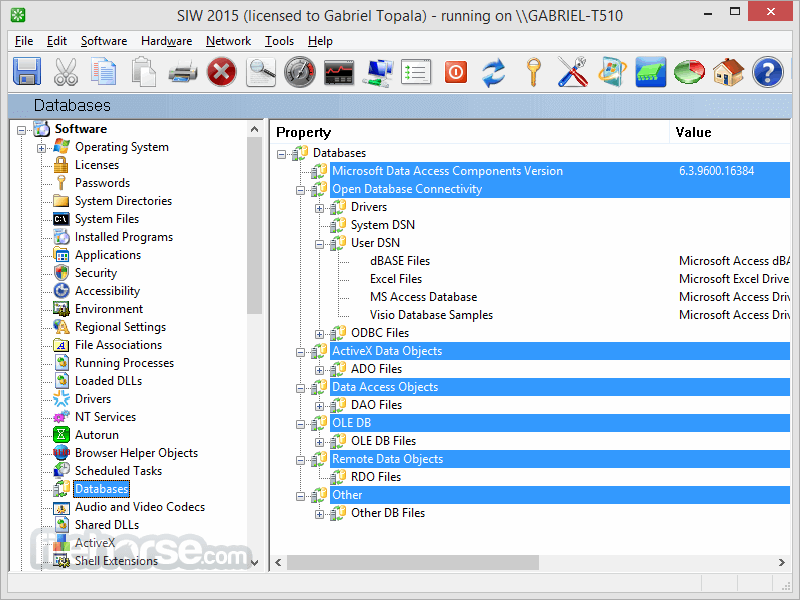
畫面截圖
- 2026-08-03 SIW 2026 16.12.0802 51.43 MB
- 2026-07-14 SIW 2026 16.11.0714 51.39 MB
- 2026-07-02 SIW 2026 16.10.0701 51.43 MB
- 2026-06-29 SIW 2026 16.08.0628 33.56 MB
- 2026-06-04 SIW 2026 16.08.0603 47.76 MB
- 2026-05-25 SIW 2026 16.07.0524 47.86 MB
- 2026-05-14 SIW 2026 16.06.0513 47.82 MB
- 2026-04-27 SIW 2026 16.05.0426 30.25 MB