⚠ 這是歷史版本頁面 — 查看 SQLite 3.53.4 (64-bit) 最新版本 →

SQLite 3.50.4 (64-bit)
v 3.50.4 (64-bit)
Windows
免費軟體
8.06/10 (95)
- 目前版本3.50.4 (64-bit)
- 更新日期2025-07-31
- 檔案大小1.3 MB
- 檔案名稱sqlite-dll-win-x64-3500400.zip
- 作業系統Windows 7 64 / Windows 8 64 / Windows 10 64 / Windows 11
- 支援語系English
- 授權型式免費軟體
- 開發商 Richard Hipp
- 軟體分類Windows 軟體 / 開發者工具
##
編輯短評
SQLite 是一款廣為使用的嵌入式 SQL 資料庫引擎,最大特色是無需獨立伺服器即可運作,所有資料都儲存在單一檔案中,部署與管理都相對簡單。它採用輕量架構,設定需求極低,特別適合應用程式本地儲存、行動裝置與嵌入式系統等情境。本軟體目前仍持續積極更新,在同類開發者工具中屬於評價普遍不錯的熱門選擇,尤其對需要輕量資料庫方案的開發者來說,是相當穩健的起點。
這套工具適合需要在本機端快速建立資料庫、又不想額外維護資料庫伺服器的開發者,無論是桌面應用程式、小型工具或原型開發,都能派上用場。與 MySQL、PostgreSQL 等傳統關聯式資料庫相比,SQLite 犧牲了多人同時寫入與進階伺服器功能,換來的是免安裝、免設定的便利性。軟體本身為免費授權,支援 Windows 平台,但介面僅提供英文,使用上需留意語系需求。
##
翻譯排程處理中,以下暫以英文原文呈現
軟體介紹
SQLite 64bit is a widely used, self-contained, high-performance database engine for Windows that operates without the need for a dedicated database server.
Unlike traditional relational database management systems (RDBMS) like MySQL or PostgreSQL, SQLite is an embedded SQL database that stores data in a single file.
It is an excellent choice for local storage in applications, mobile devices, and embedded systems due to its lightweight architecture and minimal configuration requirements.
Key Features
Self-Contained Database – No separate database server required, making it easy to deploy.
Cross-Platform Compatibility – Works across Windows, Linux, macOS, and mobile OS.
Atomic Transactions – Ensures database integrity with full ACID compliance.
Compact and Fast – Small footprint with optimized performance.
Full SQL Support – Supports most SQL standards, including subqueries, joins, and triggers.
Reliable Storage – Uses a single-file database format, making it highly portable.
Zero Configuration – No setup or administrative tasks are required.
User Interface
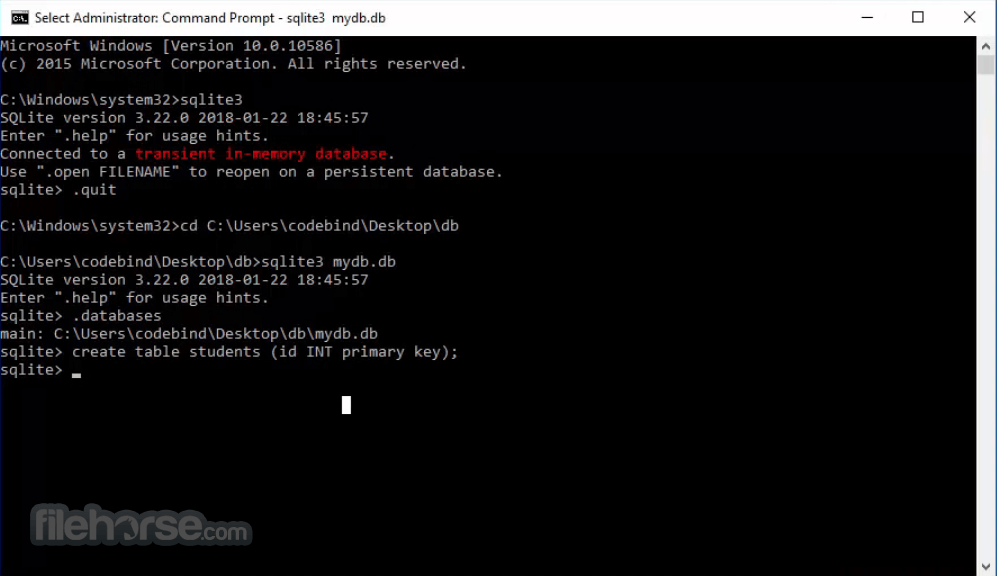
Since SQLite is primarily a database engine, it does not have a traditional graphical user interface (GUI) like MySQL Workbench or Microsoft SQL Server Management Studio.
However, developers can interact with it through the SQLite command-line interface (CLI) or third-party GUI tools such as DB Browser for SQLite and SQLiteStudio.
These tools provide a graphical representation of database structures, making it easier for beginners and professionals to manage data.
Installation and Setup
Create a Database – Run sqlite3 database_name.db to create a new database.
Create Tables – Use SQL commands such as CREATE TABLE users (id INTEGER PRIMARY KEY, name TEXT);
Insert Data – Add data using INSERT INTO users (name) VALUES ('John Doe');
Query Data – Retrieve data with SELECT * FROM users;
Export Data – Use .mode csv and .output file.csv for exporting data to a CSV file.
FAQs
Is SQLite free to use?
Yes, SQLite is free and open-source under the Public Domain, meaning anyone can use it without restrictions.
Does SQLite support multiple users?
SQLite is designed for local storage, and while multiple connections are possible, it is not optimized for concurrent high-traffic environments.
How secure is SQLite?
SQLite provides encryption support through extensions like SQLite Encryption Extension (SEE) or SQLCipher.
Can SQLite handle large databases?
Yes, it supports databases up to 281 terabytes, though performance may vary depending on hardware and query complexity.
Does SQLite require an internet connection?
No, it operates entirely offline as it is a serverless database.
Alternatives
MySQL – A full-fledged RDBMS with multi-user support.
PostgreSQL – A powerful open-source database with advanced features.
MariaDB – A MySQL-compatible alternative with improved performance.
MongoDB – A NoSQL alternative for document-based storage.
Microsoft SQL Server Express – A free version of SQL Server for Windows users.
Pricing
SQLite is completely FREE to use under the Public Domain license.
However, commercial users requiring encryption or additional features may opt for the SQLite Encryption Extension (SEE), which comes with licensing fees.
System Requirements
SQLite (64-bit) is a highly efficient and lightweight database engine, perfect for local data storage, embedded systems, and smaller applications. While it lacks the scalability of full RDBMS solutions, it excels in simplicity, portability, and performance for single-user or embedded scenarios.
Also Available: SQLite (32-bit) and SQLite for Mac
Download SQLite (64-bit) Latest Version Why is this app published on FileHorse? (More info)
Unlike traditional relational database management systems (RDBMS) like MySQL or PostgreSQL, SQLite is an embedded SQL database that stores data in a single file.
It is an excellent choice for local storage in applications, mobile devices, and embedded systems due to its lightweight architecture and minimal configuration requirements.
Key Features
Self-Contained Database – No separate database server required, making it easy to deploy.
Cross-Platform Compatibility – Works across Windows, Linux, macOS, and mobile OS.
Atomic Transactions – Ensures database integrity with full ACID compliance.
Compact and Fast – Small footprint with optimized performance.
Full SQL Support – Supports most SQL standards, including subqueries, joins, and triggers.
Reliable Storage – Uses a single-file database format, making it highly portable.
Zero Configuration – No setup or administrative tasks are required.
User Interface
Since SQLite is primarily a database engine, it does not have a traditional graphical user interface (GUI) like MySQL Workbench or Microsoft SQL Server Management Studio.
However, developers can interact with it through the SQLite command-line interface (CLI) or third-party GUI tools such as DB Browser for SQLite and SQLiteStudio.
These tools provide a graphical representation of database structures, making it easier for beginners and professionals to manage data.
Installation and Setup
- Download the SQLite (64-bit) Windows package from the official website or FileHorse.
- Extract the downloaded ZIP file to a folder of your choice.
- Add the extracted directory to your system’s PATH environment variable (optional for easier CLI access).
- Run sqlite3.exe to start using SQLite via the command line.
Create a Database – Run sqlite3 database_name.db to create a new database.
Create Tables – Use SQL commands such as CREATE TABLE users (id INTEGER PRIMARY KEY, name TEXT);
Insert Data – Add data using INSERT INTO users (name) VALUES ('John Doe');
Query Data – Retrieve data with SELECT * FROM users;
Export Data – Use .mode csv and .output file.csv for exporting data to a CSV file.
FAQs
Is SQLite free to use?
Yes, SQLite is free and open-source under the Public Domain, meaning anyone can use it without restrictions.
Does SQLite support multiple users?
SQLite is designed for local storage, and while multiple connections are possible, it is not optimized for concurrent high-traffic environments.
How secure is SQLite?
SQLite provides encryption support through extensions like SQLite Encryption Extension (SEE) or SQLCipher.
Can SQLite handle large databases?
Yes, it supports databases up to 281 terabytes, though performance may vary depending on hardware and query complexity.
Does SQLite require an internet connection?
No, it operates entirely offline as it is a serverless database.
Alternatives
MySQL – A full-fledged RDBMS with multi-user support.
PostgreSQL – A powerful open-source database with advanced features.
MariaDB – A MySQL-compatible alternative with improved performance.
MongoDB – A NoSQL alternative for document-based storage.
Microsoft SQL Server Express – A free version of SQL Server for Windows users.
Pricing
SQLite is completely FREE to use under the Public Domain license.
However, commercial users requiring encryption or additional features may opt for the SQLite Encryption Extension (SEE), which comes with licensing fees.
System Requirements
- Operating System: Windows 7, 8, 10, 11 (64-bit)
- Processor: Intel or AMD x64 processor
- RAM: Minimum 512MB (Recommended: 2GB or more)
- Disk Space: A few MBs for installation (database size depends on usage)
- Lightweight and requires no installation
- Fast and efficient for local databases
- Fully ACID-compliant transactions
- Simple SQL syntax and extensive documentation
- Portable and cross-platform
- Not ideal for large-scale, multi-user applications
- Lacks a built-in GUI for database management
- Limited concurrency handling compared to MySQL or PostgreSQL
- No built-in authentication or user management
- Performance decreases with very large datasets
SQLite (64-bit) is a highly efficient and lightweight database engine, perfect for local data storage, embedded systems, and smaller applications. While it lacks the scalability of full RDBMS solutions, it excels in simplicity, portability, and performance for single-user or embedded scenarios.
Also Available: SQLite (32-bit) and SQLite for Mac
Download SQLite (64-bit) Latest Version Why is this app published on FileHorse? (More info)
##
畫面截圖
- 2026-07-25 SQLite 3.53.4 (64-bit) 1.3 MB
- 2026-06-29 SQLite 3.53.3 (64-bit) 1.3 MB
- 2026-06-05 SQLite 3.53.2 (64-bit) 1.3 MB
- 2026-05-06 SQLite 3.53.1 (64-bit) 1.3 MB
- 2026-04-10 SQLite 3.53.0 (64-bit) 1.3 MB
- 2026-03-07 SQLite 3.52.0 (64-bit) 1.3 MB
- 2026-01-10 SQLite 3.51.2 (64-bit) 1.3 MB
- 2025-11-29 SQLite 3.51.1 (64-bit) 1.3 MB