⚠ 這是歷史版本頁面 — 查看 SQLyog Community Edition 最新版本 →

SQLyog Community Edition 13.2.0
v 13.2.0
Windows
開源軟體
8.62/10 (61)
- 目前版本13.2.0
- 更新日期2023-11-15
- 檔案大小6.4 MB
- 檔案名稱SQLyog-13.2.0-0.x64Community.exe
- 作業系統Windows 8 (64-bit) / Windows 10 (64-bit) / Windows 11
- 支援語系English
- 授權型式開源軟體
- 開發商 Webyog Softworks
- 軟體分類Windows 軟體 / 開發者工具
##
編輯短評
SQLyog Community Edition 是一套老牌的 MySQL 與 MariaDB 圖形化管理工具,主要解決純文字指令操作資料庫門檻較高的問題。它最顯著的特點是提供視覺化的查詢建構器與排程複製功能,能透過介面直接完成資料表結構與資料的比對、同步,甚至以 checksum 演算法定期複製資料,對需要從測試環境搬遷到正式環境的開發流程相當實用。此版本為開源專案,長期以來持續維護,更新頻率不算頻繁但穩定,在同類工具中屬於評價普遍不錯的選擇,雖然不是最熱門的開發工具,但累積了不少忠實使用者。
這套軟體適合需要頻繁操作 MySQL 或 MariaDB 的開發者、資料庫管理員,尤其是偏好圖形介面勝過命令列的人。與其他同類工具相比,它的優勢在於輕量、免安裝即可使用,且備份與同步功能直覺好上手;不過 Community 版僅提供英文介面,且功能上比付費版本精簡,若需要進階的排程備份或更多自動化功能,可能得考慮其他方案。授權為開源軟體,Windows 平台限定,對中文使用者來說,英文介面是唯一需要適應的地方。
##
翻譯排程處理中,以下暫以英文原文呈現
軟體介紹
SQLyog Community Edition is the best database management tool for Windows PC we have ever used. It’s easy to use, backups are easy and fast. The query builder makes life much easier.
The most complete and easy-to-use MySQL GUI! Apply schema and data changes visually while moving from test to production. Replicate data periodically at scheduled intervals using a superfast checksum-based algorithm.
SQLyog Community Free Edition for Windows 11/10 is a feature-rich, cross-platform database management tool that empowers users to efficiently manage and interact with MySQL and MariaDB databases.
Whether you are a beginner or an experienced database professional, it offers a user-friendly interface and a wide range of powerful features to streamline your database tasks.
Direct access to MySQL blocked? Forced to use clunky phpMyAdmin? SQLyog Community Edition has you covered. Powerful backup wizard with a one-click backup option and the ability to schedule backups with ease. Streamline data transfer/migration from any ODBC-compliant data source to MySQL.
Features
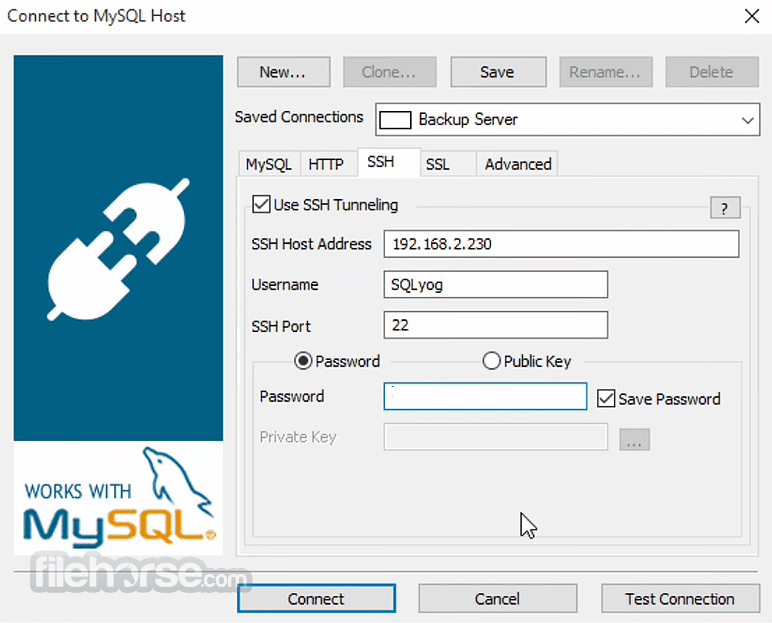
Database Connection Management: Easily establish connections to MySQL and MariaDB databases with support for SSH and SSL connections.
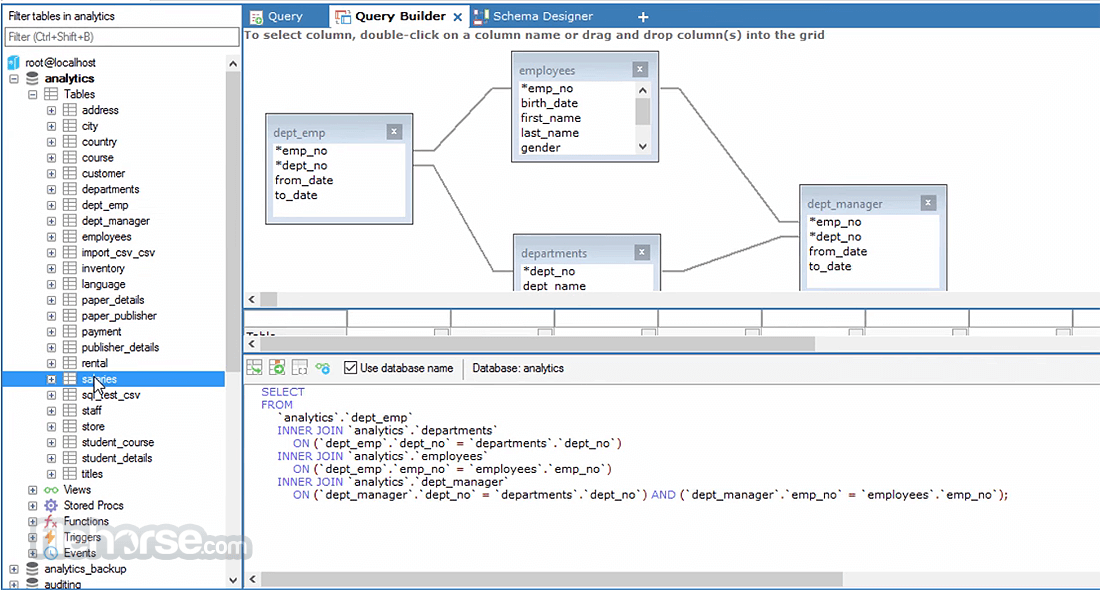
Query Builder: Construct SQL queries visually using the intuitive drag-and-drop query builder.
Data Synchronization: Synchronize data between databases, even across different server platforms.
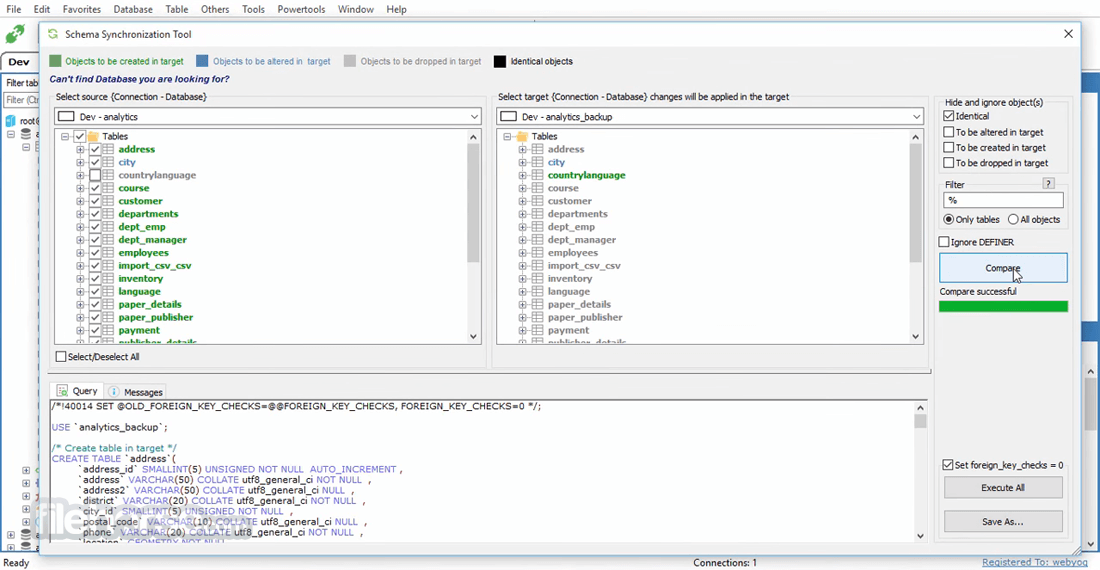
Schema and Data Comparison: Compare and synchronize database schemas and data effortlessly.
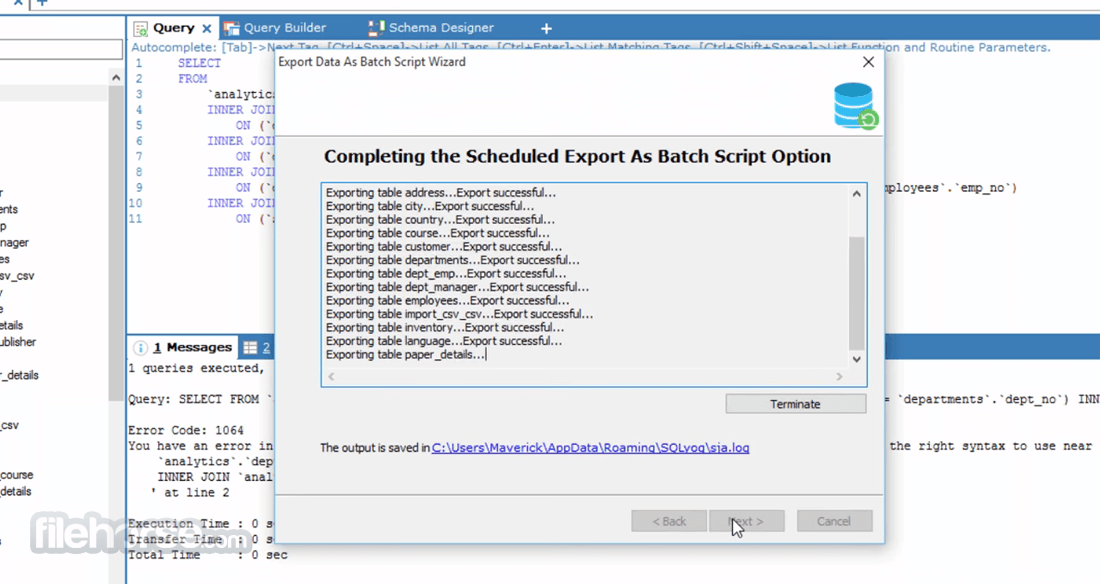
Scheduled Backups: Automate database backups and manage backup schedules to ensure data integrity.
Import and Export: Import data from various sources and export data in multiple formats, including CSV, SQL, Excel, and more.
Visual Design Tools: Create and modify database schemas using the graphical schema designer.
Table Data Search and Edit: Easily locate and modify specific data within your tables with the powerful search and edit tools.
SSH and HTTP Tunnels: Securely access databases over SSH and HTTP tunnels, ensuring data privacy and security.
Query Execution History: Keep track of your query history and re-execute previous queries with a single click.
User Interface
It sports a clean and user-friendly interface. The layout is well-organized, with a left-side navigation pane for easy access to database connections, schema information, and query history.
The main workspace provides a comfortable environment for writing and executing SQL queries. The icons and menu options are intuitive, making it accessible for users of all skill levels.
Installation and Setup
Installing SQLyog Community Edition is straightforward. You can download the installer from the official GitHub website or FileHorse and follow the on-screen instructions.
During installation, you can select components and configuration options according to your preferences. The setup process also allows you to specify database connections and customize settings.
How to Use
Is SQLyog Community Edition free to use?
Yes, SQLyog Community Edition is 100% FREE and open-source software, making it accessible to users without any licensing costs.
Can I connect to both MySQL and MariaDB databases with SQLyog?
Absolutely! It supports connections to both MySQL and MariaDB databases, offering a versatile solution for database management.
Does SQLyog offer data migration and synchronization capabilities?
Yes, it provides robust data migration and synchronization features, allowing you to keep your databases up to date effortlessly.
Is it possible to schedule automated backups in SQLyog Community Edition?
Yes, you can schedule automated backups of your databases, ensuring data safety and reliability.
Does SQLyog Community Edition offer support for SSH and SSL connections?
Yes, it supports secure SSH and SSL connections for added security when accessing your databases.
Alternatives
phpMyAdmin - A web-based database management tool that is often included with web hosting packages, providing a convenient way to manage databases through a browser.
DBeaver - An open-source, cross-platform database tool that supports various database systems, including MySQL, PostgreSQL, and SQLite, with a strong focus on data modeling and analytics.
HeidiSQL - A Windows-based database management tool that supports MySQL, MariaDB, and SQL Server, known for its lightweight and user-friendly interface.
MySQL Workbench - The official MySQL tool by Oracle, offering a comprehensive set of features for database design, development, and administration.
PROS
SQLyog Community Edition is an exceptional database management tool for MySQL and MariaDB, offering a rich set of features in a user-friendly package. Its versatility, ease of use, and cost-effectiveness make it an ideal choice for individuals and small businesses seeking efficient database management.
Whether you are a beginner or an experienced database administrator, it simplifies your database tasks and empowers you to work with your data effectively. With its strong feature set, it stands as a compelling option in the realm of open-source database management software.
Download SQLyog Community Edition Latest Version Why is this app published on FileHorse? (More info)
The most complete and easy-to-use MySQL GUI! Apply schema and data changes visually while moving from test to production. Replicate data periodically at scheduled intervals using a superfast checksum-based algorithm.
SQLyog Community Free Edition for Windows 11/10 is a feature-rich, cross-platform database management tool that empowers users to efficiently manage and interact with MySQL and MariaDB databases.
Whether you are a beginner or an experienced database professional, it offers a user-friendly interface and a wide range of powerful features to streamline your database tasks.
Direct access to MySQL blocked? Forced to use clunky phpMyAdmin? SQLyog Community Edition has you covered. Powerful backup wizard with a one-click backup option and the ability to schedule backups with ease. Streamline data transfer/migration from any ODBC-compliant data source to MySQL.
Features
- MySQL 5.X compatible
- Create/drop/alter tables, stored procedures, functions, views, triggers, and events.
- HTTP and SSH tunneling - smartly manage your MySQL server even if the MySQL port is blocked or remote access to MySQL is disallowed!
- Protect your data with SSL encryption
- Smart autocomplete
- Formats SQL statements
- Proactive query profiler
- Favorite manager to neatly organize your favorite SQL statements
- Very fast retrieval of data
- Advanced GUI query builder. Supports joins, aggregate as well as 'common' functions, sorting (order by) and filtering (where and having), and alias.
- Sqlyog import external data wizard - use the GUI or specify a query
- Schema and data synchronization tools
- Powerful compressed scheduled backup with email notification
- Schedule various jobs
- SQL scheduler and reporting tool - execute unattended queries for database maintenance of data verification with flexible email option
- Update result returned from query - also supports queries with joins. No dialogues - just edit!
- Manage foreign key relationships
- Fully innodb compliant
- Supports MySQL pluggable storage engines architecture
- Multi-threaded query execution with the option to allow multiple query executions to run simultaneously
- View your results in grid/text mode
- Filter data and result sets directly from the context menu of a displayed value
- Execute (very large) SQL scripts as batch files
- Execute multiple queries returning more than 1000s rows per result set. It's very efficient in memory.
- Very compact binary
- Written entirely in c/c++/win32 apis using native MySQL C APIs. No wrapper classes used.
- Connection manager
- Excel-like grid interface to create/alter tables
- View and edit advanced table properties, such as comment, key_length, etc.
- Do table diagnostics (check, optimize, repair, analyze)
- Duplicate tables to new table names
- Excel-like grid interface to edit data with support for enum/set
- Create/drop databases
- Manage indexes
- Comprehensive user/security manager. Control every available privilege on what level you like (server/database/table/column).
- Reorder columns of the table
- Copy database between two MySQL hosts
- Drop all tables of a database with a single click
- Edit blobs in text or graphics mode. All common (non-proprietary) graphics formats (including 'high-resolution' tiffs and pngs) are supported.
- Export table structure and data into SQL dumps
- Direct export to Microsoft Excel
- Export/import data in/from CSV files
- Export database schema in HTML
- Log all queries for a session
- Syntax-highlighting
- Save resultset in CSV, HTML, and XML
- Copy your result as CSV to the clipboard
- It is very keyboard-friendly. You can work with 99% features of SQLYog with the keyboard.
- View and kill other user processes
- Flush host/logs/privileges/tables
- Quick access to processlist, status, and variables
Database Connection Management: Easily establish connections to MySQL and MariaDB databases with support for SSH and SSL connections.
Query Builder: Construct SQL queries visually using the intuitive drag-and-drop query builder.
Data Synchronization: Synchronize data between databases, even across different server platforms.
Schema and Data Comparison: Compare and synchronize database schemas and data effortlessly.
Scheduled Backups: Automate database backups and manage backup schedules to ensure data integrity.
Import and Export: Import data from various sources and export data in multiple formats, including CSV, SQL, Excel, and more.
Visual Design Tools: Create and modify database schemas using the graphical schema designer.
Table Data Search and Edit: Easily locate and modify specific data within your tables with the powerful search and edit tools.
SSH and HTTP Tunnels: Securely access databases over SSH and HTTP tunnels, ensuring data privacy and security.
Query Execution History: Keep track of your query history and re-execute previous queries with a single click.
User Interface
It sports a clean and user-friendly interface. The layout is well-organized, with a left-side navigation pane for easy access to database connections, schema information, and query history.
The main workspace provides a comfortable environment for writing and executing SQL queries. The icons and menu options are intuitive, making it accessible for users of all skill levels.
Installation and Setup
Installing SQLyog Community Edition is straightforward. You can download the installer from the official GitHub website or FileHorse and follow the on-screen instructions.
During installation, you can select components and configuration options according to your preferences. The setup process also allows you to specify database connections and customize settings.
How to Use
- Install the software on your PC.
- Launch SQLyog and create a new database connection by providing the necessary details, such as hostname, port, username, and password.
- Once connected, you can explore the database structure, execute SQL queries, and perform various management tasks using the intuitive interface.
Is SQLyog Community Edition free to use?
Yes, SQLyog Community Edition is 100% FREE and open-source software, making it accessible to users without any licensing costs.
Can I connect to both MySQL and MariaDB databases with SQLyog?
Absolutely! It supports connections to both MySQL and MariaDB databases, offering a versatile solution for database management.
Does SQLyog offer data migration and synchronization capabilities?
Yes, it provides robust data migration and synchronization features, allowing you to keep your databases up to date effortlessly.
Is it possible to schedule automated backups in SQLyog Community Edition?
Yes, you can schedule automated backups of your databases, ensuring data safety and reliability.
Does SQLyog Community Edition offer support for SSH and SSL connections?
Yes, it supports secure SSH and SSL connections for added security when accessing your databases.
Alternatives
phpMyAdmin - A web-based database management tool that is often included with web hosting packages, providing a convenient way to manage databases through a browser.
DBeaver - An open-source, cross-platform database tool that supports various database systems, including MySQL, PostgreSQL, and SQLite, with a strong focus on data modeling and analytics.
HeidiSQL - A Windows-based database management tool that supports MySQL, MariaDB, and SQL Server, known for its lightweight and user-friendly interface.
MySQL Workbench - The official MySQL tool by Oracle, offering a comprehensive set of features for database design, development, and administration.
PROS
- Free and open-source.
- User-friendly interface.
- Comprehensive database management features.
- Support for MySQL and MariaDB.
- Secure SSH and SSL connections.
- Visual query builder and schema designer.
- Automated backup and synchronization.
- Cross-platform compatibility.
- Limited to MySQL and MariaDB support.
- Some advanced features may require upgrading to the commercial version (SQLyog Ultimate).
SQLyog Community Edition is an exceptional database management tool for MySQL and MariaDB, offering a rich set of features in a user-friendly package. Its versatility, ease of use, and cost-effectiveness make it an ideal choice for individuals and small businesses seeking efficient database management.
Whether you are a beginner or an experienced database administrator, it simplifies your database tasks and empowers you to work with your data effectively. With its strong feature set, it stands as a compelling option in the realm of open-source database management software.
Download SQLyog Community Edition Latest Version Why is this app published on FileHorse? (More info)
##
畫面截圖
- 2025-09-25 SQLyog Community Edition 13.3.1 7 MB
- 2024-08-31 SQLyog Community Edition 13.3.0 7 MB
- 2023-12-27 SQLyog Community Edition 13.2.1 6.4 MB
- 2023-11-15 SQLyog Community Edition 13.2.0 6.4 MB
- 2023-07-13 SQLyog Community Edition 13.1.9 5.9 MB
- 2023-06-05 SQLyog Community Edition 13.1.8 5.9 MB
- 2020-10-13 SQLyog Community Edition 13.1.7 5.9 MB
- 2020-05-01 SQLyog Community Edition 13.1.6 5.9 MB