⚠ 這是歷史版本頁面 — 查看 StartIsBack 2.9.21 (for Windows 10) 最新版本 →

StartIsBack 2.9.14 (for Windows 10)
v 2.9.14 (for Windows 10)
Windows
商業試用
7.64/10 (73)
- 目前版本2.9.14 (for Windows 10)
- 更新日期2021-06-13
- 檔案大小1.46 MB
- 檔案名稱StartIsBackPlusPlus_setup.exe
- 作業系統Windows 10 (32-bit) / Windows 10 (64-bit)
- 支援語系English
- 授權型式商業試用
- 開發商 Tihiy
- 軟體分類Windows 軟體 / 桌面強化
##
編輯短評
StartIsBack是一款受歡迎的第三方桌面強化工具,主要將Windows 10的開始功能表還原為Windows 7的經典樣式,並提供工作列的自訂選項,如套用皮膚、調整圖示大小與顏色、置中圖示等。其最大特色是重現舊版操作邏輯,同時宣稱能降低系統資源使用。開發商持續維護,但更新步調較慢;在同類工具中屬於熱門選擇,使用者評價普遍不錯。
這套軟體適合習慣Windows 7介面、對Windows 10預設開始功能表感到不便
##
翻譯排程處理中,以下暫以英文原文呈現
軟體介紹
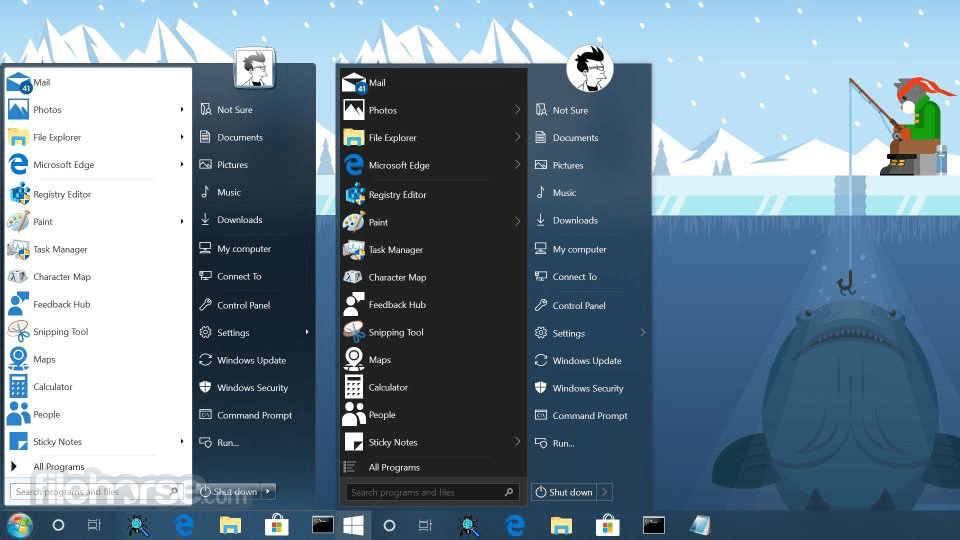
StartIsBack is a popular third-party customization tool designed to bring the classic Windows 7-style Start Menu back to newer versions of Windows, including Windows 8, Windows 10, and Windows 11.
The Start menu is back, and it's better than ever. Get the most useful shell enhancement for Windows 10 now!
This utility is an amazing Start menu tool shell for your Desktop!
It aims to provide users with a familiar and efficient Start Menu experience while enhancing system usability with additional customization options. For those who prefer the traditional Windows Start Menu over the newer tile-based or modern UI designs, this mini tool is a must-have solution.
Features
It offers a straightforward and user-friendly interface. Once installed, it immediately replaces the default Start Menu with a classic yet customizable version.
Users can access a settings panel that allows them to tweak:
Additionally, it provides smooth animations and high-DPI support, ensuring a crisp and modern look.
Installation and SetupDownload - Obtain the latest version from the official website or FileHorse. Install - Run the setup file and follow the on-screen instructions. Select Preferences - Choose a preferred Start Menu style and configure settings. Apply and Restart Explorer - Restart Windows Explorer for changes to take effect. Enjoy - Your new classic Start Menu is ready to use.
The tool does not require any special configurations or additional software dependencies, making it accessible for all users.
How to Use
Is StartIsBack safe to use?
Yes, this program is a safe and legitimate software used by thousands of Windows users worldwide. It does not contain malware or spyware.
Does StartIsBack slow down my PC?
No, the software is lightweight and runs efficiently without consuming unnecessary resources.
Can I uninstall StartIsBack if I don’t like it?
Yes, you can easily uninstall this app through the Control Panel or Settings menu, and your original Start Menu will be restored.
Does StartIsBack work on Windows 11?
Yes, the latest versions of this software are fully compatible with Windows 11, offering customization for the taskbar and Start Menu.
Is StartIsBack free?
No, this app is a paid software, but it offers a free trial so users can test it before purchasing.
How do I configure the Start Menu?
Either right-click the Start button and click "Properties" or right-click opened Start Menu itself and choose "Properties" context menu item.
Can I use StartIsBack without the start menu, just for skinning/jump list/awesomeness?
Yes. Just pick the leftmost (Windows 10) style. Then select taskbar and start button styles separately.
Can StartIsBack break my system?
No. If you experience issues with the old program on a too recent Windows 10 update, just hold the Escape key when logging in to disable the tool.
How do I uninstall StartIsBack?
As expected: go to Control Panel - Programs and Features, find the app, and click Uninstall.
How does the trial version work?
There are no limitations in the trial version. After installing, it runs for 30 days. If you don't activate it with the license number you bought within 30 days, it will still work, but in limited mode: Start Menu will be blank and sad; every boot, you'll be nagged about the evaluation period over. The trial period runs for each user who has installed Start Is Back on one PC separately.
Alternatives
Start11 – A similar premium tool by Stardock, offering multiple Start menu styles and taskbar enhancements.
Open-Shell – A classic Start menu replacement with extensive customization.
Classic Shell – Although no longer actively developed, it's still a popular choice for those seeking a classic Start Menu experience.
StartAllBack - A newer version of this app optimized for Windows 11.
Pricing
Personal License: $4.99 (for a single PC)
Multiple PCs: Discounted rates for bulk purchases
Free Trial: Allows users to test the software before purchasing
Unlike subscription-based software, the program is a one-time purchase with lifetime updates for the purchased version.
System Requirements
StartIsBack is a fantastic tool for users who prefer the classic Windows Start Menu experience. It provides extensive customization options while maintaining system performance and stability.
With its intuitive interface, seamless integration, and affordable pricing, this program is one of the best solutions available for restoring the traditional Windows Start Menu.
Note: 30-day trial version.
Download StartIsBack Latest Version Why is this app published on FileHorse? (More info)
The Start menu is back, and it's better than ever. Get the most useful shell enhancement for Windows 10 now!
This utility is an amazing Start menu tool shell for your Desktop!
- StartIsBack++ for Windows 10 can:
- Apply skins to the taskbar
- Replace taskbar jump lists (context menus) with better ones
- Center taskbar icons
- Restore larger taskbar icons
- Fine-tune taskbar color
- Reduce OS resource usage
It aims to provide users with a familiar and efficient Start Menu experience while enhancing system usability with additional customization options. For those who prefer the traditional Windows Start Menu over the newer tile-based or modern UI designs, this mini tool is a must-have solution.
Features
- Classic Start Menu Experience - Restores the fully functional Windows 7-style Start Menu with enhanced performance.
- Customization Options - Users can modify the appearance of the Start Menu, taskbar, and other system elements.
- Lightweight and Fast - The software runs natively and does not consume excessive system resources.
- Taskbar Tweaks - Allows users to adjust the transparency, color, and behavior of the taskbar.
- Seamless Integration - Unlike other third-party tools, StartIsBack feels like a native Windows feature.
- Pin and Search Functionality - Users can pin their favorite apps and utilize an improved search mechanism.
- Supports Windows 10 and 11 - The software adapts to newer Windows versions while preserving legacy features.
- Multi-Monitor Support - Users with multiple displays can enjoy consistent functionality across screens.
- Drag and Drop Support - Easily add applications to the Start Menu via drag-and-drop functionality.
- Dark Mode Support - Compatible with dark themes for modern Windows aesthetics
It offers a straightforward and user-friendly interface. Once installed, it immediately replaces the default Start Menu with a classic yet customizable version.
Users can access a settings panel that allows them to tweak:
- Start Menu style
- Button appearance
- Taskbar transparency
- System behavior and responsiveness
Additionally, it provides smooth animations and high-DPI support, ensuring a crisp and modern look.
Installation and Setup
How to Use
- Access Settings - Right-click on the Start button and select Properties to open the customization panel.
- Change Appearance - Modify Start Menu themes, taskbar styles, and icon sizes.
- Pin Applications - Drag and drop frequently used apps into the Start Menu.
- Search and Launch Apps - Use the search bar to quickly find and open programs.
- Manage Shortcuts - Customize what appears on the Start Menu, including Control Panel, Documents, and recent items.
Is StartIsBack safe to use?
Yes, this program is a safe and legitimate software used by thousands of Windows users worldwide. It does not contain malware or spyware.
Does StartIsBack slow down my PC?
No, the software is lightweight and runs efficiently without consuming unnecessary resources.
Can I uninstall StartIsBack if I don’t like it?
Yes, you can easily uninstall this app through the Control Panel or Settings menu, and your original Start Menu will be restored.
Does StartIsBack work on Windows 11?
Yes, the latest versions of this software are fully compatible with Windows 11, offering customization for the taskbar and Start Menu.
Is StartIsBack free?
No, this app is a paid software, but it offers a free trial so users can test it before purchasing.
How do I configure the Start Menu?
Either right-click the Start button and click "Properties" or right-click opened Start Menu itself and choose "Properties" context menu item.
Can I use StartIsBack without the start menu, just for skinning/jump list/awesomeness?
Yes. Just pick the leftmost (Windows 10) style. Then select taskbar and start button styles separately.
Can StartIsBack break my system?
No. If you experience issues with the old program on a too recent Windows 10 update, just hold the Escape key when logging in to disable the tool.
How do I uninstall StartIsBack?
As expected: go to Control Panel - Programs and Features, find the app, and click Uninstall.
How does the trial version work?
There are no limitations in the trial version. After installing, it runs for 30 days. If you don't activate it with the license number you bought within 30 days, it will still work, but in limited mode: Start Menu will be blank and sad; every boot, you'll be nagged about the evaluation period over. The trial period runs for each user who has installed Start Is Back on one PC separately.
Alternatives
Start11 – A similar premium tool by Stardock, offering multiple Start menu styles and taskbar enhancements.
Open-Shell – A classic Start menu replacement with extensive customization.
Classic Shell – Although no longer actively developed, it's still a popular choice for those seeking a classic Start Menu experience.
StartAllBack - A newer version of this app optimized for Windows 11.
Pricing
Personal License: $4.99 (for a single PC)
Multiple PCs: Discounted rates for bulk purchases
Free Trial: Allows users to test the software before purchasing
Unlike subscription-based software, the program is a one-time purchase with lifetime updates for the purchased version.
System Requirements
- Operating System: Windows 8/10/11 (32-bit & 64-bit)
- RAM: Minimum 512MB
- Processor: 1 GHz or higher
- Disk Space: Less than 10MB required for installation
- Restores the classic Windows Start Menu seamlessly
- Highly customizable with multiple themes and settings
- Lightweight and does not affect system performance
- Affordable one-time purchase
- Compatible with Windows 8, 10, and 11
- Lack of official support and updates
- Limited updates beyond purchased versions
- Minor compatibility issues with some third-party Windows modifications
StartIsBack is a fantastic tool for users who prefer the classic Windows Start Menu experience. It provides extensive customization options while maintaining system performance and stability.
With its intuitive interface, seamless integration, and affordable pricing, this program is one of the best solutions available for restoring the traditional Windows Start Menu.
Note: 30-day trial version.
Download StartIsBack Latest Version Why is this app published on FileHorse? (More info)
##
畫面截圖
- 2026-02-17 StartIsBack 2.9.21 (for Windows 10) 1.48 MB
- 2024-02-16 StartIsBack 2.9.20 (for Windows 10) 1.48 MB
- 2023-03-09 StartIsBack 2.9.19 (for Windows 10) 1.47 MB
- 2023-02-18 StartIsBack 2.9.18 (for Windows 10) 1.48 MB
- 2021-11-29 StartIsBack 2.9.17 (for Windows 10) 1.47 MB
- 2021-09-18 StartIsBack 2.9.16 (for Windows 10) 1.47 MB
- 2021-06-27 StartIsBack 2.9.15 (for Windows 10) 1.47 MB
- 2021-06-13 StartIsBack 2.9.14 (for Windows 10) 1.46 MB