⚠ 這是歷史版本頁面 — 查看 StarWind V2V Converter 最新版本 →

StarWind V2V Converter 9.0.167
v 9.0.167
Windows
免費軟體
7.96/10 (33)
- 目前版本9.0.167
- 更新日期2019-12-16
- 檔案大小35.67 MB
- 檔案名稱starwindconverter.exe
- 作業系統Windows XP / Vista / Windows 7 / Windows 8 / Windows 10 / Windows 11
- 支援語系English
- 授權型式免費軟體
- 開發商 StarWind Software Inc.
- 軟體分類Windows 軟體 / 檔案傳輸與網路
##
編輯短評
StarWind V2V Converter 是一款專為虛擬機與虛擬磁碟格式轉換設計的免費工具,主要解決不同虛擬化平台或硬體環境之間的遷移問題。它支援 VMDK、VHD/VHDX、QCOW2 及自家 IMG 等多種主流格式,並可雙向轉換,甚至能將實體機轉為虛擬機。最特別的是,轉換後的虛擬機會自動調整以適應新硬體,避免相容性問題。此軟體長期維護,但更新步調較慢;在同類工具中屬於中等熱度,使用者評價普遍不錯,不過評分樣本數不多。
這套工具適合需要頻繁遷移虛擬機的 IT 管理員,或想將實體伺服器虛擬化的使用者。當你更換虛擬機平台、需要在不同格式間轉換,或要將實體機轉為虛擬機時,它都能派上用場。與同分類中常見的下載或傳輸工具相比,它專注於虛擬機格式轉換,功能更為專門
##
翻譯排程處理中,以下暫以英文原文呈現
軟體介紹
StarWind V2V Converter makes VM and virtual disk migration between different hardware sets easier by booting the migrated VM in Windows Repair Mode.
Also, this utility enables the conversion of a physical machine into a virtual one.
In both cases, the VM automatically adapts to the new hardware environment, avoiding any compatibility problems.
It works with all major VM formats: VMDK, VHD/VHDX, QCOW2, and StarWind-native IMG. It functions both ways, converting from and to any VM format, thus having better functionality than similar converters.
V2V Converter is a robust PC software designed for virtual machine (VM) migration and conversion. It enables users to effortlessly convert virtual machines from one format to another, facilitating seamless migration between hypervisors and virtualization platforms.
Developed by StarWind Software, a leading provider of software-defined storage solutions, it aims to simplify the often complex process of VM migration, ensuring minimal downtime and maximum efficiency for businesses and IT professionals.
It allows easily converting VM formats directly from one hypervisor to another. You don’t need to create copies of the source and destination VM files on your local machine, making the conversion process extra simple.
It allows migrating and copying virtual machines between hosts with different hypervisors. It also enables one to convert a physical machine into a virtual one located on any industry-standard hypervisor server with no risk of breaking data consistency. The utility is compatible with major hypervisors like Microsoft Hyper-V, VMware ESXi, Citrix XenServer, and KVM.
StarWind V2V Converter is a free tool for cloning and transforming VMs from one format to another, as well as converting physical machines into virtual ones. It is utilized when a migration or hypervisor switch is required. Compared to the typical converters built into hypervisors, it offers bi-directional conversion between all the major VM formats: VMDK, VHD/VHDX (Windows Repair Mode aware), QCOW2, and StarWind native IMG.
Virtual to Virtual (V2V)
It has numerous competitive gains over converters built into hypervisors. First, it supports bi-directional VM conversion between different hypervisors. For saving time during migration and hypervisor switch, the tool enables us to convert VMs directly from one hypervisor storage to another, without creating an extra VM disk copy. On top of that, the utility ensures a safe P2V migration by using a VSS snapshot of the source machine to ensure data consistency.
Physical to Virtual (P2V)
The app enables the conversion of a physical machine into a virtual one that resides on a Hyper-V or ESXi server. The utility allows converting physical disks or volumes into a variety of formats: VHD/VHDX, VMDK, QCOW2, and IMG/RAW. Simply start the program on a physical machine and convert it into a virtual one located on a remote server. Data consistency is preserved throughout the migration. It can also help provide a turnkey virtual infrastructure to make your P2V transition seamless with its preconfigured hyper-converged appliance.
It alleviates the risk of data corruption during conversion by working with a copy of the target VM, keeping the original file intact. The utility uses VSS snapshots while carrying out P2V migration. In this way, the machine state is consistent, and any chance of data corruption or loss is avoided. It can also replicate the virtual drives across multiple nodes in the cluster to ensure constant uptime of your data using StarWind VSAN.
The app alleviates the risk of data corruption during conversion by working with a copy of the target VM, keeping the original file intact. The utility uses VSS snapshots while carrying out P2V migration. In this way, the machine state is consistent, and any chance of data corruption or loss is avoided.
V2V Converter is free software, without any hidden payments, additional required licenses, or timebombs. In other words, there are no strings attached; this tool is best suited for immediate download and use.
Main Features
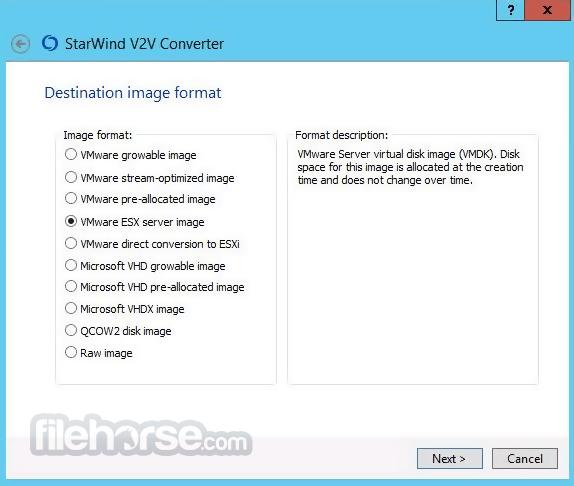
It boasts a user-friendly interface designed with simplicity and efficiency in mind. Upon launching the application, users are greeted with a clean and intuitive dashboard that guides them through the conversion process step by step.
The wizard-based approach ensures that even novice users can easily navigate the software and perform complex VM conversions without requiring extensive technical expertise.
Installation and Setup
Installing this free software is a straightforward process that involves downloading the installer from the official website or FileHorse and following the on-screen instructions.
The software is compatible with Windows operating systems and requires minimal system resources to operate efficiently. Once installed, users can launch the application and begin converting virtual machines with just a few clicks.
How to Use
Is StarWind V2V Converter free to use?
Yes, the program is available as a free download with no licensing fees or subscription costs.
Does V2V Converter support conversion of physical machines to virtual machines (P2V)?
Yes, it supports both virtual-to-virtual (V2V) and physical-to-virtual (P2V) conversion scenarios.
What virtual machine formats does V2V Converter support?
It supports conversion between various formats, including VMDK, VHD/VHDX, and IMG.
Can I convert multiple virtual machines simultaneously using V2V Converter?
Yes, it supports batch conversions, allowing users to convert multiple VMs concurrently for enhanced efficiency.
Does StarWind V2V Converter require extensive technical expertise to use?
No, it features a user-friendly interface and intuitive workflow, making it accessible to both novice and experienced users alike.
Alternatives
VMware vCenter Converter – A utility that converts physical machines and third-party virtual machines into VMware virtual machines for easier migration and virtualization.
Acronis True Image – A backup and disk imaging solution that allows users to create full system backups, clone drives, and restore data in case of system failure or data loss.
Pricing
The software is available as a FREE download with no cost associated with its usage.
System Requirements
Download StarWind V2V Converter Latest Version Why is this app published on FileHorse? (More info)
Also, this utility enables the conversion of a physical machine into a virtual one.
In both cases, the VM automatically adapts to the new hardware environment, avoiding any compatibility problems.
It works with all major VM formats: VMDK, VHD/VHDX, QCOW2, and StarWind-native IMG. It functions both ways, converting from and to any VM format, thus having better functionality than similar converters.
V2V Converter is a robust PC software designed for virtual machine (VM) migration and conversion. It enables users to effortlessly convert virtual machines from one format to another, facilitating seamless migration between hypervisors and virtualization platforms.
Developed by StarWind Software, a leading provider of software-defined storage solutions, it aims to simplify the often complex process of VM migration, ensuring minimal downtime and maximum efficiency for businesses and IT professionals.
It allows easily converting VM formats directly from one hypervisor to another. You don’t need to create copies of the source and destination VM files on your local machine, making the conversion process extra simple.
It allows migrating and copying virtual machines between hosts with different hypervisors. It also enables one to convert a physical machine into a virtual one located on any industry-standard hypervisor server with no risk of breaking data consistency. The utility is compatible with major hypervisors like Microsoft Hyper-V, VMware ESXi, Citrix XenServer, and KVM.
StarWind V2V Converter is a free tool for cloning and transforming VMs from one format to another, as well as converting physical machines into virtual ones. It is utilized when a migration or hypervisor switch is required. Compared to the typical converters built into hypervisors, it offers bi-directional conversion between all the major VM formats: VMDK, VHD/VHDX (Windows Repair Mode aware), QCOW2, and StarWind native IMG.
Virtual to Virtual (V2V)
It has numerous competitive gains over converters built into hypervisors. First, it supports bi-directional VM conversion between different hypervisors. For saving time during migration and hypervisor switch, the tool enables us to convert VMs directly from one hypervisor storage to another, without creating an extra VM disk copy. On top of that, the utility ensures a safe P2V migration by using a VSS snapshot of the source machine to ensure data consistency.
Physical to Virtual (P2V)
The app enables the conversion of a physical machine into a virtual one that resides on a Hyper-V or ESXi server. The utility allows converting physical disks or volumes into a variety of formats: VHD/VHDX, VMDK, QCOW2, and IMG/RAW. Simply start the program on a physical machine and convert it into a virtual one located on a remote server. Data consistency is preserved throughout the migration. It can also help provide a turnkey virtual infrastructure to make your P2V transition seamless with its preconfigured hyper-converged appliance.
It alleviates the risk of data corruption during conversion by working with a copy of the target VM, keeping the original file intact. The utility uses VSS snapshots while carrying out P2V migration. In this way, the machine state is consistent, and any chance of data corruption or loss is avoided. It can also replicate the virtual drives across multiple nodes in the cluster to ensure constant uptime of your data using StarWind VSAN.
The app alleviates the risk of data corruption during conversion by working with a copy of the target VM, keeping the original file intact. The utility uses VSS snapshots while carrying out P2V migration. In this way, the machine state is consistent, and any chance of data corruption or loss is avoided.
V2V Converter is free software, without any hidden payments, additional required licenses, or timebombs. In other words, there are no strings attached; this tool is best suited for immediate download and use.
Main Features
- Conversion between various virtual machine formats, including VMDK, VHD/VHDX, and IMG.
- Support for popular hypervisors such as VMware ESXi, Microsoft Hyper-V, and Citrix XenServer.
- Intuitive wizard-based interface for easy operation.
- Ability to perform batch conversions, enabling simultaneous processing of multiple VMs.
- Support for both virtual-to-virtual (V2V) and physical-to-virtual (P2V) conversion scenarios.
- Integration with StarWind's portfolio of software-defined storage solutions for enhanced data management capabilities.
- Command-line interface (CLI) for advanced users and automation purposes.
- Lightweight footprint with minimal resource utilization.
- Multi-VM Conversion: Added support for converting multiple virtual machines simultaneously.
- Cloud Conversion Improvements: Enhanced VM conversion workflows for Microsoft Azure and AWS environments.
- P2V Conversion Enhancements: Improved physical-to-virtual migration to Proxmox and ESXi platforms.
- Automated Driver Installation: Windows virtual machines now automatically install required drivers when converted to oVirt.
- VM Synchronization Fixes: Resolved issues affecting live VM synchronization between ESXi and Hyper-V.
- Windows Server 2025 Compatibility: Fixed problems encountered when converting Windows Server 2025 virtual machines.
- Proxmox Improvements: Improved conversion reliability and added support for Proxmox 9.0.
- ESXi Conversion Fixes: Addressed issues when converting virtual machines to and from ESXi.
It boasts a user-friendly interface designed with simplicity and efficiency in mind. Upon launching the application, users are greeted with a clean and intuitive dashboard that guides them through the conversion process step by step.
The wizard-based approach ensures that even novice users can easily navigate the software and perform complex VM conversions without requiring extensive technical expertise.
Installation and Setup
Installing this free software is a straightforward process that involves downloading the installer from the official website or FileHorse and following the on-screen instructions.
The software is compatible with Windows operating systems and requires minimal system resources to operate efficiently. Once installed, users can launch the application and begin converting virtual machines with just a few clicks.
How to Use
- Launch the app and select the source virtual machine file.
- Choose the desired target format and destination location for the converted VM.
- Configure any additional settings or options as needed.
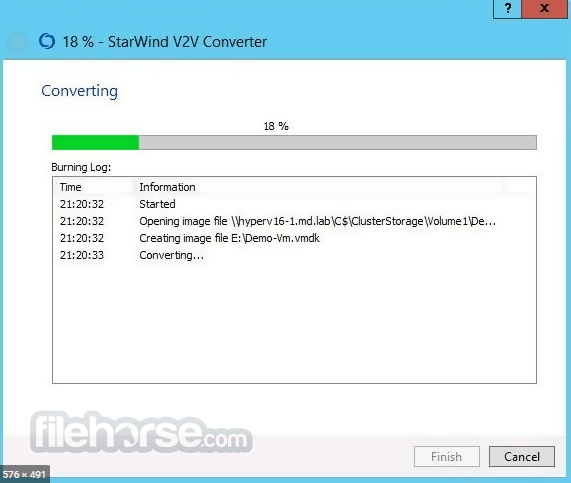
- Initiate the conversion process and monitor progress via the status indicator.
- Once the conversion is complete, verify the integrity of the converted VM and deploy it on the target hypervisor.
Is StarWind V2V Converter free to use?
Yes, the program is available as a free download with no licensing fees or subscription costs.
Does V2V Converter support conversion of physical machines to virtual machines (P2V)?
Yes, it supports both virtual-to-virtual (V2V) and physical-to-virtual (P2V) conversion scenarios.
What virtual machine formats does V2V Converter support?
It supports conversion between various formats, including VMDK, VHD/VHDX, and IMG.
Can I convert multiple virtual machines simultaneously using V2V Converter?
Yes, it supports batch conversions, allowing users to convert multiple VMs concurrently for enhanced efficiency.
Does StarWind V2V Converter require extensive technical expertise to use?
No, it features a user-friendly interface and intuitive workflow, making it accessible to both novice and experienced users alike.
Alternatives
VMware vCenter Converter – A utility that converts physical machines and third-party virtual machines into VMware virtual machines for easier migration and virtualization.
Acronis True Image – A backup and disk imaging solution that allows users to create full system backups, clone drives, and restore data in case of system failure or data loss.
Pricing
The software is available as a FREE download with no cost associated with its usage.
System Requirements
- Windows operating system (Windows 7/8/10/11 or Windows Server)
- Intel or AMD processor with a minimum of 1 GHz
- 1 GB of RAM (2 GB or more recommended)
- 110 MB of available disk space for installation
- Free to use with no licensing fees
- Intuitive wizard-based interface
- Support for various virtual machine formats and hypervisors
- Batch conversion capability for enhanced efficiency
- Limited advanced features compared to paid alternatives
- Windows-only compatibility
Download StarWind V2V Converter Latest Version Why is this app published on FileHorse? (More info)
##
畫面截圖
- 2026-03-16 StarWind V2V Converter 9.0.1.848 41.49 MB
- 2021-02-15 StarWind V2V Converter 9.0.242 39.26 MB
- 2019-12-16 StarWind V2V Converter 9.0.167 35.67 MB
- 2018-04-19 StarWind V2V Converter 8.0.168 11.8 MB