⚠ 這是歷史版本頁面 — 查看 TextSeek 最新版本 →

- 目前版本2.20.4020
- 更新日期2024-03-11
- 檔案大小50.07 MB
- 檔案名稱TextSeek_setup.exe
- 作業系統Windows XP64 / Vista64 / Windows 7 64 / Windows 8 64 / Windows 10 64 / Windows 11
- 支援語系English
- 授權型式試用版
- 開發商 Xiamen Zesite Company
- 軟體分類Windows 軟體 / 桌面強化
##
編輯短評
TextSeek 是一款專為 Windows 設計的桌面全文搜尋工具,能在幾秒內找出電腦裡 PDF、Word、Excel、PowerPoint 等文件中的內容,不必逐一開啟檔案慢慢翻找。它最大的特色是採用類似 Google 的搜尋介面,支援正規表示式,並提供關鍵字高亮的預覽功能,而且不需要建立索引就能快速比對,省去等待建檔的時間。這套軟體自 2022 年起持續更新,但近一年僅釋出一次版本,更新節奏不算頻繁;在同類工具中屬於小眾選擇,評價人數不多,整體評價中等。
如果你經常需要從大量文件中撈出特定字詞,例如研究報告、合約條款或歷史郵件,TextSeek 會比 Windows 內建搜尋更實用。與 Everything 或 Copernic 等替代方案相比,它的優勢在於免索引與正規表示式支援,但試用版授權可能限制部分功能,且介面僅有英文,對不熟悉英文操作的使用者稍有門檻。此外,它只支援 Windows 平台,使用前需留意檔案格式相容性,尤其非主流文件類型可能無法完整涵蓋。
##
翻譯排程處理中,以下暫以英文原文呈現
軟體介紹
TextSeek helps you search document contents for Windows PC within seconds, including PDF, Word, Excel, PowerPoint, and other formats. Search for various files on your computer!
Features and Highlights
A better desktop search engine
It's annoying that after a long Windows Search, you are told there are no results, even though some files are just under your nose. By introducing an advanced indexing engine, TextSeek for PC can overcome this problem.
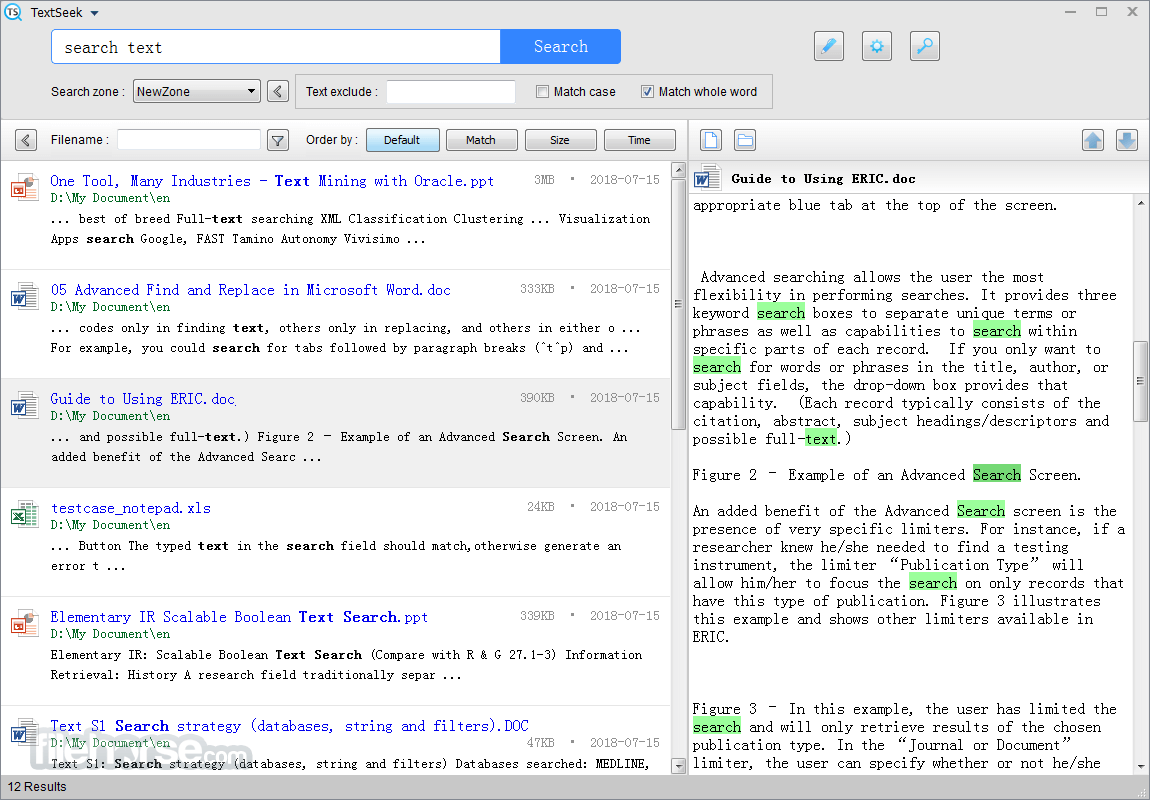
It performs full-text scanning within several seconds and renders the search results like Google. The document modification will be updated in search engines in real-time to keep the results' freshness.
File title and content are both searchable
It supports many document formats, including Word, Excel, PowerPoint, PDF, RTF, and so on. All the parsing modules are integrated with TextSeek for Desktop, so no other packages are needed to install.
Different from other desktop search tools, both the filename and all document text are included in the search engine to avoid text omission.
Customize your own search scope
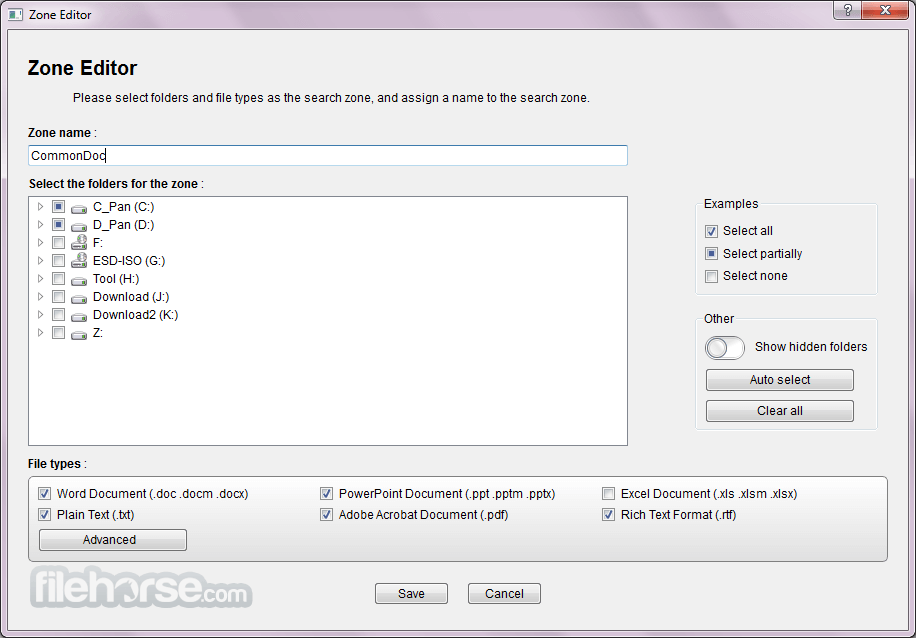
In Text Seek for Windows, you can define the "zones", which stand for the scopes (including document folders and document formats) to be searched. For example, code files are in one zone and writing files in another zone, and searching them respectively.
Furthermore, it provides four ranking methods and advanced filters (case / whole match / exclude ) to enhance search accuracy. Short abstract and detailed preview with highlight keyword is also present for you to locate documents more efficiently.
How to modify the search scope?
After ordering your edition, you will receive a registration key that you enter during the registration process. Every copy has to be licensed as a per-seat license, say, one machine per license. If you have more than two machines, you need to buy more licenses.
If you want to transfer the license to a new machine, you should uninstall the registered app on the old machine. Each license has a limited valid time (commonly three years), and the software will revert to the demo version when the registration expires.
Key Features
Minimalist Design
Download TextSeek Latest Version Why is this app published on FileHorse? (More info)
- Search like Google
- Full-text search with no omission
- No index for fast reach
- Preview with highlighted keywords
- Regular Expression
- Support PDF, Word, Excel, PowerPoint, HTML, RTF
Features and Highlights
A better desktop search engine
It's annoying that after a long Windows Search, you are told there are no results, even though some files are just under your nose. By introducing an advanced indexing engine, TextSeek for PC can overcome this problem.
It performs full-text scanning within several seconds and renders the search results like Google. The document modification will be updated in search engines in real-time to keep the results' freshness.
File title and content are both searchable
It supports many document formats, including Word, Excel, PowerPoint, PDF, RTF, and so on. All the parsing modules are integrated with TextSeek for Desktop, so no other packages are needed to install.
Different from other desktop search tools, both the filename and all document text are included in the search engine to avoid text omission.
Customize your own search scope
In Text Seek for Windows, you can define the "zones", which stand for the scopes (including document folders and document formats) to be searched. For example, code files are in one zone and writing files in another zone, and searching them respectively.
Furthermore, it provides four ranking methods and advanced filters (case / whole match / exclude ) to enhance search accuracy. Short abstract and detailed preview with highlight keyword is also present for you to locate documents more efficiently.
How to modify the search scope?
- Click the right pen-shaped icon or click the top-left menu "TextSeek", then select "Search zone".
- Click "Edit" to modify the old zone or click "Add" to add a new zone.
- In the zone editing window, select all the directories and the file types to be searched, then "Save" the zone.
- Click "Save" and all the zones will be scanned in several minutes.
After ordering your edition, you will receive a registration key that you enter during the registration process. Every copy has to be licensed as a per-seat license, say, one machine per license. If you have more than two machines, you need to buy more licenses.
If you want to transfer the license to a new machine, you should uninstall the registered app on the old machine. Each license has a limited valid time (commonly three years), and the software will revert to the demo version when the registration expires.
Key Features
Minimalist Design
- A user-friendly search experience akin to Baidu.
- Preview file content with highlighted keywords.
- Quickly navigate search results using Ctrl + Arrow shortcuts.
- Easy Mode: Search directly without indexing.
- Zone Mode: Index specific directories for faster searches.
- Compatible with Windows, Mac, and UOS systems.
- Comprehensive full-text search to ensure no results are missed.
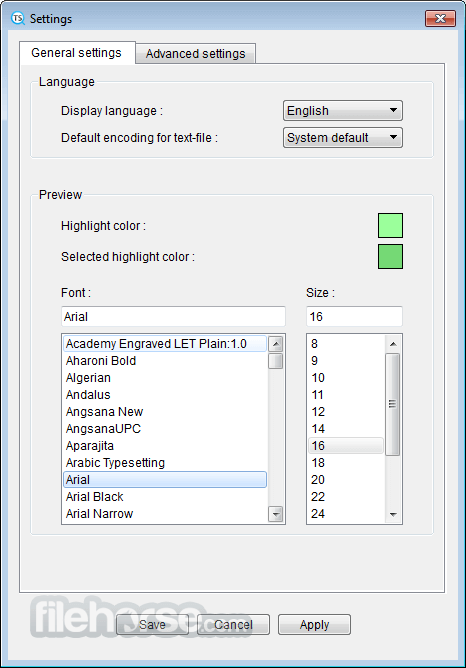
- Interface available in 14 languages, including Chinese, English, Japanese, Korean, French, German, and Arabic.
- Filter results by document type, file name, or content.
- Sort results by file size, modification date, or relevance.
- Options to match case, whole words, or exact phrases.
- Support for regular expressions and "or" keyword searches.
- Perform bulk actions such as copying, cutting, or deleting files.
- Export search result data to a CSV file for further analysis.
- Comprehensive full-text search across formats
- User-friendly interface with quick previews
- Multiple search options and filters available
- Batch processing capabilities for efficiency
- A few years without new features and official updates
- Requires internet for license verification
- Limited free trial period available
- Potential performance impact on large files
- Lacks advanced search features like regex
Download TextSeek Latest Version Why is this app published on FileHorse? (More info)
##
畫面截圖
- 2025-12-10 TextSeek 2.20.4120 50.06 MB
- 2024-04-17 TextSeek 2.20.4050 50.02 MB
- 2024-04-16 TextSeek 2.20.4038 50.07 MB
- 2024-03-11 TextSeek 2.20.4020 50.07 MB
- 2024-01-23 TextSeek 2.20.4010 50.07 MB
- 2024-01-22 TextSeek 2.20.3990 50.08 MB
- 2023-12-10 TextSeek 2.20.3960 50.15 MB
- 2023-11-28 TextSeek 2.20.3950 50.16 MB