⚠ 這是歷史版本頁面 — 查看 Tongbu Assistant 最新版本 →

Tongbu Assistant 3.5.6.0
v 3.5.6.0
Windows
商業試用
7.2/10 (58)
- 目前版本3.5.6.0
- 更新日期2020-03-20
- 檔案大小1.03 MB
- 檔案名稱Tongbu3EN_Installer_3.5.6.0.exe
- 作業系統Windows 7 / Windows 8 / Windows 10 / Windows 11
- 支援語系English
- 授權型式商業試用
- 開發商 Tongbu Team
- 軟體分類Windows 軟體 / 手機工具
##
編輯短評
Tongbu Assistant 是一款同時支援 iOS 與 Android 裝置的內容管理工具,讓使用者能直接從 Windows 桌面存取手機內部的檔案、應用程式與系統資訊。它最大的辨識度在於除了支援一般 iOS 裝置外,也相容已越獄的 iPhone 與 iPad,能對系統底層進行更深入的存取與控制,包括管理聊天應用程式的訊息、透過檔案管理員傳輸資料,以及操作系統層級的應用程式。此軟體由 Tongbu Team 開發,目前為試用版授權,僅提供英文介面;在同類工具中屬於小眾選擇,更新頻率不算頻繁,但仍在持續維護,使用者評價普遍中等。
這套工具適合需要同時管理 iOS 與 Android 兩種裝置、且不排斥使用越獄功能以取得更深層控制權的使用者。若你只需要單純的 iOS 備份或刷機,同分類中如 3uTools 或 Odin3 等熱門替代方案可能更為成熟;但 Tongbu Assistant 的優勢在於跨平台支援與對越獄裝置的完整存取,這在替代軟體中較為少見。使用上需留意它僅有英文介面,且為試用版,部分進階功能可能受限;若你的裝置沒有越獄需求,或偏好更穩定的主流工具,建議先評估自身使用情境再決定是否下載。
##
翻譯排程處理中,以下暫以英文原文呈現
軟體介紹
Tongbu Assistant is a highly capable content manager for iOS and Android devices, enabling users to get instant access to their mobile devices straight from the desktop of their PC or laptop.
This includes not only official iOS devices but also jailbroken iPhone and iPad devices that have their security safeguards lowered, thus enabling users much greater access to their operating system, local storage, and apps.
Tongbu Assistant supports direct management of messages on various chat apps, a file manager for streamlined transfer of data, various system apps that allow direct control and monitoring of various aspects of your mobile device, and much more.
You can also install or remove apps and games, download and install firmware packages, update apps, manage your complete media library (with separate tools for Photos and Video files), directly load and view multimedia files on your device, create backups of files, manage contact lists, messages, notes, and even easily transfer data between your PC and an iOS mobile device.
Some of the advanced features include cleaning the mobile storage from unnecessary (temporary cache) files, deleting browsing history, removing any saved passwords, and more.
One of the most unique features of the Tongbu Assistant is the presence of an unofficial app store for jailbroken iOS devices. Be aware that any software or game downloaded from this source is not officially approved by iOS and can introduce instability or malicious software to your phone or tablet. Such apps can also lose their activation certificate, becoming inoperable until you completely reinstall them via Tongbu software.
Highlights and Features
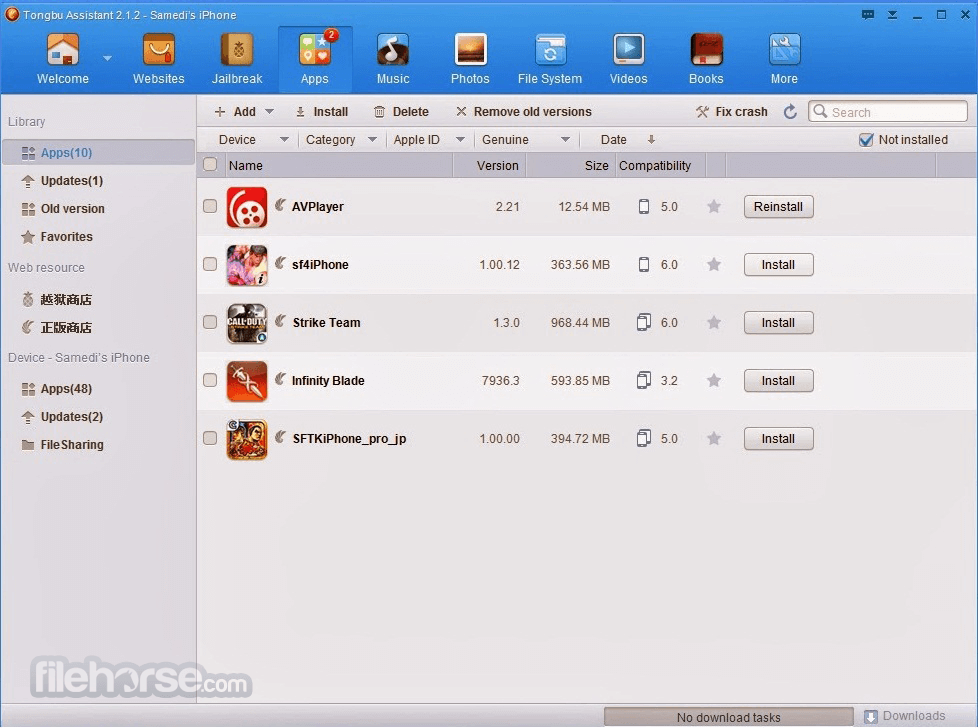
The main interface of the program features a great, eye-catching design that is focused on providing you with easy access to a wide variety of tools and services accessible through this content manager.
Once connected with your mobile device, the app will initially boot into the “Welcome” tab that showcases the basic information about your phone, connection status, and much more. Here you can find one of the most important tools found in this application – Backup and Restore. With it, you can grab the entire image of your mobile device, including all of your apps and personal data, and transfer it to your PC storage.
Other tools of the app can be found in the line of tab icons at the top – Apps, Music, Photos, Videos, File System, Jailbreak and More (which houses access to more in-depth tools for managing Messages, specific storage areas of your installed apps, System tools, and other tools for creating ringtones, converting videos and more).
FAQs
What is Tongbu OVIP and how does it work?
Tongbu OVIP is a premium subscription service that provides users with access to paid and tweaked iOS apps without requiring a jailbreak. It works through the Tongbu Assistant, which installs apps on your iOS device using enterprise certificates and a custom PC tool.
Do I need to jailbreak my iPhone to use Tongbu OVIP?
No, Tongbu OVIP does not require jailbreaking. It uses enterprise signing methods, allowing you to install and run modified or paid apps on non-jailbroken devices with minimal risk.
Is Tongbu OVIP safe and reliable for long-term use?
While Tongbu OVIP is widely used and generally safe, enterprise certificates can get revoked by Apple, causing apps to stop working temporarily. However, OVIP users often get faster re-signing support and longer-lasting certificates compared to free users.
Is Tongbu OVIP still being actively developed and updated?
No, Tongbu OVIP is no longer under active development. While the service may still function, there have been no significant updates or improvements in recent years, and official support appears limited.
Alternatives
Dr.Fone Full Toolkit - Easily remove the lock screen from your Android or iOS.
Tenorshare iCareFone - All-in-one Tool to Fix All iOS Problems and Tuneup iPhone/iPad/iPod.
ApowerManager - Professional Windows Phone Manager for Android & iOS.
iMyFone Fixppo - Professional iOS Repair Software - Get Your iPhone Back to Normal!
EaseUS MobiSaver Pro for iOS - How to Recover Deleted Text Messages or Other Files from iPhone.
Stellar Data Recovery for iPhone - iPhone Data Recovery Tool to Recover Lost Photos, Videos, and More!
PROS
Download Tongbu Assistant Latest Version Why is this app published on FileHorse? (More info)
This includes not only official iOS devices but also jailbroken iPhone and iPad devices that have their security safeguards lowered, thus enabling users much greater access to their operating system, local storage, and apps.
Tongbu Assistant supports direct management of messages on various chat apps, a file manager for streamlined transfer of data, various system apps that allow direct control and monitoring of various aspects of your mobile device, and much more.
You can also install or remove apps and games, download and install firmware packages, update apps, manage your complete media library (with separate tools for Photos and Video files), directly load and view multimedia files on your device, create backups of files, manage contact lists, messages, notes, and even easily transfer data between your PC and an iOS mobile device.
Some of the advanced features include cleaning the mobile storage from unnecessary (temporary cache) files, deleting browsing history, removing any saved passwords, and more.
One of the most unique features of the Tongbu Assistant is the presence of an unofficial app store for jailbroken iOS devices. Be aware that any software or game downloaded from this source is not officially approved by iOS and can introduce instability or malicious software to your phone or tablet. Such apps can also lose their activation certificate, becoming inoperable until you completely reinstall them via Tongbu software.
Highlights and Features
- One of the most popular iOS/Android content managers for Windows OS.
- Complete management of all your apps and games.
- Quickly transfer data between your Phone and PC, without the need for iTunes.
- Easily back up your device and restore it whenever needed.
- Granular management of chat logs.
- Available on Windows 7, 8, 10, or 11.
The main interface of the program features a great, eye-catching design that is focused on providing you with easy access to a wide variety of tools and services accessible through this content manager.
Once connected with your mobile device, the app will initially boot into the “Welcome” tab that showcases the basic information about your phone, connection status, and much more. Here you can find one of the most important tools found in this application – Backup and Restore. With it, you can grab the entire image of your mobile device, including all of your apps and personal data, and transfer it to your PC storage.
Other tools of the app can be found in the line of tab icons at the top – Apps, Music, Photos, Videos, File System, Jailbreak and More (which houses access to more in-depth tools for managing Messages, specific storage areas of your installed apps, System tools, and other tools for creating ringtones, converting videos and more).
FAQs
What is Tongbu OVIP and how does it work?
Tongbu OVIP is a premium subscription service that provides users with access to paid and tweaked iOS apps without requiring a jailbreak. It works through the Tongbu Assistant, which installs apps on your iOS device using enterprise certificates and a custom PC tool.
Do I need to jailbreak my iPhone to use Tongbu OVIP?
No, Tongbu OVIP does not require jailbreaking. It uses enterprise signing methods, allowing you to install and run modified or paid apps on non-jailbroken devices with minimal risk.
Is Tongbu OVIP safe and reliable for long-term use?
While Tongbu OVIP is widely used and generally safe, enterprise certificates can get revoked by Apple, causing apps to stop working temporarily. However, OVIP users often get faster re-signing support and longer-lasting certificates compared to free users.
Is Tongbu OVIP still being actively developed and updated?
No, Tongbu OVIP is no longer under active development. While the service may still function, there have been no significant updates or improvements in recent years, and official support appears limited.
Alternatives
Dr.Fone Full Toolkit - Easily remove the lock screen from your Android or iOS.
Tenorshare iCareFone - All-in-one Tool to Fix All iOS Problems and Tuneup iPhone/iPad/iPod.
ApowerManager - Professional Windows Phone Manager for Android & iOS.
iMyFone Fixppo - Professional iOS Repair Software - Get Your iPhone Back to Normal!
EaseUS MobiSaver Pro for iOS - How to Recover Deleted Text Messages or Other Files from iPhone.
Stellar Data Recovery for iPhone - iPhone Data Recovery Tool to Recover Lost Photos, Videos, and More!
PROS
- Ease of Use: User-friendly interface and simple navigation.
- Comprehensive Management: Provides tools for managing apps, files, and backups.
- Compatibility: Works well with iOS devices.
- Free Apps: Access to a variety of apps and games for free.
- Frequent Updates: Regular updates to improve functionality and security.
- Discontinued: This application has been discontinued.
- Limited Support: Customer support may not be as robust as official app stores.
- Stability Issues: Occasional crashes and bugs.
Download Tongbu Assistant Latest Version Why is this app published on FileHorse? (More info)
##
畫面截圖
- 2026-08-10 Tongbu Assistant 3.6.3.1 1.02 MB
- 2020-03-20 Tongbu Assistant 3.5.6.0 1.03 MB
- 2018-10-02 Tongbu Assistant 3.3.0.0 1.01 MB