⚠ 這是歷史版本頁面 — 查看 Total Commander 11.58 (64-bit) 最新版本 →

Total Commander 11.55 (64-bit)
v 11.55 (64-bit)
Windows
商業試用
8.12/10 (206)
- 目前版本11.55 (64-bit)
- 更新日期2025-06-25
- 檔案大小7.02 MB
- 檔案名稱tcmd1155x64.exe
- 作業系統Windows 7 64 / Windows 8 64 / Windows 10 64 / Windows 11
- 支援語系English
- 授權型式商業試用
- 開發商 Christian Ghisler
- 軟體分類Windows 軟體 / 檔案傳輸與網路
##
編輯短評
Total Commander 是一款老牌的雙窗格檔案管理工具,旨在取代 Windows 內建的檔案總管,提供更有效率的檔案與資料夾操作。其最具辨識度的特色是雙窗格介面,讓使用者能同時檢視兩個目錄,方便複製、移動與比對。此外,它內建檔案比較、壓縮檔處理、FTP 客戶端與批次重新命名等功能,滿足進階需求。這款軟體由 Christian Ghisler 開發,長期持續更新,使用者評價普遍不錯,在同類工具中屬於主流選擇。
適合需要頻繁管理大量檔案的進階使用者、IT 專業人員,或是對檔案總管功能感到不足的一般用戶。當你需要同時處理多個目錄、批次改名或連線 FTP 時,它會比預設工具更順手。相較於 Internet Download Manager 或 uTorrent 等專注於下載或分享的軟體,Total Commander 是全面的檔案管理方案,但沒有內建下載加速或種子功能。要注意的是,它為試用版授權,僅提供英文介面,且僅支援 Windows 平台,使用前需確認是否符合需求。
##
翻譯排程處理中,以下暫以英文原文呈現
軟體介紹
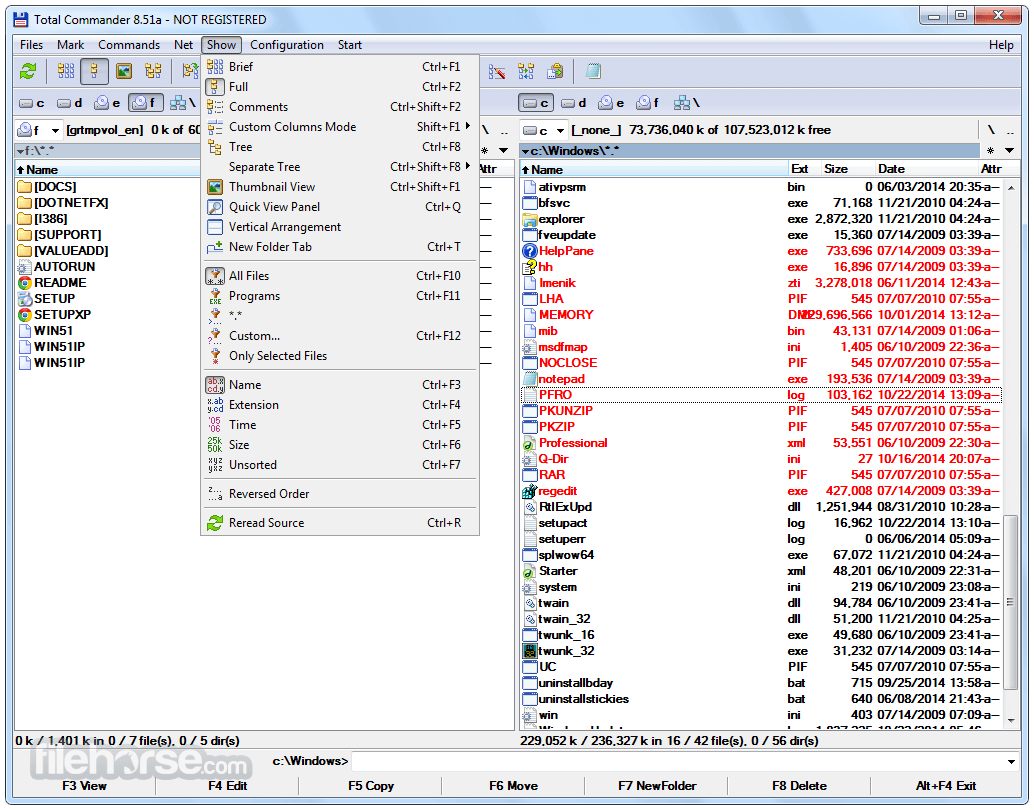
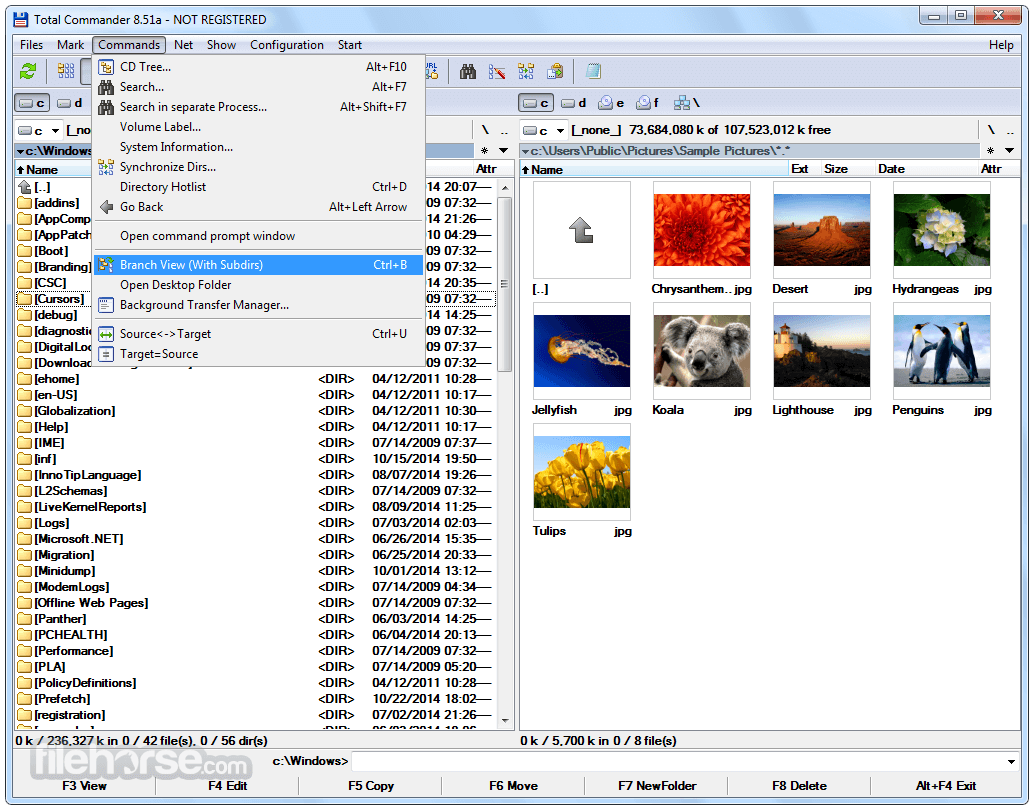
Total Commander is a powerful file management software for Windows that offers a dual-pane interface, allowing users to efficiently manage files and folders.
Developed by Christian Ghisler, it serves as a robust alternative to the default Windows File Explorer, packed with advanced features such as file comparison, archive handling, FTP client integration, and batch renaming.
Originally inspired by the classic Norton Commander, Total Commander 64bit has evolved into a comprehensive tool for power users, IT professionals, and everyday users who need enhanced file handling capabilities.
Key Features
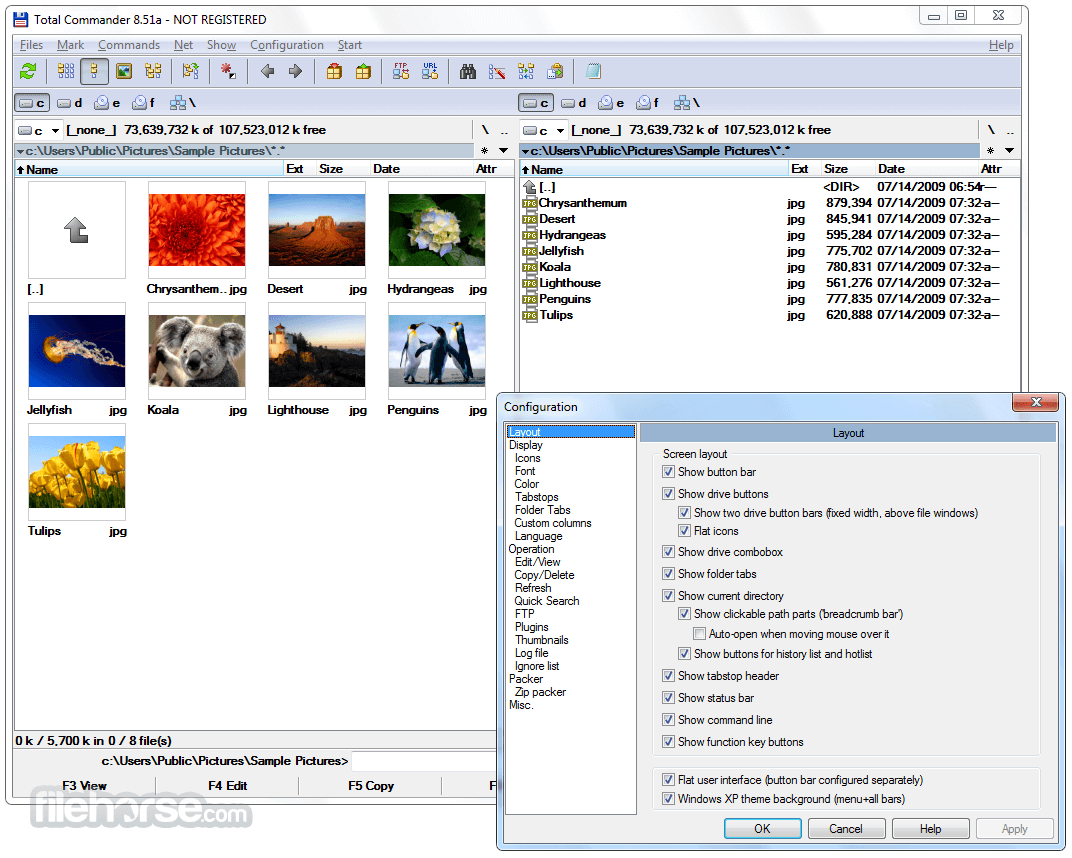
Dual-Pane Interface – View two directories side by side for seamless file operations.
Built-in FTP Client – Connect to remote servers for file transfers with support for FTP, FTPS, and SFTP.
Archive Handling – Work with ZIP, RAR, TAR, 7z, and more without external software.
File Comparison and Synchronization – Compare content and sync directories efficiently.
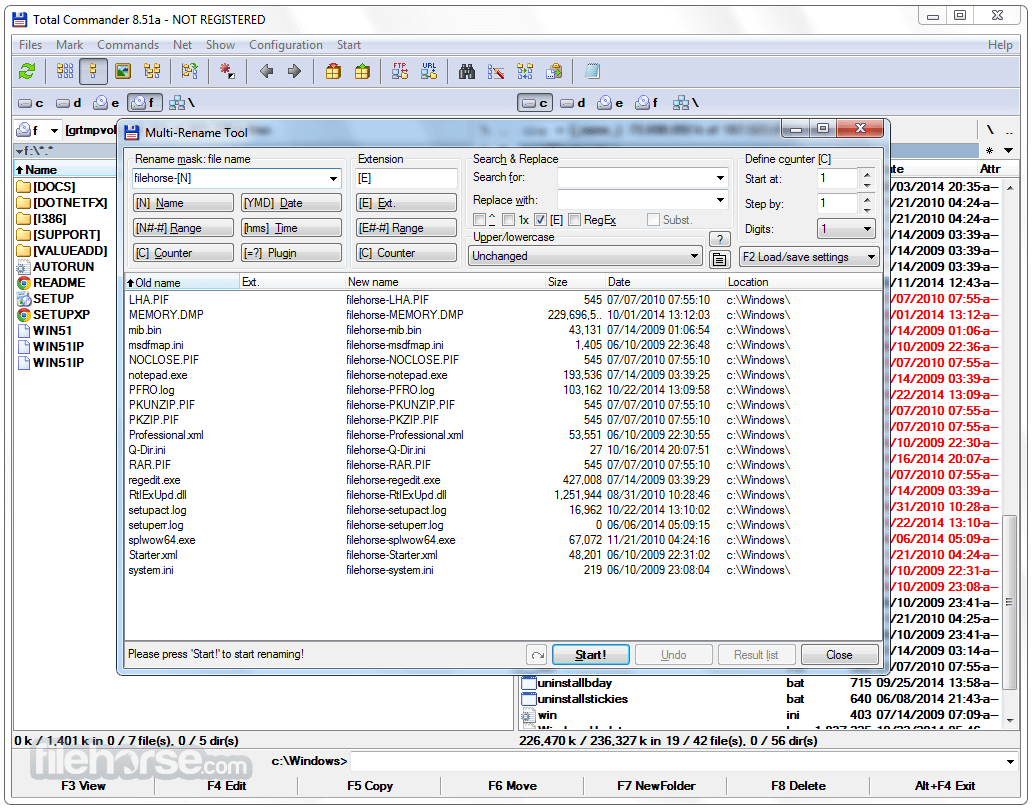
Batch Renaming Tool – Rename multiple files at once using powerful rules.
Customizable Interface – Modify toolbars, menus, and keyboard shortcuts for a personalized experience.
Extended Plugin Support – Add new functionalities such as file system extensions and multimedia viewers.
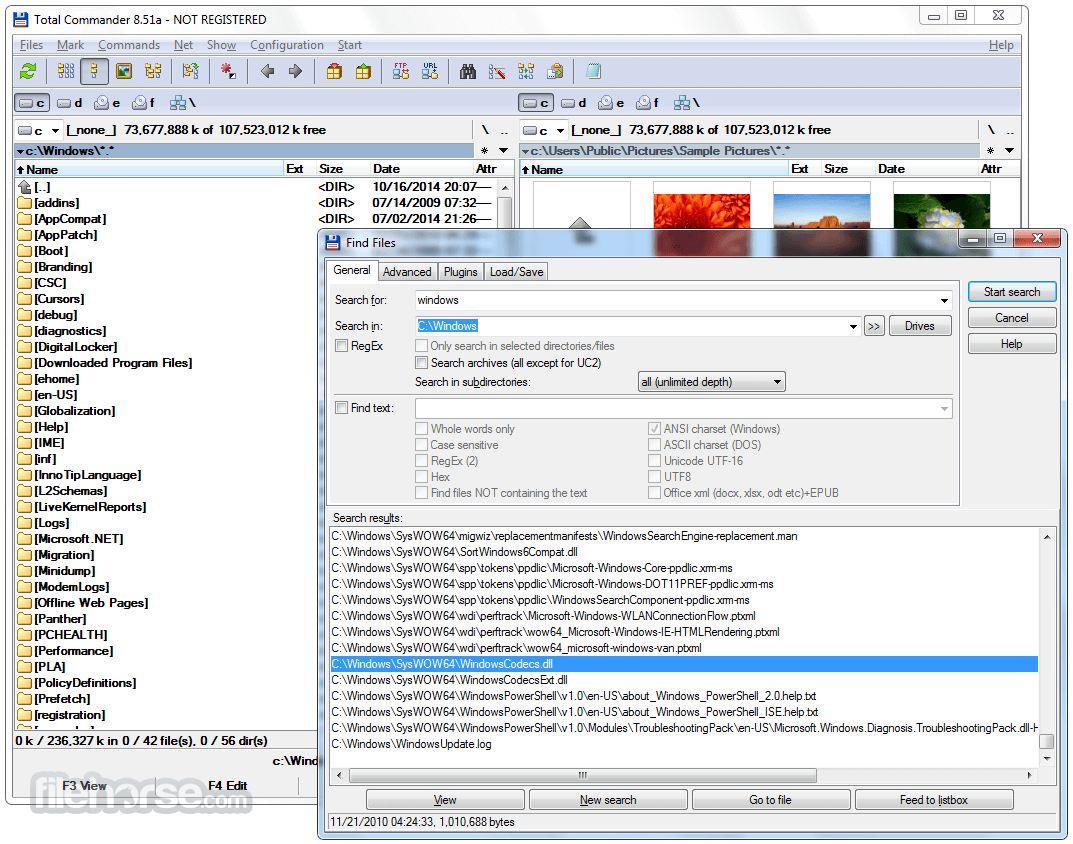
Search Functionality – Find files quickly with advanced search filters.
Multi-Rename Tool – Rename files based on patterns, numbering, or text replacement.
Secure File Transfer – Integrated support for password-protected file archives and encrypted transfers.
User Interface
It features a classic, functional interface that prioritizes efficiency over aesthetics. The dual-pane design enables users to move and copy files seamlessly.
A toolbar at the top provides quick access to frequently used functions, and the command line support enhances workflow for advanced users.
Despite its dated appearance, the software remains highly customizable, allowing users to modify colors, icons, and layouts.
Installation and Setup
Navigating Files – Use the arrow keys or mouse to browse directories.
File Operations – Copy, move, delete, or rename files using F5 (Copy), F6 (Move), and F8 (Delete).
FTP Connection – Configure FTP settings to connect to remote servers.
Archive Management – Open and extract compressed files within the software.
File Synchronization – Compare two directories and sync changes.
Batch Rename – Rename multiple files using preset rules.
FAQ
Is Total Commander 64bit free?
It offers a shareware license with a free trial. After the trial, a one-time purchase is required to continue usage legally.
Can I use Total Commander on macOS or Linux?
This software is designed exclusively for Windows, but you can run it on macOS and Linux using emulators like Wine.
Does Total Commander support cloud storage services?
Yes, with third-party plugins, users can integrate services like Google Drive and OneDrive.
Is Total Commander safe to use?
Yes, the software is secure and regularly updated, provided it is downloaded from the official website.
Can I customize the keyboard shortcuts?
Yes, users can modify keyboard shortcuts for various file operations to match their workflow.
Alternatives
Directory Opus: Directory Opus is a comprehensive file manager for Windows that offers tabbed browsing and many other advanced features.
XYplorer: XYplorer is a feature-rich file manager for Windows with tabbed browsing and a customizable interface.
FreeCommander: Easy-to-use alternative to the standard Windows file manager.
Multi Commander: A multi-tabbed file manager and is an alternative to the standard Windows Explorer.
Pricing
This program is available as shareware, meaning users can try it before purchasing.
The full license costs €42 ($45 USD approx.) for a lifetime license with free updates.
System Requirements
Total Commander is an excellent file manager for Windows users looking for a feature-rich alternative to File Explorer. While its interface may seem outdated, its functionality, speed, and efficiency make it a must-have tool for power users.
Whether you need fast file operations, secure FTP transfers, or batch renaming, it delivers a comprehensive solution. If you prioritize productivity over aesthetics, this software is well worth the investment.
Note: Free 30-Day Fully Functional Trial Version.
Also Available: Total Commander (32-bit)
Download Total Commander (64-bit) Latest Version Why is this app published on FileHorse? (More info)
Developed by Christian Ghisler, it serves as a robust alternative to the default Windows File Explorer, packed with advanced features such as file comparison, archive handling, FTP client integration, and batch renaming.
Originally inspired by the classic Norton Commander, Total Commander 64bit has evolved into a comprehensive tool for power users, IT professionals, and everyday users who need enhanced file handling capabilities.
Key Features
Dual-Pane Interface – View two directories side by side for seamless file operations.
Built-in FTP Client – Connect to remote servers for file transfers with support for FTP, FTPS, and SFTP.
Archive Handling – Work with ZIP, RAR, TAR, 7z, and more without external software.
File Comparison and Synchronization – Compare content and sync directories efficiently.
Batch Renaming Tool – Rename multiple files at once using powerful rules.
Customizable Interface – Modify toolbars, menus, and keyboard shortcuts for a personalized experience.
Extended Plugin Support – Add new functionalities such as file system extensions and multimedia viewers.
Search Functionality – Find files quickly with advanced search filters.
Multi-Rename Tool – Rename files based on patterns, numbering, or text replacement.
Secure File Transfer – Integrated support for password-protected file archives and encrypted transfers.
User Interface
It features a classic, functional interface that prioritizes efficiency over aesthetics. The dual-pane design enables users to move and copy files seamlessly.
A toolbar at the top provides quick access to frequently used functions, and the command line support enhances workflow for advanced users.
Despite its dated appearance, the software remains highly customizable, allowing users to modify colors, icons, and layouts.
Installation and Setup
- Download the installer from the official website.
- Run the setup wizard and follow on-screen instructions.
- Choose between standard or custom installation based on preference.
- Launch the software and configure initial settings, such as interface layout and keyboard shortcuts.
- Optional: Install additional plugins for extended functionality.
Navigating Files – Use the arrow keys or mouse to browse directories.
File Operations – Copy, move, delete, or rename files using F5 (Copy), F6 (Move), and F8 (Delete).
FTP Connection – Configure FTP settings to connect to remote servers.
Archive Management – Open and extract compressed files within the software.
File Synchronization – Compare two directories and sync changes.
Batch Rename – Rename multiple files using preset rules.
FAQ
Is Total Commander 64bit free?
It offers a shareware license with a free trial. After the trial, a one-time purchase is required to continue usage legally.
Can I use Total Commander on macOS or Linux?
This software is designed exclusively for Windows, but you can run it on macOS and Linux using emulators like Wine.
Does Total Commander support cloud storage services?
Yes, with third-party plugins, users can integrate services like Google Drive and OneDrive.
Is Total Commander safe to use?
Yes, the software is secure and regularly updated, provided it is downloaded from the official website.
Can I customize the keyboard shortcuts?
Yes, users can modify keyboard shortcuts for various file operations to match their workflow.
Alternatives
Directory Opus: Directory Opus is a comprehensive file manager for Windows that offers tabbed browsing and many other advanced features.
XYplorer: XYplorer is a feature-rich file manager for Windows with tabbed browsing and a customizable interface.
FreeCommander: Easy-to-use alternative to the standard Windows file manager.
Multi Commander: A multi-tabbed file manager and is an alternative to the standard Windows Explorer.
Pricing
This program is available as shareware, meaning users can try it before purchasing.
The full license costs €42 ($45 USD approx.) for a lifetime license with free updates.
System Requirements
- OS: Windows 11, 10, 8, 7 (32-bit & 64-bit)
- Processor: 1 GHz or higher
- RAM: 512 MB minimum (recommended: 2 GB+)
- Disk Space: 10 MB for installation
- Additional: Internet connection required for FTP features
- Highly efficient dual-pane interface
- Built-in FTP and archive support
- Powerful file management tools
- Plugin support for extended functionality
- Lifetime license with free updates
- Outdated user interface
- Requires time to learn for beginners
Total Commander is an excellent file manager for Windows users looking for a feature-rich alternative to File Explorer. While its interface may seem outdated, its functionality, speed, and efficiency make it a must-have tool for power users.
Whether you need fast file operations, secure FTP transfers, or batch renaming, it delivers a comprehensive solution. If you prioritize productivity over aesthetics, this software is well worth the investment.
Note: Free 30-Day Fully Functional Trial Version.
Also Available: Total Commander (32-bit)
Download Total Commander (64-bit) Latest Version Why is this app published on FileHorse? (More info)
##
畫面截圖
- 2026-07-02 Total Commander 11.58 (64-bit) 7.12 MB
- 2026-05-08 Total Commander 11.57 (64-bit) 7.07 MB
- 2025-08-18 Total Commander 11.56 (64-bit) 7.03 MB
- 2025-06-25 Total Commander 11.55 (64-bit) 7.02 MB
- 2025-02-20 Total Commander 11.51 (64-bit) 6.7 MB
- 2025-01-03 Total Commander 11.50 (64-bit) 6.69 MB
- 2024-02-21 Total Commander 11.03 (64-bit) 6.23 MB
- 2023-11-10 Total Commander 11.02 (64-bit) 6.2 MB