- 目前版本4.42
- 更新日期2025-12-11
- 檔案大小12.1 MB
- 檔案名稱TuneSweeper4Setup.exe
- 作業系統Windows 10 / Windows 11
- 支援語系English
- 授權型式試用版
- 開發商 Wide Angle Software
- 軟體分類Windows 軟體 / 音訊軟體
##
翻譯排程處理中,以下暫以英文原文呈現
軟體介紹
Tune Sweeper is a dedicated software designed to help users organize and optimize their iTunes music library.
It identifies duplicate tracks, fills in missing metadata, locates missing album artwork, and provides tools to clean up your music library efficiently.
Key Features
Duplicate Song Removal
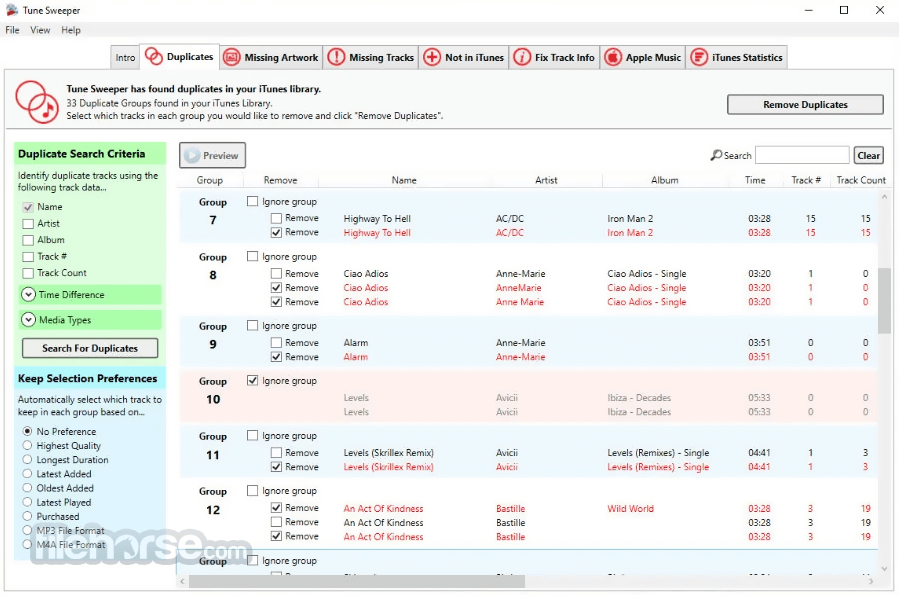
Automatically scans and identifies duplicate tracks in your iTunes library based on criteria such as artist, title, and album. Allows you to choose which duplicates to keep or delete.
Missing Artwork Finder
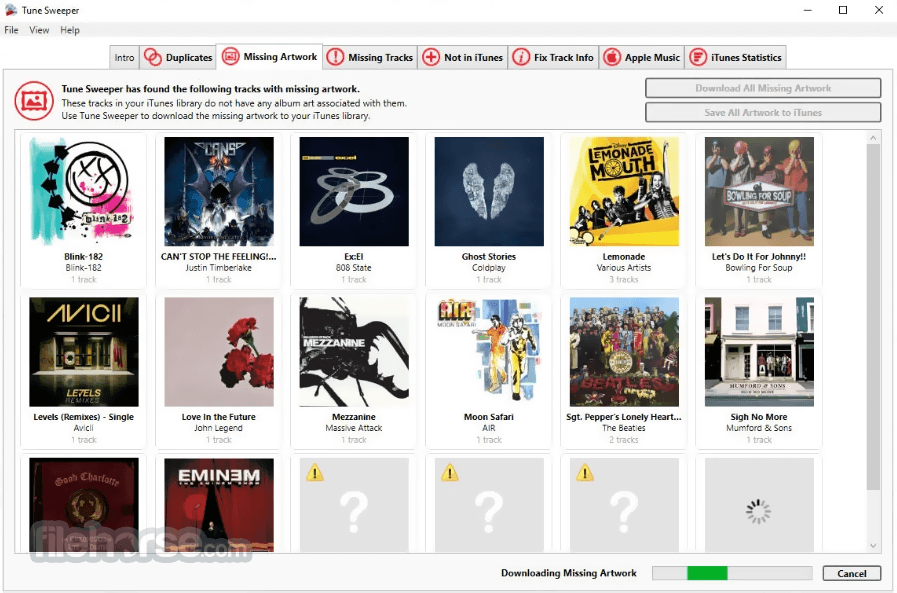
Searches for and downloads missing album artwork to enhance your listening experience.
Fix Track Information
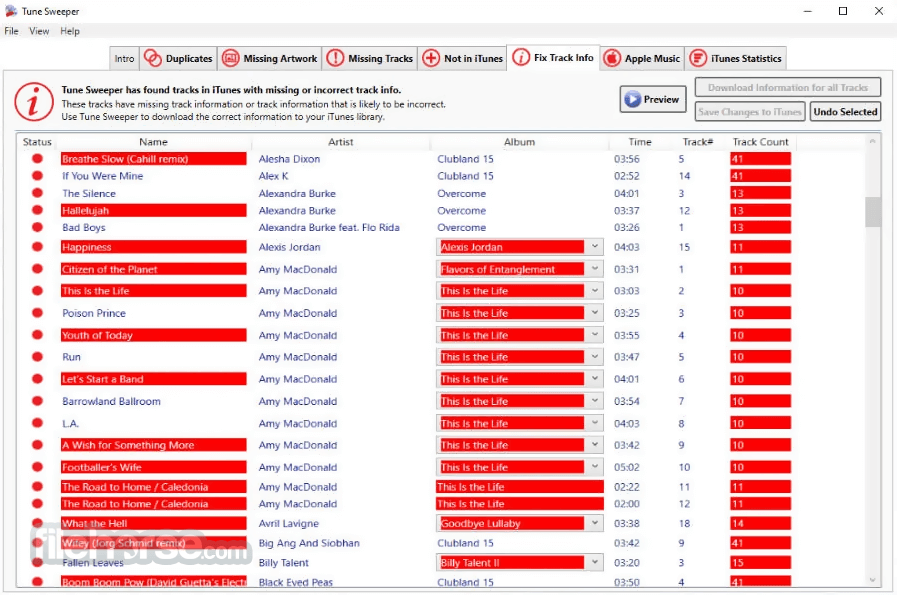
Identifies tracks with incomplete metadata and retrieves accurate information like artist names, album titles, and genres from online databases.
Remove Missing Files
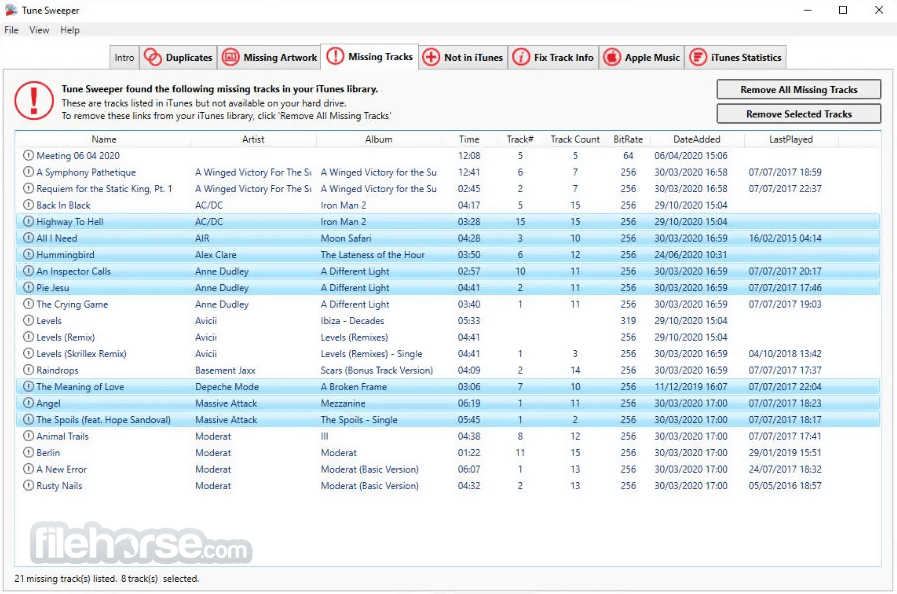
Cleans up your iTunes library by identifying "orphaned" tracks that no longer have a corresponding file.
Export Statistics
Provides detailed insights into your music library, such as the number of tracks, genres, and artists.
Compatibility
Works seamlessly with both iTunes and Apple Music libraries.
User Interface
It boasts an intuitive and user-friendly interface, making it accessible to beginners and experienced users alike.
The dashboard is cleanly laid out, with clearly labeled tabs for duplicates, missing artwork, missing files, and more.
The step-by-step wizards guide users through the cleanup process, ensuring no technical expertise is required.
Installation and Setup
Scan for Duplicates:
Launch this tool and select the "Duplicates" tab.
Click "Search for Duplicates," and the software will display a list of duplicate tracks.
Review the duplicates and choose which versions to keep or delete.
Fix Missing Artwork:
Navigate to the "Missing Artwork" tab.
Click "Find Artwork," and Tune Sweeper will locate and download album art for applicable tracks.
Update Metadata:
Select the "Fix Tracks" tab.
Click "Search for Fixes," and the app will identify tracks with incomplete or incorrect metadata.
Remove Missing Files:
Go to the "Missing Files" tab.
Run the scan to identify tracks with missing files, and delete them from your library.
FAQ
Does Tune Sweeper work with Apple Music?
Yes, it supports both iTunes and Apple Music libraries.
Can I undo changes made by Tune Sweeper?
It allows you to review changes before they are applied, but once applied, changes cannot be undone. It’s recommended to back up your library beforehand.
Is there a Mac version of Tune Sweeper?
While this review focuses on the PC version, Tune Sweeper is also available for macOS.
How accurate is the duplicate detection?
It uses sophisticated algorithms to detect duplicates based on multiple criteria, ensuring high accuracy.
Does the software support other media players?
The program is designed specifically for iTunes and Apple Music and does not support other media players like Spotify or VLC.
Pricing
It offers a single-license purchase for a one-time fee of approximately $30.
This includes all updates for the current version. For users looking for additional flexibility, Wide Angle Software also offers bundled packages with other utilities.
Windows PC Requirements
Operating System: Windows 7, Windows 8/8.1, Windows 10 and Windows 11.
Microsoft .Net Framework 4.8. The app installer will detect if you do not currently have this installed and offer to install it for you.
Tune Sweeper (PC) requires iTunes 10, 11 or 12 to be installed on your computer.
Free Download Limitations
With the free trial version of Tune Sweeper, you can explore the app and search for duplicates, mislabelled songs and broken tracks.
It will display which tracks it can clean up in your iTunes or Music library, however to remove duplicates and clean up your library a full version is required.
All limitations are removed in the full version of this software.
PROS
Tune Sweeper by Wide Angle Software is a robust and reliable tool for anyone looking to organize and optimize their iTunes or Apple Music library. Its intuitive design, combined with powerful features such as duplicate removal and metadata fixing, makes it a must-have for music enthusiasts who want a cleaner, more organized library.
While it’s not free, the one-time purchase fee is reasonable given the time and effort it can save. Whether you have a modest collection or an extensive music library, Tune Sweeper is an excellent investment for maintaining your digital music ecosystem.
If you’ve been struggling with a cluttered library or missing metadata, give this app a try and enjoy a hassle-free music experience.
Also Available: Download Tune Sweeper for Mac
Download Tune Sweeper Latest Version Why is this app published on FileHorse? (More info)
It identifies duplicate tracks, fills in missing metadata, locates missing album artwork, and provides tools to clean up your music library efficiently.
- Find and remove iTunes duplicates
- Download missing or incorrect song data
- Automatically download missing artwork
- Get rid of songs with exclamation points
- Add songs from computer to iTunes or Music
- Identify Apple Music tracks
- Clean up your Music app library
Key Features
Duplicate Song Removal
Automatically scans and identifies duplicate tracks in your iTunes library based on criteria such as artist, title, and album. Allows you to choose which duplicates to keep or delete.
Missing Artwork Finder
Searches for and downloads missing album artwork to enhance your listening experience.
Fix Track Information
Identifies tracks with incomplete metadata and retrieves accurate information like artist names, album titles, and genres from online databases.
Remove Missing Files
Cleans up your iTunes library by identifying "orphaned" tracks that no longer have a corresponding file.
Export Statistics
Provides detailed insights into your music library, such as the number of tracks, genres, and artists.
Compatibility
Works seamlessly with both iTunes and Apple Music libraries.
User Interface
It boasts an intuitive and user-friendly interface, making it accessible to beginners and experienced users alike.
The dashboard is cleanly laid out, with clearly labeled tabs for duplicates, missing artwork, missing files, and more.
The step-by-step wizards guide users through the cleanup process, ensuring no technical expertise is required.
Installation and Setup
- Download the installer from the Wide Angle Software website or FileHorse.
- Run the setup file and follow the on-screen instructions.
- Launch this app, and it will automatically detect your iTunes library.
- System requirements are minimal, ensuring compatibility with most modern Windows PCs.
Scan for Duplicates:
Launch this tool and select the "Duplicates" tab.
Click "Search for Duplicates," and the software will display a list of duplicate tracks.
Review the duplicates and choose which versions to keep or delete.
Fix Missing Artwork:
Navigate to the "Missing Artwork" tab.
Click "Find Artwork," and Tune Sweeper will locate and download album art for applicable tracks.
Update Metadata:
Select the "Fix Tracks" tab.
Click "Search for Fixes," and the app will identify tracks with incomplete or incorrect metadata.
Remove Missing Files:
Go to the "Missing Files" tab.
Run the scan to identify tracks with missing files, and delete them from your library.
FAQ
Does Tune Sweeper work with Apple Music?
Yes, it supports both iTunes and Apple Music libraries.
Can I undo changes made by Tune Sweeper?
It allows you to review changes before they are applied, but once applied, changes cannot be undone. It’s recommended to back up your library beforehand.
Is there a Mac version of Tune Sweeper?
While this review focuses on the PC version, Tune Sweeper is also available for macOS.
How accurate is the duplicate detection?
It uses sophisticated algorithms to detect duplicates based on multiple criteria, ensuring high accuracy.
Does the software support other media players?
The program is designed specifically for iTunes and Apple Music and does not support other media players like Spotify or VLC.
Pricing
It offers a single-license purchase for a one-time fee of approximately $30.
This includes all updates for the current version. For users looking for additional flexibility, Wide Angle Software also offers bundled packages with other utilities.
Windows PC Requirements
Operating System: Windows 7, Windows 8/8.1, Windows 10 and Windows 11.
Microsoft .Net Framework 4.8. The app installer will detect if you do not currently have this installed and offer to install it for you.
Tune Sweeper (PC) requires iTunes 10, 11 or 12 to be installed on your computer.
Free Download Limitations
With the free trial version of Tune Sweeper, you can explore the app and search for duplicates, mislabelled songs and broken tracks.
It will display which tracks it can clean up in your iTunes or Music library, however to remove duplicates and clean up your library a full version is required.
All limitations are removed in the full version of this software.
PROS
- Easy to use with a clean interface.
- Accurate duplicate detection and removal.
- Comprehensive metadata fixing and artwork retrieval.
- Supports Apple Music alongside iTunes.
- Limited to iTunes and Apple Music; no support for other players.
- Changes are irreversible without a backup.
Tune Sweeper by Wide Angle Software is a robust and reliable tool for anyone looking to organize and optimize their iTunes or Apple Music library. Its intuitive design, combined with powerful features such as duplicate removal and metadata fixing, makes it a must-have for music enthusiasts who want a cleaner, more organized library.
While it’s not free, the one-time purchase fee is reasonable given the time and effort it can save. Whether you have a modest collection or an extensive music library, Tune Sweeper is an excellent investment for maintaining your digital music ecosystem.
If you’ve been struggling with a cluttered library or missing metadata, give this app a try and enjoy a hassle-free music experience.
Also Available: Download Tune Sweeper for Mac
Download Tune Sweeper Latest Version Why is this app published on FileHorse? (More info)
##
畫面截圖