
UltraVNC 1.2.1.7
v 1.2.1.7- 目前版本1.2.1.7
- 更新日期2018-01-22
- 檔案大小2.83MB
- 檔案名稱UltraVNC_1_2_17_X86_Setup.exe
- 作業系統Windows 7 64 / Windows 8 64 / Windows 10 64 / Windows 11
- 支援語系English
- 授權型式開源軟體
- 開發商 UltraVNC Team
- 軟體分類Windows 軟體 / 檔案傳輸與網路
軟體介紹
- 您可以在工作地點連接到已被封鎖的網站
- 若您防火牆封鎖msn、skyep登錄,您可以使用UltraVPN登錄
- 可以保護您的e-mail及穩私
畫面截圖
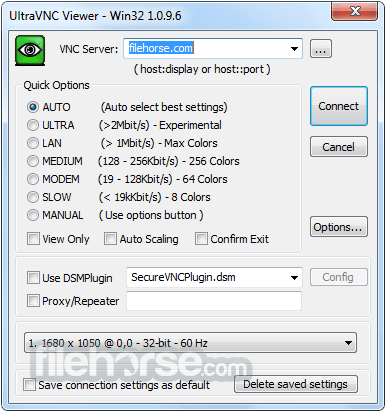
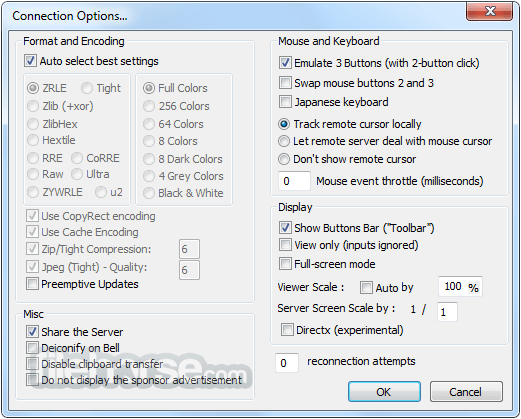
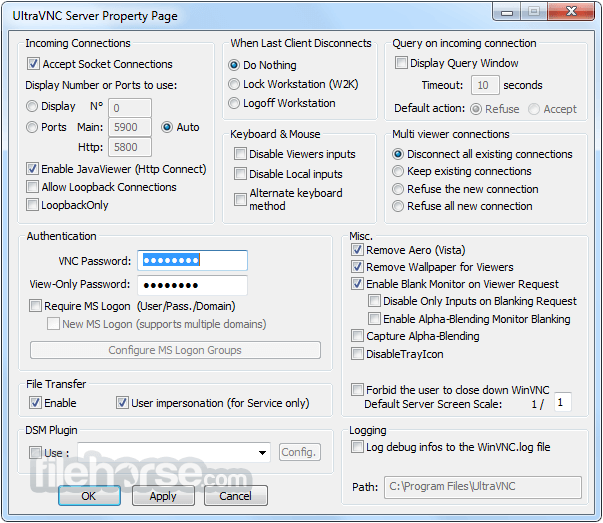
更新日誌
1.2.1.7UltraVNC is a powerful, easy to use and free software that can display the screen of another computer (via internet or network) on your own screen. The program allows you to use your mouse and keyboard to control the other PC remotely. It means that you can work on a remote computer, as if you were sitting in front of it, right from your current location. If you provide computer support, you can quickly access your customer's computers from anywhere in the world and resolve helpdesk issues remotely! With addons like SingleClick your customers don't even have to pre-install software or execute complex procedures to get remote helpdesk support.
Key features: File transfer, Video driver, Optional Encryption Plugins, MS Logon, Text chat, Viewer Toolbar, Java Viewer with File Transfer , as well as Auto scaling and Server Side Scaling, Multiple-Monitors-support,Repeater/Proxy-support, Auto reconnection, good performances and tons of other functionalities.
- 2026-06-16 UltraVNC 1.8.2.4 6 MB
- 2019-04-11 UltraVNC 1.2.2.4 2.60MB
- 2018-11-13 UltraVNC 1.2.2.3 2.60MB
- 2018-08-10 UltraVNC 1.2.2.0 2.88MB
- 2018-01-22 UltraVNC 1.2.1.7 2.83MB
- 2017-09-15 UltraVNC 1.2.1.6 2.92MB
- 2017-06-19 UltraVNC 1.2.1.5 2.51MB
- 2016-10-28 UltraVNC 1.2.1.2 3.13MB