- 目前版本11.0.2772
- 更新日期2026-04-14
- 檔案大小9.3 MB
- 檔案名稱usb_network_gate.exe
- 作業系統Windows 7 / Windows 8 / Windows 10 / Windows 11
- 支援語系English
- 授權型式商業試用
- 開發商 Electronic Team, Inc.
- 軟體分類Windows 軟體 / 檔案傳輸與網路
##
翻譯排程處理中,以下暫以英文原文呈現
軟體介紹
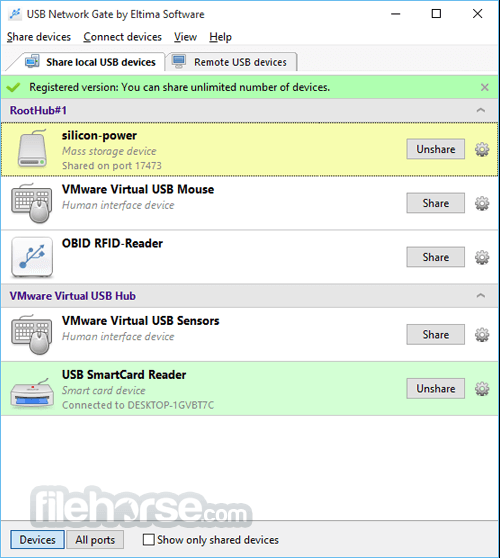
USB Network Gate for Windows lets your computer work with remote USB devices over Internet/LAN/WAN as if those devices were connected directly to this computer.
You can share a USB device with remote computers no matter how far they are and let people all over the world use them easily. For example, you may have several computers (Mac, Windows, or Linux ones) that run programs that use the same USB security dongle for authorization.
The constant plugging and unplugging of the dongle is not only annoying but brings a good chance of damage (the dongle is getting loose). With USB Network Gate for Windows, you have the dongle shared among multiple computers with no need to plug and unplug it constantly.
Features and Highlights
Corporate, OEM & Source code
Whether you are considering enterprise-wide usage of the program or redistributing the USB redirection engine as a part of your software solution, you'll find it here at a reasonable price with the most personal attitude and exceptional quality.
Access remote USB device
The only USB Network Gate for PC (former USB to Ethernet Connector) released! Now you can share USB devices over the network between Macs, Windows PCs, and Linux computers. Doesn't matter if you are in another country or in the next-door office, you can always use remote scanner, printer, webcam, modem, USB dongle, or anything else as if they were connected directly to your computer.
Low-cost iPhone applications development
When developing an iOS app you constantly need an iPhone/iPad to be connected to more than one computer involved in testing and development. With USBNetwork Gate (USB to Ethernet Connector) you can connect your iOS device via USB to Windows or Mac computer and share it with other Mac, Windows, or Linux computers involved in the development as if it was connected to each of them directly.
Keep your mobile device data up-to-date!
Travel a lot and can't sync your iPhone / iPad data with the main computer? Use USB Network Gate by Eltima Software to create secured USB over an Ethernet tunnel to sync your iOS device with a remote computer no matter how far it is at the moment! You can plug your iPhone in a Mac or Windows computer and sync it via a local network or Internet with the remote side.
Access USB devices even while working in a virtual environment
You may need to use virtualization programs with Windows OS for certain software that is only Windows compatible. At the same time, you need the virtual machines to access the USB keys (dongles) at the remote computer. It may sound tricky but is solved in a simple manner with the software. Just install the tool on both host and guest OS (Windows, Mac, or Linux - doesn't matter) and access USB devices connected to a host machine inside the virtual session.
Connect to USB over RDP
If you need to use USB devices plugged in your computer while you are working in a remote session, the tool is the perfect solution. To access USB over RDP you’ll only need to install the app on your local computer (that will be Server module) and on a remote machine (client module). Both modules are included in one instance of the application, which is easy to install and use, just as if the USB device was physically plugged in a remote machine.
Supported devices
USB NetworkGate (former USB to Ethernet Connector) easily connects one or more remote USB devices to your computer over Ethernet.
Supported devices
Equipment
Supported versions: Windows 7 SP1/8/8.1/10/11; Windows Server 2008 R2/2012/2012 R2/2016/2019/2022
Architectures: x86, x64, ARM64
PROS
Also Available: Download USB Network Gate for Mac
Download USB Network Gate Latest Version Why is this app published on FileHorse? (More info)
You can share a USB device with remote computers no matter how far they are and let people all over the world use them easily. For example, you may have several computers (Mac, Windows, or Linux ones) that run programs that use the same USB security dongle for authorization.
The constant plugging and unplugging of the dongle is not only annoying but brings a good chance of damage (the dongle is getting loose). With USB Network Gate for Windows, you have the dongle shared among multiple computers with no need to plug and unplug it constantly.
Features and Highlights
Corporate, OEM & Source code
Whether you are considering enterprise-wide usage of the program or redistributing the USB redirection engine as a part of your software solution, you'll find it here at a reasonable price with the most personal attitude and exceptional quality.
Access remote USB device
The only USB Network Gate for PC (former USB to Ethernet Connector) released! Now you can share USB devices over the network between Macs, Windows PCs, and Linux computers. Doesn't matter if you are in another country or in the next-door office, you can always use remote scanner, printer, webcam, modem, USB dongle, or anything else as if they were connected directly to your computer.
Low-cost iPhone applications development
When developing an iOS app you constantly need an iPhone/iPad to be connected to more than one computer involved in testing and development. With USBNetwork Gate (USB to Ethernet Connector) you can connect your iOS device via USB to Windows or Mac computer and share it with other Mac, Windows, or Linux computers involved in the development as if it was connected to each of them directly.
Keep your mobile device data up-to-date!
Travel a lot and can't sync your iPhone / iPad data with the main computer? Use USB Network Gate by Eltima Software to create secured USB over an Ethernet tunnel to sync your iOS device with a remote computer no matter how far it is at the moment! You can plug your iPhone in a Mac or Windows computer and sync it via a local network or Internet with the remote side.
Access USB devices even while working in a virtual environment
You may need to use virtualization programs with Windows OS for certain software that is only Windows compatible. At the same time, you need the virtual machines to access the USB keys (dongles) at the remote computer. It may sound tricky but is solved in a simple manner with the software. Just install the tool on both host and guest OS (Windows, Mac, or Linux - doesn't matter) and access USB devices connected to a host machine inside the virtual session.
Connect to USB over RDP
If you need to use USB devices plugged in your computer while you are working in a remote session, the tool is the perfect solution. To access USB over RDP you’ll only need to install the app on your local computer (that will be Server module) and on a remote machine (client module). Both modules are included in one instance of the application, which is easy to install and use, just as if the USB device was physically plugged in a remote machine.
Supported devices
USB NetworkGate (former USB to Ethernet Connector) easily connects one or more remote USB devices to your computer over Ethernet.
Supported devices
Equipment
- 3D Printers
- Cameras
- Card readers
- Digital TV Tuners
- Webcams
- Personal video recorder
- Fingerprint readers
- ID card scanners
- Interactive Whiteboards
- Modems
- USB ANT Stick
- Portable Thermometers
- Multifunctionals
- Plotters, Cutters
- Printers
- Scanners
- USB Scales
- Barcode scanners
- Spectrophotometers
- Universal Programmers
- USB Monitors
- USB Wireless Presenter
- Smart Card Readers
- Digital Mixers
- BlackBerry
- Gamepads
- Graphic Tablets
- Handhelds
- Home Monitoring & Control System
- iPads & iPhones
- iPods
- Keyboards
- MIDI Controllers
- Mouse Devices
- USB Dongles
- USB DVD Drives
- Android Devices
- USB Hard Drives
- Wireless Weather Stations
- USB VOIP (Skype) Phone
- Universal remote control
- Bluetooth adapters
- Credit Card Readers
- Depth Sensors
- Elgato Turbo.264HD Hardware Accelerator
- Infrared adapters
- J2534 interface cables
- JTAG/SWD debugging interface
- KNX/EIB USB Interface
- Software Defined Receiver
- USB Adapters
- USB Graphic Adapter
- USB Network interfaces
- USB Satellite Receivers
- USB sound cards/headsets
- USB TAPs
- USB to COM cables
- USB Wi-Fi adapters
Supported versions: Windows 7 SP1/8/8.1/10/11; Windows Server 2008 R2/2012/2012 R2/2016/2019/2022
Architectures: x86, x64, ARM64
PROS
- Easy USB device sharing over networks
- Cross-platform support for Windows, Mac, Linux
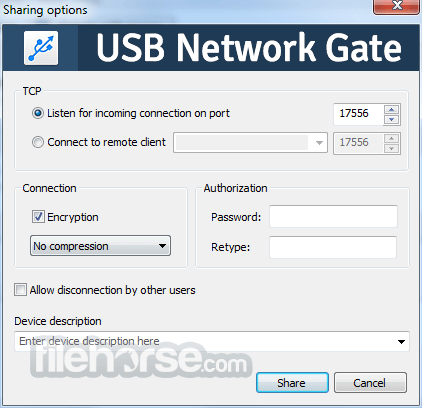
- Secure connection with encryption
- High data transfer speed
- Simple setup and user-friendly interface
- Requires stable internet connection
- Limited trial period before purchase
- Some devices may experience latency
- Occasional compatibility issues
- Lack of official support and updates
Also Available: Download USB Network Gate for Mac
Download USB Network Gate Latest Version Why is this app published on FileHorse? (More info)
##
影片介紹
##
畫面截圖