
Video Compressor 2023
v 2023
Windows
商業試用
7.86/10 (38)
- 目前版本2023
- 更新日期2025-09-26
- 檔案大小10.31 MB
- 檔案名稱videocompressor-setup.exe
- 作業系統Windows XP / XP64 / Vista / Vista64 / Windows 7 / Windows 7 64 / Windows 8 / Windows 8 64 / Windows 10 / Windows 10 64
- 支援語系English
- 授權型式商業試用
- 開發商 Compressor Software
- 軟體分類Windows 軟體 / 影片軟體
##
編輯短評
Video Compressor 是一款專門處理影片檔案瘦身的編碼工具,核心目標是在盡量不犧牲畫質的前提下,把體積龐大的影片壓縮得更小,藉此釋放電腦硬碟空間。它標榜對各種等級的 PC 配備都有不錯的相容性,並支援常見的影音格式,讓不熟悉技術細節的使用者也能用簡單的點擊操作完成壓縮。這款軟體在市場上已推出多年,更新頻率不算頻繁但仍在維護,整體評價屬於中規中矩,在同類工具中算是個低調但實用的選擇。
這套軟體適合手邊累積大量影片、想整理影音庫卻又不想花時間研究複雜參數的人,尤其是從手機、相機或螢幕錄影等不同來源取得素材、需要快速縮小檔案以便備份或傳送的場合。與 KMPlayer 或 K-Lite Codec Pack 這類播放或解碼工具相比,Video Compressor 專注在壓縮這項單一任務,功能更為直接,但相對地也不具備播放或格式轉換的附加能力。需要注意的是,它提供的是試用版,且介面僅有英文,使用前最好先確認自己能接受英文操作環境。
##
翻譯排程處理中,以下暫以英文原文呈現
軟體介紹
Video Compressor is a highly capable video encoding application that allows users to easily compress their large video files without losing much in video quality.
Optimized for use on a large spectrum of PC configurations, this program can help users of all knowledge levels to better optimize their video libraries and free up their precious local storage space with just a few clicks of their mouse.
With years of experience on the market and support for all the commonly used audio/video formats, this Video Compressor app represents one of the best ways videos captured from many sources can be slimmed down and prepared for future use.
One of the few most common uses for this utility are compression of large RAW files created by some video cameras or screen-capture applications into much smaller video files that utilize high-quality and efficient video codecs such as H264 and H265, or as a nice productivity tool that can help anyone to reduce a particular video file to a size that is manageable when sending files from your PC to your family members, friends, coworkers or clients via the internet.
The entire list of the supported codecs this Video Compressor supports is too big for listing here since it includes over 100 audio/video codecs and 20+ container formats, such as AVI, WMV, FLV, 3GP, MKV, MOV, MP4, XVID, DIVX, and many others.
In addition to converting a video file into another format, users also have the option for “Original” preset, which will retain the use of original codecs and containers but will reduce the size by utilizing different bitrates for audio and video data. In addition to picking exact bitrates, the app also allows videos to be resized, processed as part of a batch video conversion, and much more.
To simplify the procedure of compression, users can even create their own profiles so that they can repeatedly use the same settings when compressing new videos.
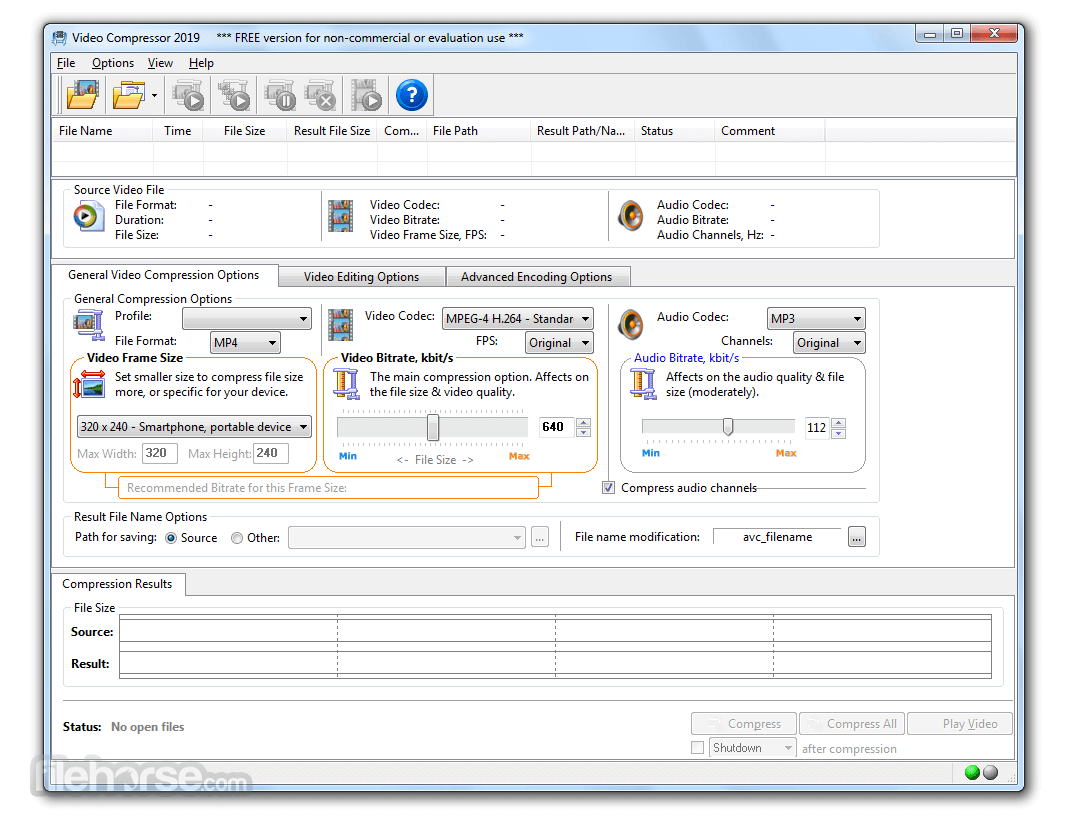
The entire user interface of this Video Compressor app is focused on a single screen that is packed with useful tools for exact manipulation of final video quality and size.
At the top are general usage tools, adding videos, and starting the compression procedure. Immediately next down is the list of added videos, three-tabbed area (General Video Compression Options, Video Editing Options, and Advanced Encoding Options) for managing all aspects of audio/video compression, Compression Results tab where Source and Result file are compared, and a final status bar area for following the current state of Encoding procedure (visual bar, percentage meter and estimated/elapsed time counter).
Video Compressor can be used for FREE during the length of its Trial license. Unrestricted use is activated only after a premium license (personal or business, for one user or many) is purchased.
It is important to note that the license is tied to the specific version of the software. To move to a newer version of an app, the upgrade license fee is required.
Key Features
Advanced Video Compression Engine: Utilizes cutting-edge algorithms, including MPEG-4 H.264, to produce high-quality videos with the best quality-to-file-size ratio.
Extensive Codec and Format Support: Compatible with over 100+ video/audio codecs and supports more than 20+ video file formats, such as AVI, WMV, FLV, 3GP, MKV, MOV, MP4, MPEG, MPG, DIVX, XVID, ASF, AVM, AVS, DAT, F4V, NSV, OGM, RM, RMVB, TP, TS, VOB.
Multiple Output Formats: Convert source videos to MP4, 3GP, FLV, AVI, or choose the "Original" setting to maintain the same format as the source file.
Customizable Bitrates: Easily adjust video and audio bitrates to achieve the desired file size without compromising quality.
Video Resizing Options: Modify the frame size of the video with intuitive controls for optimal resolution adjustments.
Compression Preview: Visualize compression results in real-time, with a graphical representation of the resulting file size and changes based on selected compression settings.
Profile Management: Streamline the compression process by using profiles, which are sets of predefined compression options. Create, save, and apply named profiles to process multiple videos consistently.
Batch Compression Mode: Effortlessly compress multiple videos at once. Batch mode supports file renaming and additional options to handle a selected group of video files simultaneously.
User-Friendly Interface: Offers a simple and clean user interface that conceals a powerful compression engine, providing ease of use with high customization capabilities.
Installation and Uninstallation
Installing the software is straightforward - simply run the downloaded installation file and follow the on-screen instructions.
To uninstall the program, go to the Control Panel through the Start menu, select "Add or Remove Programs" (or "Programs and Features" in newer versions of Windows), find the program in the list of installed applications, and double-click its entry to initiate the uninstallation process.
Pricing
For personal use, a single-user license is available at a cost of $35. For those requiring the software for business purposes, a single-user business license is priced at $99.
PROS
Download Video Compressor Latest Version Why is this app published on FileHorse? (More info)
Optimized for use on a large spectrum of PC configurations, this program can help users of all knowledge levels to better optimize their video libraries and free up their precious local storage space with just a few clicks of their mouse.
With years of experience on the market and support for all the commonly used audio/video formats, this Video Compressor app represents one of the best ways videos captured from many sources can be slimmed down and prepared for future use.
One of the few most common uses for this utility are compression of large RAW files created by some video cameras or screen-capture applications into much smaller video files that utilize high-quality and efficient video codecs such as H264 and H265, or as a nice productivity tool that can help anyone to reduce a particular video file to a size that is manageable when sending files from your PC to your family members, friends, coworkers or clients via the internet.
The entire list of the supported codecs this Video Compressor supports is too big for listing here since it includes over 100 audio/video codecs and 20+ container formats, such as AVI, WMV, FLV, 3GP, MKV, MOV, MP4, XVID, DIVX, and many others.
In addition to converting a video file into another format, users also have the option for “Original” preset, which will retain the use of original codecs and containers but will reduce the size by utilizing different bitrates for audio and video data. In addition to picking exact bitrates, the app also allows videos to be resized, processed as part of a batch video conversion, and much more.
To simplify the procedure of compression, users can even create their own profiles so that they can repeatedly use the same settings when compressing new videos.
The entire user interface of this Video Compressor app is focused on a single screen that is packed with useful tools for exact manipulation of final video quality and size.
At the top are general usage tools, adding videos, and starting the compression procedure. Immediately next down is the list of added videos, three-tabbed area (General Video Compression Options, Video Editing Options, and Advanced Encoding Options) for managing all aspects of audio/video compression, Compression Results tab where Source and Result file are compared, and a final status bar area for following the current state of Encoding procedure (visual bar, percentage meter and estimated/elapsed time counter).
Video Compressor can be used for FREE during the length of its Trial license. Unrestricted use is activated only after a premium license (personal or business, for one user or many) is purchased.
It is important to note that the license is tied to the specific version of the software. To move to a newer version of an app, the upgrade license fee is required.
Key Features
Advanced Video Compression Engine: Utilizes cutting-edge algorithms, including MPEG-4 H.264, to produce high-quality videos with the best quality-to-file-size ratio.
Extensive Codec and Format Support: Compatible with over 100+ video/audio codecs and supports more than 20+ video file formats, such as AVI, WMV, FLV, 3GP, MKV, MOV, MP4, MPEG, MPG, DIVX, XVID, ASF, AVM, AVS, DAT, F4V, NSV, OGM, RM, RMVB, TP, TS, VOB.
Multiple Output Formats: Convert source videos to MP4, 3GP, FLV, AVI, or choose the "Original" setting to maintain the same format as the source file.
Customizable Bitrates: Easily adjust video and audio bitrates to achieve the desired file size without compromising quality.
Video Resizing Options: Modify the frame size of the video with intuitive controls for optimal resolution adjustments.
Compression Preview: Visualize compression results in real-time, with a graphical representation of the resulting file size and changes based on selected compression settings.
Profile Management: Streamline the compression process by using profiles, which are sets of predefined compression options. Create, save, and apply named profiles to process multiple videos consistently.
Batch Compression Mode: Effortlessly compress multiple videos at once. Batch mode supports file renaming and additional options to handle a selected group of video files simultaneously.
User-Friendly Interface: Offers a simple and clean user interface that conceals a powerful compression engine, providing ease of use with high customization capabilities.
Installation and Uninstallation
Installing the software is straightforward - simply run the downloaded installation file and follow the on-screen instructions.
To uninstall the program, go to the Control Panel through the Start menu, select "Add or Remove Programs" (or "Programs and Features" in newer versions of Windows), find the program in the list of installed applications, and double-click its entry to initiate the uninstallation process.
Pricing
For personal use, a single-user license is available at a cost of $35. For those requiring the software for business purposes, a single-user business license is priced at $99.
PROS
- High Compression Quality: Maintains video quality with advanced algorithms.
- Wide Format Support: Compatible with over 100+ codecs.
- User-Friendly Interface: Simple UI with powerful features.
- Batch Processing: Compress multiple videos efficiently.
- Customizable Settings: Adjust bitrates and resolution easily.
- Trial Limitations: Full features are unlocked only with a paid license.
- License Restrictions: License tied to specific app version.
- Upgrade Costs: Fees required for newer versions.
- Complex for Beginners: Advanced settings may be overwhelming.
Download Video Compressor Latest Version Why is this app published on FileHorse? (More info)
##
畫面截圖
- 2025-09-26 Video Compressor 2023 10.31 MB
- 2020-11-25 Video Compressor 2021 10.24 MB
- 2018-11-14 Video Compressor 2019 10.23 MB