⚠ 這是歷史版本頁面 — 查看 VirtualBox Extension Pack 最新版本 →

VirtualBox Extension Pack 7.2.4
v 7.2.4
Windows
開源軟體
8/10 (45)
- 目前版本7.2.4
- 更新日期2025-10-21
- 檔案大小21.7 MB
- 檔案名稱Oracle_VirtualBox_Extension_Pack-7.2.4.vbox-extpack
- 作業系統Windows 7 / Windows 8 / Windows 10 / Windows 11
- 支援語系English
- 授權型式開源軟體
- 開發商 Oracle
- 軟體分類Windows 軟體 / 開發者工具
##
編輯短評
VirtualBox Extension Pack 是 VirtualBox 官方推出的擴充套件,用來補足基礎版缺少的進階功能,例如 USB 2.0 控制器,讓虛擬機器能更有效率地存取周邊裝置。安裝方式相當直覺,只要關閉執行中的 VirtualBox,雙擊擴充套件檔即可自動安裝或升級,無需額外步驟。此套件由 Oracle 持續維護,更新頻繁,在開發者工具分類中雖非最熱門,但評價普遍不錯,是 VirtualBox 使用者常見的必備元件。
這套擴充套件適合需要 VirtualBox 完整功能的使用者,尤其是必須在虛擬機中使用 USB 2.0 裝置的情境。與 BlueStacks 或 VMware Workstation Player 等替代方案相比,VirtualBox 本身是開源軟體,搭配此擴充套件可獲得更多控制能力,但需注意此版本僅提供英文介面,且目前支援 Windows 平台。若你習慣使用 VirtualBox 且需要進階功能,這套擴充套件是官方推薦的選擇,安裝前記得先關閉所有虛擬機器。
##
翻譯排程處理中,以下暫以英文原文呈現
軟體介紹
VirtualBox Extension Pack was introduced in Virtualbox as a new way to extend the functionality of the VirtualBox base package.
Using the extension pack doesn't require a separate installation. The packs have a "vbox-extpack" file extension that's automatically handled by VirtualBox.
To install it just close down any running Virtual Box instances and double-click on extension pack file and the tool will launch and install it for you, upgrading any earlier version of extension pack you might have.
The current extension pack includes a USB 2.0 (EHCI) controller that allows you to get better performance from your USB 2.0 devices. To use it you'll have to enable the controller by hand and add filters for USB devices that you want to use this controller.
VirtualBox Remote Desktop Protocol (VDRP) support allows you to run a virtual machine on one PC, while you can view and control it from another. Intel PXE boots ROM with support for the E1000 network card allows you to remotely boot a computer trough emulation.
Since Version 5.1.x, the Oracle VM VirtualBox Extension Pack is also compatible with the new Virtual Box version for Windows 10 and Windows 11.
Features and Highlights
Download VirtualBox Extension Pack Latest Version Why is this app published on FileHorse? (More info)
Using the extension pack doesn't require a separate installation. The packs have a "vbox-extpack" file extension that's automatically handled by VirtualBox.
To install it just close down any running Virtual Box instances and double-click on extension pack file and the tool will launch and install it for you, upgrading any earlier version of extension pack you might have.
The current extension pack includes a USB 2.0 (EHCI) controller that allows you to get better performance from your USB 2.0 devices. To use it you'll have to enable the controller by hand and add filters for USB devices that you want to use this controller.
VirtualBox Remote Desktop Protocol (VDRP) support allows you to run a virtual machine on one PC, while you can view and control it from another. Intel PXE boots ROM with support for the E1000 network card allows you to remotely boot a computer trough emulation.
Since Version 5.1.x, the Oracle VM VirtualBox Extension Pack is also compatible with the new Virtual Box version for Windows 10 and Windows 11.
Features and Highlights
- Support for USB2.0 and 3.0 devices
- Virtualbox Remote Desktop Protocol VRDP
- Host webcam passthrough
- Virtual hard disk encryption
- PXE boot for Intel cards
- Download the Extension Pack matching your VirtualBox version
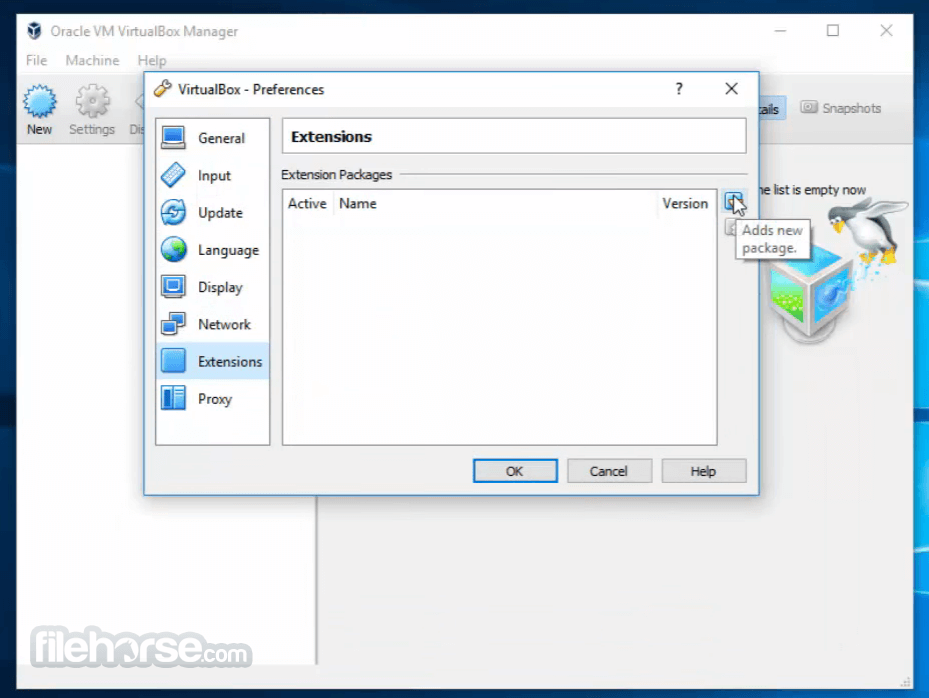
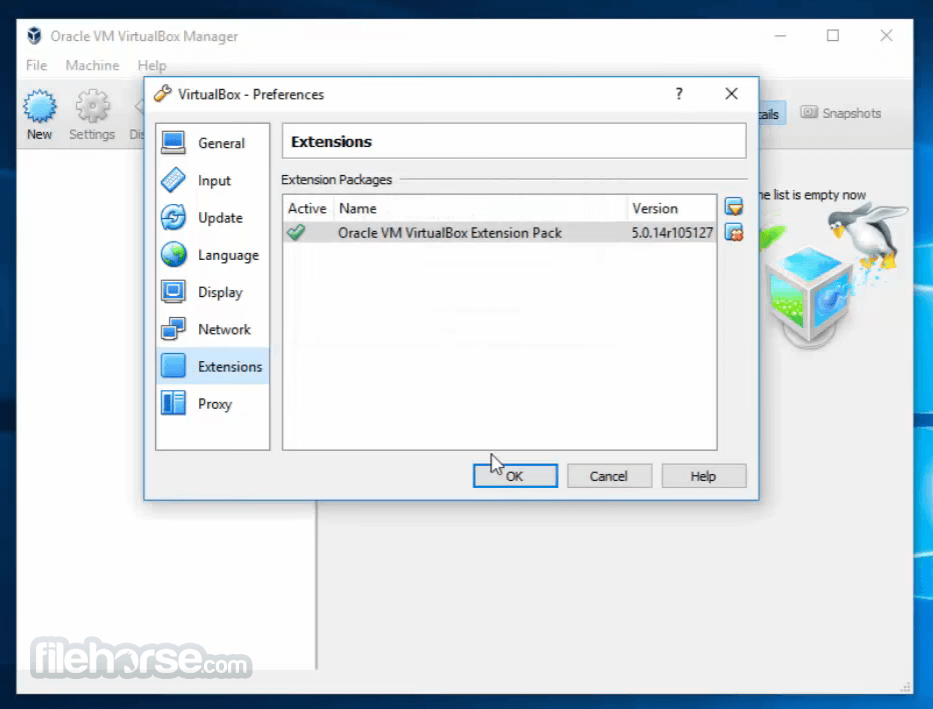
- Open VirtualBox and go to "File" > "Preferences" > "Extensions"
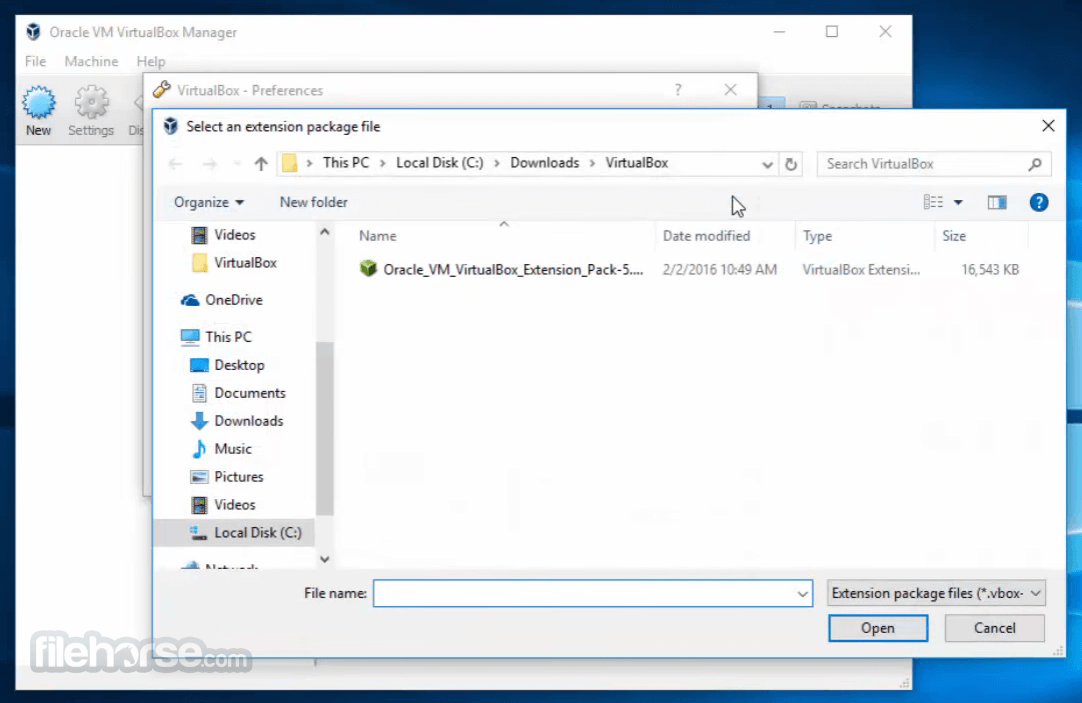
- Click "Add" and select the downloaded Extension Pack
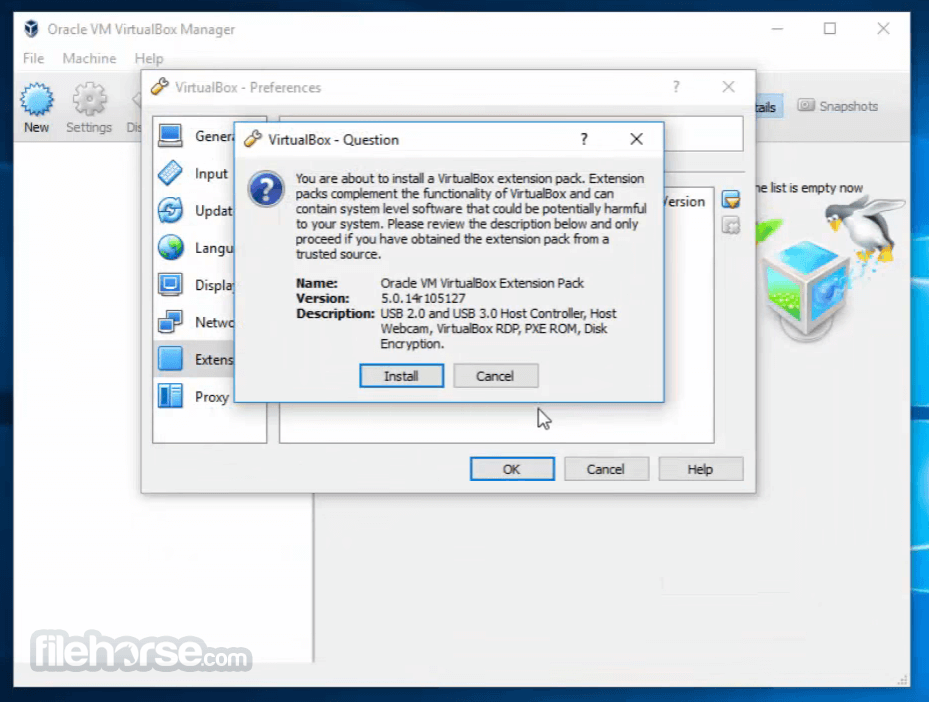
- Follow the installation prompts and accept the license agreement
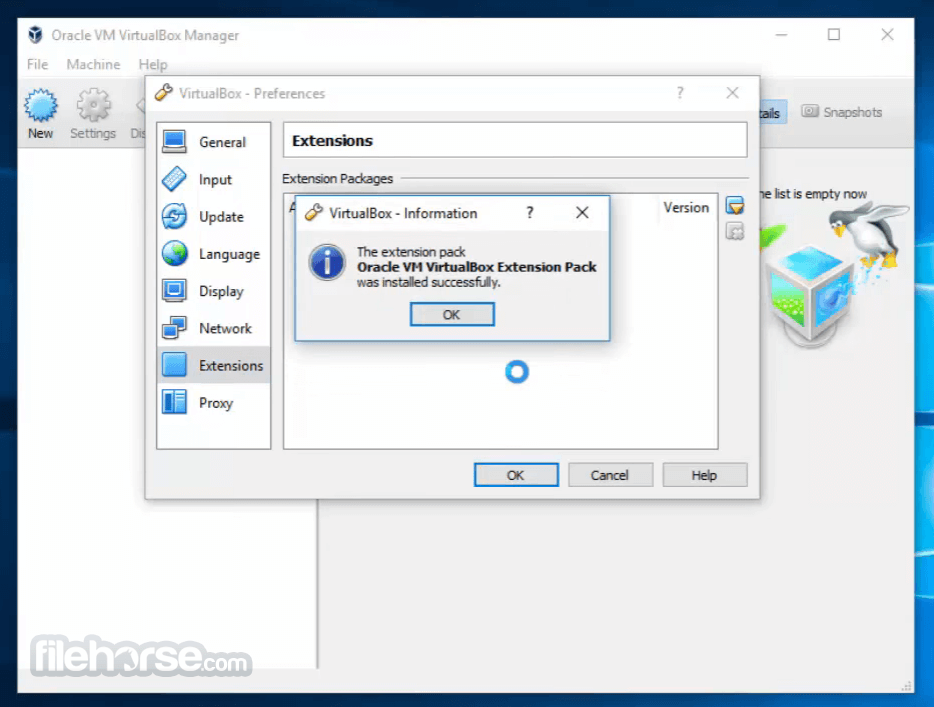
- Restart VirtualBox to apply the changes
- Verify installation in the "Extensions" tab
- Windows 11 or Windows 10 (64-bit only)
- Intel or AMD processor with virtualization support
- Minimum 4GB RAM (8GB recommended)
- At least 500MB free disk space
- VirtualBox installed before adding the Extension Pack
- Enhanced USB support
- Improved remote desktop features
- Encryption for virtual machines
- Better networking functionality
- Seamless integration with host system
- Requires VirtualBox installation
- Not open-source software
- Compatibility issues with updates
- Additional configuration needed
- Some features locked behind licensing
Download VirtualBox Extension Pack Latest Version Why is this app published on FileHorse? (More info)
##
畫面截圖
- 2026-07-22 VirtualBox Extension Pack 7.2.14 19.1 MB
- 2026-06-17 VirtualBox Extension Pack 7.2.10 19.1 MB
- 2026-04-21 VirtualBox Extension Pack 7.2.8 19.1 MB
- 2026-01-29 VirtualBox Extension Pack 7.2.6 19.1 MB
- 2025-10-21 VirtualBox Extension Pack 7.2.4 21.7 MB
- 2025-06-04 VirtualBox Extension Pack 7.1.10 21.9 MB
- 2025-04-16 VirtualBox Extension Pack 7.1.8 21.9 MB
- 2025-01-22 VirtualBox Extension Pack 7.1.6 21.9 MB