⚠ 這是歷史版本頁面 — 查看 WaveLab Pro 最新版本 →

- 目前版本9.5.50 (Update)
- 更新日期2019-03-20
- 檔案大小133 MB
- 檔案名稱WaveLab_Pro_9.5.50_Update_win.exe
- 作業系統Windows 10 (64-bit) / Windows 11
- 支援語系English
- 授權型式商業試用
- 開發商 Steinberg Media Technologies
- 軟體分類Windows 軟體 / 音訊軟體
##
編輯短評
WaveLab Pro 是 Steinberg 出品的專業音訊編輯與母帶處理軟體,主打將剪輯、修復、混音與 mastering 等眾多功能整合在單一工作流程中。它提供兩種編輯模式:破壞性的 Audio Editor 適合精準的樣本級剪輯,非破壞性的 Audio Montage 則便於安排多軌素材與整體編排,這套雙軌制設計是它最具辨識度的特色。軟體長期由原廠維護,更新步調穩定,在廣播與後製領域有不少專業用戶倚賴其穩定性,使用者評價普遍不錯,在同類工具中屬於中上位置的熱門選擇。
這套軟體適合需要高階音訊處理的錄音室工程師、母帶後製人員,以及對聲音品質要求嚴格的音樂創作者。若你常處理 podcast、廣告或音樂專輯的後期,它提供的工具能大幅縮短編輯時間;但若只是偶爾剪個片段,免費或輕量級軟體可能更省事。與 Virtual DJ、iTunes 這類偏播放或 DJ 應用的工具相比,WaveLab Pro 的定位更專業且深入,學習曲線也較陡。要注意的是它僅提供試用版,且介面只有英文,Windows 與 macOS 皆有版本,下載前需確認系統相容性。
##
翻譯排程處理中,以下暫以英文原文呈現
軟體介紹
WaveLab Pro is one of the most powerful and versatile audio editing, mastering, and audio processing applications on the market today, and combines the facilities of many other products within one intuitive, flexible application.
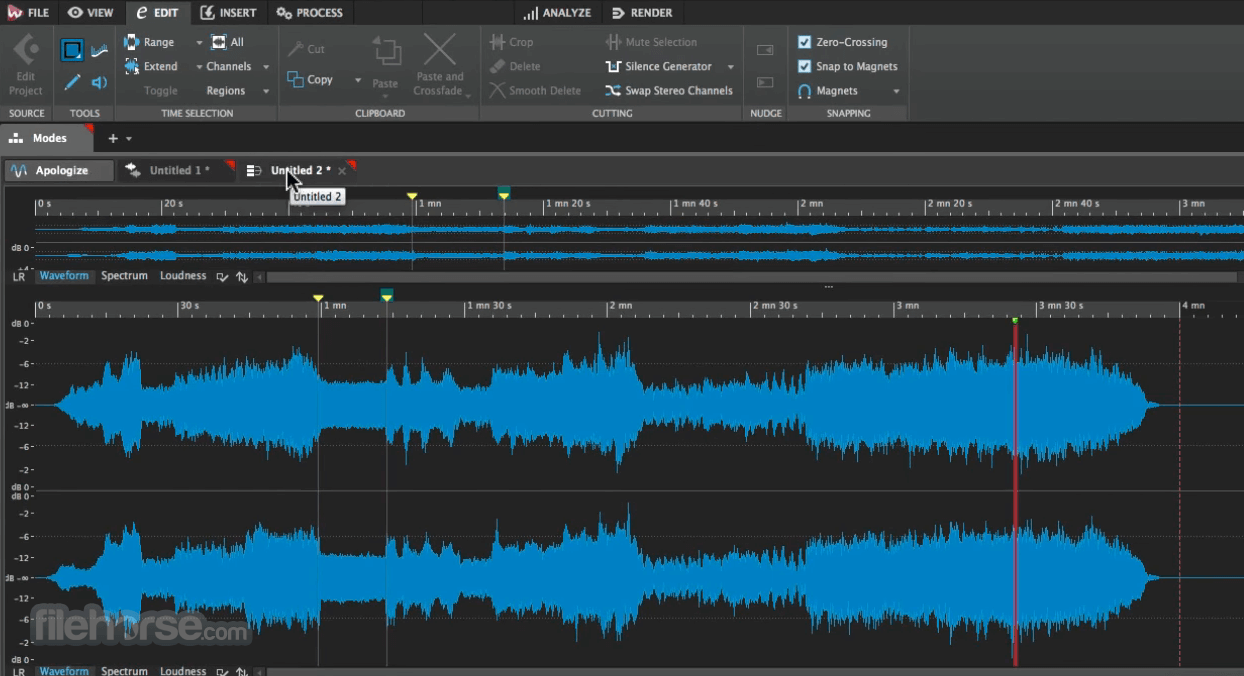
WaveLab Pro features sample-accurate audio editing combined with an impressive set of tools to speed up editing operations. Depending on the editing task, you may choose between a destructive Audio Editor and a non-destructive Audio Montage.
An increasing number of broadcast companies rely on the tool in their daily work because of its outstanding stability and comprehensive feature set.
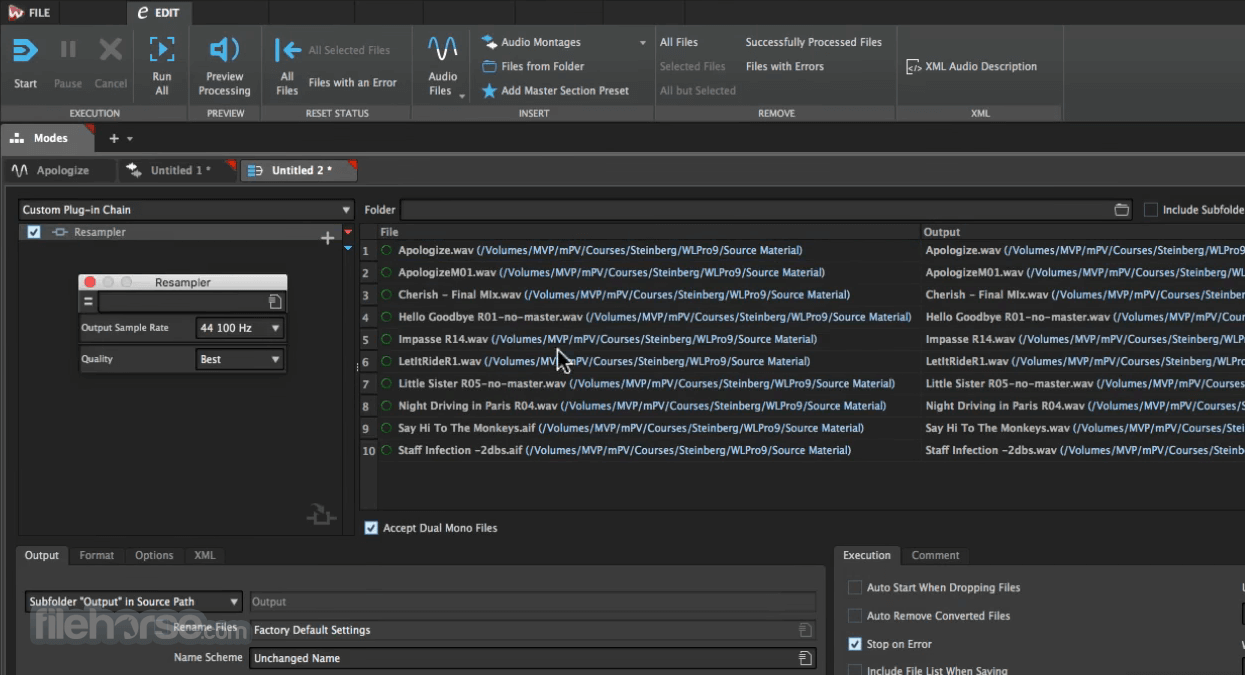
From editing and processing operations for preparing broadcast-ready content, over the batch conversion of large amounts of audio files through to individual system integration via scripting technologies — the app is the premier choice for any kind of professional audio work.
WaveLab Pro introduces many improvements for mastering and editing workflows, as well as carefully selected features for audio refinement and polishing.
Ranging from a top-notch Spectrum Editor to the new restoration plug-in suite to the unique Audio Inpainting technology alongside a redesigned and enhanced plug-in set, Wave Lab is a quantum leap in audio quality.
Main Features
User Interface
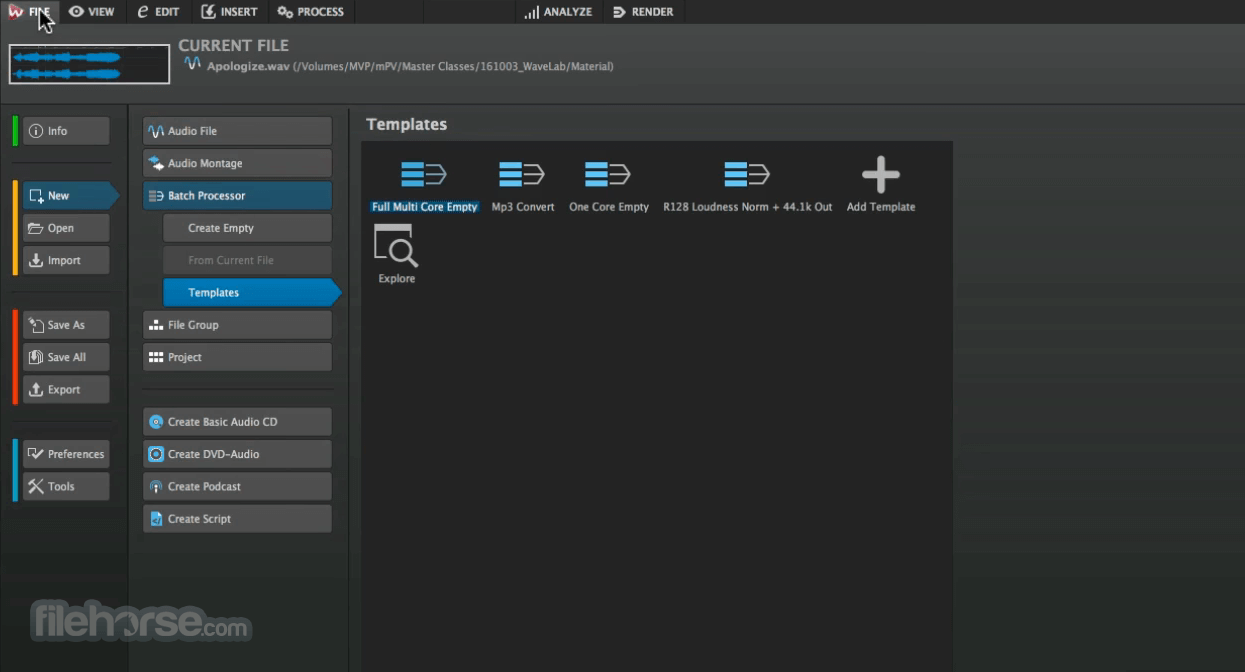
WaveLab Pro features a professional, task-oriented interface divided into dedicated workspaces such as Audio Editor, Audio Montage, and Batch Processor. Each workspace is optimized for a specific stage of the mastering process, with dockable panels, detailed waveform displays, and precise metering sections arranged for efficient workflow.
The interface is highly customizable, allowing users to rearrange panels, create custom layouts, and save personalized workspaces. Toolbars, meters, plugin chains, and file browsers are logically organized, providing quick access to editing, restoration, and rendering functions while maintaining a clean and production-focused environment.
How to Use
What is WaveLab Pro used for?
WaveLab Pro is a professional audio editing and mastering software developed by Steinberg. It is primarily used for audio mastering, detailed waveform editing, restoration, loudness analysis, and final preparation of music for digital and physical distribution.
How is WaveLab Pro different from a DAW?
Unlike traditional DAWs that focus on music production and multitrack recording, WaveLab Pro is specialized for post-production and mastering. It offers advanced metering, spectral editing, batch processing, and precise editing tools tailored for finishing and publishing audio projects.
Does WaveLab Pro support modern audio formats?
Yes. WaveLab Pro supports high-resolution audio formats, surround sound configurations, and industry-standard plugins such as VST. It also includes tools for preparing content for streaming platforms, CDs, and broadcast.
Is WaveLab Pro suitable for professional studios?
Yes. WaveLab Pro is widely used in professional mastering studios due to its precision tools, audio analysis capabilities, and integration with other Steinberg products. It is designed for advanced users who require detailed control over sound quality.
Is WaveLab Pro still relevant in 2026?
Yes. In 2026, WaveLab Pro remains a leading mastering solution, regularly updated and compatible with modern systems. It continues to be a strong choice for audio engineers, producers, and post-production professionals.
Pricing
WaveLab Pro 13 is available as a full version for €499.00.
WaveLab Elements 13 (Full Version) is priced at €99.99.
A 60-day trial version is also available, allowing users to test the software before purchasing.
Alternatives
Adobe Audition – A professional audio editing and mixing software used for recording, restoration, podcast production, and multi-track editing with advanced effects and noise reduction tools.
Sound Forge Pro – A high-end audio editor designed for precise waveform editing, mastering, and audio restoration with detailed processing controls.
iZotope RX – An advanced audio repair and restoration suite used to remove noise, clicks, hum, and other audio issues with intelligent processing tools.
Reaper – A flexible and lightweight digital audio workstation that supports multi-track recording, editing, mixing, and extensive plugin customization.
System Requirements
Also Available: Download WaveLab Pro for Mac
Download WaveLab Pro Latest Version Why is this app published on FileHorse? (More info)
WaveLab Pro features sample-accurate audio editing combined with an impressive set of tools to speed up editing operations. Depending on the editing task, you may choose between a destructive Audio Editor and a non-destructive Audio Montage.
An increasing number of broadcast companies rely on the tool in their daily work because of its outstanding stability and comprehensive feature set.
From editing and processing operations for preparing broadcast-ready content, over the batch conversion of large amounts of audio files through to individual system integration via scripting technologies — the app is the premier choice for any kind of professional audio work.
WaveLab Pro introduces many improvements for mastering and editing workflows, as well as carefully selected features for audio refinement and polishing.
Ranging from a top-notch Spectrum Editor to the new restoration plug-in suite to the unique Audio Inpainting technology alongside a redesigned and enhanced plug-in set, Wave Lab is a quantum leap in audio quality.
Main Features
- Professional audio mastering and editing suite for music, broadcast, and post-production.
- Advanced waveform and spectral editing tools for precise audio correction.
- Comprehensive metering system with loudness, spectrum, and phase analysis.
- Audio restoration tools, including noise reduction and error correction.
- Montage workspace for assembling, editing, and mastering full albums.
- Extensive plugin support, including VST3 and external hardware integration.
- Batch processing for automated rendering and large-scale audio tasks.
- High-resolution audio support with industry-standard export formats.
- CD/DVD authoring tools with DDP export for professional replication.
- Customizable interface tailored for efficient mastering workflows.
- Dolby Atmos Master Montage: Introduces a dedicated mastering environment for single ADM files with the Immersive Plug-in Hub supporting up to 128 channels, advanced sidechain routing, stereo reference A/B comparison, and integrated loudness and TruePeak normalization.
- Dolby Atmos Album Montage: Enables sequencing and mastering of multiple ADM files into a cohesive album with crossfade support, automatic renderer display updates, stereo comparison tracks, and precise loudness management across immersive projects.
- Multicore Rendering: Delivers dramatically faster processing by enabling full multicore support for Audio Montage elements, significantly reducing render times for complex projects.
- Tab Synchronized Playback: Allows seamless A/B comparison by continuing playback from the same position when switching between tabs.
- Sidechain Support: Enables routing clip audio directly into track plug-ins with adjustable signal levels for detailed dynamic and creative processing.
- Color Rules: Automatically manages clip and track colors based on customizable rules to improve visual organization in complex sessions.
- Enhanced Envelope Editing: Adds clone editing, grouped fade editing, and fine control mode for more precise and efficient adjustments.
- MasterRig 2 Redesign: Updates the mastering suite with a modern, scalable interface, sidechain capability, and improved EQ, compression, limiting, and stereo imaging modules.
- VocalChain: Introduces a streamlined multi-effect processor tailored for vocal and speech production.
- Underwater: Adds a creative effect simulating submerged acoustic environments for cinematic and experimental sound design.
- UltraShaper: Combines advanced compression and transient shaping for detailed dynamic control.
- PitchShifter: Provides real-time pitch manipulation for corrective adjustments or creative sound transformations.
- MixerDelay: Aligns speaker channels in surround and immersive setups for accurate spatial imaging.
- Bass Manager: Optimizes low-frequency routing and crossover management in multi-channel monitoring environments.
User Interface
WaveLab Pro features a professional, task-oriented interface divided into dedicated workspaces such as Audio Editor, Audio Montage, and Batch Processor. Each workspace is optimized for a specific stage of the mastering process, with dockable panels, detailed waveform displays, and precise metering sections arranged for efficient workflow.
The interface is highly customizable, allowing users to rearrange panels, create custom layouts, and save personalized workspaces. Toolbars, meters, plugin chains, and file browsers are logically organized, providing quick access to editing, restoration, and rendering functions while maintaining a clean and production-focused environment.
How to Use
- Install this program and activate the license
- Set up audio interface and preferences
- Import audio files into the workspace
- Use the Wave Editor for detailed waveform editing
- Apply effects and mastering tools
- Edit metadata and batch process files
- Export and render the final audio project
What is WaveLab Pro used for?
WaveLab Pro is a professional audio editing and mastering software developed by Steinberg. It is primarily used for audio mastering, detailed waveform editing, restoration, loudness analysis, and final preparation of music for digital and physical distribution.
How is WaveLab Pro different from a DAW?
Unlike traditional DAWs that focus on music production and multitrack recording, WaveLab Pro is specialized for post-production and mastering. It offers advanced metering, spectral editing, batch processing, and precise editing tools tailored for finishing and publishing audio projects.
Does WaveLab Pro support modern audio formats?
Yes. WaveLab Pro supports high-resolution audio formats, surround sound configurations, and industry-standard plugins such as VST. It also includes tools for preparing content for streaming platforms, CDs, and broadcast.
Is WaveLab Pro suitable for professional studios?
Yes. WaveLab Pro is widely used in professional mastering studios due to its precision tools, audio analysis capabilities, and integration with other Steinberg products. It is designed for advanced users who require detailed control over sound quality.
Is WaveLab Pro still relevant in 2026?
Yes. In 2026, WaveLab Pro remains a leading mastering solution, regularly updated and compatible with modern systems. It continues to be a strong choice for audio engineers, producers, and post-production professionals.
Pricing
WaveLab Pro 13 is available as a full version for €499.00.
WaveLab Elements 13 (Full Version) is priced at €99.99.
A 60-day trial version is also available, allowing users to test the software before purchasing.
Alternatives
Adobe Audition – A professional audio editing and mixing software used for recording, restoration, podcast production, and multi-track editing with advanced effects and noise reduction tools.
Sound Forge Pro – A high-end audio editor designed for precise waveform editing, mastering, and audio restoration with detailed processing controls.
iZotope RX – An advanced audio repair and restoration suite used to remove noise, clicks, hum, and other audio issues with intelligent processing tools.
Reaper – A flexible and lightweight digital audio workstation that supports multi-track recording, editing, mixing, and extensive plugin customization.
System Requirements
- OS: 64-bit Windows 11 Version 24H2 (or higher) or 64-bit Windows 10 Version 22H2 (or higher)
- Processor: Intel Core i5 (8th Generation) or AMD Ryzen 3000 series or Windows on ARM processor
- CPU Cores: 4 cores or more
- Memory: 8 GB RAM
- Storage: 2 GB free space (core installation), 4 GB total free space required
- Display: Minimum 1440 x 900 @ 100% UI scaling (1920 x 1080 recommended)
- Graphics: Graphics card with native Windows 10 support (Microsoft Basic Display Driver not recommended)
- Recommended GPU: AMD R/RX series or newer, NVIDIA 700 series or newer
- GPU Memory: 4 GB or higher for 4K displays
- Audio Hardware: OS-compatible audio hardware required; ASIO-compatible audio hardware recommended for low-latency performance
- Internet: Required for license activation, installer download, account sign-up, and product registration
- Professional-grade audio editing tools
- Advanced mastering and restoration features
- Flexible batch processing options
- High-quality built-in audio effects
- Seamless integration with other Steinberg software
- Expensive compared to similar tools
- Requires powerful hardware for smooth performance
- The interface can feel cluttered at times
- Limited support for third-party plugins
Also Available: Download WaveLab Pro for Mac
Download WaveLab Pro Latest Version Why is this app published on FileHorse? (More info)
##
影片介紹
##
畫面截圖
- 2026-02-25 WaveLab Pro 13 390 MB
- 2025-12-17 WaveLab Pro 12.0.51 352 MB
- 2024-11-07 WaveLab Pro 12.0.40 375 MB
- 2024-07-11 WaveLab Pro 12.0.30 375 MB
- 2024-05-29 WaveLab Pro 12.0.20 357 MB
- 2022-02-23 WaveLab Pro 11.0.30 226 MB
- 2021-03-23 WaveLab Pro 10.0.70 221 MB
- 2019-03-20 WaveLab Pro 9.5.50 (Update) 133 MB