⚠ 這是歷史版本頁面 — 查看 TopWin Movie Maker 最新版本 →

TopWin Movie Maker 9.2.0.4
v 9.2.0.4
Windows
商業試用
8/10 (49)
- 目前版本9.2.0.4
- 更新日期2021-06-15
- 檔案大小15.13 MB
- 檔案名稱windows-movie-maker-new-multi.exe
- 作業系統Windows 7 / Windows 7 64 / Windows 8 / Windows 8 64 / Windows 10 / Windows 10 64 / Windows 11
- 支援語系English
- 授權型式商業試用
- 開發商 TopWin Software Limited
- 軟體分類Windows 軟體 / 影片軟體
##
編輯短評
TopWin Movie Maker 是一款在 Windows 上运行的影片剪辑工具,主打快速将照片与影片片段组合成完整作品,并加入特效、转场、字幕与音轨。它的核心特色是内建 Auto Movie 功能,能自动编排素材生成影片,对不熟悉时间轴操作的使用者来说相当友善。软件自 2020 年起持续有版本更新,近一年内仍维持维护,不过在同类型工具中属于较冷门的选择,评价人数不多,整体口碑中等。
这款软件适合偶尔需要把出游照片、家庭影片整理成短片,却不想花时间学习专业剪辑软体的人。与 KMPlayer 或 K-Lite Codec Pack 这类播放或解码工具不同,它专注在影片「制作」而非播放,替代方案多为免费开源的剪辑软体,但 TopWin Movie Maker 的介面更接近早期 Windows Movie Maker 的直觉操作。需注意的是它仅有英文介面,且为试用版授权,长期使用需购买;另外它支援 Windows 7 到 11,旧版才相容 XP 与 Vista,下载前最好确认系统版本。
##
翻譯排程處理中,以下暫以英文原文呈現
軟體介紹
With Windows Movie Maker, you can quickly turn your photos and videos into polished movies. Add special effects, transitions, sound, and captions to help tell your story. Share the movie with friends and family.
Windows Movie Maker is an easy-to-use & powerful video creating / editing software application, designed for the latest Windows 7, Windows 8, Windows 10, and Windows 11.
The old version works for Windows XP and Vista. Windows Movie Maker 2026 contains effects, transitions, titles/credits, audio track, timeline narration, and Auto Movie. New effects and transitions can be made, and existing ones can be modified using XML code.
The app is also a basic audio track editing program. It can apply basic effects to audio tracks, such as fade-in or fade-out. The audio tracks can then be exported in the form of a sound file instead of a video file.
With TopWin Movie Maker, it's easy to organize and select the photos and videos you want to use in your next movie. With the program, you can add text, transitions, video effects, and more. Change as much as you want, or let Movie Maker do it for you.
Post your movie to your favorite sites, including YouTube, Facebook, Windows Live SkyDrive, and many others, right from TopWin Movie Maker.
Highlights
Try an AutoMovie theme
Just pick the photos and videos you want to use, and Movie Maker does the rest.
Share with friends
Once your movie's done, it's easy to post it on popular social networking and video-sharing sites.
Add your photos and videos
Import photos and videos from your PC or camera into Movie Maker to start making movies.
Edit the video
Make your movie look like you want it to, with editing tools that let you easily trim, split, and speed up or slow down your movie.
Edit the audio
Add and edit your movie's soundtrack. Adjust the volume, fade music in or out, and more.
Key Features
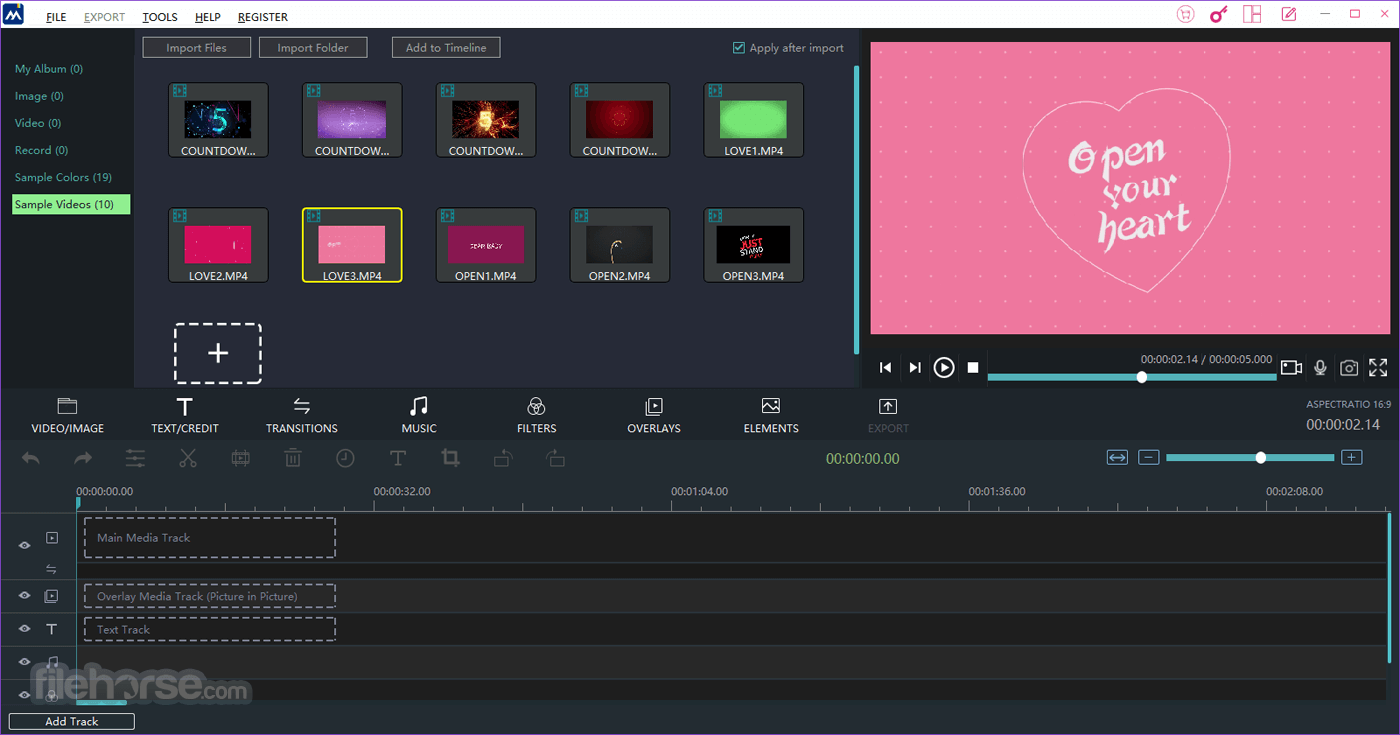
The interface of the video app is clean and easy to navigate. The main workspace features a timeline where you can arrange and edit your clips, and the toolbar provides quick access to various editing tools and effects.
Overall, it strikes a balance between simplicity and functionality, making it suitable for users of all skill levels.
Installation and Setup
Installing the app is a straightforward process.
Users can download the software from the official website or FileHorse, run the installer, and follow the on-screen instructions. It is compatible with Windows 7, 8, 10, or 11.
How to UseImport Media: Click on the "Import" button to add your video clips, images, and audio files to the library. Arrange Clips: Drag and drop media files onto the timeline to arrange them in the desired order. Edit Content: Trim, split, or add transitions and effects to your clips as needed. Add Text and Titles: Use the text tool to insert captions, titles, or credits. Audio Editing: Adjust audio levels, add background music, or include voiceovers. Preview and Export: Preview your project and then click the "Export" button to save your video in the preferred format. FAQs
Can I use this software on a Mac computer?
Unfortunately, Windows Movie Maker is designed specifically for Windows operating systems and is not available for Mac.
Are there any limitations on video length or file size?
It has no strict limitations, but performance may vary depending on your computer's hardware specifications.
Does it support 4K video editing?
Yes, it can handle 4K video editing, provided your computer meets the necessary hardware requirements.
Can I export videos directly to YouTube or other social media platforms?
Yes, the software offers direct sharing options for YouTube and various social media platforms.
Alternatives
Adobe Premiere Pro - A professional-grade video editing software with a wide range of features, but it comes with a subscription fee.
DaVinci Resolve - A free video editing software that offers advanced editing tools and professional-grade color correction.
HitFilm - A free video editing software that combines editing and visual effects compositing features.
Filmora by Wondershare - A user-friendly video editor with a wide range of effects and templates.
MiniTool MovieMaker - Simple, easy-to-use free video tool. Everyone can make movies easily!
Pricing
The software is available for FREE for 30 days, making it an attractive option for budget-conscious users.
System Requirements
Windows Movie Maker is an excellent choice for users who need a simple and free video editing solution for Windows 11/10. It offers a user-friendly interface, a variety of editing tools, and the ability to create impressive videos without the complexity of professional software.
While it may not have all the advanced features of premium video editors, it's a reliable option for basic to intermediate video editing needs. Give it a try if you're looking for an accessible and cost-effective way to create and edit videos on your Windows computer.
Note: 30-day trial version. Output Watermark.
Download Windows Movie Maker Latest Version Why is this app published on FileHorse? (More info)
Windows Movie Maker is an easy-to-use & powerful video creating / editing software application, designed for the latest Windows 7, Windows 8, Windows 10, and Windows 11.
The old version works for Windows XP and Vista. Windows Movie Maker 2026 contains effects, transitions, titles/credits, audio track, timeline narration, and Auto Movie. New effects and transitions can be made, and existing ones can be modified using XML code.
The app is also a basic audio track editing program. It can apply basic effects to audio tracks, such as fade-in or fade-out. The audio tracks can then be exported in the form of a sound file instead of a video file.
With TopWin Movie Maker, it's easy to organize and select the photos and videos you want to use in your next movie. With the program, you can add text, transitions, video effects, and more. Change as much as you want, or let Movie Maker do it for you.
Post your movie to your favorite sites, including YouTube, Facebook, Windows Live SkyDrive, and many others, right from TopWin Movie Maker.
Highlights
Try an AutoMovie theme
Just pick the photos and videos you want to use, and Movie Maker does the rest.
Share with friends
Once your movie's done, it's easy to post it on popular social networking and video-sharing sites.
Add your photos and videos
Import photos and videos from your PC or camera into Movie Maker to start making movies.
Edit the video
Make your movie look like you want it to, with editing tools that let you easily trim, split, and speed up or slow down your movie.
Edit the audio
Add and edit your movie's soundtrack. Adjust the volume, fade music in or out, and more.
Key Features
- Intuitive Interface: The program offers a user-friendly interface with a drag-and-drop timeline, making it easy for beginners to start editing right away.
- Video Editing: Users can import video clips, images, and audio files to create customized videos. It supports a wide range of file formats.
- Transitions and Effects: There are numerous transition effects and video filters available to enhance the visual appeal of your videos.
- Text and Titles: Add text, captions, and titles to your videos with a variety of fonts and customization options.
- Audio Editing: You can adjust the volume, fade in/out, and even add background music or voiceovers to your videos.
- Export Options: It supports various output formats, including MP4, AVI, WMV, and more. You can also directly share your creations on social media platforms.
- Storyboard Mode: This mode simplifies the editing process, allowing users to arrange clips and images in a storyboard-style layout.
The interface of the video app is clean and easy to navigate. The main workspace features a timeline where you can arrange and edit your clips, and the toolbar provides quick access to various editing tools and effects.
Overall, it strikes a balance between simplicity and functionality, making it suitable for users of all skill levels.
Installation and Setup
Installing the app is a straightforward process.
Users can download the software from the official website or FileHorse, run the installer, and follow the on-screen instructions. It is compatible with Windows 7, 8, 10, or 11.
How to Use
Can I use this software on a Mac computer?
Unfortunately, Windows Movie Maker is designed specifically for Windows operating systems and is not available for Mac.
Are there any limitations on video length or file size?
It has no strict limitations, but performance may vary depending on your computer's hardware specifications.
Does it support 4K video editing?
Yes, it can handle 4K video editing, provided your computer meets the necessary hardware requirements.
Can I export videos directly to YouTube or other social media platforms?
Yes, the software offers direct sharing options for YouTube and various social media platforms.
Alternatives
Adobe Premiere Pro - A professional-grade video editing software with a wide range of features, but it comes with a subscription fee.
DaVinci Resolve - A free video editing software that offers advanced editing tools and professional-grade color correction.
HitFilm - A free video editing software that combines editing and visual effects compositing features.
Filmora by Wondershare - A user-friendly video editor with a wide range of effects and templates.
MiniTool MovieMaker - Simple, easy-to-use free video tool. Everyone can make movies easily!
Pricing
The software is available for FREE for 30 days, making it an attractive option for budget-conscious users.
System Requirements
- Windows 7, 8, 10, or 11
- 1 GHz processor or faster
- 1 GB RAM (2 GB recommended)
- 300 MB of free disk space for installation
- DirectX 9.0 or later
- Super VGA (800x600) resolution, 16-bit graphics card or higher
- Windows-compatible sound card
- User-friendly interface.
- A wide range of editing features.
- No cost is involved.
- Direct sharing options for social media.
- Supports 4K video editing.
- Limited advanced features compared to professional video editing software.
- Windows-only compatibility.
- Occasional performance issues on lower-end hardware.
Windows Movie Maker is an excellent choice for users who need a simple and free video editing solution for Windows 11/10. It offers a user-friendly interface, a variety of editing tools, and the ability to create impressive videos without the complexity of professional software.
While it may not have all the advanced features of premium video editors, it's a reliable option for basic to intermediate video editing needs. Give it a try if you're looking for an accessible and cost-effective way to create and edit videos on your Windows computer.
Note: 30-day trial version. Output Watermark.
Download Windows Movie Maker Latest Version Why is this app published on FileHorse? (More info)
##
畫面截圖
- 2025-11-19 TopWin Movie Maker 10.0.3.3 11.44 MB
- 2022-03-17 TopWin Movie Maker 9.9.5.0 16.82 MB
- 2021-06-15 TopWin Movie Maker 9.2.0.4 15.13 MB
- 2021-04-09 TopWin Movie Maker 8.0.8.8 10.76 MB
- 2020-01-16 TopWin Movie Maker 8.0.6.2 10.76 MB