⚠ 這是歷史版本頁面 — 查看 Windows Terminal 最新版本 →

Windows Terminal 1.24.11321.0
v 1.24.11321.0
Windows
開源軟體
8.4/10 (62)
- 目前版本1.24.11321.0
- 更新日期2026-05-13
- 檔案大小21.3 MB
- 檔案名稱Microsoft.WindowsTerminalPreview_1.24.11321.0_8wekyb3d8bbwe.msixbundle
- 作業系統Windows 10 / Windows 11
- 支援語系English
- 授權型式開源軟體
- 開發商 Microsoft Corporation
- 軟體分類Windows 軟體 / 開發者工具
##
編輯短評
Windows Terminal 是微軟推出的開源終端機應用程式,整合了命令提示字元、PowerShell 與 WSL 等多種殼層,解決傳統命令列視窗介面老舊、功能不足的問題。它最具辨識度的特色在於分頁式介面、GPU 加速文字渲染、完整的 Unicode 與 UTF-8 字元支援,以及可深度自訂的主題與設定選項。這套工具由微軟持續維護,更新相當活躍,在同類開發者工具中屬於主流首選,使用者評價普遍不錯。
這款軟體適合需要同時操作多個殼層的開發者、系統管理員,以及日常依賴命令列工作的進階使用者。與其他第三方終端機相比,它由微軟官方開發,與 Windows 系統的整合度更高,但介面目前僅提供英文,且僅支援 Windows 平台。開源授權讓使用者可以自由下載使用,免安裝版本也方便隨身攜帶,對於習慣在 Windows 上進行開發工作的人來說,是值得一試的現代化終端方案。
##
翻譯排程處理中,以下暫以英文原文呈現
軟體介紹
The brand-new Windows Terminal improves upon the legendary command-line system administrator app by adding a fast, optimized, and powerful terminal application platform for a new modern age.
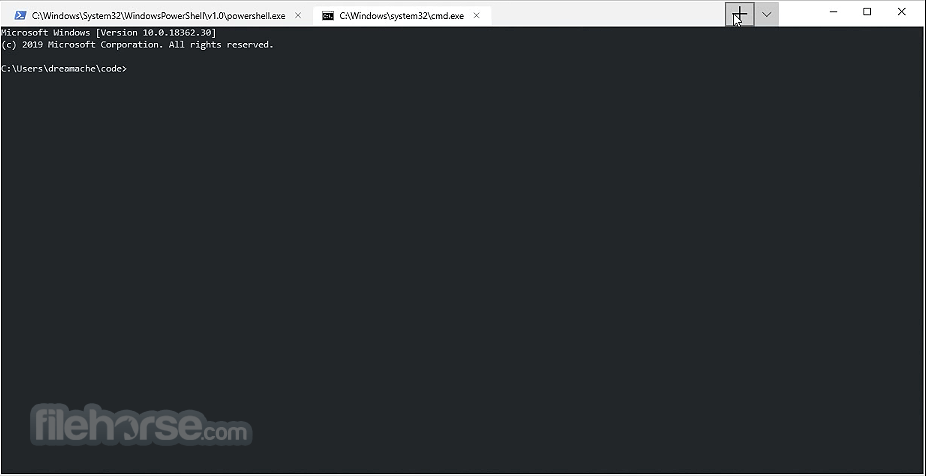
With full support for shells like Command Prompt, PowerShell, and WSL, new Windows Terminal adds more modern user interface features such as tabs, GPU accelerated text rendering engine, Unicode, and UTF-8 character support, custom themes, and in-depth user configuration support.
Built as the new open-source environment under the code name “Cascadia” and developed with the insights and direct contribution from the worldwide community, new Windows Terminal strives to greatly enhance productivity for professional users who are used to control and monitor their workflow jobs with this popular command-line tool.
Other much-requested features available in Cascadia are the support for window transparency effects, 24-bit color support, JSON settings file, integration with Microsoft Narrator, support for Azure Cloud Shell Connector, ANSI/VT sequences, and the ability to copy HTML format text to the clipboard.
However, be aware that as of late 2019 this developer utility app was still in the early preview release, providing users only access some of its features such as innovative “assistive technology”.
According to the official listing on the Windows Store, at that point, It was still not formally tested and users could experience various bugs and instabilities, which are being aggressively fixed on the road to releasing a final stable build.
Features and Highlights
Windows Terminal is a developer utility app that is as of 2019 still in the early preview phase of release. But even in this development state, many developers are gladly using it to enhance their daily workflow.
The app can be quickly installed from its official Windows Store page by clicking on the “Get” button. Upon finishing the installation, you can start it and immediately notice many of the improvements new this codename “Cascadia” app is offering to professional users.
he most noticeable difference is the presence of tabs, GPU accelerated rendering and configuration area that can be accessed by clicking on the “+” button at the right of your latest tab. Settings can also be activated with a keyboard shortcut “Ctrl+,”.
How to Use
Download Windows Terminal Latest Version Why is this app published on FileHorse? (More info)
With full support for shells like Command Prompt, PowerShell, and WSL, new Windows Terminal adds more modern user interface features such as tabs, GPU accelerated text rendering engine, Unicode, and UTF-8 character support, custom themes, and in-depth user configuration support.
Built as the new open-source environment under the code name “Cascadia” and developed with the insights and direct contribution from the worldwide community, new Windows Terminal strives to greatly enhance productivity for professional users who are used to control and monitor their workflow jobs with this popular command-line tool.
Other much-requested features available in Cascadia are the support for window transparency effects, 24-bit color support, JSON settings file, integration with Microsoft Narrator, support for Azure Cloud Shell Connector, ANSI/VT sequences, and the ability to copy HTML format text to the clipboard.
However, be aware that as of late 2019 this developer utility app was still in the early preview release, providing users only access some of its features such as innovative “assistive technology”.
According to the official listing on the Windows Store, at that point, It was still not formally tested and users could experience various bugs and instabilities, which are being aggressively fixed on the road to releasing a final stable build.
Features and Highlights
- A brand new modern terminal app for professional users.
- Introduction of the tabbed interface.
- Full support for modern Unicode character rendering.
- GPU-accelerated app.
- Advanced customizability.
- 100% FREE!
Windows Terminal is a developer utility app that is as of 2019 still in the early preview phase of release. But even in this development state, many developers are gladly using it to enhance their daily workflow.
The app can be quickly installed from its official Windows Store page by clicking on the “Get” button. Upon finishing the installation, you can start it and immediately notice many of the improvements new this codename “Cascadia” app is offering to professional users.
he most noticeable difference is the presence of tabs, GPU accelerated rendering and configuration area that can be accessed by clicking on the “+” button at the right of your latest tab. Settings can also be activated with a keyboard shortcut “Ctrl+,”.
How to Use
- Install Windows Terminal from Microsoft Store
- Launch Windows Terminal from Start menu or shortcut
- Open new tabs with different command-line profiles
- Customize settings in the JSON configuration file
- Use keyboard shortcuts for faster navigation
- Split panes for multitasking in one window
- Change themes and appearance in settings
- Use multiple shells like PowerShell, CMD, and WSL
- Enable acrylic effects for a transparent background
- Configure startup behavior and default profile
- Windows 10 or Windows 11
- 64-bit processor (x86-64 or ARM64)
- Minimum 4GB RAM (8GB recommended)
- At least 200MB of available storage
- DirectX-compatible GPU for rendering
- Customizable themes and layouts
- Supports multiple command-line shells
- Fast and smooth performance
- Tabbed interface for better organization
- Open-source and regularly updated
- Requires Windows 10 or newer
- No built-in support for older Windows versions
- Limited graphical customization options
- Learning curve for advanced configurations
- Some features depend on external tools
Download Windows Terminal Latest Version Why is this app published on FileHorse? (More info)
##
畫面截圖
- 2026-07-17 Windows Terminal 1.24.11911.0 21.3 MB
- 2026-05-13 Windows Terminal 1.24.11321.0 21.3 MB
- 2026-04-03 Windows Terminal 1.24.10921.0 21.3 MB
- 2026-03-05 Windows Terminal 1.24.10621.0 21.2 MB
- 2026-01-24 Windows Terminal 1.23.20211.0 20.7 MB
- 2025-12-18 Windows Terminal 1.23.13503.0 22.1 MB
- 2025-10-14 Windows Terminal 1.23.12811.0 22.1 MB
- 2025-09-27 Windows Terminal 1.23.12681.0 22.1 MB