⚠ 這是歷史版本頁面 — 查看 WinNTSetup 最新版本 →

- 目前版本5.2.4
- 更新日期2022-04-22
- 檔案大小1.47 MB
- 檔案名稱WinNTSetup_v524.rar
- 作業系統Windows 7 64 / Windows 8 64 / Windows 10 64 / Windows 11
- 支援語系English
- 授權型式免費軟體
- 開發商 JFX
- 軟體分類Windows 軟體 / 系統優化
##
編輯短評
WinNTSetup 是一款專為 Windows 系統部署設計的免費工具,主要讓管理員或進階使用者能自訂安裝映像檔的預設選項。它可直接載入 WIM、ESD、SWM 或 ISO 格式的映像,並瀏覽其中啟用的版本,再針對安裝過程進行細部調整,省去手動修改的繁瑣步驟。這套軟體由開發商 JFX 長期維護,更新頻率雖不算密集,但持續有版本釋出;在同類工具中屬於小眾但專業的選擇,使用者評價普遍不錯,尤其受到需要大量部署環境的技術人員信賴。
如果你負責為多台電腦安裝 Windows,或想深入控制安裝流程,WinNTSetup 會比 Rufus 或 Glary Utilities 更貼近需求——Rufus 專注於製作開機碟,Glary Utilities 則偏向系統優化,而 WinNTSetup 直接切入安裝階段的客製化。它的介面偏技術導向,對一般使用者可能有些門檻,但換來的是更高的彈性。軟體本身免費,僅支援 Windows 平台,目前介面只有英文,使用前需留意語系限制。
##
翻譯排程處理中,以下暫以英文原文呈現
軟體介紹
Do you own one or more copies of Windows OS? Do you want to change the default options that come with them? If so, the best tool for the job is WinNTSetup.
This is designed specifically for administrators and other advanced users who must massively deploy Windows copies to end-users.
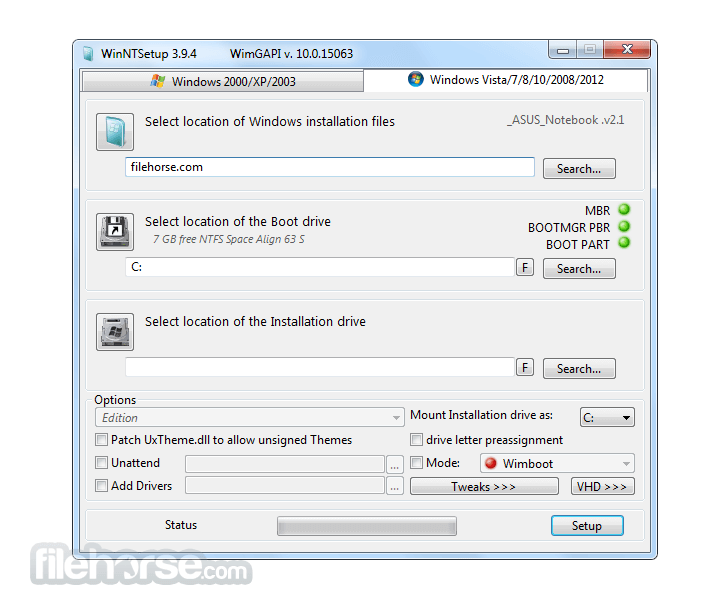
The WIM image can be browsed with WinNTSetup. It doesn’t matter if you’re using an ESD, WIM, or SWM file. An ISO file can be loaded as well.
Once you load your Windows copy, the window will display the editions which are currently enabled. From there, the application lets you tweak and modify various settings to your liking.
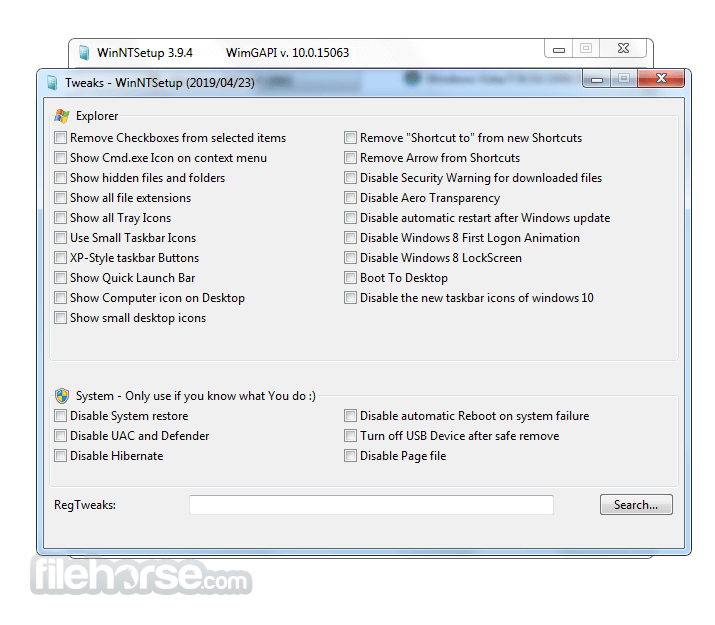
You can enable or disable several features like icons, system restore, quick launch, and page file. Download the Win NT Setup app today!
If you want to save time by changing the settings of your Windows copy before installing it, then you’ll want to have this application.
Available Features:
If you are looking for WinNTSetup alternatives, we recommend you to download Rufus or YUMI.
How to Use
Download WinNTSetup Latest Version Why is this app published on FileHorse? (More info)
This is designed specifically for administrators and other advanced users who must massively deploy Windows copies to end-users.
The WIM image can be browsed with WinNTSetup. It doesn’t matter if you’re using an ESD, WIM, or SWM file. An ISO file can be loaded as well.
Once you load your Windows copy, the window will display the editions which are currently enabled. From there, the application lets you tweak and modify various settings to your liking.
You can enable or disable several features like icons, system restore, quick launch, and page file. Download the Win NT Setup app today!
If you want to save time by changing the settings of your Windows copy before installing it, then you’ll want to have this application.
Available Features:
- Perform certain tweaks.
- Uxtheme patch allows for unsigned themes.
- Integrate Textmode drivers, standard PNP drivers, and other drivers.
- Windows installation if remove setup.exe or winnt32.exe is in nlite/vlite.
- Install Windows in the drive letter of your choice.
- The simplest WinPE can run this tool.
If you are looking for WinNTSetup alternatives, we recommend you to download Rufus or YUMI.
How to Use
- Launch the executable (no installation needed)
- Select the Windows ISO or WIM/ESD/SWM image
- Choose the target installation drive
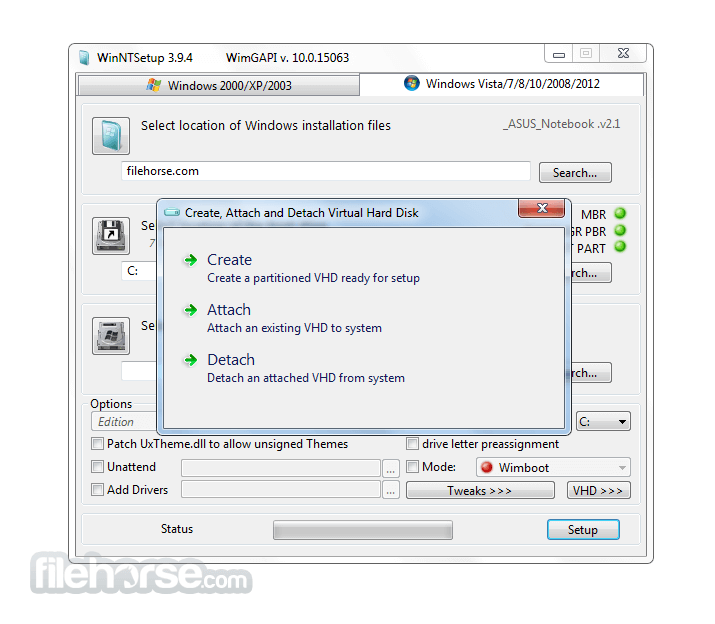
- Customize settings (drivers, tweaks, boot options)
- Click "Setup" to begin installation
- Wait for process completion and reboot
- OS: Windows 11, 10, 8 or 7
- RAM: 512 MB minimum
- CPU: Intel Pentium or equivalent
- Disk: 100 MB for program, more for OS image
- Display: 800x600 resolution minimum
- Portable with no installation needed
- Supports all Windows versions
- Advanced tweaking options
- Fast deployment from ISO/WIM
- Compatible with legacy systems
- Not beginner-friendly
- Outdated UI design
- Limited official support
- No built-in ISO downloader
Download WinNTSetup Latest Version Why is this app published on FileHorse? (More info)
##
畫面截圖
- 2025-12-31 WinNTSetup 5.4.2.0 1.42 MB
- 2024-12-30 WinNTSetup 5.4.1.0 1.42 MB
- 2024-12-24 WinNTSetup 5.4.0.0 1.34 MB
- 2024-07-02 WinNTSetup 5.3.5.2 1.62 MB
- 2024-05-29 WinNTSetup 5.3.5.1 1.62 MB
- 2024-05-08 WinNTSetup 5.3.5 1.59 MB
- 2024-02-14 WinNTSetup 5.3.4 1.58 MB
- 2023-10-05 WinNTSetup 5.3.2 1.61 MB