Wise Auto Shutdown 2.1.1
v 2.1.1
Windows
免費軟體
8.2/10 (163)
- 目前版本2.1.1
- 更新日期2026-02-26
- 檔案大小3.17 MB
- 檔案名稱WASSetup_2.1.1.112.exe
- 作業系統Windows 7 / Windows 8 / Windows 10 / Windows 11
- 支援語系English
- 授權型式免費軟體
- 開發商 WiseCleaner
- 軟體分類Windows 軟體 / 桌面強化
##
翻譯排程處理中,以下暫以英文原文呈現
軟體介紹
Wise Auto Shutdown is a free desktop utility designed for Windows users to automate power management tasks.
Wise Auto Shutdown for PC/Laptop enables scheduling of shutdowns, restarts, log-offs, sleeps, hibernations, and screen locks, enhancing convenience and energy efficiency.
Main Features
Task Scheduling
Set your PC to perform actions like shutdown, restart, log-off, sleep, hibernate, or lock screen at specified times or after a defined period.
Flexible Timing Options
Schedule tasks to occur daily, at a specific time, or after a certain duration.
Reminder Notifications
Receive a notification five minutes before the scheduled task executes, allowing time to postpone if necessary.
Silent Operation
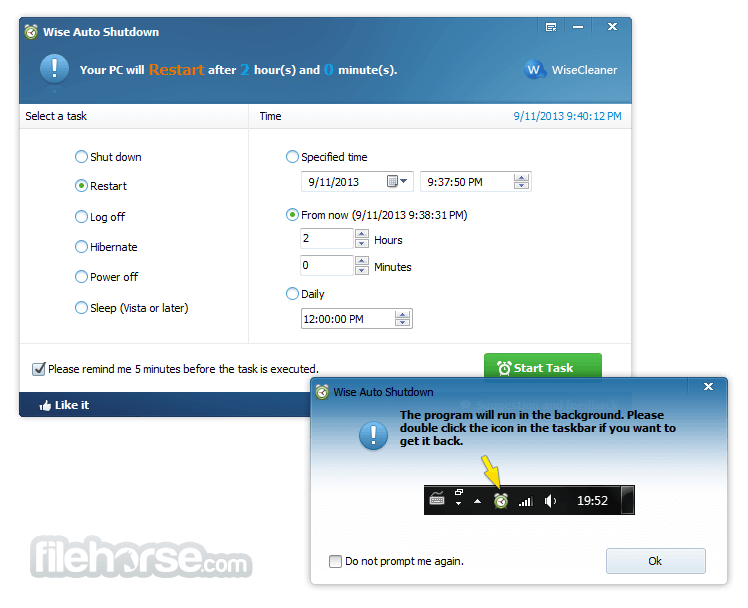
Runs discreetly in the background, minimizing to the system tray and consuming minimal system resources.
User Interface
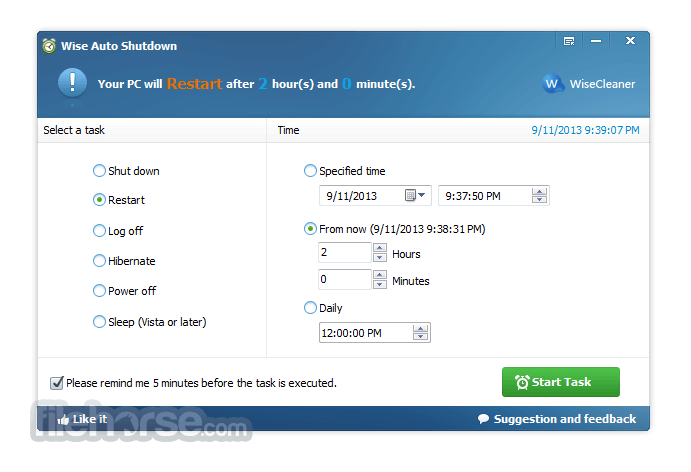
The app interface is straightforward and user-friendly, featuring a single main window divided into two panels.
The left panel allows selection of the desired task, while the right panel provides timing options. This simplicity ensures users can schedule tasks with ease.
Installation and Setup
Download: Obtain the installer from the official WiseCleaner website or trusted sources like FileHorse.
Install: Run the downloaded file and follow the on-screen instructions.
Launch: Open the application to access the main interface.
How to Use
Select Task: Choose the desired action (e.g., shutdown, restart) from the left panel.
Set Timing: Specify when the task should occur using options in the right panel.
Start Task: Click "Start Task" to activate the schedule. The application will minimize to the system tray and execute the task as configured.
FAQs
Can I cancel a scheduled task?
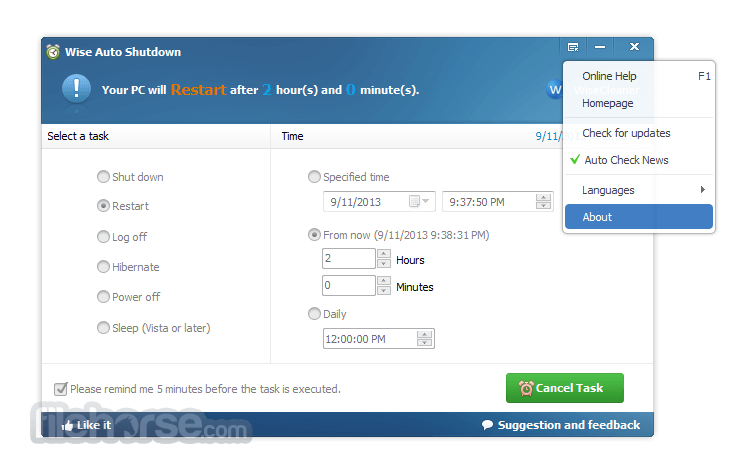
Yes, reopen the application from the system tray and click "Cancel Task."
Does it work if the computer is in sleep mode?
No, the computer must be active for the task to execute.
Is it compatible with all Windows versions?
Yes, Wise Auto Shutdown supports Windows 7 through Windows 11.
Will it notify me before executing a task?
Yes, a reminder appears five minutes prior to execution.
Can I delay a scheduled task?
Yes, upon receiving the reminder, you can choose to postpone the task.
Pricing
Wise Auto Shutdown is completely FREE to use.
System Requirements
Operating System: Windows 11, 10, 8 or 7
Disk Space: Approximately 3 MB
Memory: Minimal RAM usage
PROS
Wise Auto Shutdown is a reliable and efficient tool for automating basic power management tasks on Windows PCs. Its ease of use, combined with flexible scheduling and minimal resource consumption, makes it a valuable addition for users seeking to streamline their computer's operations.
Download Wise Auto Shutdown Latest Version Why is this app published on FileHorse? (More info)
Wise Auto Shutdown for PC/Laptop enables scheduling of shutdowns, restarts, log-offs, sleeps, hibernations, and screen locks, enhancing convenience and energy efficiency.
Main Features
Task Scheduling
Set your PC to perform actions like shutdown, restart, log-off, sleep, hibernate, or lock screen at specified times or after a defined period.
Flexible Timing Options
Schedule tasks to occur daily, at a specific time, or after a certain duration.
Reminder Notifications
Receive a notification five minutes before the scheduled task executes, allowing time to postpone if necessary.
Silent Operation
Runs discreetly in the background, minimizing to the system tray and consuming minimal system resources.
User Interface
The app interface is straightforward and user-friendly, featuring a single main window divided into two panels.
The left panel allows selection of the desired task, while the right panel provides timing options. This simplicity ensures users can schedule tasks with ease.
Installation and Setup
Download: Obtain the installer from the official WiseCleaner website or trusted sources like FileHorse.
Install: Run the downloaded file and follow the on-screen instructions.
Launch: Open the application to access the main interface.
How to Use
Select Task: Choose the desired action (e.g., shutdown, restart) from the left panel.
Set Timing: Specify when the task should occur using options in the right panel.
Start Task: Click "Start Task" to activate the schedule. The application will minimize to the system tray and execute the task as configured.
FAQs
Can I cancel a scheduled task?
Yes, reopen the application from the system tray and click "Cancel Task."
Does it work if the computer is in sleep mode?
No, the computer must be active for the task to execute.
Is it compatible with all Windows versions?
Yes, Wise Auto Shutdown supports Windows 7 through Windows 11.
Will it notify me before executing a task?
Yes, a reminder appears five minutes prior to execution.
Can I delay a scheduled task?
Yes, upon receiving the reminder, you can choose to postpone the task.
Pricing
Wise Auto Shutdown is completely FREE to use.
System Requirements
Operating System: Windows 11, 10, 8 or 7
Disk Space: Approximately 3 MB
Memory: Minimal RAM usage
PROS
- User-friendly interface
- Flexible scheduling options
- Low system resource usage
- Free of charge
- Limited to basic power management tasks
- No advanced features like condition-based triggers
Wise Auto Shutdown is a reliable and efficient tool for automating basic power management tasks on Windows PCs. Its ease of use, combined with flexible scheduling and minimal resource consumption, makes it a valuable addition for users seeking to streamline their computer's operations.
Download Wise Auto Shutdown Latest Version Why is this app published on FileHorse? (More info)
##
畫面截圖