⚠ 這是歷史版本頁面 — 查看 Wise Folder Hider 最新版本 →

Wise Folder Hider 4.3.6
v 4.3.6
Windows
試用版
7.82/10 (159)
- 目前版本4.3.6
- 更新日期2020-09-29
- 檔案大小2.77 MB
- 檔案名稱WFHSetup_4.3.6.195.exe
- 作業系統Windows 7 / Windows 8 / Windows 10 / Windows 11
- 支援語系English
- 授權型式試用版
- 開發商 WiseCleaner
- 軟體分類Windows 軟體 / 安全工具
##
編輯短評
Wise Folder Hider 是一款 Windows 上的資料隱藏工具,能將個人資料夾或檔案隱藏到電腦或隨身碟的指定位置,並以密碼保護,避免他人直接窺探。它的最大辨識度在於操作簡單,幾個步驟就能完成隱藏,官方也推薦用於隱藏影片、照片等個人檔案。開發商 WiseCleaner 持續維護,更新頻率穩定,在同類安全工具中評價人數不少,整體評價普遍不錯。
這套軟體適合一般家庭或個人用戶,用來保護私密檔案,但官方建議不要用於商業或機密資料,因為它並非嚴謹的加密方案。與 Folder Lock 等替代軟體相比,Wise Folder Hider 更輕量、操作更直覺,但功能較單純,不提供完整加密。授權為試用版,僅提供英文介面,使用前需留意語言與功能限制;平台僅限 Windows,若需跨平台則需另尋其他方案。
##
翻譯排程處理中,以下暫以英文原文呈現
軟體介紹
Wise Folder Hider is a freeware used to hide your personal folder(s) or file(s) to somewhere else in your PC or in removable devices, in which way you can protect your privacy with passwords by following easy steps.
It is recommended for home and personal use instead of hiding commercial/confidential information which may need further strict encryption. Wise Folder Hider is the No. 1 freeware to hide folders and files including videos, photos, etc. for personal use.
Why choose Wise Folder Hider?
Lock Files for Visible Security
It allows you to lock files, protecting them from unauthorized access by restricting read, write, rename, and delete permissions. Locked files remain visible in Windows File Explorer but cannot be opened, edited, moved, or deleted, ensuring they stay secure while still accessible in their original location.
Encrypt Files and Folders
The encryption feature provides advanced protection by allowing users to create encrypted partitioned drives. Files and folders can be dragged and dropped into these drives, rendering them hidden and inaccessible once the program is closed. Encrypted files cannot be opened, read, modified, copied, moved, or deleted, and they remain completely invisible to unauthorized users.
Hide Files and Folders Easily
With the ability to hide files and folders, it ensures your data is not visible in Windows File Explorer. Hidden files are completely concealed, providing effective protection against unauthorized access and accidental deletion, making it an ideal solution for safeguarding private information.
USB Drive Privacy and Security
The app extends its functionality to USB drives, enabling users to hide and password-protect personal files on these devices with a single click. Even if the USB drive is lost, the protected files remain secure and inaccessible to others, ensuring peace of mind for users who frequently share or transport sensitive data.
Portable Encrypted Files
The program supports portable encryption, allowing users to manage encrypted files in batches and create encrypted drives directly on removable storage devices like USB drives. These encrypted drives are portable and can be used just like a regular USB drive, offering convenience and flexibility for users on the go.
Multiple Layers of Password Protection
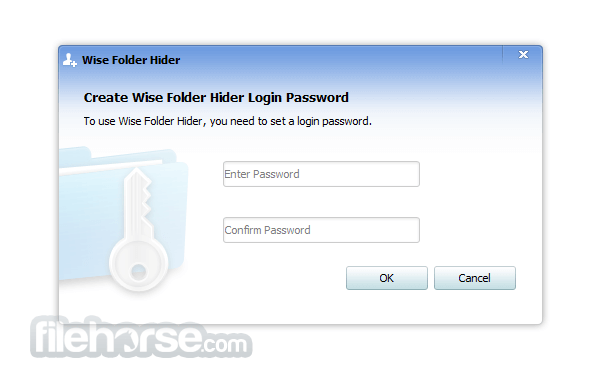
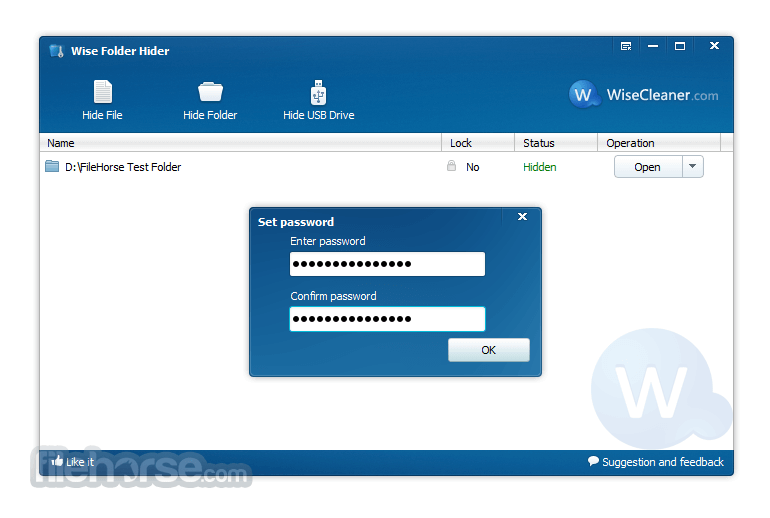
Security is enhanced with multi-level password protection. Users must set a login password to access the program and can assign additional passwords to specific files, folders, USB drives, and encrypted drives. The program cannot be uninstalled, nor can protected data be deleted, without the required passwords, ensuring comprehensive security.
User-Friendly Interface and Context Menu Integration
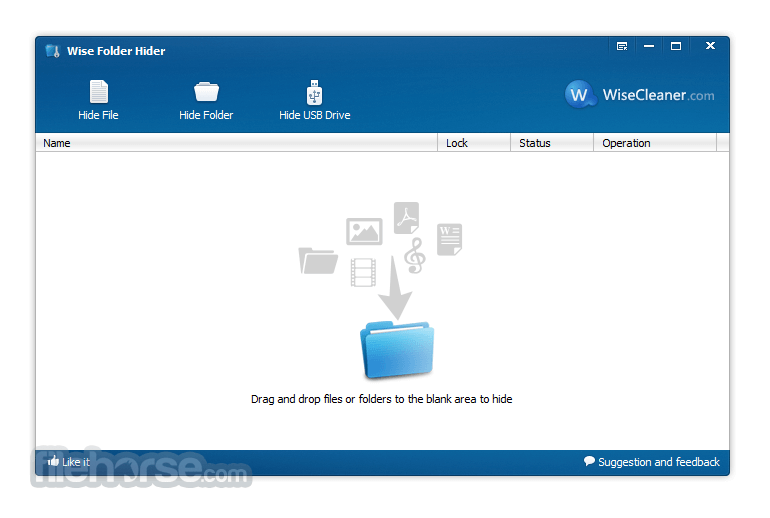
It features an intuitive interface that is easy to navigate, even for first-time users. For added convenience, the program integrates directly into the Windows context menu, allowing users to hide files or folders with a simple right-click, eliminating the need to launch the program for basic operations.
What`s New
Wise Folder Hider - Free Version
Download Wise Folder Hider Latest Version Why is this app published on FileHorse? (More info)
It is recommended for home and personal use instead of hiding commercial/confidential information which may need further strict encryption. Wise Folder Hider is the No. 1 freeware to hide folders and files including videos, photos, etc. for personal use.
Why choose Wise Folder Hider?
Lock Files for Visible Security
It allows you to lock files, protecting them from unauthorized access by restricting read, write, rename, and delete permissions. Locked files remain visible in Windows File Explorer but cannot be opened, edited, moved, or deleted, ensuring they stay secure while still accessible in their original location.
Encrypt Files and Folders
The encryption feature provides advanced protection by allowing users to create encrypted partitioned drives. Files and folders can be dragged and dropped into these drives, rendering them hidden and inaccessible once the program is closed. Encrypted files cannot be opened, read, modified, copied, moved, or deleted, and they remain completely invisible to unauthorized users.
Hide Files and Folders Easily
With the ability to hide files and folders, it ensures your data is not visible in Windows File Explorer. Hidden files are completely concealed, providing effective protection against unauthorized access and accidental deletion, making it an ideal solution for safeguarding private information.
USB Drive Privacy and Security
The app extends its functionality to USB drives, enabling users to hide and password-protect personal files on these devices with a single click. Even if the USB drive is lost, the protected files remain secure and inaccessible to others, ensuring peace of mind for users who frequently share or transport sensitive data.
Portable Encrypted Files
The program supports portable encryption, allowing users to manage encrypted files in batches and create encrypted drives directly on removable storage devices like USB drives. These encrypted drives are portable and can be used just like a regular USB drive, offering convenience and flexibility for users on the go.
Multiple Layers of Password Protection
Security is enhanced with multi-level password protection. Users must set a login password to access the program and can assign additional passwords to specific files, folders, USB drives, and encrypted drives. The program cannot be uninstalled, nor can protected data be deleted, without the required passwords, ensuring comprehensive security.
User-Friendly Interface and Context Menu Integration
It features an intuitive interface that is easy to navigate, even for first-time users. For added convenience, the program integrates directly into the Windows context menu, allowing users to hide files or folders with a simple right-click, eliminating the need to launch the program for basic operations.
What`s New
- Improved GUI for hiding USB drives.
- Improved compatibility with Intel DirectStorage.
- Fixed minor bugs in the previous version.
- Added the function of preventing the specified program from running.
- Support double-clicking to open hidden files or locked files.
- Fixed the problem that encrypted files are added to Hidden after double-clicking.
- Fixed the problem that the option of "Lock files with Wise Folder Hider" still remains in the right-click menu after uninstallation.
- Fixed minor bugs in the previous version.
- Minor improvements to the graphical user interface.
Wise Folder Hider - Free Version
- Double password protection
- Hide files & folders
- Hide USB drive
- Encrypt files & folders - 50MB
- Double password protection
- Hide files & folders
- Hide USB drive
- Encrypt files & folders - Unlimited
- Automatic password recovery
- Automatic updates
- Premium tech support
- 60-Day Money-Back Guarantee
- Effective Folder Encryption
- Easy-to-Use Interface
- Password Protection for Files
- Supports USB File Hiding
- Lightweight and Fast Performance
- Limited Free Features
- No Recovery for Lost Passwords
- May Conflict with Antivirus Software
- No MacOS Compatibility
- Relies on Third-Party Software Trust
Download Wise Folder Hider Latest Version Why is this app published on FileHorse? (More info)
##
影片介紹
##
畫面截圖
- 2026-05-25 Wise Folder Hider 5.1.1 6.65 MB
- 2025-08-16 Wise Folder Hider 5.0.9 6.55 MB
- 2025-01-02 Wise Folder Hider 5.0.8 6.23 MB
- 2024-12-06 Wise Folder Hider 5.0.7 6.32 MB
- 2024-10-29 Wise Folder Hider 5.0.6 6.32 MB
- 2024-03-15 Wise Folder Hider 5.0.5 6.55 MB
- 2023-12-06 Wise Folder Hider 5.0.3 6.52 MB
- 2023-09-25 Wise Folder Hider 5.0.2 6.22 MB