⚠ 這是歷史版本頁面 — 查看 WizTree 最新版本 →

- 目前版本4.13
- 更新日期2023-03-15
- 檔案大小4.34 MB
- 檔案名稱wiztree_4_13_setup.exe
- 作業系統Windows 7 / Windows 8 / Windows 10 / Windows 11
- 支援語系English
- 授權型式免費軟體
- 開發商 Antibody Software
- 軟體分類Windows 軟體 / 系統優化
##
編輯短評
WizTree 是一款專為 Windows 設計的硬碟空間分析工具,主要解決「磁碟空間被什麼檔案佔用」的困擾。它透過直接讀取 NTFS 格式硬碟的 Master File Table,跳過傳統逐檔掃描的耗時流程,因此掃描速度遠勝同類工具如 WinDirStat,官方宣稱可達數十倍差距。這項特色讓它成為辨識「空間怪獸」檔案或資料夾的利器,尤其適合硬碟容量吃緊時快速找出可清理的目標。目前該軟體仍持續更新,開發者維護相當活躍,雖然使用者評價人數不多,但整體評價普遍不錯,屬於小眾但口碑穩定的實用工具。
這套軟體適合經常需要清理磁碟、管理大量檔案的進階使用者,例如影音剪輯師、程式開發者或一般用戶在系統碟空間不足時,都能用它快速定位大型檔案。與 WinDirStat 等替代軟體相比,WizTree 的最大取捨在於犧牲部分視覺化樹狀圖的豐富度,換來極致的掃描速度;若你重視效率勝過介面細節,它會是更順手的選擇。軟體為免費授權,僅支援 Windows 平台,介面目前只有英文,但操作直覺,不熟悉英文的使用者也能透過圖示與數據理解結果。若需免安裝版本,官方也提供攜帶版,方便隨身碟使用。
##
翻譯排程處理中,以下暫以英文原文呈現
軟體介紹
WizTree is a hard drive disk space analyzer similar to WinDirStat but is MUCH faster. WizTree is the world's fastest disk space analyzer. It scans your hard drive and shows you which files and folders are using the most disk space. 46x faster than WinDirStat!
It does this in the FASTEST way possible - you simply won't find any other application of this type that's quicker! Use the information Wiz Tree provides to quickly locate and remove "space hogs" from your hard drive.
When scanning NTFS formatted hard drives (most modern hard drives use this format), It reads the hard drive's Master File Table (MFT) directly from the disk.
The MFT is a special hidden file used by the NTFS file system to keep track of all files and folders on a hard drive. Scanning for files this way completely bypasses the operating system (Windows) and provides a huge performance boost.
Exporting WizTree File Data to CSV File
Press Ctrl+Alt+E or right-click on a file/folder and select "Export to CSV file...". The selected files and/or folders will be exported to a comma-separated value file (.CSV format). The information exported will depend on which view is currently active (Tree View or File View). If no files or folders are selected then ALL files and folders will be exported.
Copying file/folder data to Clipboard
Press Ctrl+Alt+C or right-click on a file/folder and select "Copy file and size info to clipboard". File size and name information will be copied to the clipboard in a human-friendly format, suitable for pasting into emails, support forum posts, or text documents. The files will be indented to match the current tree structure, and only currently visible files within the selection will be included.
Command Line Export
As of WizTree 3.18, it's now possible to automatically export file data to the CSV file via the command line.
Command Line MFT Dump
As of WizTree version 3.22, it's possible to dump the MFT file via the command line.
Features and Highlights
WizTree Update Highlights
WizTree now features the ability to locate duplicate files using either their Name and Size, or Name, Size, and Date. It treats file names that have been automatically renamed by Windows as equivalent. For example, "NAME.EXT," "NAME (1).EXT," "NAME (2).EXT," "NAME - COPY.EXT," and "NAME - COPY (1).EXT" are considered the same. Note that WizTree currently does not compare the contents of the files, so exercise caution before deleting files that may not be true duplicates.
How to Locate Duplicate Files
Free for Personal Use
Pay based on staff size $25-$500
FROM 1 TO 100 STAFF MEMBERS
If you are looking for an excellent alternative to this product, we recommend WinDirStat.
PROS
Download WizTree Latest Version Why is this app published on FileHorse? (More info)
It does this in the FASTEST way possible - you simply won't find any other application of this type that's quicker! Use the information Wiz Tree provides to quickly locate and remove "space hogs" from your hard drive.
When scanning NTFS formatted hard drives (most modern hard drives use this format), It reads the hard drive's Master File Table (MFT) directly from the disk.
The MFT is a special hidden file used by the NTFS file system to keep track of all files and folders on a hard drive. Scanning for files this way completely bypasses the operating system (Windows) and provides a huge performance boost.
Exporting WizTree File Data to CSV File
Press Ctrl+Alt+E or right-click on a file/folder and select "Export to CSV file...". The selected files and/or folders will be exported to a comma-separated value file (.CSV format). The information exported will depend on which view is currently active (Tree View or File View). If no files or folders are selected then ALL files and folders will be exported.
Copying file/folder data to Clipboard
Press Ctrl+Alt+C or right-click on a file/folder and select "Copy file and size info to clipboard". File size and name information will be copied to the clipboard in a human-friendly format, suitable for pasting into emails, support forum posts, or text documents. The files will be indented to match the current tree structure, and only currently visible files within the selection will be included.
Command Line Export
As of WizTree 3.18, it's now possible to automatically export file data to the CSV file via the command line.
Command Line MFT Dump
As of WizTree version 3.22, it's possible to dump the MFT file via the command line.
Features and Highlights
- Finds the files and folders using the most space on your hard drive
- VERY Fast! It reads the master file table (MFT) directly from NTFS formatted hard drives (similar to the way Everything Search Engine works)
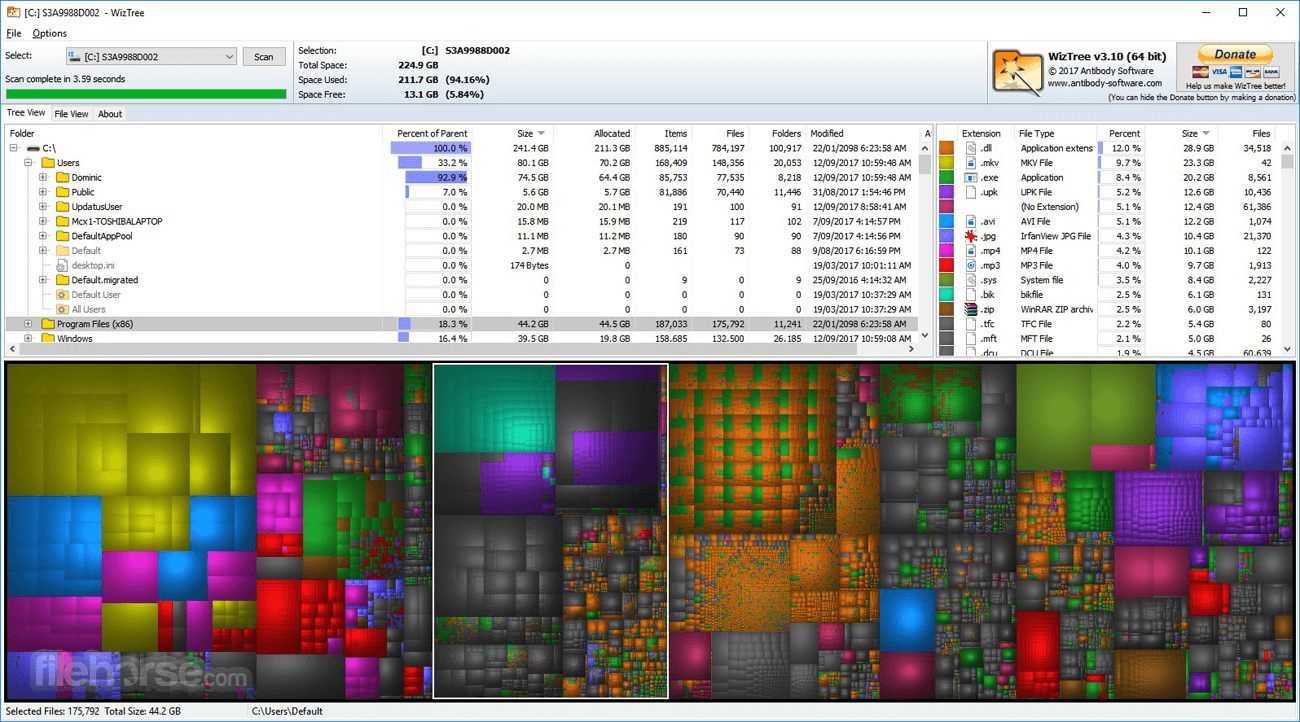
- Visual Treemap allows you to spot large files and large collections of smaller files at a glance
- Finds the largest files on your hard drive. Every single file on your hard drive can be sorted in order of size.
- File Name Search - quickly locate files by name or wildcard match
- Export file data to CSV (comma-separated values) file or clipboard
- Import CSV file data back into Wiz Tree for viewing
- Command-line CSV file export
- Sort the contents of your entire hard drive by folder size and optionally delete files and folders
- Scan ALL hard drive file system types (NTFS, FAT, FAT32, network, etc) and/or individual folders
WizTree Update Highlights
WizTree now features the ability to locate duplicate files using either their Name and Size, or Name, Size, and Date. It treats file names that have been automatically renamed by Windows as equivalent. For example, "NAME.EXT," "NAME (1).EXT," "NAME (2).EXT," "NAME - COPY.EXT," and "NAME - COPY (1).EXT" are considered the same. Note that WizTree currently does not compare the contents of the files, so exercise caution before deleting files that may not be true duplicates.
How to Locate Duplicate Files
- Select the "File View": Navigate to the "File View" section.
- Choose Duplicate Detection Method: Select the desired method from the "Duplicate Files" dropdown menu.
- Identify Duplicates: If duplicates are found during the scan, a "+" symbol will appear next to the file name. Click the plus sign to expand and view the list of duplicate files beneath the original file.
- Dup Count & Dup Size Columns: Two new columns, "Dup Count" (number of duplicates) and "Dup Size" (total size of all duplicates), have been added. These columns allow you to quickly identify and sort duplicates.
- Duplicates Only Checkbox: A new checkbox lets you display only files with duplicates for easier management.
- File Name Column: A new column in the "File View" displays just the file name, excluding the path.
- File View Display: The file view now shows all relevant files correctly, even when "max files" is not set to "ALL" and sorting is not by size.
- Improved Sorting Speed: File view sorting is now much faster.
- Regular Expression Filters: Fixed an issue where regular expression filters were incorrectly applied to the entire path when "match by name only" was selected and the expression contained a backslash.
- Themes Disabled for SYSTEM Account: Themes are now automatically disabled when WizTree is running as the local system account ("SYSTEM") to prevent display issues when using remote access tools like ScreenConnect.
- Stability Enhancements: Improved stability when scanning network folders and drives.
Free for Personal Use
- Rapid scanning of hard drives
- Network drives supported
- Tree view
- Visual Tree Map
- File View/Search (find largest files)
- CSV export/import for file data
- Locate duplicate files
Pay based on staff size $25-$500
FROM 1 TO 100 STAFF MEMBERS
- Rapid scanning of hard drives
- Network drives supported
- Tree view
- Visual Tree Map
- File View/Search (find largest files)
- CSV export/import for file data
- Locate duplicate files
- Commercial use ok
- Donation button removed
- No donation message in exports
- Standard support
If you are looking for an excellent alternative to this product, we recommend WinDirStat.
PROS
- Extremely fast disk space analysis
- Intuitive and user-friendly interface
- Low system resource usage
- Comprehensive file and folder details
- Supports NTFS hard drives
- Limited advanced features
- No real-time monitoring
- Windows only compatibility
- Basic reporting options
- Lacks built-in cleanup tools
Download WizTree Latest Version Why is this app published on FileHorse? (More info)
##
畫面截圖
- 2026-08-05 WizTree 4.32 4.91 MB
- 2026-03-23 WizTree 4.31 4.91 MB
- 2026-03-06 WizTree 4.30 4.89 MB
- 2026-03-04 WizTree 4.29 4.89 MB
- 2025-11-24 WizTree 4.28 4.89 MB
- 2025-08-26 WizTree 4.27 4.87 MB
- 2025-07-02 WizTree 4.26 4.86 MB
- 2025-02-28 WizTree 4.25 4.86 MB